I came across this little rant about people not writing "WordPress" as it should be (one word, capitalized W and P). While a part of me thought "damn it, who cares", another part was slightly amused.

So, this morning, I decided that I would take care of those obsessed people with a simple plugin, and I literally wrote Correctly Spell WordPress while brushing my teeth.

Get it, you know it's high time your blog makes one step further on the road to perfection :)

I’ve just come across Le HibOO (phonetically “the owl” in French), an online magazine about music, movies, clubbing and everything related to going out. I usually spot within seconds if a given site uses WordPress, but this time if it wasn’t for the little WP logo in the lower right corner, I would never have found out. I must say I’m pretty impressed with their layout and how they’re featuring elements. Very very nice job. (3) «

I'm currently scheduling my upcoming holidays (in 3 weeks !) and I'm in the middle of the once tedious process of finding the best flight. You know, something with a decent balance between a fair price and a minimal number of connexions and stops in airports you've never heard about before.

And I've recently found about the best damn site of the whole intarwebs for this : Kayak.com. It's been online for a while, and I discovered it as they launched their French version. This site is truely the Google of flight searches. Pages are clean and simple, load fast, the whole interface is intensively ajaxified, you can refine your searches on a number of details and see changes in search results in real time. You basically never get a page refresh beyond the first searching round. They're even giving a try to the user generated social side, but this part really sucks as of writing :Þ

In short, Kayak.com is totally awesome and I can't believe something like this has never been mentioned on TechCrunch. I just cannot imagine using another tool to search for a flight now. The site is available in several languages (de, en, fr) and I urgently urge anyone who has ever bought a flight ticket online to check it.

I'm the kind of guy who listens to one and the same band over a period of time. Like, I find a CD I had forgotten for a long time, or a mismoved mp3 directory buried deep somewhere in my hard drive, and I go "hooooooo I love them" for a week.

I am the one, OrgasmatronThis time, and for the past 3 weeks actually, I've been playing Motorhead's discography practically non stop. I'm even in the top 20 listeners on last.fm this week.
Since I literally dropped my jaw when hearing Orgasmatron for the first time in 1992 (yeah I was late !) I've owned a few albums, but I recently got my hands onto the whole collection (23 albums, 300+ tracks). And God, this is so g o o d, track after track.
So, after some quite long internal debates, thinking and pondering, I'm officially promoting Motorhead into my top 3 bands of all times. (one of the consequences being I'll have to modify the footer here on this blog!:)

My good ole friend Arma, busy lawyer during the day, has opened another blog and now writes about random things he likes on My Review. Bon Jovi’s fans will like his preview of their upcoming album, Lost Highway. (4) «

Every time I check my referrers, I cannot help but notice all those utterly futile referrer spams from various order-your-pills-online sites. And each time I start thinking about various method to block them all (then I never implement these methods because I mostly don't care about refer spam :)

I checked a couple hundreds of referrer domains and, unsurprisingly, about 85% of the spammers have been registered via moniker.com, biggest spam domain registrar in this part of the known universe.

So, I thought, a method of getting rid of most of these would be to check every referrer's registrar and deny site access if it happens to be one of spamoniker's domain. A moniker checking script is an easy piece of code.

Of course, this would be totally overkill since it would add about a 0.2 second delay to every page load. But I just couldn't not blog about this and about the fact that moniker.com are a bunch of worthless scum.

I'm currently giving a new plugin a try: Odiogo's Listen Button converts your posts to an audio file, ready to be downloaded, podcasted, or just played from within the page while you're reading it.

A few years ago I had tried something similar, but it sort of sucked: you needed to register first in order to play audio files. Hopefuly Odiogo gets it right and anybody can listen to your blogging.

The plugin itself is as simple as it can be. Follow these instructions to get their activate-and-forget plugin (it may currently take a few hours before you receive the needed activation email, but they're working to improve this), and you're reading to podcast yourself away. Their system seems to support many languages, and the English text-to-speech generation at least looks pretty decent to me.

I'm not a podcast fan (and I must say I find it usually pretty boring) but at the moment I find this plugin on my own blog quite amusing and, why not, useful.

  • It's fun to hear what you've just typed
  • For me not being an English native speaker, it's always good to practice a bit :Þ
  • I'm pretty sure it can actually improve one's writing style: weird sentences cannot be missed when heard, and it's easier to detect unwanted typos or repetitions repetitions (hey, this one was intended of course)

We'll see how I will be using or not this plugin in the long run. I guess my next post with code snippets should be particularly lame in an audio file, for instance (hey Odiogo team, suggestion ! Support something like <!–no-odiogo–>some text<!–/no-odiogo–> to manually exclude some parts from the generated speech)

What do you think ? Like it ? Hate it ? Don't give a sh1t ? (yes, I'm testing their leetspeak abilities too). Anyway, expect this plugin to pop in a number of WordPress blogs. I'm predicting it a fair success! What you say? Excuse, I cannot hear you over the sound of how hip I am…

You may have seen a nasty Error 500 for the past two or three hours here, and this is the second time I've had this kind of trouble. Site up, MySQL up, stuff looking OK, except that everything related to WordPress, including the admin area, dies returning an error. It turned out that the culprit was… WordPress' Cache.

Apparently, there can be sometimes a stale lock file in wp-content/cache/ that prevents everything from running normally. In my case, I'm using WP's internal cache but not the WP-Cache plugin, but it seems this problem affects also WP-Cache users. The stale lock is actually preventing things from running so well that every process just timeouts and dies.

Today's lesson : when your WordPress blog starts to behave weirdly and not responding, simply delete wp-content/cache/.

In: , , , On: 2007 / 05 / 22 Short URL: http://ozh.in/en

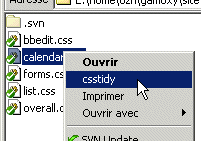
I've been using CSSTidy lately, and I like it a lot. This is a pretty cool software that optimizes CSS files so that they are smaller and cleaner. It comes with a bunch of options and is available in Linux, OSX and Windows flavors.

CSSTidy context menu I'm running Windows on my test computer, and I made a convenient right click context menu on CSS files so I can clean them in one click. Here's how I did it:

Read More

Hilarious Ebay Feedback. A few sellers must have gone ôO when reading their feedback on sold item :) (0) «