There's a recurring debate about WordPress and whether they should keep code compatible with PHP 5.2 or drop it and bump the requirements to a newer PHP version. Hey, I have an opinion on this.
What's wrong with PHP 5.2?
Nothing much, except PHP 5.2 was released in November 2006, and was maintained and developed till January 2011. This means that it's now considered an old release, rusty dusty code that's no longer improved, and should a new vulnerability be discovered in the 5.2 branch, it will remain unfixed.
In short: it's *old*. Any PHP library you'll find these days requires 5.3+.
Old but still everywhere ?
According to W3Techs, 33% of websites running PHP are on 5.2. That's a lot, but wait, there's worse.
According to WordPress, more than 50% of WordPress-powered sites are still on 5.2. Earlier this week @dd32 made a pretty graph showing that PHP 5.2's share is only slowly decreasing.
So what?
Dropping a platform running half of your user base would be crazy, right? For sure. Except I think the numbers are somewhat skewed.
As you may know, my pet project is a self-hosted URL shortener, YOURLS, which was released in its version 1.7 earlier this month. This new version comes with a phone-home feature to report the same kind of stats that WordPress is aggregating from its users, and particularly what PHP version YOURLS is installed on.
Of course, the YOURLS user base is nowhere near as important in volume as WordPress' market, but I think the average user is similar, so YOURLS figures should be relevant in some way.
What I've learned since the release of YOURLS 1.7 came as a surprise: I was expecting a similar share to what WordPress reports, but it turns out only 10% of YOURLS installs are running on PHP 5.2
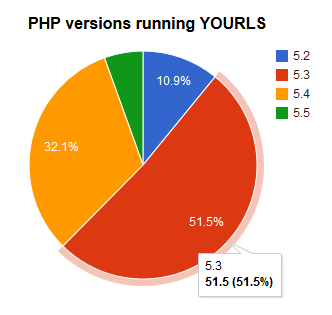
What did I conclude from all this?
1. Old installs vs new installs
WordPress is old, it's been around for 10 years. The typical WordPress user installed WP 4 or 5 years ago, when 5.2 was still the standard.
YOURLS is much younger, it's been around for 4 years, but the project sort of picked up 3 years ago with YOURLS 1.5, released in November 2010. The typical YOURLS user installed YOURLS 1 year ago, when the default hosting setting on most host was PHP 5.3 or more.
I think that's the key of the skewed numbers : simply too many WordPress installs were around when PHP 5.2 was the default, and those users just did not upgrade their hosting. Well, why would they, it just works fine.
That would be exhibit A : newer users are on 5.3+, older are still on 5.2.
2. Deeper digging: who's running PHP 5.2?
Most host, if not all, still offer 5.2, even if you open an account today, but I could not find any which does not support 5.3+. All the major hosts (Dreamhost, Bluehost, Hostgator, etc…) have 5.3 by default.
And if there is a minor host where PHP 5.2 is the best you can have, then what's the point with signing with a smaller and lesser known company if they cannot provider better services than big ones?
Exhibit B: hosts can give you 5.3+
3. WordPress should lead
And that will be exhibit C: WordPress has the power.
WordPress runs on 20% of all websites in the world. That's huge. Moreover, it apparently has 60% of the CMS market, which is also very impressive.
Few organizations in the world have the power to say "we're moving to a newer version of PHP" and have a global impact ; WordPress is one of them.
With such an influence, WordPress should even go a step further and pro-actively announce end of support for PHP version and follow PHP's 3 year release process, instead of simply watching user adoption. PHP 5.3 will be maintained till July 2014, PHP 5.4 will be maintained till March 2015: I think WordPress should announce the same minimal requirement changes.
TL;DR
The day WordPress says "we require PHP 5.3", the whole web which is still running 5.2 switches to 5.3. Simple as that.