
Current version : 2.0 – compatible with Twitter's OAuth API
If you want to browse your own tweet history, Twitter sucks. If you have published more than 3200 tweets, Twitter lost the older ones. If you want to search a particular tweet about that awesome link you shared, you're toast. You can use #hashtags in your tweets but they won't be of any use to help you organize them. Oh, and those horrible t.co links.
On the other hand, WordPress does all this fine, so I made a plugin to archive all your tweets in WordPress, easily search them, and everything you wish Twitter would do.
Live Example
My tweet archive: Ozh' Tweets (notice the cool stats in the sidebar)
Download
ozh-tweet-archiver.zip
Extract and upload to your blog, preserving directory structure.
Plugin Usage
- Install a fresh new empty blog (a subdirectory of your current blog will be fine, or a tweet.domain.com subdomain, it doesn't matter)
- Install, activate the plugin, follow configuration instructions.
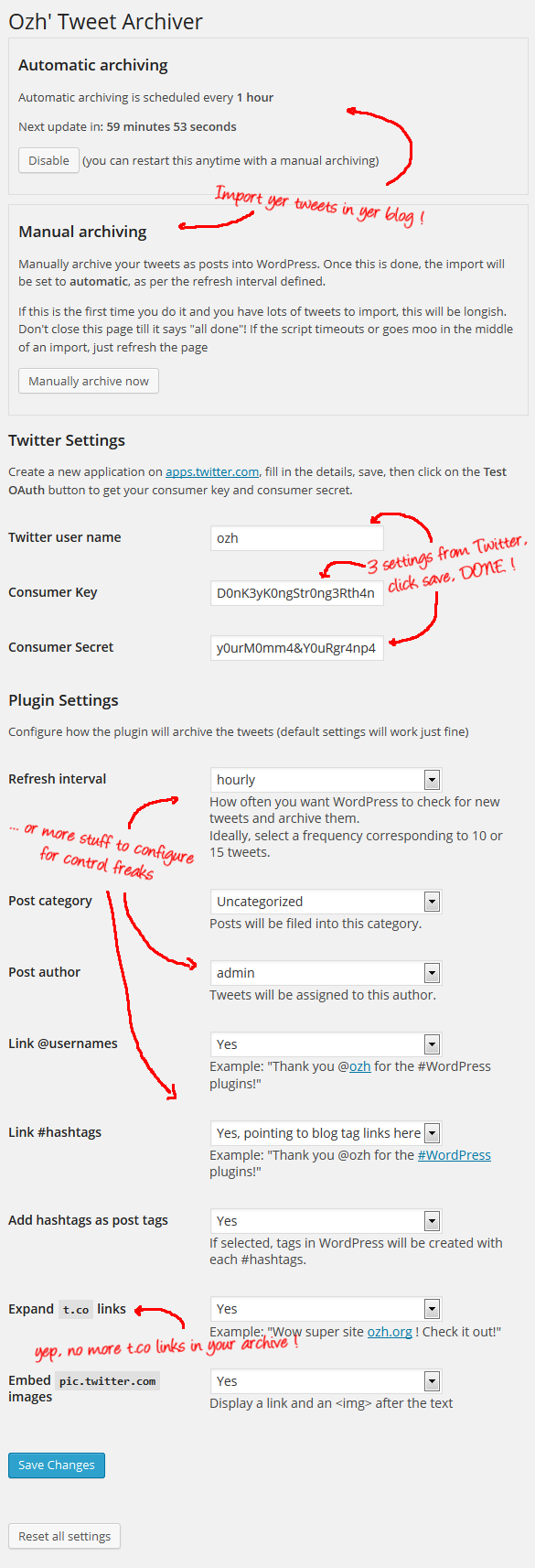
Features, Plugin Configuration
You'll need to create a Twitter application to obtain the consumer and secret keys. That'll be the hardest part.
FAQ
Q: The [whatever] does not work!
A: WorksForMe.
Q: But [Other guy's plugin] does the same and more!
A: Exactly. "And more". I didn't need this.
Q: How are tweets imported?
A: As regular posts, with a few post custom fields (containing tweet source, "in reply to" data, etc). Hashtags can be converted as post tags if you wish (you'll want to do this), t.co links can be expanded to their original URLs, and some proper markup will be applied (see below, developer info)
Q: I tried to import all my tweets for the first time but the page died with an error / timeout / alien abduction !!1
A: Just hit F5 to reload the page. There will be no duplicates.
Q: I have more than 3200 tweets. How do I import & archive the old ones?
A: I wrote an importer script that uses this plugin. If it doesn't work for you, see first question of this FAQ (or write something yourself). The script: https://gist.github.com/ozh/11166845. There is another script with a similar approach, using data from the JSON files instead of the CSV one: https://gist.github.com/ozh/f5deafcffd8d271bfa92
Q: What theme did you use for your Tweet archive?
A: I made a theme for my own needs but it's freely available, feel free to use and hack it to make something for yourself: Ozh' Tweet Archive Theme.
Q: Can you add this or that feature?
A: This plugin was made to fit my needs. But hey, who knows, maybe I'll feel the need for your idea? Head to the Github repository and file a pull request.
Q: That one tweet got weirdly formatted/truncated when imported!
A: There's an "Edit post" link somewhere. That's the beauty of WordPress when compared to Twitter.
Q: Something doesn't work
A: Create a file named debug.log in this plugin's directory. This will activate the debug mode and a lot of things will be logged in that file. See if that helps. If not, see item #1 of this FAQ.
Theme developer stuff
Each tweet will be added some markup and classes, depending on your settings (if you want to link to @mentions, link to #hashtags as tags, etc…) to allow fine styling.
@mentions
When linked to Twitter profiles:
- <span class="username username_linked">@<a href="https://twitter.com/ozh" title="Ozh Richard">ozh</a></span>
Not linked:
- <span title="@ozh" class="username username_unlinked">@ozh</span>
#hashtags
You can elect to link hashtags to Twitter (as Twitter does), as local WordPress tags (much cooler), or to not link them. In each case, the markup for #bleh will be:
When linked to Twitter:
- <span class="hashtag hashtag_twitter">#<a href="https://twitter.com/search?q=#bleh">bleh</a></span>
When locally linked to WordPress tags:
- <span class="hashtag hashtag_local">#<a href="http://yoursite.com/tag/bleh">bleh</a>
Not linked:
- <span class="hashtag hashtag_no">#bleh</span>
Links
Links can be "un-t.co'd" (expanded)
- <a href="http://example.com" title="http://example.com" class="link link_untco">example.com</a>
Or kept as original t.co links:
- <a href="http://t.co/L4m3l1nk" class="link link_tco">http://t.co/L4m3l1nk</a>
Embedded media
If you enable embedding images from pic.twitter.com, you'll get the following:
- <span class="embed_image embed_image_yes"><a href="[image link]"><img src="[image src]" /></a></span>
Template tags
The plugin comes with a bunch of template tags to be used into your theme. Refer to file template_tags.php that comes with the plugin.
Chip Bennett » go for it! The very reason I moved this on github was to foster contributions like this :)
Hey Ozh, is there any reason this shouldn't work on shared server hosting? I'm seeing the automatic archiving hang fairly frequently. I've enabled the debug log (idk if you care, but that causes debug info to show in the plugin admin), but don't understand the log file. I'd be happy to email it if you'd like.
Chris » My own tweet archive is hosted on the most basic Dreamhost shared hosting, works fine. Not sure what you call "automatic archiving hang". Check the debug.log and see if something seems to cause that (eg: is it because it could not reach twitter? because it hit the twitter rate limit? etc…)
Ozh, thanks for the quick reply. I'm on the same hosting, so that must not be the issue. I had no problem manually importing tweets, but after it goes to automatic import, it doesn't seem to be importing. When reloading the setting page, I've seen "Next update in 59 minutes, 59 seconds" or "1 second" and currently it doesn't show a next update time. Nothing sticks out to me in the log file, although it does show 15 tweets skipped on each instance. It shows that it hits Twitter each instance.
Ozh, another quick followup. Judging by the log, it looks like the cron is running every few minutes (2 minutes or so), even thought I've selected the option to run hourly. Can I send you the log file?
Chris » paste it somewhere
Chris » no need to send the log file, I'm seeing the same problem. I'll investigate this and fix asap.
Thanks, I appreciate it!
Peeps: I've just pushed 2.0.1, update ASAP
Hey Ozh, I'm still seeing automatic import fail. I have to trigger manual import, and after that automatic doesn't seem to work. Here's a log:
http://pastebin.com/jp66e3YV
I'm also seeing post formats not be applied on manual imports. Thanks for your help!
Chris » Dunno. This relates to the FAQ item #1
I can't believe I just came across this plugin today. Loving it!
Has anyone written a script to import tweets older than the latest 3200? I'd be interested in that.
Thanks,
Dave
Dave » Yes, I wrote one. Updating the page with that info.
Ozh –
The script worked great to import my remaining tweets. Thanks.
One thing I'm noticing since I ran the script is that now when new tweets are imported they are being added as scheduled posts. Is this normal behavior?
Thanks,
Dave
Dave » definitely not, there's no code to do such thing in my plugin
I did some testing and have more information. If I keep my blogs timezone set to UTC posts get published right away. If I set the timezone of the blog to my local time (UTC-4) posts get scheduled for later. This makes sense (I guess) because the the timestamp of the post is inherited from the tweet. The problem is that now all of my posts are timestamped 4 hours into the future of my actual timezone. (It's only ~10:30 AM local time but I have a post timestamped 11:47 AM today.) Would like to have the timestamps set to local time. Will look into this myself but if you have any thoughts that may help I'd be interested.
Thanks again for the plugin (and the theme too).
– Dave
Dave » indeed the date & time are those from the tweet itself. I think what you need is to change that line to have a date() or strtotime() that complies to your WP install setup. If you happen to fix this, make sure to open a pull request with your fix :)
I think changing that line to the following should do the trick:
$date = date( 'Y-m-d H:i:s', strtotime( substr( $tweet->created_at, 0, strlen($tweet->created_at) – 5 )." ".get_option('gmt_offset') ));
I'll add it to the version I'm running and see how it goes. Shouldn't take long to test.
– Dave
Dave » I think you're overcomplicating stuff. Something like date( 'Y-m-d H:i:s', strtotime( $tweet->created_at ) + HOUR_IN_SECONDS * get_option('gmt_offset') ) looks enough to me (didn't test though)
Ozh –
You're right. I was overthinking it. Your code works better than mine and is far less complicated. I have it working on my blog now will let it run an day or two to be sure it's working properly before opening a pull request.
Thanks,
Dave
Dave » this needs testing with positive & negative offsets, though
Ozh – Understood. Doing that today. That's why I wanted to wait day or so before opening a pull request.
Hi,
In both of my sites, first manual archive goes just fine and then later with auto archive some "tweets posts" lose the content of the post (entry) and they just keep the title of the post (obtaining 2 versions of the post in revision WP).
I have tried different stuff, like changing timezone, uninstalling plugins, and finally it seems that since I desactivated JetPack everything seems to work ok.
Very strange, I need to test now what part of JetPack is causing this incompatibility with OZH TweetArchiver.
Thanks