
WordPress 2.5 introduced per-user admin color schemes, letting you style and design your own admin area. This said, how easy is it to craft a nifty CSS with harmonious colors? For most of us, it's definitely not easy. With the Admin CSS Designer plugin, for all of us it's going to be fun, easy, and addictive!

COLOURlovers
COLOURlovers is a design community focused on colors and sets of colors, palettes. It's a color and design blog. It's a community of color lovers who create hundreds of thousands of colors, palettes and patterns.
Ozh & COLOURlovers' Admin CSS Designer
This plugin pulls colorful palettes from COLOURlovers, and lets you re-arrange, tweak and modify colors, then save them real time. No dirty hand CSS editing. Right below is a 3 minutes quick demonstration of how the plugin looks and what it can do :
Usage and explanations
Once you've activated the plugin, head to your Profile page, and pick the "Random CSS + Designer Tools". This very special stylesheet will load a random palette from COLOURlovers and make a color scheme for your admin area. It will also load the Designer Tool.
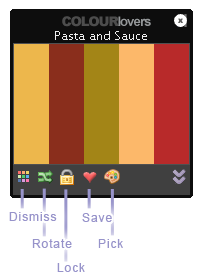 This colorful and powerful tool has 5 controls:
Dismiss: not happy with the palette you got? Forget it and load another one.
Rotate: looks good but it's not it yet? How about rotating colors so they apply and match differently on the page?
Lock: by default, a new palette loads on every page. Unless you lock your current palette, of course.
Save: Got something pretty? Save it as a standalone CSS that will be available in your Profile.
Pick: Found a palette you love on COLOURlovers? Enter its number and load it as a stylesheet.
Undo: (not shown here) Of course, there's an undo button. It will simply revert to the original palette if you don't like your changes.
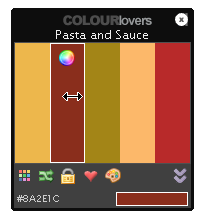 Of course, you are in command. If you find a pretty palette but want to switch two colors, simply drag them. Or, if you want to completely change a color, click the little color swatch, and colorize the way you feel it.
The plugin comes with a handy bookmarklet: whenever you visit a palette you like on COLOURlovers, you're a click from making it an admin CSS for your blog!
Bundled with the plugin, you'll find 10 custom color schemes made from 10 COLOURlovers' palette. Play with them, preview them, delete them, then make your own!
What for ?
There are two ways to give your admin area some color love.
#1: Let the tool charm you on every page
During the few weeks of coding this baby, this is what I've been doing: just let the plugin load a new and refreshing color scheme on every page. Got something ugly or that makes things unreadable? Just click the "Dismiss" button and get another one. In about 8 times out of 10, you'll get a really cool color scheme. And you'll often get something so beautiful that you'll want to save it :)
#2: Use it to make your definitive color scheme
If you just want to make the most beautiful CSS ever with the crispiest colors ever, the Admin CSS Designer plugin is your perfect tool. Edit and modify colors real time in every page until what you see is what you love, save the palette as a standalone stylesheet, and use it forever.
Download
ozh-colourlovers-admin-css-designer.zip
Extract and upload to your blog, preserving directory structure, then activate.
Note: download counter here and stats on wordpress.org may differ and reflect the number of downloads made directly there
Credits, limitations, misc stuff
- The cute icons used in this plugin are coming from famfamfam's silk set. Awesome work.
- Photos here above by Cliff Robin and DailyPic
- The cool music in the above video is "More Than a Feeling" from Boston. Used with absolutely no permission from anybody, but hey, I do own the CD :)
- The plugin was coded for and with Firefox. I don't have access to Safari, but it should be as cool as intented. With MSIE and it's as fugly as expected, and some features are disabled. You've been warned.
- Visit COLOURlovers and read their blog. It's truely awesome.
- If you use and like the Admin CSS Designer plugin, blog and tell the world about it!
[…] it goes: I'm pleased to introduce the Admin CSS Designer, a plugin that lets you design and tweak real time your admin color scheme. It fetches colorful […]
[…] Wem die Auswahlmöglichkeiten für die Farben des Adminbereiches von WordPress nicht ausreichen, der sollte unbedingt einen Blick auf dieses Plugin werfen: Admin CSS Designer von Ozh […]
[…] Ozh & ?COLOURlovers Admin CSS Designer, een hele mond vol. Haalt kleurenschema's van COLOURLOVERS binnen die je dan voor het WordPress backend kunt gebruiken. Grappig, hoewel ik momenteel toch bij "Fris" blijf. […]
[…] site's admin colors with built-in COLOURlovers functionality. Looking at the video demo on Ozh's blog, it looks like a pretty functional plugin. Here's what we […]
[…] site's admin colors with built-in COLOURlovers functionality. Looking at the video demo on Ozh's blog, it looks like a pretty functional plugin. Read the […]
Cool Plugin, I've given it a try and am currently using it.
Having it set to display random colors is real fun, one time its too light and then too dark.
Awesome to have some fun at the back end :)
[…] are not handy with CSS and would like to try some different color schemes, you should give a try to COLOURlover WordPress Plugin. Written by Mehmet on May 13, […]
Great plugin!
I have this working successfully in the Admin blog of my WPMU install. Do you know of a way that I might choose a color scheme in my Admin blog and then apply that color scheme to ALL OTHER ADMIN BLOGS in my WPMU install?
doesn't work on my space… the Designer Tool is not loaded when I click on "Random CSS" (with all other plugins deactivated) :( but the idea is really good!
ah okay, needed to rename the folder… it's working now *yay* :)
Nice plugin! Great idea to integrate ColourLovers for a huge resource for color palettes.
There is a bug in how your Bookmarklet is generated: it relies on get_settings('home') instead of get_settings('siteurl'). These two options give the same value when WordPress is installed in the root directory of the blog, but different values otherwise. See http://codex.wordpress.org/Giving_WordPress_Its_Own_Directory
Thanks for this plugin!
Doug » Thanks for the pointer! I've fixed it.
[…] View it here | […]
just incredible. Ozh, your plugins great.
Sorry but it didn't work for me in firefox or safari. the designer tool never loaded. even tried renaming the folder. nice idea though.
Hail, fellow COLOURlover, and great idea. I'll have a use for this plugin in the next few weeks. ^^
i never could get the colors to work and the tool thing to pop up what am i doing worng i want this so bad
Hey, I've just download and installed the plugin. I haven't even looked at what it has to offer yet… but I really got annoyed with the (heart)(heart)Admin CSS Designer on my pretty drop downs. Is there anyway I can change how that appears because it messes up my drop downs =( Thank you.
Dannii » Sure, just edit the header of the plugin file
I changed the pluin name in wp_ozh_cl.php to admin css designer but that didn't do it. If that is where you mean then I will obviously need to log out and resfresh a few times…i take it?
thank you!
[…] Ozh's Admin CSS Designer Tool […]
Ok…I tried out the plugin and I see it has amazing potential and I definitely want to use it in future; but I have two issues with it:
1) I'm an IE 7 user and I cannot retrieve the pallete I want, because there's a Javascript error of some sorts.
2) If I enable the COLOURlovers RSS feed on the plugin's options, I cannot add any other RSS feed I'd like to retrieve data from (I'm using Viper007bond's plugin to customise the Dashboard).
I hope my feedback is useful:)
And this is not my country's flag :(
And that country broke in two more than 2 years ago, so this was not my ex-country's flag.
So, that would be feedback for one of the other plugins, I guess. ^_^
Iva » I'm not an IE7 user, so I'm afraid I won't pull my hair fixing stuff for this browser :)
As for the RSS feed bug, thanks for the report, I'll have a look at it when I have some time
Hey, one useful plugin. Thanks there Ozh :P
I'd like to write some reviews of your plugins I use, if you want to :P
Hello,
I liked very much this plugin, thank you. I just want to report a little problem.
I have several wp installations on the same server, these wp installs use the same plugin directory through a symbolic link. This makes plugin management and update much more easier.
But with this configuration, your plugin do not works very well, Maybe there is some php function that gets the plugin dir wrong and the paths of the .js and .css files on the admin theme header appear like this: "http://site.com/wp-content/www/var/plugins/ozh…".
Thanks
Humberto
[…] Version: n/a – License: GPL – Author: planetozh – Plugin Page – » Download […]
[…] […]
This may sound stupid but I was wondering how I could go about to enable the designer tool to be active on every page?
Admin page I mean, mostly because I would like to change the colors and arrangement after I have selected them
Zee » It is active on every admin page.
Excellent!!
Thanks!!
:-)
WordPress Plugins: Mehr Komfort für den Admin…
Vor allem bei der Backend-Usability bietet WordPress viel Verbesserungspotential. In diesem Posting stelle ich die besten Helferlein für Admins und Blogger vor – denn wer will mit der Maus schon mehr Kilometer zurücklegen als notwendig?
……
[…] View it here | […]
[…] Plugin Admin CSS Designer holt von der Website COLOURlovers Formkombinationen für das CSS Design und zeigt diese im […]
[…] 5. Ozh's Admin CSS Designer Tool […]
Hi, love the plugin, and came accross it while searching for something else. I would like a plugin that allows the viewer to change the colour of a picture on a page, so they can see what colour t-shirt they prefer. That available that you know of?
Many Thanx
ScooterSchalk » Don't know.
[…] Demonstration View it here | Download […]
[…] ??? | […]
Hiya,
Love the plugin for my own use.. is there a way to make it the default for all new users though, or do they have to go into their profile to choose it?
If there's a way to make it the default, then this plugin will be an absolute dream for all those that have membership blogs..
Kind Regards,
Penny
[…] Ozh’s Admin CSS Designer Tool […]
[…] pull colorful palettes from COLOURlovers.com and make admin CSS for you. You can make, edit …..read more Download Plugin! Version 1.0.1 Last Updated: August 11, 2008 […]
Hi!
How can I create a widget to show in my site the last colourlovers´s colors?. I´m not programmer but i think is not too complicate whit your plugin.
Sorry for my english.
Thxs!
Renzo » My plugin has nothing to do with such a widget
Ozh, thanks for your reply!
Yes, I know, but your plugin use the api of colour and some of js. Then to show in a site must be simple. Or not?
Exitos!
Hey this is an amazing plugin, but I can't get the design tool to load on IE and Firefox. I want to use it so bad! I noticed someone said renaming folders, what do I rename?
Natalia: there's nothing to rename. Note that the plugin is (currently) for a deprecated version of WP.
[…] site's admin colors with built-in COLOURlovers functionality. Looking at the video demo on Ozh's blog, it looks like a pretty functional plugin. Here's what we […]
[…] Ozh's Admin CSS Designer Tool […]