
One of the first things I wanted to improve in the admin area of my WordPress blog, back in the 1.5 days, was the header menu. I wanted to be able to reach any admin page in one click, instead of first clicking on the first level link ("Manage" for example) and then only on a submenu link ("Comments") So came a very neat plugin : the WordPress Admin Drop Down Menu
When WordPress 2.7 and its new and optimized user interface came, I thought there was still room for improvements: a horizontal menu gave the admin area more of a "desktop application" feel, and I think it's superior to a vertical menu. So I updated the WordPress Admin Drop Down Menu.
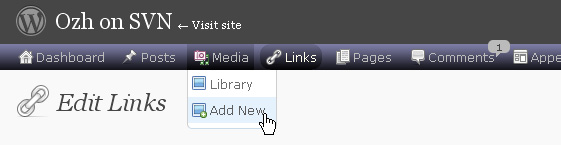
Download
Get the plugin :
ozh-admin-drop-down-menu.zip
Extract and upload to your blog, preserving directory structure.
Note: download counter here and stats on wordpress.org may differ and reflect the number of downloads before this plugin was hosted on the plugin directory
Activate and enjoy. Another friendly install & forget piece of PHP.
Features
- Customizable color scheme with a neat color picker
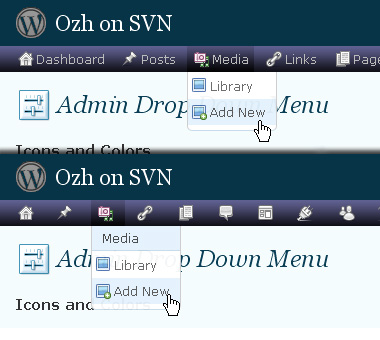
- Normal mode for regular users, compact mode for real estate maniacs, minimal mode for those who never have enough
- Optional cute icons from FamFamFam
- Enhanced compatibility with handheld devices
- Joy and happiness for every day
Javascript is involved for advanced features and to make stuff compatible with MSIE6, but on any decent browser everything works even with Javascript disabled.
Super neat color picking.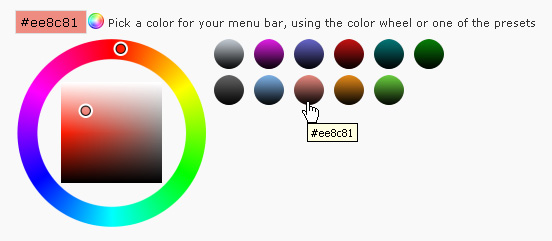
Any color you'll love.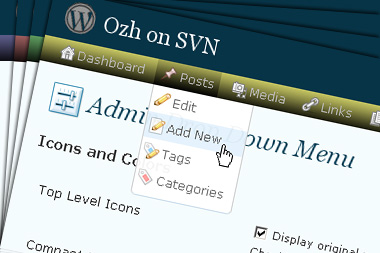
Normal or compact display.
Browser compatibility
The plugin has been developed on Firefox 3, Chrome and MSIE7. It should do fine with MSIE6 and Safari too.
There are glitches with Firefox 2 and Camino which both use a deprecated rendering engine. There are also glitches with Opera. I won't fix these, but if anyone wants to submit a CSS patch to resolve one of these issue, you're welcome :)
Developer friendly
The plugin comes with a wickedly cool API that will allow other plugin developers to interact with it, like adding your own custom icon for your plugin. Read the API for Coders page for examples and documentation. Also, all elements the plugin produces get custom CSS classes and id's to allow easy styling or selecting.
Translations
The plugin is ready for interglobanalization and there is a .pot template file included so polyglots can even make their own translation and sent the .mo and .po files to me that I'll include in the package.
The plugin comes with the following translations, in no particular order:
- Turkish, thanks to Baris Ünver
- Korean, thanks to Jong-In Kim
- Spanish, thanks to Karin Sequen
- Italian, thanks to Gianni Diurno
- Deutsch, thanks to Frasier Crane
- Russian, thanks to Fat Cow
- Brazilian Portuguese, thanks to Renato Tavares
- Greek, thanks to Friedlich
- Belorussian, thanks to ilyuha
- Hebrew, thanks to Amiad Bareli
- Romanian, thanks to Octav
- Ukrainian , thanks to wpp.pp.ua and Jurko Chervony
- Traditional Chinese, thanks to Paogray and Joan Wang
- Dutch, thanks to Cees van den Heuvel
- Slovak, thanks to Branco from WebHostingGeeks.com
And maybe more since I might totally forget to update this list :)
Older Versions
All my plugins are designed to run on the latest WordPress version available. Upgrade WordPress whenever a new version is out, or be sorry when your site gets compromised.
If for some unintelligent reason you need to get an older version of this plugin, it might be available, yet totally unsupported or recommended. Check here: Other versions.
Feedback, Bug report, Feature request
Sure. Feed me back. Like it? Blog about it. Love it? Click on the download link, see the Paypal button appear, and give it some clicks!
If you're reporting bugs, you're welcome, but please provide a screenshot and informations about your browser & your OS. I'm not supporting deprecated blogs or plugins or browsers, and I can't respond to incomplete bug reports.
If you're suggesting a feature, you're welcome too, but I won't add an admin menu on the public side of the blog, on top of pages. If you're looking after having this menu fixed on top of page, check this companion plugin that works as a plugin to this plugin: Admin Menus Fixed.
amazing! really cool. I am going to try this plugin in now. Thanks
[…] 3. Ozh' Admin Drop Down Menu […]
I think this looks amazing. I love the pics to show what it looks like. Do you know of any plug-ins for drop down menus on my site (not just in admin)? Thanks and look forward to the good work.
[…] Ozh’ Admin Drop Down Menu Tous les liens disponibles dans le panneau d’admin se retrouvent dans un menu déroulant horizontal (et non plus vertical) trés soigné. Aller sur le site de l’extension […]
There are 2 bugs I want to mention:
– the flash content is above the menu
– with Internet Explorer 8, the menu has weird spaces..
http://img268.imageshack.us/img268/537/adminmenu.png
Any fixes by any chance?
Thanks,
Octav
Octav » Not sure I can do something with flash objects. I think I've already scratched my head about this, with no luck. As for IE8 spacing, I'd rather wait for someone to submit a patch for IE than use this browser myself :)
Hi Ozh,
There's a bug on the options screen of your indispensable plugin.
If you uncheck the 'Favorite Actions' checkbox and then save your options, the checkbox gets hidden and you can't re-enable the favorite actions.
Unless I'm mistaken, the code that hides the checkbox (line 119 of inc/options.php) should be taken out so the checkbox is always visible.
[…] der Unterseiten, um mal nur ein Beispiel zu nennen. Bislang habe ich für diese Zwecke "Ozh' Admin Drop Down Menu" genutzt. Dies ist ebenfalls ein empfehlenswertes Plugin für den angenehmen Admin-Job, […]
Awesome awesome awesome! I loathe the new and "improved" WordPress dashboard with a passion. This makes it so much better, and should be the standard. THANK YOU for this plugin.
Ozh » I think that one solution to the IE8 spacing might be adding the code in adminmenu.css.php:
#ozhmenu .ozhmenu_sublevel { line-height: 100%; margin: 0; }
Also, unless the flash objects have wmode set to transparent, the menu goes under it. Too bad.
[…] ???????[↩]????[↩]Guest Book[↩]Visit plugin homepage[↩]Admin Drop Menus [↩]?????? ????????[↩] ++????++Extended Live […]
[…] on mastering and tweaking the dashboard of the WordPress.org interface. Thanks to one little plug-in (Admin Drop Down menu by Ozh) I find the dashboard to be about 10 times better than it was before. That alone was worth it! […]
[…] 2. Admin Drop Down Menu wordpress admin theme […]
[…] Admin Drop Down Menu – Con la nueva interfaz de WordPress muchos dicen que este plugin a perdido su utilidad, pero […]
Thanks for great plugin :D
[…] To save a lot of clicks and keep the admin menu bar tidy, Ozh' Admin Drop Down Menu is my plugin of choice. Agree, the new menu system in WordPress 2.7 is a good improvement, but […]
[…] been using Ozh's Admin Drop Down Menu, a WordPress plugin that arranges the current admin area menus in a horizontal, instead of a […]
[…] Eklenti Ana Sayfas? […]
[…] 16?Ozh’ Admin Drop Down Menu : ?????????????????[????] […]
[…] Ozh' Admin Drop Down Menu : Une extension qui modifie ladministration de wordpress : les menus sont en haut et sont déroulants. sympa pour gagner de la largeur de page et cela rend plus accessible les sous menus. Le site. […]
[…] Ozh' Admin Drop Down Menu […]
[…] 18.Ozh' Admin Drop Down Menu:??????WordPress???????WordPress2.6?????. […]
[…] vous avez installé la barre de menu d'administration ( »Ozh' Admin Drop Down Menu« , je vous le conseille ), le nombre d'extensions à mettre à jour est indiqué […]
I really like this plugin, BUT, I had to turn it off because it won't let me load my posts list. Everything else works except the EDIT POSTS link which loads a blank page. The page url is correct but the page is white with nothing and nothing else was effected. I turned off the plugin and it was OK.
msmarko » You're the first to report something similar. There's something wrong on your side.
[…] OMaximus am 11. September, 2009, unter WordPress Dank Ozh's Admin Drop Down Menü lassen sich die Schaltflächen im Administrationsmenü von WordPress […]
[…] PLUGIN HOME PAGE […]
[…] been using Ozh's Admin Drop Down Menu, a WordPress plugin that arranges the current admin area menus in a horizontal, instead of a […]
I'm really loving this css function. It makes wordpress admin look a lot cleaner. And I like that you can choose your own colours.
Been using this plugin for some time, and it's great!
One small glitch seen on upgrade to WP 2.8.4 from 2.7.1 — if the Admin Drop Down plugin is activated with the 'orginal' WP dashboard sidebar set to "icons only" (by clicking on the gray line below first menu item), the plugin leave a gap on the left-hand side of the admin pages.
If I deactivate the plugin, put the original sidebar back to its normal, 'wide' mode, and re-activate the plugin, then the admin displays are flush against the left side of the page, as they should be.
Sounds bizarre, but that's what I found after playing around. I had two sites running the plugin, one was fine and the other had the 'gap', and that original dashboard sidebar setting cleared it up — and the problem was the same displayed in FF 3.5 or IE 8.
Just FYI,
BMB
I have the exact same issue as msmarko. Edit Posts loads a blank page. When I disable the plugin it works as expected.
Thanks
Evan » Definitely can't reproduce, and the plugin is so popular that if such a problem was generic it would have been reported a thousand times. There must be a plugin conflict. Try disabling other plugins one by one to identify which one.
Hi,
Thanks for the super fast response. I upgraded a handful of plugins recently so I went back and started with those.
When I disable "Organize Series" plugin the problem goes away.
Thanks
Hello. I did the Ukrainian version of the plugin. Download here ??????? WordPress
[…] ?????http://planetozh.com/blog/my-projects/wordpress-admin-menu-drop-down-css/ […]
Evan » Indeed something's wrong between this plugin & mine. A quick scan of its code didn't highlight anything obvious… Sorry, I don't have time to dig deeper, maybe you should warn the author about this.
Ozh,
I posted a comment on the Organize Series developer's site regarding the conflict. Hopefully with that and the comments here a few people will be saved from having to grind through all of their plugins. Thanks again for the nifty plugin and responsiveness.
Hi.
Congratulations for this plugin. It's 99% perfect, the only thing I would suggest you, would have the option to show in the drop menu page section, all the page created. This would make life easier for people (like me) that has a lot of pages and use WP as a CMS.
Thanks
Daniel » I don't see the point of linking to pages within the admin area. Plus, I admit I want to torture someone everytime I hear "I use WP as a CMS".
Hello. The new version 3.3.3 which you have found that a plug and errors. New writing and Edit tabs does not work. Please resolve this error, you.
Yakupcan » Another plugin you're using is messing things up. Find which one.
I use your plugin in all blogs of my small community (about 25 blogs). I love it – thanks.
Two questions:
1. There is a lot of updates going on all the time, and I get confused about what's being changed – are they maintenance updates (bug squashing), or there are new features, or what?
2. "Brasilian" is not really a language :) We call it Portuguese, and if you really want, Brazilian Portuguese (Português brasileiro).
That's it. Thanks a lot again, and congratulations.
Daniel » There's a changelog in the readme (that's a link, really) and into the plugin source itself. Thanks for the correction about the language name, I've fixed it :)
Oh, ok! Great! That's what I was looking for (the changelog :) Sorry I missed, a thanks for point me out.
Congratulations again on your excellent plugin!
Instead of upgrading, I am sent to my home page after I click upgrade automatically in my WP admin for your plug-in.
Trying to do it by manually uploading the latest version says folder already exists and installation fails.
Great plugin!
Thanks
Hi have a problem with plugin, i use the last version of wp, but the vertical menu remain and the horizontal menu appear without style and images…
Thank you for your plugin is very nice (before of upgrade wp).
Hi.
After upgrading Drop Down Menu to 3.3.4 it wipes the edit-post page blank. We are using wordpress 2.8.4 (no core tweaks or special server config) and Firefox 3.5.3 on OS X 10.6.1
After deacticating the plugin, everything works fine again. Any suggestions?
Help is very much apprecieated!
Thanks,
m.
Max » Conflicting plugin that does something on the edit-post page. Find it and tell the author to fix it.
Hey Ozh!
You were right. There is a conflict with "Organize Series" plugin. I will contact Darren, the developer of og.
Thanks dude!
m.