
One of the first things I wanted to improve in the admin area of my WordPress blog, back in the 1.5 days, was the header menu. I wanted to be able to reach any admin page in one click, instead of first clicking on the first level link ("Manage" for example) and then only on a submenu link ("Comments") So came a very neat plugin : the WordPress Admin Drop Down Menu
When WordPress 2.7 and its new and optimized user interface came, I thought there was still room for improvements: a horizontal menu gave the admin area more of a "desktop application" feel, and I think it's superior to a vertical menu. So I updated the WordPress Admin Drop Down Menu.
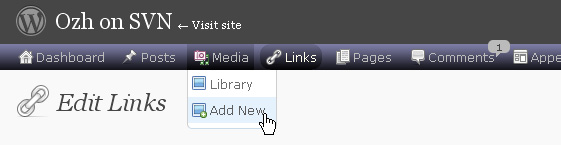
Download
Get the plugin :
ozh-admin-drop-down-menu.zip
Extract and upload to your blog, preserving directory structure.
Note: download counter here and stats on wordpress.org may differ and reflect the number of downloads before this plugin was hosted on the plugin directory
Activate and enjoy. Another friendly install & forget piece of PHP.
Features
- Customizable color scheme with a neat color picker
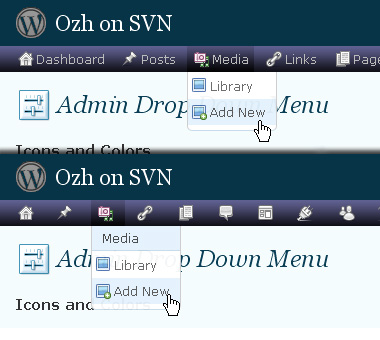
- Normal mode for regular users, compact mode for real estate maniacs, minimal mode for those who never have enough
- Optional cute icons from FamFamFam
- Enhanced compatibility with handheld devices
- Joy and happiness for every day
Javascript is involved for advanced features and to make stuff compatible with MSIE6, but on any decent browser everything works even with Javascript disabled.
Super neat color picking.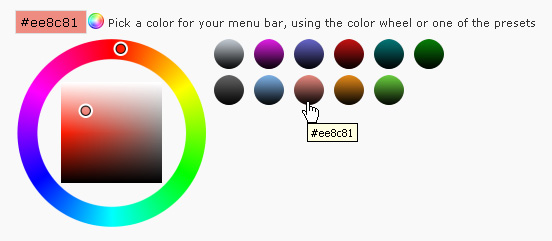
Any color you'll love.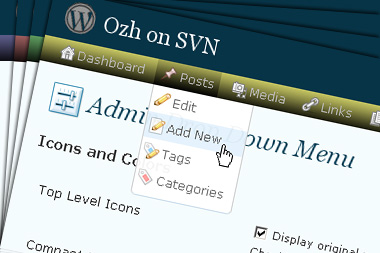
Normal or compact display.
Browser compatibility
The plugin has been developed on Firefox 3, Chrome and MSIE7. It should do fine with MSIE6 and Safari too.
There are glitches with Firefox 2 and Camino which both use a deprecated rendering engine. There are also glitches with Opera. I won't fix these, but if anyone wants to submit a CSS patch to resolve one of these issue, you're welcome :)
Developer friendly
The plugin comes with a wickedly cool API that will allow other plugin developers to interact with it, like adding your own custom icon for your plugin. Read the API for Coders page for examples and documentation. Also, all elements the plugin produces get custom CSS classes and id's to allow easy styling or selecting.
Translations
The plugin is ready for interglobanalization and there is a .pot template file included so polyglots can even make their own translation and sent the .mo and .po files to me that I'll include in the package.
The plugin comes with the following translations, in no particular order:
- Turkish, thanks to Baris Ünver
- Korean, thanks to Jong-In Kim
- Spanish, thanks to Karin Sequen
- Italian, thanks to Gianni Diurno
- Deutsch, thanks to Frasier Crane
- Russian, thanks to Fat Cow
- Brazilian Portuguese, thanks to Renato Tavares
- Greek, thanks to Friedlich
- Belorussian, thanks to ilyuha
- Hebrew, thanks to Amiad Bareli
- Romanian, thanks to Octav
- Ukrainian , thanks to wpp.pp.ua and Jurko Chervony
- Traditional Chinese, thanks to Paogray and Joan Wang
- Dutch, thanks to Cees van den Heuvel
- Slovak, thanks to Branco from WebHostingGeeks.com
And maybe more since I might totally forget to update this list :)
Older Versions
All my plugins are designed to run on the latest WordPress version available. Upgrade WordPress whenever a new version is out, or be sorry when your site gets compromised.
If for some unintelligent reason you need to get an older version of this plugin, it might be available, yet totally unsupported or recommended. Check here: Other versions.
Feedback, Bug report, Feature request
Sure. Feed me back. Like it? Blog about it. Love it? Click on the download link, see the Paypal button appear, and give it some clicks!
If you're reporting bugs, you're welcome, but please provide a screenshot and informations about your browser & your OS. I'm not supporting deprecated blogs or plugins or browsers, and I can't respond to incomplete bug reports.
If you're suggesting a feature, you're welcome too, but I won't add an admin menu on the public side of the blog, on top of pages. If you're looking after having this menu fixed on top of page, check this companion plugin that works as a plugin to this plugin: Admin Menus Fixed.
Lane Lester » There's an option for this in the plugin settings
Ozh, is this what you mean:
Top Links Make top links clickable
Uncheck this option to improve compatibility with browsers that cannot handle the "hover" event (ie most handheld devices)
When I uncheck it, it doesn't seem that I can do anything with the iPad, because touching a main menu item does nothing. With it checked, the main menu item is executed, but there's no way to get to a submenu item.
Absolutely love this plugin and have used it for a long time. Thanks.
Just updated to WP3.5 and the plugin broke. The images are not showing up properly. Checked in on many hosts and many browsers. All the same problem.
Any thoughts?
Lance » No problem for me with WP 3.5 and plugin 3.6.4
Ozh – Was using 3.6.3. Just saw the update notification this morning. 3.6.4 did the trick. Thanks for a great plugin and great support.
Thanks for a great plugin.
On WP 3.5 multi-site with Admin Drop Down menu ver 3.6.4 activated on the main site, the images on the network admin are broken links for the menu items Dashboard through Updates. On site admin, all images display fine.
In the source, I see:
If I recall correctly, ver 3.6.3 worked perfectly in this regard, even under WP 3.5.
Could it be my setup?
WP v3.5, Admin Drop Down Menu v3.6.4
I'm getting the same no icons on Network Admin as well. Network activated. Subsites work fine, including the Primary Blog Admin, where I change the menu preferences that apply to the Network Admin screens.
Hey Ozh. Thanks for the plugin.
Can you make the >> link to the "Visit Site" front-end open in a new window? Minor inconvenience having to leave the dashboard and I always disliked it in the vanilla WP menu.
No biggie but great if you can add a _blank or similar element.
Vin Carrillo » I'll never do that. Forcing targets on link is evil, since you can't escape it, while having no target lets the user decide (regular click for same tab or right click / middle click / whatever for another tab)
I understand your reasoning about the target thing, although I would also prefer it.
My wish is that the "disable admin bar" option would disable it on the actual web pages, too. I hate that "feature," and the P3 plugin tester says the admin bar disabler plugin adds a lot of time to page load.
The Toolbar visibility on the frontend (actual web pages) has always been selectable:
Your Profile > Toolbar check box > Show Toolbar when viewing site
Duplicating that function would be unnecessary.
Wow! I'm evidently not the expert I like to think I am. Thanks!
You're welcome.
Back when the Admin Bar first came out, there were two checkboxes there; one for frontend, one for backend. When they renamed the Admin Bar to Toolbar and made it persistent, they removed the backend checkbox; because they want everyone to use it and certain plugins add menus to it. Ozh' setting restores the removal functionality but, with the Toolbar disabled, any menus that plugins add to it won't be available.
Nice plugin, but there is a bug if screen size is reduced, @media css properties for max 900px screens are then activated and that causes blank space to the left to appear and whole menu shifts to the right…just try resizing the window and you will see what I mean (or just login using iphone…)
Thanks for a great menu!
Like this plug-in but have big issue just discovered. When the Ozh plugin is enabled, the "All in one calendar" htt://time.ly does not properly display its events/Calendar feeds" page. Ozh makes the calendar plugin appear to be broken. Hope there is a fix.
Thanks,
Roy
Great plugin. Thank you.
Same issue as Nesako. Wonder if you could maybe give some possibilities on reverting to wordpress default styling whenever the screen size gets to a certain width. That will put the small icons back to the left of the page and allow for the full responsiveness of the WP Admin area. As it is, the responsiveness is lacking. Looking into the issue myself right now, but writing this just in case you have a quick answer before I start editing anything.
sorry, wrong code…..
what i meant is that img src is broken.
page source: img class="wp-menu-image" src="div"
Hi
Love this plugin. Such a better use of precious desktop and window area. I have a problem though and the link below is a post of mine from yesterday to the Jetpack forum explaining what might be a conflict between Ozh and Jetpack which creates a 404 error for every page change, edit, publish click, save draft click, etc. etc. I perform within my website.
http://wordpress.org/support/topic/jetpack-generating-404-errors?replies=3#post-4321163
Really would like to keep Ozh, but with the 404 errors I am afraid the NSA is going to pick it up an misconstrue it as some sort of terrorist attack or a threat to national security and shut my website down. :) Anyone familiar with this? Any fixes available for a complete and utter noob?
Randall » I'm running both on all my sites, no problem detected
Running both on mine and no issues like you describe, Randall.
It's still not breaking long lists though – it ceased to do that when I updated WP to v3.3 way back in 2011 :-(
Thank you for the heads-up guys.
Might be corruption somewhere so I'll try a re-install of the plugins.
Keep your stick on the ice.
Cheers,
RJ
In my 20 years if IT, this is the best software ever! wordpress has just had a full version upgrade after installing this. yay :-)
from,
one frustrated "has-had-to-use-wordpress" developer. now i like using it!
Great plugin! Is there a way to make the menu bar static? Where it always stays just below the wordpress bar instead of scrolling with everything else?
Thanks!
When WP_DEBUG is set to true I get this:
Notice: Undefined index: displayfav in /…/wp-content/plugins/ozh-admin-drop-down-menu/inc/core.php on line 264
Davit » Indeed, thanks for reporting. I'm pushing a fix.
LOVE Ozh drop-down.. hard to live without.. BUT is totally broken by WordPress 3.7.1.. Waaaaah!
asa: absolutely not.
Agreed. Works here on three separate installs. So, one would gather that something with your install is Borked.
Hi
Nice plugin !!
Suggestion to make the menu stationary (non scrollable)
so that one can always access the menu without scrolling up to see it.
Thanks
Ice » there's a companion plugin for this. Don't remember the name.
It's Admin Menus Fixed. Mentioned and linked to on this page in the last sentence in the Feedback, Bug Report, Feature Request section.
First time this old reliable (and great) plugin has caused me any problems.
I found a conflict with "Ozh' Admin Drop Down Menu"and "Event Organizer" http://wordpress.org/plugins/event-organiser/
I need the Event Organizer more than Ozh, so for now I'll say goodbye to my old friend. :(
All I do to trigger the crash is install both plugins, do to Events->Venues. Add a couple venues, then to back to the Venue list and click Edit. I get what looks like a white screen of death with only the text message "cannot load venues."
Hope that's enough to demonstrate the problem. I'd like to re-activate Ozh.
Plugin works great with 1 issue and that is the icons it tries to generate as it rebuilds the menu display as "image not found". When it first starts, it shows just fine, but as it looks for all the menus and re-generates the list is when the icons get lost for some reason. Other wise the plugin works great and it does display the drop down menu and icons. Any ideas as to why this is happening or a fix for it ??
Let me know..thank you..
Broken with WP Version 3.9.1.
Images are not displaying correctly now.
Bummer.
Even Admin Menus Fixed is broken now too.
The plug in works for me and I'm using 3.9.1 . The only issue I have is that the icons will not display. If I disable the icons the menu works, but if enable the icons they show up as broken links. I've asked if this can be fixed, but as you can see no support is offered for it any more and that's a shame as this is a nice plugin. It cleans up the admin area for better viewing.
The reason that the "icons" don't work is that there are no icons. It's a font. The good news is, there's a fix.
Go here on the WordPress Repository Support page:
http://wordpress.org/support/topic/menu-icons-missing-wp-39
Be sure to read the whole thread, as there is an adjustment that I found had to be made to get the font to display correctly.
As for Admin Menus Fixed, it works on my 3.9.1 as it should. Tested on every release as it comes out.
Nice Menu. I tried to fit my needs. Only one thing I wasen't able to change. the Color of the "default" grey icons. I wanna have them white. I changed the menu, only the icons displayed. is it possible to change the color from the icons?
tnx
Daniela
Is it possible to column links to an external url?
Love the plugin. Makes your life much easier. Congratulations.
I was wondering if there is any chance the menu bar could be sticky to avoid going top to change options. Thanks in advance.
Your menu so greatly improves the WordPress admin area that it should be the default admin menu in WordPress. Have you tried donating it to the WordPress Development team, maybe you could join the team if you did, your plug is that good.