
One of the first things I wanted to improve in the admin area of my WordPress blog, back in the 1.5 days, was the header menu. I wanted to be able to reach any admin page in one click, instead of first clicking on the first level link ("Manage" for example) and then only on a submenu link ("Comments") So came a very neat plugin : the WordPress Admin Drop Down Menu
When WordPress 2.7 and its new and optimized user interface came, I thought there was still room for improvements: a horizontal menu gave the admin area more of a "desktop application" feel, and I think it's superior to a vertical menu. So I updated the WordPress Admin Drop Down Menu.
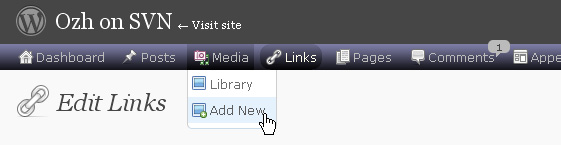
Download
Get the plugin :
ozh-admin-drop-down-menu.zip
Extract and upload to your blog, preserving directory structure.
Note: download counter here and stats on wordpress.org may differ and reflect the number of downloads before this plugin was hosted on the plugin directory
Activate and enjoy. Another friendly install & forget piece of PHP.
Features
- Customizable color scheme with a neat color picker
- Normal mode for regular users, compact mode for real estate maniacs, minimal mode for those who never have enough
- Optional cute icons from FamFamFam
- Enhanced compatibility with handheld devices
- Joy and happiness for every day
Javascript is involved for advanced features and to make stuff compatible with MSIE6, but on any decent browser everything works even with Javascript disabled.
Super neat color picking.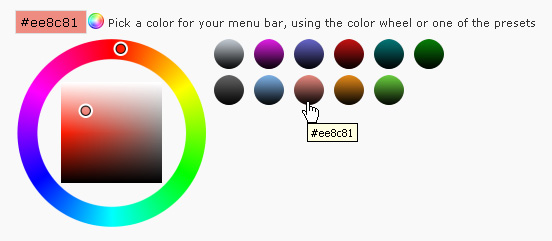
Any color you'll love.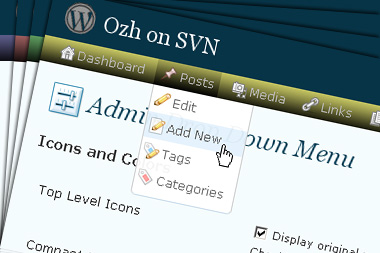
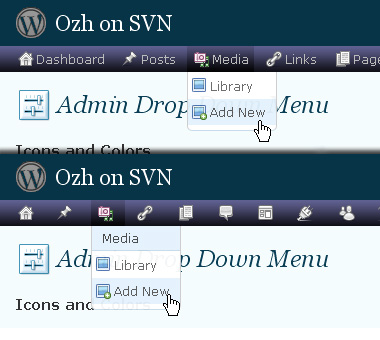
Normal or compact display.
Browser compatibility
The plugin has been developed on Firefox 3, Chrome and MSIE7. It should do fine with MSIE6 and Safari too.
There are glitches with Firefox 2 and Camino which both use a deprecated rendering engine. There are also glitches with Opera. I won't fix these, but if anyone wants to submit a CSS patch to resolve one of these issue, you're welcome :)
Developer friendly
The plugin comes with a wickedly cool API that will allow other plugin developers to interact with it, like adding your own custom icon for your plugin. Read the API for Coders page for examples and documentation. Also, all elements the plugin produces get custom CSS classes and id's to allow easy styling or selecting.
Translations
The plugin is ready for interglobanalization and there is a .pot template file included so polyglots can even make their own translation and sent the .mo and .po files to me that I'll include in the package.
The plugin comes with the following translations, in no particular order:
- Turkish, thanks to Baris Ünver
- Korean, thanks to Jong-In Kim
- Spanish, thanks to Karin Sequen
- Italian, thanks to Gianni Diurno
- Deutsch, thanks to Frasier Crane
- Russian, thanks to Fat Cow
- Brazilian Portuguese, thanks to Renato Tavares
- Greek, thanks to Friedlich
- Belorussian, thanks to ilyuha
- Hebrew, thanks to Amiad Bareli
- Romanian, thanks to Octav
- Ukrainian , thanks to wpp.pp.ua and Jurko Chervony
- Traditional Chinese, thanks to Paogray and Joan Wang
- Dutch, thanks to Cees van den Heuvel
- Slovak, thanks to Branco from WebHostingGeeks.com
And maybe more since I might totally forget to update this list :)
Older Versions
All my plugins are designed to run on the latest WordPress version available. Upgrade WordPress whenever a new version is out, or be sorry when your site gets compromised.
If for some unintelligent reason you need to get an older version of this plugin, it might be available, yet totally unsupported or recommended. Check here: Other versions.
Feedback, Bug report, Feature request
Sure. Feed me back. Like it? Blog about it. Love it? Click on the download link, see the Paypal button appear, and give it some clicks!
If you're reporting bugs, you're welcome, but please provide a screenshot and informations about your browser & your OS. I'm not supporting deprecated blogs or plugins or browsers, and I can't respond to incomplete bug reports.
If you're suggesting a feature, you're welcome too, but I won't add an admin menu on the public side of the blog, on top of pages. If you're looking after having this menu fixed on top of page, check this companion plugin that works as a plugin to this plugin: Admin Menus Fixed.
[…] Admin Drop Down Menu […]
For installation in the mu-plugins directory for WPMU
Upload the "ozh-admin-drop-down-menu" folder to mu-plugins.
Create "mu-plugins/ozh-admin-drop-down-menu.php" with these contents…
Then in mu-plugins/ozh-admin-drop-down-menu/core.php
Search and replace…
WP_PLUGIN_DIR with WPMU_PLUGIN_DIR
WP_PLUGIN_URL with WPMU_PLUGIN_URL
/plugins with /mu-plugins
Ozh: please delete my comment 1043, which is incorrect
And thanks for a kick-butt awesome plugin.
[…] step down a bit from Twitter for a while. This is a much overdue update to the übercòól Admin Drop Down Menu. Aside from minor tweaks related to the upcoming WordPress 2.8, more languages than ever (German […]
[…] Subscribe to Comments 2.1 is a plugin that allows commenters on your blog to check a box before commenting and get e-mail notification of further comments. You probably seen it already, it adds a checkbox "Notify me of followup comments via e-mail" in the comment form. Admin Drop Down Menu […]
dear guy
the plugin was just perfect
it was excatly what i supposed it to be
the oldev version had some problems which
was resolved in this one
tnx 2 u
This has got to be my favorite plugin. However, one problem: I do not have a 20+ inch screen and due to some other plugins, the menu is wider than the screen. This causes two problems:
1) The drop down menu for the last item on the screen (far right) disappears off the screen
2) The menu wraps around to a second line, which is not formatted (i.e. not the nice looking 3d bar).
If needed, I can provide a screenshot.
I tried to use the compact version, but I miss the bubbles there (e.g. for plugin updates, new comments). So I would greatly appreciate if this could get fixed :-)
By the way, I am using the option to not show more than x items in the dropdown menu, it would be nice if they could be in neat columns instead of a cloud-like list (again, a screenshot can be provided). Using FF3 with WP 2.7.1
Thank you, much appreciated :-)
Just tried the plugin. Will post a feedback later. this plugin seems to be creating a lot of buzz in the admin world (refering the trackbacks it got here) And i totally agree with the horizontal menu. perhaps, because of this, i had somewhere in mind that the previous versions had something better than the newer one. now i know what it is :D
[…] WOW WOW, talk about pick up some horizontal real estate. I just installed the Ozh Admin Drop Down Menu. I thought it would add the Admin menu to the top of the screen so I didn't have to scroll […]
[…] Plugin – Admin Drop Menu quarta-feira | novembro 5th, 2008 Cria um menu drop-down no seu painel de administração do wordpress facilitando sua navegação. Compatível com WordPress 2.5+. Para outras versões do wordpress, verifique a compatibilidade ou a disponibilidade de outra versão do plugin no site do autor. Página do plugin planetozh.com/blog […]
[…] WordPress Plugin : Admin Drop Down Menu « planetOzh […]
I absolutely love it, though I'm still having some problem with the API for coders…
[…] Ozh’s Admin Drop Down Menu??????????WordPress 2.7?????????????????????????????????????????????????????????????????????????????????????????????WordPress????????????????? […]
Possibly I'm misunderstanding stuff here, but what I'm seeing with WP 2.7.1 & OZH 3.2 is that the plugin works fine for the site administrator but
a] does not replicate any altered colour/gradient settings for logged in non-admin users – users still see the default colours and
b] there's no way for admin to enforce menu colour/gradient changes for users or allow those users [editor/author/contributor] to alter their own menu settings via their profile etc.
Have I got this right or have I missed something? If I haven't got this right could someone tell me what I've missed. If I have got it right it would be really nice to be able to make role or user administration menus consistent across the site.
Thanks,
Robert
[…] scrolling down to get to the bottom. If anyone know of a plugin for this let me know!Found it! The Admin Drop Down Menu by OZh is exactly what I wanted! And it hs pretty colors! Thank you to Rachel of Beyond Beeton for […]
[…] Ozh' Admin Drop Down Menu 3.2 NEW! ?Wordpress2.7??????????????dropdown menu??????????? […]
Hi, Great plugin. One of the most ambitious I've seen in terms of user experience. Love the instant reaction when changing the settings.
I do have a suggestion for future versions. I'd love to have the option to make the menu sticky. I get tired of scrolling up and down (even with the old vertical menu) when I need to navigate to a new page – especially when my new super wireless ultimate fantastic mouse doesn't support the scroll wheel – so as a workflow feature I think that would be a cool addition.
Keep it up.
Hey,
Great plugin. I use it on all my wordpress websites. However, is this compatible with WPMU?
[…] WordPress ??????? ???????????? ?????? ??? ????? ??????. 16. Admin Drop-Down Menu – ??????? ?????????? ???? ? ???????, ??? ????????? […]
I have quite a few plug ins and they don't drop down so I can access the ones at the bottom, is there a way to see them all and be able to work with them? I like the plug in though.
And tell that idiot using the questions marks for comments – that they are an idiot!!! I hate them.
Great work. I love this plugin!
Helpful stuff!!!
Hello
Here is the fix for "vertical text" after install..
After the installation of latest plugin for wordpress version 2.7.1 i did not get the horizontal bar at the top of the admin page, but instead i the plugin was displayed as a vertical text menu next to the existing vertical administration bar.
Solution:
1. deactivate the latest ozh admin bar plugin which is not working (admin >> plugins >> deactivate)
2. delete from the plugins directory
3. upload old plugin version "ozh-admin-drop-down-menu.2.3.4.1.zip" (Version 2.3.4.1 for WordPress 2.5 to 2.6.5)
4. activate via admin >> plugins
5. download the latest plugin version for wordpress 2.7.1 and upload to the plugins directory (do not delete the older plugin folder from the plugin directory!)
6. activate via admin >> plugins
7. follow the instructions exactly.. and it will work
[…] Ozh' Admin Drop Down Menu??2.71?????????????????????????????????????? […]
Your plugin is fantastic. I greatly prefer drop-down menus to the standard left-hand menu.
The one snag I've noticed is that when clicking the dashboard icon in the toolbar, the link is http://www.domain.com/directory/wp-admin/admin.php?page=index.php, which loads a blank page. Clicking the dashboard item in the menu itself loads http://www.domain.com/directory/wp-admin/index.php?page=index.php, which is also blank.
This is on WP 2.7.1 on a server running PHP 5. I've observed it in Firefox 3 on OS X and Vista and Internet Explorer 7 on Vista. Any thoughts about what might be causing it?
Tyler » the same happens without my plugin I guess. And you probably have a blank index.php in /plugins/
Ozh, the blank pages don't happen without the plug-in, but yes, there is a blank index.php in the plugins folder. A post on making a WordPress installation more secure recommended it.
[…] Ozh's Admin Drop Down Menu by Ozh It looks better than the default WP menu. And it's easy to use. So… […]
Tyler » First, making a blank file is mostly useless (hackers don't check to see if you get an exploitable plugin then test the exploit, they just test the exploit right away). Second, making it a blank index.html will fix your problem.
So noted. Thanks for the tips as well as the plugin!
[…] been using Ozh's Admin Drop Down Menu, a WordPress plugin that arranges the current admin area menus in a horizontal, instead of a […]
[…] It's called Admin Drop Down Menu. […]
[…] been using Ozh's Admin Drop Down Menu, a WordPress plugin that arranges the current admin area menus in a horizontal, instead of a […]
[…] Admin Drop Down Menu by Ozh 2.0.3 […]
Works great, thank you
[…] documentation, examples, screenshot and a live demo, please refer to the official plugin page for Admin Drop Down Menu. There is also an API for plugin coders (give your plugin its own special […]
Hello,
I came just to say thank you for your wonderful plugin, I came across and now I don't know how I did live without it! It made administratio of my wordpress blog so easy and quick!
As you wrote in the description of the plugin it is really for the lazy ones like me :D
Cheer Lethe.
This rocks. You rock. Thank you for sharing and helping people out. I send you a virtual beer :)
hi,
thanks for this great plugin, but i got an error if i click on the DASHBOARD button… it redirects to /wp-admin/admin.php?page=index.php (Top Button) and the Dashboard link in the menu redirects to /wp-admin/index.php?page=index.php
both given errors
Warning: Cannot modify header information – headers already sent by (output started at /wp-admin/admin-header.php:17) in /wp-content/plugins/index.php on line 1
all other links are ok, but my question, is it a bug, or did i installed it wrong?
thx in advance
Moff
sry, im using wp 2.7.1 and the latest version of the plugin… i tried the suggestion from the faq but i dont find anything :/
can you help?
thanks
I use your plugin, and I love it, but all of a sudden my dashboard disappeared. I installed wordpress 2.8 and maybe that's the reason, but I'm pretty sure I had a dashboard, right after I upgraded. Is this a bug, or this I screw up my installation?
Hanna,
I've had the same problem and it seems to be the fact that the plugin is changing to dashboard link. It should be "/wp-admin/index.php" but instead it's outputting "/wp-admin/admin.php?page=index.php".
I've contacted Ozh about this issue and hope it's an easy fix. If anybody else knows how to fix this (it should be in the /inc/core.php file) please post the fix here.
Thanks,
Tim
I managed to fix it by reinstalling my blog and deleting all my plugins. I also restored my database. I have no idea what caused it though. Might've been another plugin, or wordpress 2.8.
I'm still curious about the solution though since I'm scared it might happen again.
Hanna: there's indeed a problem with dashboards on 2.8 and my plugin. I'll investigate this to release a fix by the time 2.8 stable comes out.
I love the concept and am trying to find something to put on a clients website that will give them a basic editing package instead of all the options they get with the full admin features.
Your plugin looks to fit perfectly, however, after I installed it the admin page duplicated the left nav bar as text and I had to scroll way down to see the content area of the admin screen. The admin bar does not show up either.
I'm running 2.7.1 … I looked for a FAQ and briefly through the comments, but couldn't find the solution.
Thanks … Scott
I may have a work-around for the disappearing menu in WordPress 2.8. It seems that 2.8 lays down an "index.php" in the plugins directory. When I rename that to index_old.php, your admin menu works perfectly again. I've tested this on 3 out of 4 of my sites and it's worked in every case.
Thanks for the great plugin!
Bill
Oh, and the same check needs to be applied to line 58 and 66 so that it doesn't break clickable top links.
The php tag converts ampersands, unfortunately, so don't forget to fix that.
Hi Ozh!
It seems that this great plugin doesn't shows the Links Categories Page (/wp-admin/edit-link-categories.php)
I have the last version (3.3)
Cheers!
Hi Ozh, great plugin!
Got a bug report:
Since upgrading to WP 2.8, with v3.3 of this plugin activated… anytime I go to an admin page that's loading "jquery-form" through load-scripts.php all I get is a blank page. If I disable JavaScript, deactivate this plugin, or stop this JS file from loading, the page shows up correctly. It looks like there's some sort of incompatibility here.
Thanks.
Hi Ozh,
To follow up on my last comment…
This appears to be an issue between "jquery-form" and "farbtastic" (that's being enqueued in the "wp_ozh_adminmenu_add_page" function)
same here – blank pages everywhere except the dashboard itself (since wp 2.8). when ozh admin menu is deactived, everything works (but doesn't look quite good, honestly). i'd be glad if you could fix this somehow – if i can be of any assistance in debugging, contact me via email. thanks a lot!