
One of the first things I wanted to improve in the admin area of my WordPress blog, back in the 1.5 days, was the header menu. I wanted to be able to reach any admin page in one click, instead of first clicking on the first level link ("Manage" for example) and then only on a submenu link ("Comments") So came a very neat plugin : the WordPress Admin Drop Down Menu
When WordPress 2.7 and its new and optimized user interface came, I thought there was still room for improvements: a horizontal menu gave the admin area more of a "desktop application" feel, and I think it's superior to a vertical menu. So I updated the WordPress Admin Drop Down Menu.
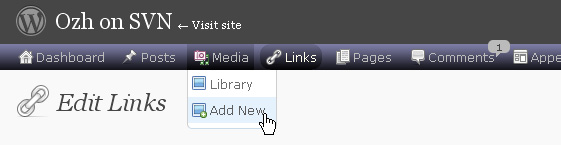
Download
Get the plugin :
ozh-admin-drop-down-menu.zip
Extract and upload to your blog, preserving directory structure.
Note: download counter here and stats on wordpress.org may differ and reflect the number of downloads before this plugin was hosted on the plugin directory
Activate and enjoy. Another friendly install & forget piece of PHP.
Features
- Customizable color scheme with a neat color picker
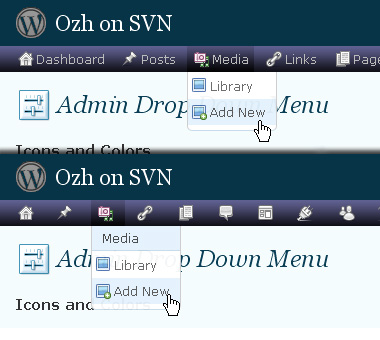
- Normal mode for regular users, compact mode for real estate maniacs, minimal mode for those who never have enough
- Optional cute icons from FamFamFam
- Enhanced compatibility with handheld devices
- Joy and happiness for every day
Javascript is involved for advanced features and to make stuff compatible with MSIE6, but on any decent browser everything works even with Javascript disabled.
Super neat color picking.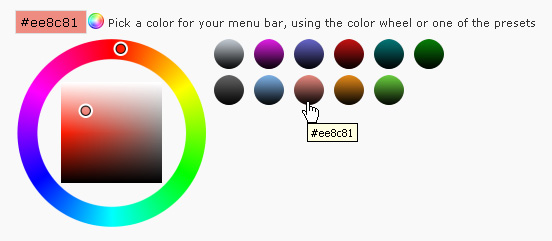
Any color you'll love.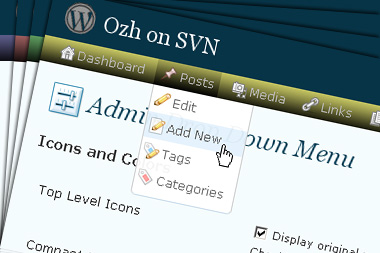
Normal or compact display.
Browser compatibility
The plugin has been developed on Firefox 3, Chrome and MSIE7. It should do fine with MSIE6 and Safari too.
There are glitches with Firefox 2 and Camino which both use a deprecated rendering engine. There are also glitches with Opera. I won't fix these, but if anyone wants to submit a CSS patch to resolve one of these issue, you're welcome :)
Developer friendly
The plugin comes with a wickedly cool API that will allow other plugin developers to interact with it, like adding your own custom icon for your plugin. Read the API for Coders page for examples and documentation. Also, all elements the plugin produces get custom CSS classes and id's to allow easy styling or selecting.
Translations
The plugin is ready for interglobanalization and there is a .pot template file included so polyglots can even make their own translation and sent the .mo and .po files to me that I'll include in the package.
The plugin comes with the following translations, in no particular order:
- Turkish, thanks to Baris Ünver
- Korean, thanks to Jong-In Kim
- Spanish, thanks to Karin Sequen
- Italian, thanks to Gianni Diurno
- Deutsch, thanks to Frasier Crane
- Russian, thanks to Fat Cow
- Brazilian Portuguese, thanks to Renato Tavares
- Greek, thanks to Friedlich
- Belorussian, thanks to ilyuha
- Hebrew, thanks to Amiad Bareli
- Romanian, thanks to Octav
- Ukrainian , thanks to wpp.pp.ua and Jurko Chervony
- Traditional Chinese, thanks to Paogray and Joan Wang
- Dutch, thanks to Cees van den Heuvel
- Slovak, thanks to Branco from WebHostingGeeks.com
And maybe more since I might totally forget to update this list :)
Older Versions
All my plugins are designed to run on the latest WordPress version available. Upgrade WordPress whenever a new version is out, or be sorry when your site gets compromised.
If for some unintelligent reason you need to get an older version of this plugin, it might be available, yet totally unsupported or recommended. Check here: Other versions.
Feedback, Bug report, Feature request
Sure. Feed me back. Like it? Blog about it. Love it? Click on the download link, see the Paypal button appear, and give it some clicks!
If you're reporting bugs, you're welcome, but please provide a screenshot and informations about your browser & your OS. I'm not supporting deprecated blogs or plugins or browsers, and I can't respond to incomplete bug reports.
If you're suggesting a feature, you're welcome too, but I won't add an admin menu on the public side of the blog, on top of pages. If you're looking after having this menu fixed on top of page, check this companion plugin that works as a plugin to this plugin: Admin Menus Fixed.
[…] documentation, examples, screenshot and a live demo, please refer to the official plugin page for Admin Drop Down Menu. There is also an API for plugin coders (give your plugin its own special […]
Was checking on the bug I reported earlier and noticed I wasn't very complete, so per your requirements, here is my problem: Your plug-in looks so cool, unfortunately when I activate it all I get is a vertical text list not the cool drop down menus. Check out the screen shot below and all the relevant information you should require also follows.
Screenshot:
http://files.louiealvarez.com/admindropdownmenu.jpg
Browser: Firefox v3.0.5 & Internet Explorer v7.0.5730.13
OS Desktop: Windows XP Media Center Edition Version 2002 SP3
OS Server: Windows Server 2003 Enterprise Edition
WebServer: Microsoft-IIS/6.0
PHP v5.2.8
MYSQL v5.1.30-community
hey, ozh.
just dropped by to report that version 3.1 together with wp 2.7 causes a menu error with the simplepress forum plugin. here is the whole error report in case you are interested to have a look: http://simplepressforum.com/support-forum/spf-version-4/probs-with-admins-and-access-rights/
[…] Admin Drop Down Menu […]
Nice plugin! And the latest version works nicely with wp 2.7 without any error. And I'm using it to my blog PlanetAutomobile.com
Thank you.. nice little plugin that helps!
Hi?
I translate a language pack, how to use it?
Thanks you?
[…] WordPress ??????? ???????????? ?????? ??? ????? ??????. 16. Admin Drop-Down Menu – ??????? ?????????? ???? ? ???????, ??? ????????? […]
[…] ????????! ???????????????, ????? scrollbar ???????????, what the…anyway, ? RSS reader ???? Worpdress Admin Drop Down Menu ??, […]
[…] Admin Drop Down Menu […]
[…] ? WordPress 2.7 ???WordPress MU 2.7 ????????????????Viper007Bond ??? WordPress Admin Bar ????????????????????? WordPress ?????????????????????????????????????????????? Ozh' Admin Drop Down Menu…… […]
Please, when I make some restricts to some users with role-manager plugins some linkes stayed broken, can you can integrate this plugin with role-manager please? seems to be an easy thing.
sory my english, I am brazilian!
Same problem as Louie Alvarez. "when I activate it all I get is a vertical text list not the cool drop down menus".
Any solution. This plugin works great on all of my other sites. Not sure what is going on with this one.
[…] Ozh' Admin Drop Down Menu […]
[…] Admin Drop Down Menu – Reemplaza admin menu con CSS menu. Os salvará muchos clicks y carga de paginas. Solo WordPress 2.5+ By Ozh. […]
[…] Ozh Admin Drop Down Menu by Ozh […]
[…] love it : all admin links available in a neat CSS driven drop down menu. No need to click …..read more Download Plugin! Version 3.1 Last Updated: December 15, 2008 Author: Ozh Visit Plugin's […]
[…] Ozh' Admin Drop Down Menu is a way to give yourself more room on your dashboard. It moves the vertical menu on your dashboard to a horizontal position. It also gives you a lot of control over the header at the very top of your page, including removing it. You can customize the color of the menu bar, and choose to have text, text and icons, or just icons. It does have some problems with some browsers, most notably Firefox 2, Camino, and Opera. It is amazing how much space that vertical menu takes up, even when it is compact. […]
[…] 2. Admin Drop Down Menu wordpress admin theme […]
[…] Admin Drop Down Menu – Dropdown statt sidebar mit famfam Icons […]
New blog and installed your nice module on WP 2.7, PHP v5.2.6, but apache 2.2 error logs say:
PHP Notice: Undefined index: fluency in /wp-content/plugins/ozh-admin-drop-down-menu/inc/adminmenu.css.php on line 31, referer:
PHP Notice: Undefined index: mu in /wp-content/plugins/ozh-admin-drop-down-menu/inc/adminmenu.css.php on line 32, referer:
Fr. Marie-Paul: mostly we don't care about these notices, but anyway they're fixed in the next release
[…] Ozh' Admin Drop Down Menu […]
Hi Ozh. What a nice plugin… Although the WP 2.7 dashboard was an improvement, I think this plugin tops it. Installs nicely and the drop down is very nice. Thanks again, I will be back.
The plugin which version is 3.1 can't works with MSIE7
Oh i like it, thanks you very much, you are ver good!
[…] Ozh' Admin Drop Down Menu […]
great plugin! very functional and helps me save a lot of time editing my blogs. thanks for a job well done!
Hi,
I commented before about that the plug-in when activated in non-English blogs which languages are from RTL.. makes a scroll bar and make the admin page wide.. any way i installed the plug-in and edited it and removed every word left with right in every file and saved it and uploaded it and it's working fine.
Thank you for the plug-in.
[…] Admin Drop Down Menu […]
[…] Ozh' Admin Drop Down Menu […]
hi. Thanks for plugin
perfect.
Regards
Perfect! Thanks a lot!
[…] ?????????????????????????????????????????????????Worpdress Admin Drop Down Menu ???????????????????????????? […]
Hi,
here is the 3 files i have edited – link :http://one4v.com/modified.zip
and i used Notepad++ to replace the word 'left' with right and saved it..the 3 files
adminmenu.css.php
adminmenu.js
options.php
[…] Ozh' Admin Drop Down Menu […]
Hi there,
I've installed the latest release in wordpress 2.6 . It seems that the submenu items go behind the page and are unclickable after navigating to an edit page. Is this the rendering issue you're referring to in firefox 2?
Thanks
J.
Jeff » Don't know. Deprecated WP, unsupported browser, you're on your own.
Fair Enough, thanks for the quick reply! Problem is, I'm using some plugins that aren't working for 2.7. It only seems to happen for edit.php, none of the rest. Any suggestions for a place to start on that front would be huge!
Great plugin btw.
J.
[…] To save a lot of clicks and keep the admin menu bar tidy, Ozh' Admin Drop Down Menu is my plugin of choice. Agree, the new menu system in WordPress 2.7 is a good improvement, but […]
Hi,
I have been trying to activate your plugin for quite a few versions (in fact ever since it was released) but have had to "back off" each time and always for the same reason.
The "Break Long Lists" option works for all menu options other than the Settings menu. I have re-ininstalling, resetting and different values but never with any luck.
I ma running WP 2.7.1, Gears and also the latest build of the K2 theme. My browser is Firefox 3.0.6 running on Ubuntu.
Any feedback that might assist me and enable me to run this great value add-on to WP would be greatly appreciated.
For now I'm going to turn it off again.
R
[…] ?????. ??? ???? ??? ?????. ??? ????: http://planetozh.com/blog/my-projects/wordpress-admin-menu-drop-down-css/ ??: wordpresswp-contentplugins ? ?? ???? […]
[…] WordPress ??????? ???????????? ?????? ??? ????? ??????. 16. Admin Drop-Down Menu – ??????? ?????????? ???? ? ???????, ??? ????????? […]
[…] drop down menu?????Ozh' Admin Drop Down Menu? ? 2.7 […]
I noticed the issue marked with Camino. The only problem I can see is that the menu falls behind objects as if the z-index were set to a negative number. This is especially noticeable on the Dashboard itself where WP boxes such as "Right Now" etc. are closer to the top of the page.
Are you planning a fix for this? I ask because you do mention leaving Opera out.
Thanks
Doc4 » No, I won't work on this (don't even know if it's possible to fix)
This aside, it works perfectly otherwise and this is the only part of the admin interface with this issue.
I really like the plugin, it really expands the real estate available on my dashboard. I do have one question, when the menu is in compact mode, are the bubbles for plugin updates and comments supposed to disappear?
Is it possible to add the bar to the top of the homepage if a user is logged in as an admin? This would keep me from having to browse to the dashboard 95% of the time.
Mike » So many people ask for this feature that I guess I should implement it one day…