
Liz Strauss Comment Counter is a highly configurable "internet badge" that shows the number of comments your WordPress blog has. Use it either to show off how social your blog is, as an incentive for commenters to be part of it, or just because it's fun :)
Live example: 
This plugin was made in honor of Liz Strauss from Successful Blog and her dedication to building community and fostering interaction between a blog and its audience. Extra credits go to Lorelle for inspiration and networking, and obviously to Feedburner for being so seminal in cool web badges showing off.
Features
Performance: the plugin generates a static image every time a comment is left (or an admin moderates one). The benefit is that, when showing the badge, nothing dynamic is generated on the fly by the webserver.
Failover: if for some reason your server was not able to generate a static image (write permissions or whatever) the plugin falls back to generating the badge on the fly, so you always have something to show.
Minimal overhead: state of the art code that loads only when needed, and the plugin adds a grand total of zero extra database query.
Compatibility: the admin interface either runs as a widget (with no extra "Settings" page created) or as a traditional plugin.
Flexibility: just like your Feedburner badge, except there's more options!
Neat interface: one click color presets, killer Farbtastic color picker, and cute FamFamFam icons
Ready for translation: polyglots, a .pot file is included. If you happen to translate the plugin, be sure to send me your work so I can include it in the archive! (Please send your .mo and .po files to ozh at planetozh dot com). Currently the plugin has flavors in Italian (thanks to Gianni Diurno), Russian (thanks to Fat Cow), Belorussian (thanks to ilyuha) and German (thanks to Design Contest).
Fun: well yes, it's just fun to show how many comments you have :)
Screenshots of the admin interface
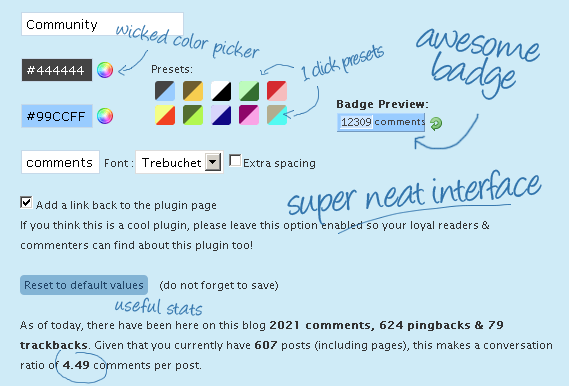
General view of the interface:
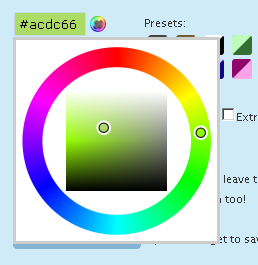
Super hot color picker :
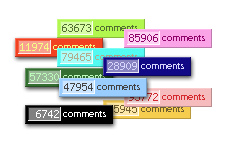
Color presets if you're not sure what colors to start with:
Download
Liz Comment Counter by Ozh
Extract and upload to your blog, preserving directory structure.
Installation
If your theme is widget aware, head to "Design / Widgets" and add the widget to your sidebar
If your theme is not widget aware:
- edit the beginning of the main plugin file (wp_ozh_lcc.php) and replace define('LCC_AS_PLUGIN_ONLY', false); with: define('LCC_AS_PLUGIN_ONLY', true);
- in your theme's sidebar.php, add <?php if (function_exists('wp_ozh_lcc_badge')) wp_ozh_lcc_badge(); ?> where you want the badge to appear
- go to "Settings / Liz Comment Counter" and have fun with the options
FAQ
Why show my comment count?
As you want. Either because it's fun, egoboosting, an incentive for others to participate, an indication of the "socialness" of your blog. And, anyway, because it's fun:)
Where is the static badge saved?
In your uploads directory, typically wp-content/uploads/cmt_badge/cmt_badge.png
How do I manually insert the badge in a document?
Like this:
<?php if (function_exists('wp_ozh_lcc_badge')) wp_ozh_lcc_badge(); ?>
What version of WordPress is this for?
Anything from 2.5 and above will be fine.
Who is Liz Strauss?
I'll let her answer: About Liz Strauss. If you are looking to build connections and conversation or to grow a community of fiercely loyal fans, Liz is the person to see. Check her blog!
Who are you?
I make WordPress Plugins!
I love this plugin, how can I say thanks?
Make my day: blog about the plugin and let your readers know about it. Make Liz' day: read her blog and comment!
Why are comments closed?
Because for some reason this page is attracting a number of idiots. Sorry if you wanted to say thanks :-)
thanks..these tools are very nice.just the thing i was searching for.i would surely use it on my blog
[…] Liz Strauss Comment Conunter: Muestra la cantidad de comentarios recibidos en tu Blog a todo el mundo. Más info y descarga […]
[…] que todos puedan ver cuántos comentarios tiene tu blog, basta con instalar el Liz Strauss Comment Counter, y […]
[…] For a more detailed documentation and screenshots of the interface, please visit its official page: Liz Comment Counter […]
Thank you very much for this useful article and the comments. I love this site as it contains good materials.
Awesome tool! Going to add in into my blog tonight, that was exactly what I was looking for.
Thanks,
Great Plugin.
I was wondering if there is a way to subtract the pingbacks from the total it shows on the badge?
Kushal : out of the box, no.
Great Plugin. Will install it now. Thanks and great Work :)
Opps!
When I met that on one page, I was though that it's a mistake and instead of word "readers" on counter it's written "comments".
Now I can see – that's true and that vidget based plugin is worth to be placed on any popular blog.
Many thanks!