
WordPress 2.5 introduced per-user admin color schemes, letting you style and design your own admin area. This said, how easy is it to craft a nifty CSS with harmonious colors? For most of us, it's definitely not easy. With the Admin CSS Designer plugin, for all of us it's going to be fun, easy, and addictive!

COLOURlovers
COLOURlovers is a design community focused on colors and sets of colors, palettes. It's a color and design blog. It's a community of color lovers who create hundreds of thousands of colors, palettes and patterns.
Ozh & COLOURlovers' Admin CSS Designer
This plugin pulls colorful palettes from COLOURlovers, and lets you re-arrange, tweak and modify colors, then save them real time. No dirty hand CSS editing. Right below is a 3 minutes quick demonstration of how the plugin looks and what it can do :
Usage and explanations
Once you've activated the plugin, head to your Profile page, and pick the "Random CSS + Designer Tools". This very special stylesheet will load a random palette from COLOURlovers and make a color scheme for your admin area. It will also load the Designer Tool.
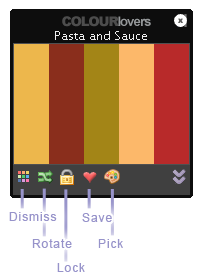 This colorful and powerful tool has 5 controls:
Dismiss: not happy with the palette you got? Forget it and load another one.
Rotate: looks good but it's not it yet? How about rotating colors so they apply and match differently on the page?
Lock: by default, a new palette loads on every page. Unless you lock your current palette, of course.
Save: Got something pretty? Save it as a standalone CSS that will be available in your Profile.
Pick: Found a palette you love on COLOURlovers? Enter its number and load it as a stylesheet.
Undo: (not shown here) Of course, there's an undo button. It will simply revert to the original palette if you don't like your changes.
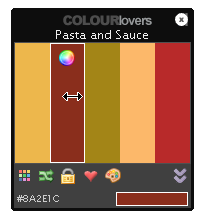 Of course, you are in command. If you find a pretty palette but want to switch two colors, simply drag them. Or, if you want to completely change a color, click the little color swatch, and colorize the way you feel it.
The plugin comes with a handy bookmarklet: whenever you visit a palette you like on COLOURlovers, you're a click from making it an admin CSS for your blog!
Bundled with the plugin, you'll find 10 custom color schemes made from 10 COLOURlovers' palette. Play with them, preview them, delete them, then make your own!
What for ?
There are two ways to give your admin area some color love.
#1: Let the tool charm you on every page
During the few weeks of coding this baby, this is what I've been doing: just let the plugin load a new and refreshing color scheme on every page. Got something ugly or that makes things unreadable? Just click the "Dismiss" button and get another one. In about 8 times out of 10, you'll get a really cool color scheme. And you'll often get something so beautiful that you'll want to save it :)
#2: Use it to make your definitive color scheme
If you just want to make the most beautiful CSS ever with the crispiest colors ever, the Admin CSS Designer plugin is your perfect tool. Edit and modify colors real time in every page until what you see is what you love, save the palette as a standalone stylesheet, and use it forever.
Download
ozh-colourlovers-admin-css-designer.zip
Extract and upload to your blog, preserving directory structure, then activate.
Note: download counter here and stats on wordpress.org may differ and reflect the number of downloads made directly there
Credits, limitations, misc stuff
- The cute icons used in this plugin are coming from famfamfam's silk set. Awesome work.
- Photos here above by Cliff Robin and DailyPic
- The cool music in the above video is "More Than a Feeling" from Boston. Used with absolutely no permission from anybody, but hey, I do own the CD :)
- The plugin was coded for and with Firefox. I don't have access to Safari, but it should be as cool as intented. With MSIE and it's as fugly as expected, and some features are disabled. You've been warned.
- Visit COLOURlovers and read their blog. It's truely awesome.
- If you use and like the Admin CSS Designer plugin, blog and tell the world about it!
Any plans on updating this?
Jay » yeh, sometimes I think about this. When I have some (I mean, lots lots) free time :)
I can't seem to get this Plugin to work. I can't find what the pallet ID is, and anything I put in doesn't show the one I chose. Also, I can't drag the colors or change them. Nothing happens. This is the result in both IE and FF.
Am » This plugin was designed for an old version of WP. I'll see what it would take to update it.
@Ozh Thank you! I'm running 3.0 with BuddyPress id that helps
Would also love to see this plugin available for 3.0+, it would be great if designers could share admin styles through it – the default design can become tedious at times.
hello,
great plugin! can we get an update?
Keep up the good work!