
One of Twitter's cool features is that you can really customize your profile, in particular with any background you want. Doing this, you are soon facing a design constraint: Twitter is a fixed width centered column, and your background image will be aligned from the top left corner. So despite all your artistic efforts, your background might just look dull or clumsy if visitors viewing your profile are not using the same screen resolution as yours.
To help with designing a background that fits every desktop resolution (from 1024×768 to 1900×1200), I made a convenient Photoshop template (.psd file).
The Photoshop template contains a set of layers that will mimic intermediate resolutions, so you can mask what lower screen sizes won't see. Each layer contains a background mask (the screen real estate), a twitter mask (centered Twitter column) and the outer mask (everything that doesn't fit in the current resolution)
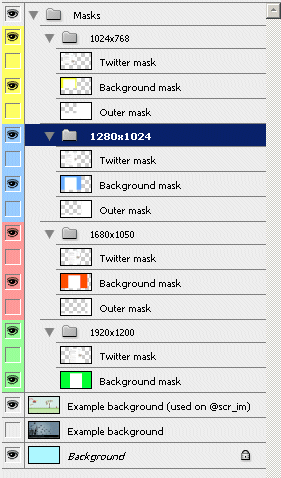
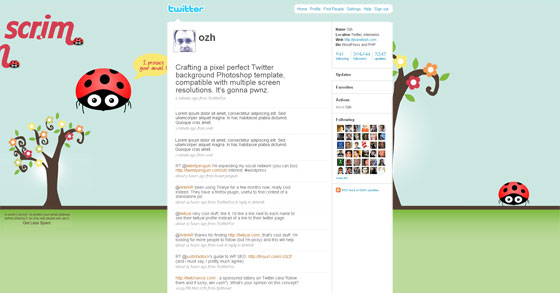
Design your background to fit the biggest resolution (1900×1200), but move and align elements so that each screen size won't look like something weird or unexpected (half of a logo or a few missing words from your witty slogan). For instance, in the background I made for @scr_im, I tried to place elements so that the whole stuff does not look too bad in each resolution:
1024×768:

1280×1024:

1680×1050:
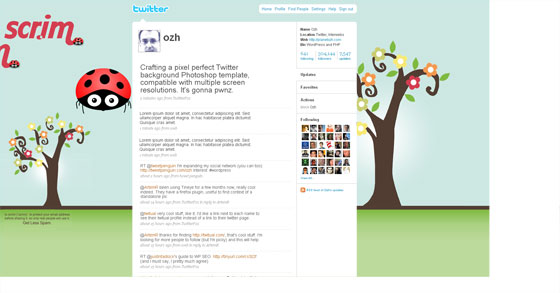
1900×1200:
twitter-background-photoshop-template.zip
(This 2.3 MB file contains a PSD file, for Photoshop)
Credits: the idea of a multi layered mask showing resolution goes to someone I totally forgot. I've seen this before, I just can't remember where. But it was way less cooler than mine and I added a bunch of stuff :)
If you happen to make a cool background using this template file: please tweet it! The short URL of this post is http://ozh.in/k8. Or use the one clickTweet this link.
Once you made a killer background, be sure to check it under different resolutions with twtbg.me, it's a fun little site that will show how your profile page will look on bigger and smaller screen sizes. It's cool!
And be sure to leave a comment here so I can check your work :)
Awesome Ozh! I was looking for something like this! Perfect timing ;-)
[…] Pixel Perfect Background Photoshop Template for Twitter « planetOzh No TweetBacks yet. (Be the first to Tweet this post) […]
[…] Pixel Perfect Background Photoshop Template for Twitter « planetOzh […]
Excellent template. Thanks a lot!
[…] the post by Nantes-born Ozh (who, I learn, can't wait for his two children Ariane and Cyrus to grow up so he can play […]
Thank you! Wish I would have found this months ago when I was searching for some guidelines and creating one for a client. This is by far the best one yet. You have just made my life so much easier with this and: http://twtbg.me/
You rock!
Great Resource! I would totally Recommend this, Thank you! I've not quite finished my background as I still have some gaps on the two higher resolutions and a small amount of tweaking. I would have really struggled without this photoshop tutorial. Well done and Thank You!
[…] che insegna come realizzare un background compatibile con le risoluzioni video più diffuse: http://planetozh.com/blog/2009/03/pixel-perfect-background-photoshop-template-for-twitter/. Al suo interno troverete anche un file PSD che vi aiuterà a progettare il vostro template […]
I work with Photoshop Elements, and I'd love love love to have a version of this template. The masks aren't coming through when I open it up without the full Photoshop app (darn that simplicity). Pretty please?
This is great! Really useful. Thank you!
@susangallagher
so the same template & dimensions would apply to desktop wallpapers, wouldn't they ..?
trying to find some expert advice on "how to design desktop backgrounds, and make different sizes available for download".
Thank you for the template. Will use it to create a background of my own!
Take a look @nardyello in a few :]
check out mine's and say what did u think http://www.twitter.com/schuchterdan ;)
This is great. Your template is so helpful. You rock!!
Thanks for the Photoshop template and instructions.
Thanks for the template, I have tweeted that I used it, you can see the background I made here @2010Hairstyles
I think this template is really useful, thanks so much for making it available, it saved me alot of time.
Thanks for this – have tried one quickly and pleased with how easy it is. Am looking forward to getting ringing more changes in the future. Check @cliftonjan for my trial attempt!
Cheers,
Jan
this template worked really well. I added some pics on the right side. I then copy and pasted a copy of the pics and got it to line up so that you can see the pics at most resolutions.. chk it out http://twitter.com/smrsound … @smrsound
THANKS
Thanks for the template. check out mine’s and say what did u think http://twitter.com/lestat546
Thanks for this Template. Awesomely helpful!
thanks for the tutorial, here's my new profile page http://twitter.com/scazzini
Brilliant! Glad I found this. About to use it now, thank you!
I'm a total photoshop newbie and I need some help with the file size. I'm assuming I save the template after I've added my own background as a jpg and then fix the size of the file- is this correct? or is there a different way to save and make sure that the file is below 800kb while saving it as either a gif, jpg, or png as outlined by twitter?
hi, yeah i am having a problem, my file size is 16.4 mb and i am only allowed to upload 2kb, help??
I see this tut is using the old Twitter layout. Does it still pertain to the new one? If not, can we get a new one?
Just what i was looking for, fantastic! Thankyou!