
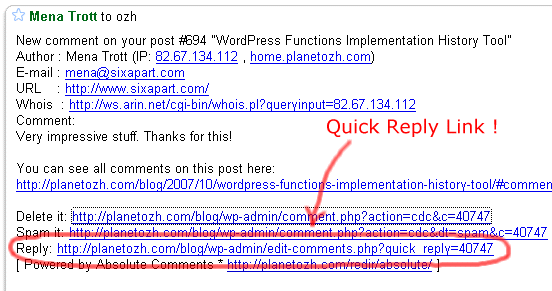
Absolute Comments allows you to reply to comments right from the email notification. It also automatically fills the reply with the commenter's name (so if you reply to Joe, your comment will be prefilled with "Joe » " for your convenience)
There's no setup, no setting. Just upload, activate and forget.
Download Absolute Comments
This plugin is for WordPress 3.1+.
ozh-absolute-comments.zip
Extract and upload to your blog, preserving directory structure if any.
Older version
Absolute Comments used to be a feature packed plugin, back in the WordPress 2.x days. WordPress 2.7 implemented most of these much needed features (reply to comments from the Edit Comments page, those stuff you don't even believe weren't always part of WordPress). Older versions are still available but totally unsupported, obviously.
If you like this plugin and you feel it enhances your blogging and community managing experiences, please make my day and simply blog about it to let your readers know about it. They might like it too:)
Feedback
I'm closing the comments here. This post is attracting 80% of my spam and I'm tired of manually moderating messages. If you have a question, ask your mom :)
[…] dem Plugin Absolute Comments kann man auf Kommentare direkt aus dem WordPress-Admin Menü antworten. Das Admin-Menü ist für […]
[…] Absolute Comments: version 2.0 […]
[…] Télécharger Absolutes comments Tags:Absolutes comments, commentaires, plugin, téléchargement, wordpress […]
[…] Ozh' Absolute Comments – ????? ????? ????? ?? ???? ??? ????????? ?? ?????? ?? ???? ?????? ?????? (+). […]
[…] 1. Absolute Comments: Comment Manager with Instant Reply […]
[…] Ozh' Absolute Comments: va permite sa raspundeti la comentarii mult mai simplu, si in plus adauga un link catre pagina de raspuns in email, daca aveti activata optiunea de primire a comentariilor de pe blog via email. […]
[…] Ozh' Absolute Comments Reply instantly to comments, either from the email notification, or the usual Comments page, without loading the post first. […]
[…] Source | Plugin Homepage […]
Amazing plugin! Makes replying sooo easy… I was going nuts!
[…] Ozh' Absolute Comments – Um excelente plugin para gerir comentários. Vale a pena! WP Threaded Comments – Um plugin que […]
Like others here, I am getting the message
Error (duplicate comment, or posting too quickly ?). Aborted Clear Details ?
I know it is a conflicting plugin, and that plugin is 'Quick Code'
http://blog.netnerds.net/quickcode/
I would like to continue to use both of these plugins….but I don't see any solutions to the problems above other than to switch from using one, and I didn't read about any new more advanced error reporting features for troubleshooting.
I appreciate that you are so involved, offering so much support for a free plugin. If you can help me out, that's great…if you can't I understand.
rotheblog » poor code. Replace last line "add_action('admin_head', 'quickcode_add_options_page');" with "add_action('admin_menu', 'quickcode_add_options_page');" and notify the plugin author about his mistake.
Ozh,
Thanks so much, that fixed my compatibility issue with Quickcode. You took your time to look at that plugin for me, thanks a ton.
I thought your site had subscribe to comments on it…man I was glad I came back eventually to check and see if someone responded. Is there a reason you don't use that plugin?
Will notify plugin maker…he didn't respond to my first email so I doubt I'll hear anything else….
rotheblog » The subscribe to comment plugins is something I have to implement here, it's been on my todo list for 12 years now :)
I installed this comment on WordPress 2.5. It initially worked, but then I changed one of the options (below error messages) and now I can't get the plugin to work or to get back to the setup options to change it back to default so it can work again…
Here are the three error messages I'm getting when I go to set the options:
Warning: include(/wp-content/plugins/o/includes/_admin.php) [function.include]: failed to open stream: No such file or directory in /wp-content/plugins/ozh-absolute-comments/wp_ozh_absolutecomments.php on line 169
Warning: include() [function.include]: Failed opening '/wp-content/plugins/o/includes/_admin.php' for inclusion (include_path='.:/usr/lib/php:/usr/local/lib/php') in /wp-content/plugins/ozh-absolute-comments/wp_ozh_absolutecomments.php on line 169
Fatal error: Call to undefined function wp_ozh_cqr_adminpage_print() in /wp-content/plugins/ozh-absolute-comments/wp_ozh_absolutecomments.php on line 123
If you need the full path, e-mail me.
In the Settings for Absolute Comments, I changed the default to #Joe from @Joe. I put something in there that caused all that, but have no idea what it was or how to get it back out.
I have deleted and reinstalled, but no luck.
Any ideas?
Thanks…Scot
Just for the record, I was suddenly having that duplicate comment error. It turned out to be a problem with the wp-commentform plugin, and the "add_action(’admin_menu')" thing did the trick.
Thanks again for this awesome plugin!
Spoke too soon.. now the contact plugin doesn't work…
Scot Herrick » you seem to have screwed all paths (/wp-content/plugins/o/ and /wp-content/plugins/ozh-absolute-comments/ ??). Please delete and reinstall the plugin, be sure to upload as is and preserve directory structure.
wpGuy » get a contact form plugin that doesnt suck then :)
I had already deleted the plugin and reinstalled it, but it will not change the comments page and trying to configure the plugin within settings gives me the above errors.
I also re-downloaded the plugin, extracted and installed with the same result.
This happened when I changed from the default "name" to the Comment # and name option. What happens when the plugin goes to that option? That is what moves this to the errors. Where is it storing that option and holding the setting even after deletion?
Thanks for looking at this; it's pretty weird.
[…] Absolute Comments – BLOG?????? […]
[…] man selber zu seinem eigenen Artikel gehen und dort kommentieren. Joost empfiehlt dazu das Plugin Absolute Comments, mit dem man alle Kommentare auf einer eigenen Oberfläche […]
[…] ?????????????????????????????????? WordPress ?????????????????????????????????????????????????????????????????????????????????????????Absolute Comments — ??????????? […]
[…] Absolute Comments: Comment Manager with Instant Reply- Gives you the ability to reply to comments from within the same page as where you manage them. […]
[…] Absolute Comments: Comment Manager with Instant Reply permite s? r?spunzi comentariilor chiar din pagina de moderare. Am reg?sit apoi pluginul Smart YouTube despre care Jurgen tocmai a scris ast?zi. Admin Management Xtended adaug? ni?te facilit??i care ar trebui – dup? mine – s? fie native în WP: po?i modifica data unui articol sau starea lui (publicat sau nu) cu un click, din lista articolelor. The Admin CSS Designer Tool: a COLOURlover WordPress Plugin este un alt plugin pentru manipularea schemei de culori din sec?iunea de administrare. My FTP permite manipularea fi?ielor blogului a la FTP (vezi captura de mai jos). O alt? facilitate care mi-ar place s? o v?d nativ în WP este reordonarea cu mouse-ul a categoriilor. Pân? atunci problema o rezolv? Category Order, pur ?i simplu tr?gând categoriile cu mouse-ul pentru a crea ordinea dorit?. […]
I'm using WordPress 2.5 and Brian's Threaded Comments. While I can get the Reply Thread button to appear, when I actually click it, it does not thread the comment. Also, when I use the "quick reply" it sites on the little blue posting reply box and never posts the reply. I have to use the advanced reply to do any replies. (Yes, I have javascript enabled and the box appears for me to try to comment when I click Reply) Any ideas? The more urgent of the two is the reply threaded option.
Thanks,
Brad
Bradford » First issue looks like a plugin conflict. The blue reply box should contain a few details to help find the culprit.
Second issue, I'm not sure. I've never had a bug report about threading, so either it works, or it doesn't but no one uses this feature:) I'll have a look when I have some time.
[…] Credits A big thank you goes to Ozh, who wrote the Absolute Comments plugin […]
[…] güzel bir eklentisini tan?taca??m eklentinin ad?: Absolute Comments.Bu eklenti sayesinde wordpress admin panelinde yorumlar? geni? çapl? yönetebiliyoruz. Nas?l […]
[…] could reply to read comments, and reply to comments from there. (With a little help from the "Absolute Comments" plugin.) That would be useful to the heavy commenters. Indeed, that "comments" […]
[…] özelliklerinin devam?n? ?uradan ingilizce olarak okuyabilirsiniz.Eklentiyi buradan direk indirebilirsiniz.Bildirgeç'te […]
[…] Tracking Comments Easier. Ozh’ Absolute Comments WordPress Plugin makes it easy to approve and reply to the comments on your Blog right from your Administrator […]
[…] Absolute Comments: version 2.0 […]
[…] Ozh’ Absolute Comments […]
[…] Dieses Plugin ist ziemlich praktisch,denn damit kann ich direkt aus dem Dashboard heraus auf Kommentare anworten. […]
This is very neat!
I will definatly use Absolute Comments when i start a WordPress blog.
[…] Ozh' Absolute Comments – Um excelente plugin para gerir comentários. Vale a pena! […]
thanks for this plugin, very useful for comment tasking =)
Russian (ru-RU) translation (for version 2.2.2)
http://lecactus.ru/download/absolutecomments-ru_RU.zip
Lecactus » thank you very much!
[…] Absolute Comments: version 2.0 […]
Can you add a feature that automatically emails the person who left the comment. So that they know there is a reply to their comment.
Thanks
max » That's another plugin
Hello Ozh,
i love your plugin. I have one problem, when i read my blog with a mobilephone, than i have a long load-time in backend on the comments-page and the css is wrong with your plugin. ON the laptop is all OK.
Do you have an idea?
[…] Absolute Comments: version 2.0 […]
[…] Absolute Comments: version 2.0 […]
[…] Absolute Comments: version 2.0 […]
[…] Absolute Comments: version 2.0 […]
Hey, Ozh, can I make a suggestion for the next iteration of this plugin? Would it be possible to flip the buttons so that the blue ones are on top of the red ones? I just accidentally deleted a comment because the Delete and Reply buttons are right next to each other and I clicked the wrong one. First time I've ever done that, but it'd be nice to separate those buttons a bit.
This is a great plugin! however on the latest release, I noticed that when I click on the 'Reply' link in the email, the resulting permalink that gets pre-populated in the comment field looks like this:
The backslashes need to be removed manually in order for the link to work properly once I submit. Not a huge deal, but something that might be an easy fix?