
Here are a few example of display rules you can use with the plugin Who Sees Ads
I. Simple rules
These rules use "core" conditions that are enabled by default. To understand the logical flow, read rules in ascending order and mentally insert "otherwise" between each.
1) Display ads on older posts

2) Display ads for everybody except regular readers

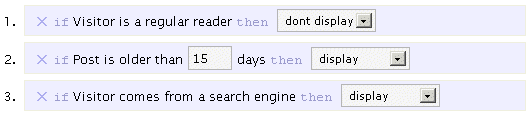
3) Display for Search Engines visitors and on older posts, but never for regular readers
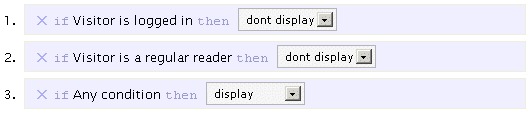
4) Display for everybody except regular readers and logged in users
5) Display for one month only

6) Display 2000 times only

II. Advanced rules
If you have the guts or need even more flexibility, edit the beginning of the plugin to have the following:
$wp_ozh_wsa['iknowphp'] = true;This will enable advanced condition where you can use PHP code and function calls. Be warn: from now on, you're on your own and can break things :)
7) Display on home page only

8) Display everywhere except on home page

Or, this is the same :

9) Display 30% of the time

10) Display only to US readers
Feeling the need to geotarget your content? For this, you will need first to install the (excellent) plugin IP to Nation. Then, simply create a context with the following rule:

III. Hurt Me Plenty
Still not convinced ? Or you need even more flexibility and power ? Dude. What about creating rules that make several ads interact then ?
11) Show Ad 1 30% of the time, Ad 2 70% of the time
Create two contexts : ad1 and ad2.
Context ad1 would be:

Context ad2 would then be:

Now, simply insert context ad1 in your pages or post. Awesome, isn't it.
12) Show Ad1 1000 times, then Ad2 1000 times, then Ad3 1000 times
Create 3 contexts and their code, named ad1, ad2 and ad3, with the following rules :
ad1:

ad2:

ad3:

Then insert context ad3.
13) Let's get a bit crazy
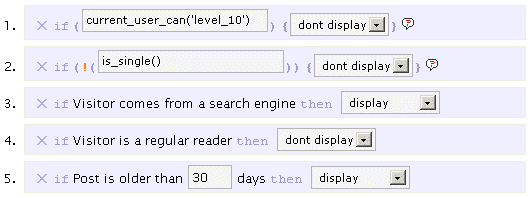
You can of course create the most complex display rules if you really need them. Like: on single post pages, always display to Search Engines visitors, display on old posts excepts if visitor is not a regular reader, but above all, never display ads to yourself ? Weeeeeeeee:
IV. Conclusion
Who Sees Ads is the Ultimate Ad Management plugin, I hope you're convinced by now.
You can use it, of course, to display quite everything, not just ads: greetings, help messages, temporary notices, images, text. Anything.
[…] also gathered a few example display rules to help you create simple, complex or totally crazy […]
Holllly sh*t! YOU ARE CRAZY OZH!!! This is by far the most extensive/best ads management system I've seen–and believe me I have a folder called "Monetization Plugins" =P…But I'll need some work on this with all the php goodies., plus I got to see if it screw up Adsense Deluxe or Manager….
Hi Ozh,
I'm having a hard time getting an advanced rule to work. I'd like to have this:
Context: Affiliate
if [Regular Reader] then [Display];

if [Logged In] then [Display];

if ![current_user_can('manage options') then [Display];

if Previous Conditions Fail, try context [Adsense]

---affiliate program code---
Context: Adsense
if [Any Condition] then [Display]

---adsense code---
Reason is: on my blog Adense shows a lot of CPM banners, which is really good and I'm really happy with. Problem is: most of my regular visitors and/or logged in users aren't going to click the same ad multiple times, which leads to a very low CTR (high views, low clicks). So I need to show my regulars/known members the affiliate program banners and my new visitors the Adsense CPM banner.
And now for the catch: as an admin I'd still like to see the Adsense CPC/CPM banners, because I'd like to check what kind of ads are being displayed.
What ruleset should I need for this??? I just can't seem to make it work :-( What I'd really like to see is a lot more NOT conditions, like:
if ![Regular Reader] then [Display]
Preferably condition should have an opposite NOT condition.
Thanks so much for looking into this!
Jean-Paul Horn » What about the following :
Adsense:
1. Admin: display
2. Regular reader: dont display
3. Logged in: dont display
4. Any: display
Affiliate:
1. Admin: don't display
2. Regular reader: display
3. Logged in: display
Hi OZh,
Thanks for the feedback, will try your ruleset. Just to clarify for your rules:
1. The Affiliate rule comes first with an handover to Adsense?
2. The admin check should be "if ![current_user_can('manage options') then [Display];" ?
Thanks!
P.S. Looking forward to the new version. I absolutely adore the flexibility with Who Sees Ads.
Jean-Paul Horn » Yes, the "is admin" is your perfect current_user_can() use. And no, there's no need for a "fall back to" rule. As far as I understand what you need, the 2 rule sets are mutually exclusive. Just add the two context calls, and only one should display.
Aaaaaaaaaaaaaah! (insert big light bulb here). I got you! I was trying to fix this rule by calling just one ruleset, but somehow forgot you could insert multiple php calls (or template calls) next to eachother :D
Hi Ozh .. sorry to bother again. Tried to post this earlier, but there were some MySQL errors. I just can't seem to get the admin check working, whether I try current_user_can('level_10') or current_user_can('manage_options'). It just looks like WSA completely ignores the rule (Adsense first (admin display), Affiliate 2nd (admin don't display)). Any advice?
Also: I noticed you bumped the version number to 1.3.. is this released yet? Couldn't find a changelog or a comment from you. Thanks!
Hi,
Is it possiable to write a rule based on search engine search terms? For example: "if user search for "wordpress" then display".
Very, very nice plugin! I just implemented a plugin to show my blog in iPhone format and had to change my ads to 250 px max. Today I found your plugin and started to think if there's a possibility to use the advanced rules to do something like:
if screen resolution is < 250, show ad 1
else show ad 2
Ad 1 250×250
Ad 2 468×60
It would be really awesome!
Leo Borges » The screen resolution is a *client* side setting, ie something the browser knows, but the server doesnt. So you can't do what you're thinking about.
Without digging much I think there are 2 options:
– server side: detect user agent. Something like if user-agent is something show ad1; else show ad2. There are examples of this in the plugin comments and/or the example page
– client side: have your adsense or whatever change according to screen resolution, using only one context. Something like:
php test for social media, or any set of domains for that matter:
I'd like to show ads to readers coming from three specific domains. How on earth do I create such a rule.
I know where to put the rule, but I don't know the syntax.
Hi Ozh :)
Please bear my English, but
What would be the rule/syntax to not display ads to visitors who come to my site directly (no referers) only?
I mean, people who type directly into their browsers my URL.
Hope you can help!
Thanks in advance
Mia
I'm wondering if there are plans in the future to support auto-inserting ad code into posts?
Aaron » Like what, exactly? Insert an ad after the jump, or after the first line break?
Could be an interesting option actually. Will think of it.
I made a little plugin that works with yours to automatically insert ads into posts. It's relatively static since it's really just for use on Web Developer News and Attackr, but I think it's something you should consider adding to your plugin. This one checks the number of paragraphs, and then inserts the ad at a random position between them.
I'd also be interested in seeing the ability to re-use rules in a context. I think it would be nice to say:
If Visitor is from a search engine – display
If post is older than 365 days – display
If visitor is a regular reader – Don't Display
If post is older than 15 days – display
This way, even regular visitors get ads on really old posts, but everyone gets ads on post that are more than 15 days old.
Ozh: I love this plugin but I have a question for you – I want it so that if a visitor comes from a search engine it shows them my ads for their entire visit, not just the first page they land on. Is this possible?
hi OZH how can i create rule when visitor from specific URL can't see my ads
thx
adi » If you can't figure this out from the doc here, this has been answered a number of times in the comments, please search.
Hi Ozh,
Thanks God I found your plugin! I need it to prevent clickfraud from certain country. However, there is some bugs of this plugin which you may need to know for future development.
I use wordpress 2.8 and I found that the "if Any Condition" syntax is override anything. Like I set the rules to hide adsense in from visitors come from my country. When I use the wp_ozh_getCountryCode(0)==’id’ don't display code along with if anything code, the result is:
It shows ads to all condition, even I block the id country.
However if I use wp_ozh_getCountryCode(0)==’id’ don't display only, it blocks ALL country because I don't even get any impression in my adsense account.
I hope this report can help you fix the future release, and I'm really waiting for it :)
Hi Ozh,
It's good! Now, what about showing a different ad in different Categories, i.e., one ad for culture and another for money? Would be great.
Poli » This is answered either in the doc or in the comments
Sorry Ozh, I just couldn't find the answer. Will search again
Anyway to have just search engine visitors see the ad just 30% of the time. The problem is when I and the 30% rule it displays to every one else. I can add the rule or don;t show to regular visitors but then the search engine visitors won;t see it because I am setting the regular visitors to 0 pages. Basically I just want any traffic from the search engines to have a 30% chance to see the ad without affecting anyone else.
Chris » This doesn't make sense to me but well, anyway… The way I'd do it would be with a custom function (for instance in your theme's function.php) that would check the result from wp_ozh_wsa_is_fromsearchengine() and return true with a 30% chance. Then use an advanced display rule with this function.
Hi Ozh, great plugin!
I'd like to set it up so that people coming from search engines will see ads on every page they visit – not just the first page they see.
Also, would like ads NOT to show when a reader comes to the blog from a direct link or any other source that is not a search engine.
Have tried many variables and nothing seems to work. Any thoughts? Thx!
Miklo » All this is either in the examples or in the comments of the plugin page
i need to disable ad after 10 view times per session .i mean if user saw ad 10 times at same session as refreshing the same page or navigating my site then disable ad but if he closes the browser and come again after aperiod of time he can see the ad again.can i do that plz help
I second ciidoctor´s question.
This plugin is absolutely marvaelous but is there a simple advanced line we can use to block ads after the same user has seen them x number of times?
Or will the same effect be achieved by choosing the rules
if ad viewed by visitor <=4 times then display
is this based on cookie or IP?
I feel there there is a lack of robust adsense click protection for WP on the web, grateful for any advice
Ozh – sorry to bother you. I thought I figured this out but something doesn't seem to work the way I expect.
What I want is that anyone from a search engine sees an ad as well as anyone that hasn't seen 10 pages on the site in the last 30 days.
I assume that you are using cookies to track the regular visitor feature so to test, I have deleted the cookies on my browser.
Everything works fine on search visitors but I can't check the infrequent visitors test. I may have it set up wrong or maybe it is not working correctly.
Here are my settings:
× if Visitor comes from a search engine then display
× if Visitor is a regular reader then don't display
A "regular reader" is someone who has viewed at least 10 pages over the last 30 days
Am I missing something? Thank you for your help.
Sean O » so what if the visitor does not come from a search engine, or is not a regular reader? You didn't define any rule for this case. Add a third rule with "if any condition then display" and that will be the default behavior.
That was it. I figured it was something simple that I was missing – I didn't do the logic that you clearly state that if no rule is appropriate than nothing is shown!
DUH!!
Elad from Israel wrote, on 17/Apr/08 at 9:43 am:
Hi,
Is it possible to write a rule based on search engine search terms? For example: "if user search for "wordpress" then display".
I am also interested in learning how to do this. But the situation I am interested in is that of "then do NOT display" for search terms I know people are using to find my page (because I checked my stats) and I know these search terms do not result in conversions. So I want to filter out the search terms that I know will result in traffic that will not click on my ads. Is there a way to do this?
Have you got a wpmu/wp multisite adsense revenue sharing plugin at all? would really appreciate it greatly if you can create one. I'm sure everyone here will agree on that.
But of course, this plug-in is an absolute gem. I love it. I wish you can modify it so it can be used on an mu/multisite where multiple authors/bloggers will be able to enter their pub id and allow percentage sharing between the blogger and the superadmin.
Re: Display only to US readers option
Will this work the opposite? Where I can exclude a particular country from displaying the ad?
Apologies for replying three times in a row. Feel free to merge it all in a single comment. Many Thanks Ozh
Hi Ozh,
I want a little more advanced context. Like in my site, I have the Facebook Social Plugin and as you know Facebook is blocked in many companies. Is it possible to find if a user is behind a proxy(probably that is the way to find if Facebook plugin is getting blocked), so that I don't show the plugin and the page loads faster?
There may be some other means of doing this also, but I am not sure.
Please suggest how I can take care of this issue.
Regards,
Praz.
Praz » no, there is no way to detect if someone is behind a proxy.
thanks a lot Ozh for your quick response. But can you atleast suggest how to decrease the page loading time?
Thanks,
Praz.
hi admin! I want to my cpalead ads just visible only in one post, for example:
myblog.com/ads.html
what must I do? and where I put the ads code? please fast response thanks! :)
Hi. Your plugin looks amazing but I'm wondering if it's possible to add some kind of filter to protect my sites from invalid clicks. For example,
if (the same ad is clicked more than 2 times)
{
disable all ads for that IP address
}
I'm sure many webmasters would be interested in this feature.
Thanks.
Hey Ozh,
How can I avoid ads from a specific URL on my site? Please help.
Hi Admin,
Hope you will be fine. I want some best Configuration for my adsense ads because i want to save my adsense account from click bombing. please anyone tell me some best solution for this. its a request. Thank you.
I don't want to show ads to India and Kenya. Please send me which country code should I enter in this plugin. Please send that to my email ID. Please.
Is this plugin compatible with WordPress 3.9 and above ?
Can this work well with some themes publicly available