Better Feed is a plugin for WordPress that allows you to enhance your feeds with several highly customizable features.

Features
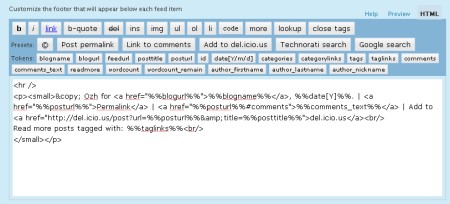
Using a convenient interface with real time preview, Better Feed will allow you to add anything below each entry in your RSS feed. It also brings back the ability to split your feed with "Read More" links, just like your blog posts.
- Add "Read more" links
On your site, you can split post on two parts, teaser and body, using the tag <!–more–>. Why not have a "Read more" link as well in your feed, for longer posts, or when you want to tease and keep the surprise off the feed ?
(By the way, while I'm at it : "summary" feeds truncated after 40 words just suck big time. Read more) - Add a copyright notice
Concerned with content stealers reproducing your posts automatically somewhere without giving you credit ? Why not add something like "© Joe – 2005" and a link to some neat Creative Commons License ? - Add the number of comments
When you find an interesting post via your feed reader, you often have to check the website for new comments, or to subscribe to the comment feed. Why not add, at the end of every RSS item, something like "13 comments", just like in your blog frontpage ? - Add a "Add to del.icio.us" link
Let your readers bookmark your entries right from within their RSS reader - Add a link for incoming links in Technorati or Google
Why not add a handy link to quickly check who's linking to your post ? - Add anything
There's so many stuff you could think of that I just can't list them all :)
Download
wp_ozh_betterfeed.zip
Extract and upload to your blog, preserving directory structure if any.
Note: download counter here and stats on wordpress.org may differ and reflect the number of downloads before this plugin was hosted on the plugin directory
Once you're done installing it, head to "Settings" and then "Better Feed". Everything is configured and tested from there.
Please note
A few things you might not get on first run that will save me some support:
- If you include the number of comments in each feed item, be warned that some feed readers will display an item as "New" every time someone comments on it. It's normal, and it is how I intented it to behave so following conversation is easier than ever.
- If you're using Feedburner, your feed won't immediately show changes after you've activated the plugin. To do so, go to your Feedburner Dashboard → Troubleshootize → Synchronize.
- You won't notice any change if you're viewing your feed with your regular browser. Use a feed reader, or this simple service I set up especially for you: RSS 2 HTML
License
This plugin is released under the terms of the BAI & SMYF License. BAI means "Blog About It". Like the plugin? Let your readers know! SMYF stands for "Show Me Your Feed", so if you happen to use my plugin, just tell me so I can see what you've done (and maybe subscribe to your feed if it's cool !)
Shorter URL
Want to share or tweet this page? Please use this short URL: http://ozh.in/kt



I've been doing quite a lot of that. :-) I'll have to see what I can come up with. Thanks!
Hi
great plugin. Not related to the Full Vs. Partial feed debate, but is there a way to make your plugin work if WP is set to provide partial feeds?
(what Carlos asked)
thanks in advance
never mind, I found it!
If anyone else is interested in making Ozh Better Feed work with partial feed, here's what you have to do:
– edit plugins/ozh-better-feed/wp_ozh_betterfeed.php
– below the line:
add_filter('the_content', 'wp_ozh_betterfeed', 9999);
– add the line:
add_filter('the_excerpt_rss', 'wp_ozh_betterfeed', 9999);
It's that simple :)
I don't want to truncate my feed but I would like to edit the links within the feed and make them point to the specific posts. Is there any way to do that? Viper's Video Quicktags plugin does something like that when there is a video embedded which is not viewable in the feed, it then displays a link which says "Click here to watch the video on the original site" or something like that.
Matthias » no, that's not what this plugin is for
Hi,
I've created a new RSS feed with this guide (http://xplus3.net/2008/10/30/custom-feeds-in-wordpress/) but I can't figure out how to bypass the Better Feed from this new feed.
Any idea?
Thank you
Does this plugin work with WP 3.1?
Mine has stopped working since updating from 3.05…
Brian Clifton » works fine here.
Great plugin. Thanks a lot! just activated and it's working
Thank you very much from France. i really need it !
Thank you for this plugin, is there a way to add the thumbnail image to the feed?
i have problem, when i use read more tag in my posts. my feed not show in full text and cuted with read more tag.
i want my feed show full text in feed readers. i disabled cut feed options in better feed setting but no effected!
pleas help me.
Better Feed is a very useful plugin for wp. It's really helpful to have a tool that can help customize rss feeds. The best part is it allows you to add "anything"…
Excellent website. Many valuable facts in this article. I sure am delivering it to a couple of buddies ans also revealing in delicious. And of course, great sweat!
Is there an instruction page on how to get this plugin to work after it has been installed? Am I suppose to put some of the code into the body of my post?
Hello, i didn't see any menu to add RSS feed with your plugin. I see only Settings/Better Feed.
How can add a rss feed ???
Thanks to 'Tiger Weeds' above – that was going to be my question as well and your question and answer to your own comment helped immensely!
Thanks!!
Hi, I was wondering if it would be possible to creat e a custom feeds with your plugins in this specific way: I am using buddypress and want to know if I can create a feed of all custom post types from members in a particular group. If so, are there any special considerations I need to take?
Thank you in ad Vance for your reply.
Thank you! Thank you! Thank you! Posted with a link back! I have been looking for this solution for soooo long! :)
Hi Ozh: Love this plugin – it's exactly what I needed for the feed so thanks for sharing it.
However, I don't want to break up what's on my blog's homepage (which displays the most current full post) with the tag. Is there a way to flag "more" for the feed only, but not on the post's home page display itself?
Is there any way to hide the BetterFeed imposed Feed Item Footer in excerpts only? I want it to show on full posts in the feed but not the excerpts. Is there a way to do this within the plugin or would I have to use scripting?
I am a fairly new blog and once my traffic increases I will remove it but I really want to add the "read more" after 100 words. How and where do I add that? I know I add this code but where do I add it and how do I let it determine the number of words its shows before the "read more"?
very good page
very impressive
This plugin seems to be the best. But i don't have the same screen you have in your article. I don't have the preview you have in your article. Is this plugin compatible with the last version of WordPress ? Can you give the code of the Tokens to help people who have problem with the plugin like me ?
Thanks
Jerome » Indeed, the live preview doesn't seem to work any more, don't know when it stopped working. I don't plan on updating this anyway.
Very good plug-in.
the features very helpfull with my site.
im wait for your next invention :)
How can I edit: Powered by WordPress and Improved RSS Feeds
I really love this plugin but I wonder: is it possible to enable this plugin for the comments-feed, too? I know a little PHP myself so if you gave me a hint on how to do that I might try to do that and provide you with an updated version.
Best regards and keep up the good work!
Great plugin. But does not display the image of the post in the feed. How can I post a picture in the feed?
Such a pity this WONDERFUL plugin, the best one there has evern been for RSS feed customization, died because of PHP7.
I hope someone finds how to adapt it, who knows :)