
One of the first things I wanted to improve in the admin area of my WordPress blog, back in the 1.5 days, was the header menu. I wanted to be able to reach any admin page in one click, instead of first clicking on the first level link ("Manage" for example) and then only on a submenu link ("Comments") So came a very neat plugin : the WordPress Admin Drop Down Menu
When WordPress 2.7 and its new and optimized user interface came, I thought there was still room for improvements: a horizontal menu gave the admin area more of a "desktop application" feel, and I think it's superior to a vertical menu. So I updated the WordPress Admin Drop Down Menu.
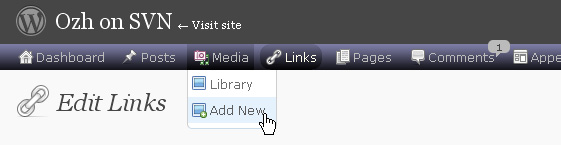
Download
Get the plugin :
ozh-admin-drop-down-menu.zip
Extract and upload to your blog, preserving directory structure.
Note: download counter here and stats on wordpress.org may differ and reflect the number of downloads before this plugin was hosted on the plugin directory
Activate and enjoy. Another friendly install & forget piece of PHP.
Features
- Customizable color scheme with a neat color picker
- Normal mode for regular users, compact mode for real estate maniacs, minimal mode for those who never have enough
- Optional cute icons from FamFamFam
- Enhanced compatibility with handheld devices
- Joy and happiness for every day
Javascript is involved for advanced features and to make stuff compatible with MSIE6, but on any decent browser everything works even with Javascript disabled.
Super neat color picking.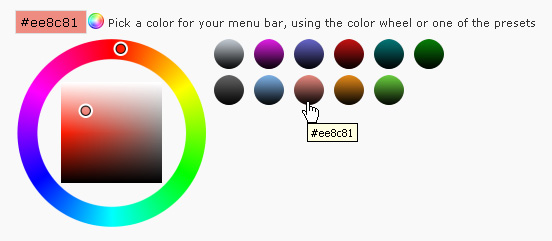
Any color you'll love.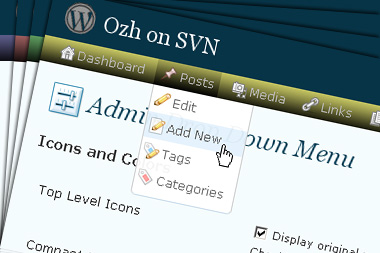
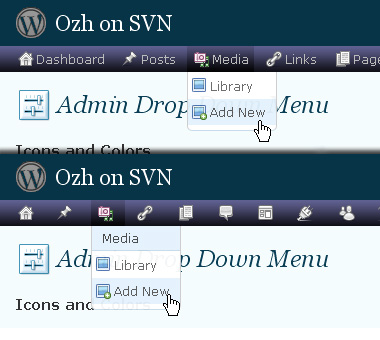
Normal or compact display.
Browser compatibility
The plugin has been developed on Firefox 3, Chrome and MSIE7. It should do fine with MSIE6 and Safari too.
There are glitches with Firefox 2 and Camino which both use a deprecated rendering engine. There are also glitches with Opera. I won't fix these, but if anyone wants to submit a CSS patch to resolve one of these issue, you're welcome :)
Developer friendly
The plugin comes with a wickedly cool API that will allow other plugin developers to interact with it, like adding your own custom icon for your plugin. Read the API for Coders page for examples and documentation. Also, all elements the plugin produces get custom CSS classes and id's to allow easy styling or selecting.
Translations
The plugin is ready for interglobanalization and there is a .pot template file included so polyglots can even make their own translation and sent the .mo and .po files to me that I'll include in the package.
The plugin comes with the following translations, in no particular order:
- Turkish, thanks to Baris Ünver
- Korean, thanks to Jong-In Kim
- Spanish, thanks to Karin Sequen
- Italian, thanks to Gianni Diurno
- Deutsch, thanks to Frasier Crane
- Russian, thanks to Fat Cow
- Brazilian Portuguese, thanks to Renato Tavares
- Greek, thanks to Friedlich
- Belorussian, thanks to ilyuha
- Hebrew, thanks to Amiad Bareli
- Romanian, thanks to Octav
- Ukrainian , thanks to wpp.pp.ua and Jurko Chervony
- Traditional Chinese, thanks to Paogray and Joan Wang
- Dutch, thanks to Cees van den Heuvel
- Slovak, thanks to Branco from WebHostingGeeks.com
And maybe more since I might totally forget to update this list :)
Older Versions
All my plugins are designed to run on the latest WordPress version available. Upgrade WordPress whenever a new version is out, or be sorry when your site gets compromised.
If for some unintelligent reason you need to get an older version of this plugin, it might be available, yet totally unsupported or recommended. Check here: Other versions.
Feedback, Bug report, Feature request
Sure. Feed me back. Like it? Blog about it. Love it? Click on the download link, see the Paypal button appear, and give it some clicks!
If you're reporting bugs, you're welcome, but please provide a screenshot and informations about your browser & your OS. I'm not supporting deprecated blogs or plugins or browsers, and I can't respond to incomplete bug reports.
If you're suggesting a feature, you're welcome too, but I won't add an admin menu on the public side of the blog, on top of pages. If you're looking after having this menu fixed on top of page, check this companion plugin that works as a plugin to this plugin: Admin Menus Fixed.
Great job. My blog's been online just for 4 days, but as soon as I installed this plugin I thought: "How could I have lived without this plugin installed before?"
Thank you, you just made a lot of blogger's lifes easier.
[…] 1. "Admin Drop Down Menu", welches das Hauptmenü im ACP vereinfacht. Alle Untermenüpunkte werden als […]
Hey, I love this plugin… but for some reason it's no longer working. The problem seems to be in regards to the Fluency Admin skin… basically, if I have both activated the content area of the screen is covered by the same grey color as the sidebar.
Everything seems up to date – WP 2.5.1, Fluency Admin 1.1, and Admin Dropdown 2.1.
Any ideas?
affa » Same here, and everything working fine. When I first updated my plugin to 2.1, I fixed a tiny bug with Fluency about an hour later without bumping the version number up, maybe you were an early updater and didn't get the fixed version? Please install it again from fresh archive and see if it fixes anything.
Unfortunately, updating Fluency did not fix the issue. When both are activated I get a grey screen (still can see sidebar and dropdown, just not content.) Sometimes I can see the content for a split second before it gets covered by grey.
Side note — using Firefox 2.0.0.14
affa » Same. Please reget *my* plugin.
[…] possible. Lighter Menus it is not an entirely original plugin, its code is largely based on the Admin Drop Down Menus plugin by Ozh. Anyway, it comes with its own flavor and a few extra […]
[…] Admin drop menus 2.1 (for WP 2.5 + only) now dynamically resize its elements so you can manage many levels in menus or sub-menus. Ozh Admin Drop menu 2.1 for WP 2.5 + Downloads: 10 times […]
[…] Admin Drop Down Menu […]
[…] in the WordPress backend with a set of new stylesheets) to make it fully compatible with my own Admin Drop Down Menu. He threw in some really nice subtle tweaks (see screenshot) that make the two plugin coexist very […]
Thanks for interesting clause
VERY! NICE! WORK! :-D i like it!
It seems there's an incompatibility between you plugin and Get Recent Comments (submenus don't appear).
Get Recent Comments hadn't been updated for 2.5+ yet and had an open issue with this WP version, so I think the problem is there and not here but…
[…] Admin Drop Down Menu by Ozh 2.0.3 […]
Would there be any way to get this to appear on the main site as well?
Comme une image » … but ? :] Edit the beginning of my plugin to make the submenu always appear, might fix the problem with your plugin.
Paradox » This is not what the plugin is made for (this would be of course possible, but requires coding. Note that there are plugin that add a backend menu to the visible part of your site)
I am using a plugin by Viper007Bond, and it works well, i just like consistency.
[…] migliorare i due aspetti sopra citati, esiste un ottimo plugin: Admin Drop Down Menu. Questo plugin, attua due importanti modifiche alla dashboard di […]
Sorry for taking so long to get back to this. The horizontal menu thing is fixed now. Thanks.
[…] 1. Admin Drop Down Menu : […]
Hi I want to request a feature, or report a bug, depending on how it is looked at.
Whenever the number of elements in a drop down gets too big the drop down gets greater that window size, making it impossible to reach the elements on the bottom.
I was wondering if you could make it so that after a certain number of elements it would create a second column for the following elements, and then a third, and a forth and so on…
Love it anyways!
Alex
Alex » Already implemented. Please read the doc here.
Oops, sorry didn't see that, I'll try it right now thanks a lot :)
[…] Admin Drop Down Menu – ????? ????? ? ?????. ???? ????? ?? ?????? 2.5 ??? ? ?? ???. ???? ?????? ??????? ???????? ?? ???? ?????? ??? ????? ?????? (drop down menus) ??? ????? ????? ??????? ? ????? ???? ?????. ????? ? ?? ???? ;) (+) […]
Hi,
I'd like to make a request for an enhancement.
When there is no comment pending review, could you hide the bubble?
Thanks in advance! :)
[…] Admin Drop Down Menu – […]
Leo » I may add this if I update this plugin.
Any way to make this plugin turn off when IE7 is being used. I ask because I am using Fluency which is not supported in IE7. Fluency will display the side bar if Admin Drop Down Menu plugin is enabled, but the sidebar will cover a good portion of the screen.
Typlerd » You could modify the very end of the plugin to look like this:
Might do what you want.
[…] Convenient admin navigation thanks to ozh […]
[…] WordPress Plugin : Admin Drop Down Menu […]
Thanks a lot. It worked great.
[…] Admin Drop Down – É um plugin bastante útil para quem passa muito tempo "agarrado" à administração do seu blog […]
[…] Admin Drop Down Menu – Reemplaza admin menu con CSS menu. Os salvará muchos clicks y carga de paginas. Solo WordPress 2.5+ By Ozh. […]
[…] og dermed også nedsætte antallet af klik i det daglige arbejde med din weblog. Plugins som Ozh Admin Drop Down Menu, Lighter Menus (med lækre famfam-ikoner) og Admin Drop Down Menus fra Yellow Swordfish, giver […]
[…] jeszcze jedna sprawa: na pocz?tek polecam instalacj? wtyczki Admin Drop Down Menu – w du?ej mierze u?atwi nam poruszanie si? po panelu. A oto instrukcja jak zainstalowa? […]
[…] Admin Drop Down Menu – […]
[…] Admin Drop Down Menu – Reemplaza admin menu con CSS menu. Os salvará muchos clicks y carga de paginas. Solo WordPress 2.5+ By Ozh. […]
[…] to navigate, looks nicer, and is much less buggy or "quirky" than before. Ozh's drop-down menu plugin is a nice addition to it […]
[…] plugin which I requested was Admin Drop Down Menu. It working perfectly with WordPress 2.5, and after installation I receive a great drop-down menu […]
Hi,
Actually it's quite simple. You only need to put the following CSS into wp_ozh_adminmenu_css()
I sincerely hope this helps.
And this might be a better solution for those who prefer the scheme Fresh :
Not thoroughly tested though, but it seems to work fine on my blog.
[…] Admin Drop Down Menu […]
[…] Admin Drop Down Menus Tampilan menu admin berupa 'CSS drop down'. Lumayan ringkas dan menghemat sekian kali klik. […]
[…] Maio 2008 O Plugin-Admin Drop Down Menu já tem uma nova versão para o WordPress Versão […]
[…] WordPress Plugin : Admin Drop Down Menu « planetOzh (tags: wordpress plugin navigation administration) […]
[…] learned that Fluency is often combined with the Admin Drop Down Menu plugin as a means of conserving space and increasing efficiency, so I installed it […]
Hi,
Brian from WordPressIntoCMS.com here.
On my main CMS website I have a ton of plugins installed, which makes my Settings menu in the dashboard quite long. In fact, it makes it too long for Admin Drop Down Menu to display all of the Settings in the list.
Is there a way to "break" the drop down menu into two columns so that it won't extend below the visible portion of the dashboard?
If someone can point me in the right direction I will try to get under the hood and figure it out.