
One of the first things I wanted to improve in the admin area of my WordPress blog, back in the 1.5 days, was the header menu. I wanted to be able to reach any admin page in one click, instead of first clicking on the first level link ("Manage" for example) and then only on a submenu link ("Comments") So came a very neat plugin : the WordPress Admin Drop Down Menu
When WordPress 2.7 and its new and optimized user interface came, I thought there was still room for improvements: a horizontal menu gave the admin area more of a "desktop application" feel, and I think it's superior to a vertical menu. So I updated the WordPress Admin Drop Down Menu.
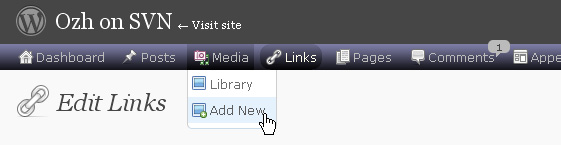
Download
Get the plugin :
ozh-admin-drop-down-menu.zip
Extract and upload to your blog, preserving directory structure.
Note: download counter here and stats on wordpress.org may differ and reflect the number of downloads before this plugin was hosted on the plugin directory
Activate and enjoy. Another friendly install & forget piece of PHP.
Features
- Customizable color scheme with a neat color picker
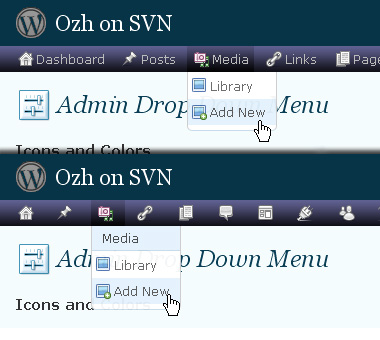
- Normal mode for regular users, compact mode for real estate maniacs, minimal mode for those who never have enough
- Optional cute icons from FamFamFam
- Enhanced compatibility with handheld devices
- Joy and happiness for every day
Javascript is involved for advanced features and to make stuff compatible with MSIE6, but on any decent browser everything works even with Javascript disabled.
Super neat color picking.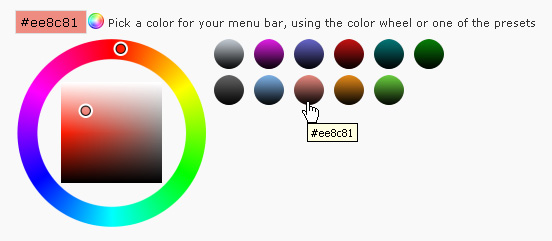
Any color you'll love.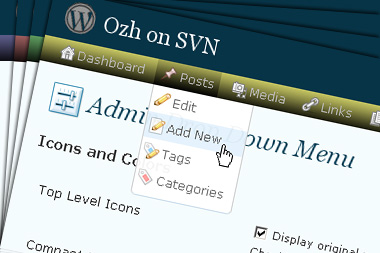
Normal or compact display.
Browser compatibility
The plugin has been developed on Firefox 3, Chrome and MSIE7. It should do fine with MSIE6 and Safari too.
There are glitches with Firefox 2 and Camino which both use a deprecated rendering engine. There are also glitches with Opera. I won't fix these, but if anyone wants to submit a CSS patch to resolve one of these issue, you're welcome :)
Developer friendly
The plugin comes with a wickedly cool API that will allow other plugin developers to interact with it, like adding your own custom icon for your plugin. Read the API for Coders page for examples and documentation. Also, all elements the plugin produces get custom CSS classes and id's to allow easy styling or selecting.
Translations
The plugin is ready for interglobanalization and there is a .pot template file included so polyglots can even make their own translation and sent the .mo and .po files to me that I'll include in the package.
The plugin comes with the following translations, in no particular order:
- Turkish, thanks to Baris Ünver
- Korean, thanks to Jong-In Kim
- Spanish, thanks to Karin Sequen
- Italian, thanks to Gianni Diurno
- Deutsch, thanks to Frasier Crane
- Russian, thanks to Fat Cow
- Brazilian Portuguese, thanks to Renato Tavares
- Greek, thanks to Friedlich
- Belorussian, thanks to ilyuha
- Hebrew, thanks to Amiad Bareli
- Romanian, thanks to Octav
- Ukrainian , thanks to wpp.pp.ua and Jurko Chervony
- Traditional Chinese, thanks to Paogray and Joan Wang
- Dutch, thanks to Cees van den Heuvel
- Slovak, thanks to Branco from WebHostingGeeks.com
And maybe more since I might totally forget to update this list :)
Older Versions
All my plugins are designed to run on the latest WordPress version available. Upgrade WordPress whenever a new version is out, or be sorry when your site gets compromised.
If for some unintelligent reason you need to get an older version of this plugin, it might be available, yet totally unsupported or recommended. Check here: Other versions.
Feedback, Bug report, Feature request
Sure. Feed me back. Like it? Blog about it. Love it? Click on the download link, see the Paypal button appear, and give it some clicks!
If you're reporting bugs, you're welcome, but please provide a screenshot and informations about your browser & your OS. I'm not supporting deprecated blogs or plugins or browsers, and I can't respond to incomplete bug reports.
If you're suggesting a feature, you're welcome too, but I won't add an admin menu on the public side of the blog, on top of pages. If you're looking after having this menu fixed on top of page, check this companion plugin that works as a plugin to this plugin: Admin Menus Fixed.
hello,
your plugin causes 'redirection, see http://urbangiraffe.com/plugins/redirection/' not to work.
The page is blank and no redirection is working. i've deactivated all my plugins (22 total) and only yours keep redirection not working.
tested system: wordpress 2.8, windows 7, ie 8 & latest firefox – with wp 2.7 it worked fine.
thanks
oliver
Frank: everything working fine on my blog with latest versions.
Oliver: I'm afraid you'll have to chose between the two plugins. I just can't inspect every plugin on earth when there seems to be an incompatibility. Plus, I have the feeling that a redirection plugin should not mess with a plugin that loads only when viewing the backend…
i narrowed it down to what seems like an incompatilibity between your plugin and "stray random quotes" – i used both with 2.7.1 without any problem whatsoever, but now with wp 2.8 "one of those" doesn't seem to like the other (and makes most of the backend-/admin-pages go blank).
my programming skills in php (or rather jquery-stuff, as it seems) aren't good enough to tell which one is the faulty one, but maybe you (or someone else) could have a look? i'll let the author of the quotes-plugin know, as well.
I found a fix/hack for the Stray Quotes plugin incompatibility. Just edit "stray_quotes.php" and comment out lines 48-51 in the "stray_quotes_add_js" function. Everything should work fine then (though I suppose there will be missing ajax functionality, but I don't think I was using that anyway).
Hope this helps.
Tim
So just upgraded to 2.8 today and also updated your plugin to 3.3. When i the plugin is enabled now, i don't get the TOP menu like i use to. It stays with the old default wordpress nav menu on the side except it adds almost a "double menu" on the side along with the original menu while the plugin is active.
I still experience this with all other plugins disabled. I've also tried removing your plugin after reseting it and reinstalling it, which did fix the issue either. I did have it working correctly before i updated 2.7.
Screeny of what i am seeing http://imagebin.org/52647
I noticed that when Admin Drop Down Menu v3.3 is activated in WordPress v2.8, the Screen Options and Help buttons are no longer visible. Deactivating the plug-in restores these buttons. I recall seeing those buttons when I had WP2.7 and earlier versions of the plug-in. I can live without the buttons, but is the problem unique to my site? If not, perhaps the bug can be fixed without much effort.
Thanks,
Mark
I'm sorry Ozh, but for me your plugin isn't working. I'm with 2.7 wp… and a few plugins working perfectly. I get back to the previous version of your plugin.
I'm a fan of your plugin (the previous version in this case).
Roy » Of course it's not. Current version is for WP 2.8.
Shit, i typo'd "which did fix the issue either." Where as i meant to say that it did not fix the issue. DOH.
To make sure i am clear, hopefully i don't make any typo's this time, I am still experiencing the issue as what can be seen in my screenshot from the link that i posted from my prior post.
[…] Ozh’ Admin Drop Down Menu ?????Wordpress?????????????????, ????????????????????????. ??,??,?? WordPress […]
Hi the ozh.
I have WordPress 2.8 installed on my Vista SP2 laptop, running the most recent version of Firefox.
I installed your Admin Drop Down Menu plug-in, but it doesn't actually display on the lower portion of the screen anything I select from the menus above.
I can't access the plug-in menu to uninstall, or anything else, really.
When you can, could you give me a hand?
Thank you.
Lou
[…] Ozh’ Admin Drop Down Menu ?????Wordpress?????????????????, ????????????????????????. 2008?12?12???,??,?? WordPress […]
[…] Admin Drop Down Menu – ini menghilangkan kebutuhan untuk melakukan double klik pada tindakan Admin layar. Anda cukup arahkan mouse Anda ke menu utama dan Anda akan segera melihat drop down menu. […]
I've just upgraded to wordpress 2.8 and my "New Post" page wasn't working (tried to load but would come up plain white). I systematically deactivated plugins and it turned out to be this plugin that caused it for me. I LOVE your plugin and can't wait for this bug to be fixed. Thank you for your space saving work of art!
Dave
[…] have been using this Ozh Admin Drop Down Menu plugin for months now and really don't know how other people can be content with the default menu […]
[…] an enhanced admin interface. Admin Drop-Down Menu transforms admin menu in a quick drop-down menu; you can reach any admin page in one click, instead […]
On the manage plugins admin page I get
Warning: Missing argument 2 for wp_ozh_adminmenu_plugin_actions() in /home/content/s/a/a/saa05admin/html/news/wp-content/plugins/ozh-admin-drop-down-menu/inc/core.php on line 348
using any browser (firefox 3.0.11, Safari 4, Opera 9.64, Chrome, Flock, Camino, Omniweb – Mac and/or Win PC)
WordPress 2.8
I think there were other errors – will add as I re-find them.
[…] been using Ozh's Admin Drop Down Menu, a WordPress plugin that arranges the current admin area menus in a horizontal, instead of a […]
[…] Favorit für das Backend (den Adminbereich), nennt sich Admin Drop Down Menü und stammt von Ozh. Es stellt, wie der Name schon sagt, die bestehenden WordPress-Menüs auf Drop Down Menüs um. […]
I didn't expect it to be so wonderfully handy and I just love it. Whole set up is so well manageable, all needed is somuch faster to be found, simply great.
Thank you so much for creating this!!
Sincerely,
Maya
[…] been using Ozh's Admin Drop Down Menu, a WordPress plugin that arranges the current admin area menus in a horizontal, instead of a […]
[…] been using Ozh's Admin Drop Down Menu, a WordPress plugin that arranges the current admin area menus in a horizontal, instead of a […]
Is there a change log for this plugin? If not there needs to be one, if so could someone link me to it?
This is the greatest plugin of it's kind, hands down!
trm96 » the changelog is included in the plugin source, and generated by SVN as I commit http://plugins.trac.wordpress.org/log/ozh-admin-drop-down-menu?verbose=on
Lately, the dropdown menu for Settings goes horizontal instead of vertical. Because mine is so long, it was difficult to scroll down it even in vertical form, but it's impossible in vertical. Is there something I need to change? Thanks, Jim
Love the plugin
BUT I've got an extremely annoying problem, intermittently a long list of menu entries which are expected to wrap (the settings menu) but instead of just wrapping the whole list of about 65 entries collapses to 5 (or up to 11). Sometimes it works OK then it collapses and wraps to 5 (the first 4 in the list and the Last on its own on the second row, or more up to 10+1 on the bigger screen on my IMAC – depending on browser window size) and from then on remains collapsing. The first level menu items are also wrapped but work OK except the 2nd line does not inherit the CSS styling – the raised style you give the menu.
And I then have to disable the plugin when I need to get to items in the settings menu. It exhibits this behaviour whether I access my blog using my Win-PC laptop or IMAC on any browser, IE8, Chrome, Safari, Firefox, Opera, Camino, Omniweb, Flock.
Obviously as its a dynamic effect I cannot give you a screenshot.
By the way your IP-2-country data is wrong (or was on 22-June) its saying I'm from Sweden, but I am UK based with my blog being US hosted
[…] been using Ozh's Admin Drop Down Menu, a WordPress plugin that arranges the current admin area menus in a horizontal, instead of a […]
[…] Ozh' Admin Drop Down Menu – Adds a drop down menu replacing the sidebar menu. […]
[…] been using Ozh's Admin Drop Down Menu, a WordPress plugin that arranges the current admin area menus in a horizontal, instead of a […]
[…] suchen oder sich gerne mal eine neue Navigation für das Backend installieren wollen, gibt es das Admin DropDown Menu. Die Installation ist wie üblich ganz einfach – Herunterladen, entpacken, Ordnerinhalt in […]
[…] take my word for it, take a look at the smack down article here. Oh by the way, I am using Ozh's Drop Down Menu for my wordpress, far easier to […]
Thanks for a great plugin and all the work that goes into creating and maintaining it! Much appreciated.
[…] 2.8.1 und auf PHP5 einwandfrei und lässt sich sogar mit solchen Admin-Plugins wie Ozh-Admin Drop Down Menu kombinieren. Links seht ihr erstmal, welche farben dort bereits verfügbar sind und man kann […]
[…] Umstellung des Admin-Bereiches auf Ozh's Admin Drop Down Menu […]
[…] You can also upload a logo to the site that will display in the header in lieu of the standard site title in the Georgia typeface. The Custom Admin Branding plugin also lets you add your logo to the admin's footer along with a link to your website. This plugin also comes with support for Ozh's famed Admin Drop Down Menu plugin. […]
[…] Ozh' Admin DropDown Menu – Exploring admin menu easier with Drop Down menu. enable you to configure display of admin menu and color scheme. […]
[…] Admin Drop Down Menu – eliminates the need for this double clicking on the Admin screens by allowing you to see the second level menu just by placing your mouse over a main menu. […]
[…] OZh' Admin Drop Down Menu is first in line. Simply put, this takes your admin menu from the side and puts in into a really nice dropdown at the top of the screen. It makes everything in your admin menu accessible, and has a lot of great little configuration options for making it exactly what you want. It even tells you when you have new comments and plugin updates, and how many of each! It really makes the backend a lot less confusing to navigate, and gives you your whole screen to work in to boot! […]
Thank you for your admin drop down plugin, it's really useful for me.
Hello, a beautiful Plugin, thanks. Could one make the compact mode, even with smaller text, or shortened texts?
It seemed that "(Zu viele) Unterpunkte übersichtlicher darstellen" ("display to many sumenuitems more clearly" or something like this) didn't work her. I set it to "20" items and it still shows more which was bad at the settings-tab cause I have many plugins with settings and can't get to the plugin "wp-cache" f.e. cause "w" wasn't visible.
Ozh' Admin Drop Down Menu Version 3.3.1 DE-Edition, WordPress 2.8.2 DE-Edition, Firefox 3.0.6 (Debian-3.0.6-1).
Anyway it's still a great tool. ;)
[…] Admin Drop Down Menu […]
[…] 16?Ozh’ Admin Drop Down Menu : ?????????????????[????] […]
[…] been using Ozh's Admin Drop Down Menu, a WordPress plugin that arranges the current admin area menus in a horizontal, instead of a […]
[…] La verdad es que me gustó mucho el panel de administración nuevo, pero después de un rato, el menú vertical me resultó algo molesto y entonces volví activar Ozh' Admin Drop Down Menu. […]
[…] Sitio/descarga: planetozh.com/blog/my-projects/wordpress-admin-menu-drop-down-css […]
The "Upgrade Available" bubble doesn't indicate plugin upgrades are available. The bubble always shows 0. Is that the Drop Down plugin's doing or WordPress itself? I think I'll deactivate to see what happens upon the next plugin upgrade becoming available.
Tom Usher » definitely works for me.
[…] Ozh' Admin Drop Down Menu: Admin menüsünü daha kullan??l? hale getiren bir eklenti. […]