
 I've finally released the much awaited and long overdue YOURLS version 1.4. It's still not perfect but there are no more blocking issue that I know of. This version brings a much better installer, an upgrader from version 1.3 of course, lots of code improvements, and, yum yum, stats (example). Honestly, bit.ly and such, you're not better any longer :)
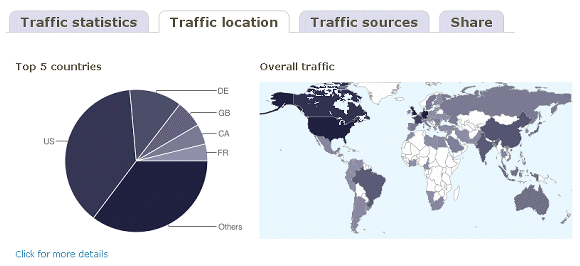
Please pay attention to the included readme file, especially if you're upgrading from version 1.3 (and if so, please backup your database before upgrading)
While I'm at it, I'm sending out warm thanks to anyone who have filed issues and feedback regarding bugs, especially to a guy from Das Literatur-Café for detailed, fast and frequent reports.
If you encounter unexpected behavior, the best thing to do is file an issue so I can keep track of them easier than in blog comments here (of course, before file it please search in older and closed one to make sure it's not already there). Have fun shrinking your URLs!
Thank you Ozh for your hard work =)
Excellent work. This is so useful for for us non-twitter folks! (Can you say auto-pilot?)
Thank you.
you have done great job bro ;-).
This is a really great project with great potential.
Any chance of adding the ability for users to sign up so stats and links can be private?
Tony Lindskog » This is a frequently requested feature, I'll probably make that into 1.5
That is excellent – you already have the multi-user functionality so half the battle is already won. :)
Another thing that would be nice would be if you can set an option to use a random keyword with a set number of characters rather than let the user set it themselves or sequential which looks kind of boring.
Tony Lindskog » The random stuff has been asked for already, I won't do it
Hi There,
I have downloaded 1.4, however I'm not getting any success with being able to check stats – not even in the admin panel. Even manually putting the plus sign after my shortened link isn't working.
Any suggestions?
Thanks!
Dalton » As stated in the readme, please file an issue on the googlecode site (probably an .htaccess problem, check that it looks like http://yourls.org/htaccess )
Hello,
Thank you for the reply. I have filed a issue on that page you provided.
http://code.google.com/p/yourls/issues/detail?id=157
Thanks,
Dalton
I'm liking the potential of yourls from what I can see, and judging from comments here and elsewhere on the web, it's obvious that it is SUPPOSED to work.
I've verified that the .htaccess file is as it is supposed to look. I can log into admin and generate short urls. But they simply won't redirect. I end up with 500 errors.
Not sure if I'm seeing normal behavior with 1.4. I did a private installation last night on my local webserver. When anyone visits one of my pages, even if its months old, a short URL is getting generated. I thought private meant only I could generate one, and that it only happened when newly published. Is this correct? Running wordpress and your twitter plugin.
walter » This is normal behavior if you tell WP to generate short URLs for posts or pages. Either newly published, or old stuff.