
Early 2006, a cool guy named Lokesh Dhakar introduced Lightbox, a unobtrusive script used to display large images using modal dialogs over a black faded background. A great script, really. Since, every once in a while, someone comes up with their own take at this concept, using this or that javascript library (jQuery, Prototype, Mootools, YUI, you name it) and supporting various types of objects: images, flash objects, videos, inline HTML content, iframes, content fetched via an Ajax call, etc…
Recently, thinking about ditching Prototype here on this blog, I wondered if there was any cool Lightbox clone for jQuery. Man, there are dozens of them. How am I supposed to chose the one that will suit my needs? I started to write down a few URLs and comments, then it occurred to me that I could make something cooler. A few coding later, here is the Lightbox Clones Matrix!

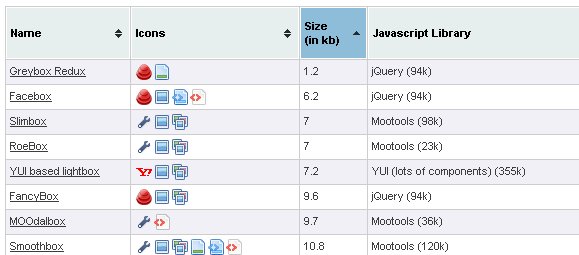
I've listed more than 30 scripts, detailing for each one:
- Its javascript size (not considering CSS, images or anything else)
- The library needed, if any, mentionning its javascript size. I opted to compare uncompressed javascript file sizes, as it (sorts of) reflects the complexity and/or power of the library, regardless of how packed/minified/obfuscated it usually ships.
- The total javascript size. This data won't interest someone already using a javascript library on their site, obviously.
- Image support
- The ability to group images into a single collection, allowing for easily browsing through images within the same overlay
- Any other common object supported: inline content (ie content already existing in the page, but typically hidden), iframe, content fetched by an Ajax call, video, Flash.
To make things cuter and quicker to read, everything is summarized by a row of pretty icons (mostly coming from the wonderful Silk set)
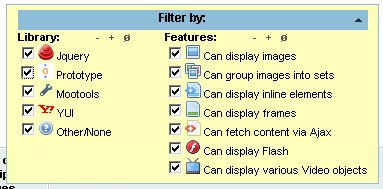
Of course, what would be the point of it if you couldn't quickly restrict you search to a few criteria? There's a handy filter set to make your selection easier. All the options are logical "OR", ie selecting several features will list scripts with at least one of them. Note that you can shrink the filter box if you don't need it.
Overall I had some fun making the Lightbox Clones Matrix. I hope it will be actually of any use to someone. Bookmark it, just in case you need it in the future! ;)
Ok, do ANY of these work with image rollovers (done in jquery, css or javascript?)
All the ones i try fail when the thumbnail is a rollover.
Please help!!
Hi Ozh,
Any chance of updating the home page link for Floatbox? It's changed to http://floatboxjs.com/
Thanks!
please add licensing filter.
I found a new jquery lightbox plugin. It's called Lightcase.
If someone is searching for a lite and well looked one.
A lot of content types are supported.
Good Lightbox alternative:
LightZAP
http://dragonzap.szunyi.com/index.php?e=page&c=projects&al=lightzap&l=en
Works Standalone
Size: 24Kb (full package)
– Automatic image resizing
– Fullscreen mode
– Optimized for touch screen
– Support themes
– Description function
– HTML5 valid
– Author and link
– Print
– Download
– Image share