
I have been using UltraEdit as my primary text editor over the last few years. I thought it had all the features I could expect from a text editor : tabbed interface, syntax highlighting for a number of languages, code block collapsing, regular expressions for searching and replacing, opening and closing brace matching, you name it.
Then, recently, I got more and more annoyed by the weaknesses of the code highlighting feature. For instance, UltraEdit gets it wrong if you use heredoc syntax (using something like <<<HERE and HERE; as delimiters for a string) and can't parse and highlight properly your code.
One night, someone in #wordpress mentioned they were using PSPad. I realized that, after all, I had been using the same text editor over the years simply because I had never looked if something better existed. So I loaded my gun and went for a little hunt, hoping to find the perfect text editor. UltraEdit, Notepad++, PSPad, EditPlus, EditPad Pro, Crimson Editor, GridinSoft Notepad, HTML-Kit, I tortured them all with my binary and merciless 10 seconds review tool: the Tricky Code Snippet From Hell.
The test
I made up a short and catchy text file filled with traps I knew most editors would fall in, which consisted of the following :
<?php

$pattern = '(<body[^>]*?>';

/*	abcdef
	multi-line
*/

$hello = <<<HELLO
	<<<<--! jk -->
	>>>
	/*
	abcdef
HELLO;

function echoit($pattern) {
	echo "123 456 $pattern";
	echo '123 456 $pattern';
	foreach (array(1,2,3) as $val) {
		echo $val;
	}
}

echo "/*";
echo '//';echoit($pattern);

?>
From this incongruous yet efficient snippet, I was expecting to check, at a glance and in less than 10 seconds, the following 9 tests:
- Line 3: will the editor think the regular expression pattern is actually the closing ?> PHP tag
- Line 5 to 7: can you collapse multiline comments
- Line 9: heredoc, part one, does the editor understands we're just defining a string
- Line 12: heredoc, part tow, does the editor gets that we're not starting a multi line comment
- Line 16: can you collapse regular code block
- Line 17 & 18: will the editor display differently these two lines(variable in the first one, just text in the second one)
- Line 19: how will the editor display nicely (or not) the nested code folding marks
- Line 24: will the editor think we're starting a multi line comment
- Line 25: will the editor think we're commenting out the line
You've already noted that the in-blog code highlighter I'm using failed on line 12 and test #4 :) How did the desktop software did?
Results and verdicts.
Crimson Editor
I didn't know this software, but it was in Google's top results for "text editor" and looked decent, so I gave it a try.
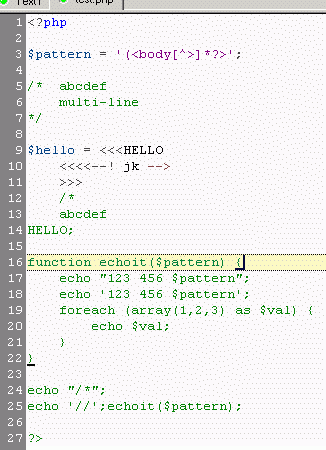
Miserably fails at line 12 (while still being able to highlight matching braces within what it thinks is a comment), and you can't fold code blocks.
Verdict: Sucked.
EditPad Pro
Again a software with a good ranking within Google's search results. It produced:
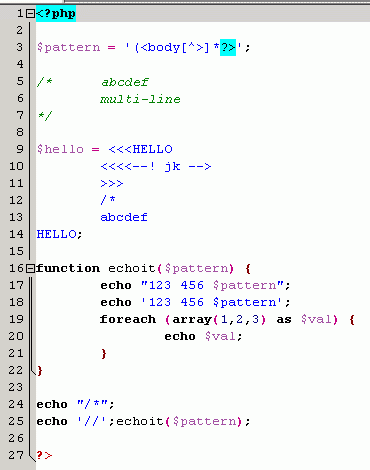
Incoherent results: fails at line 3, while still giving folding marks for the whole file (does it end on line 3 or not??), you can collapse a function block but not the nested foreach block. That's too bad, because the highlighting abilities were not mislead by the heredoc and its deadly line 12, and it does make a difference between line 17 and 18. Almost passed.
Verdict: Sucked.
EditPlus
I was recommended this software by some friends.
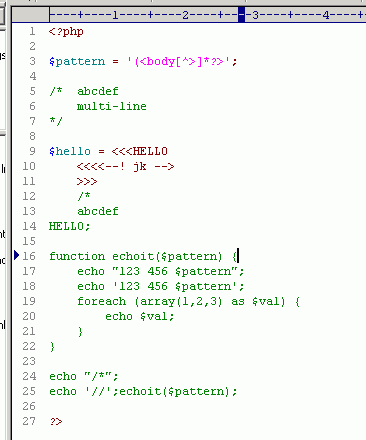
Oh, my. I hope we're still friends. Died at line 12.
Verdict: Sucked.
GridinSoft Notepad
Another software I didn't know and that was waiting for abuse within Google's top results.
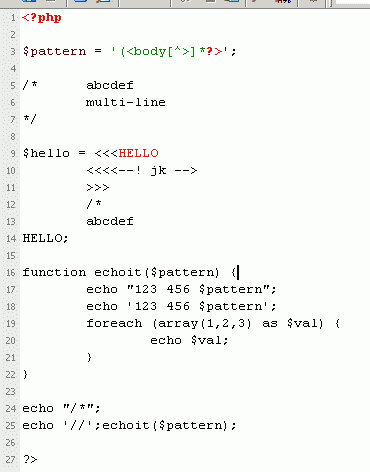
Pathetically fails at line 3. By the way, I don't understand why it highlighted HELLO that way.
Verdict: Sucked.
HTML Kit
It was recommended by a friend, so I gave it a try despite its name making me thinking it was more HTML oriented than anything else.
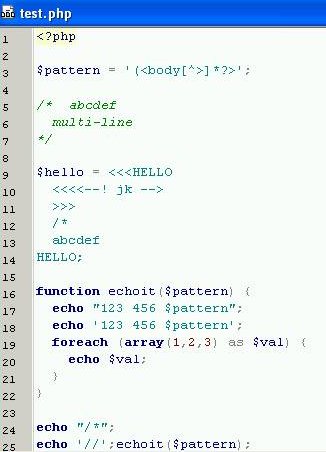
The highlighting abilities are decent, it doesn't get fooled by line 3 and the confusing heredoc. Making no difference between line 17 and 18 is too bad, and not being able to collapse block is a no-go with me.
Verdict: Sucked.
PSPad
I read about it on #wordpress as a coding tool of choice, so I had a good a priori here.
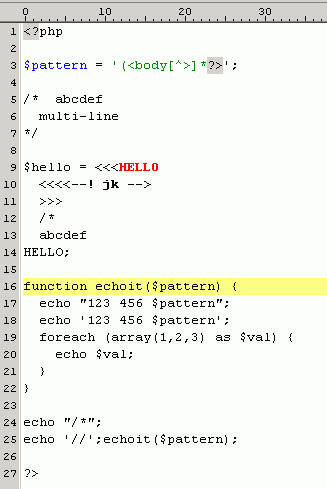
Failed at line 3.
Verdict: Sucked.
UltraEdit
The software I thought was the Rolls Royce of editors for years.
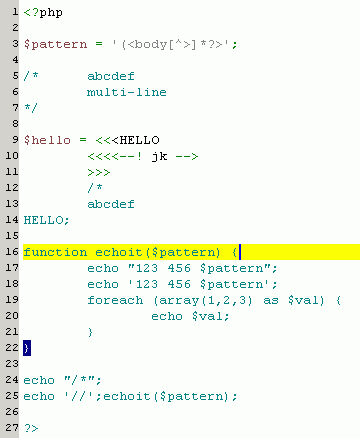
As I knew it, UE understands nothing about heredocs, which is really too bad considering that without this line 12, it would pass every other tests.
Verdict: Sucked.
Hey… No winner ?
Ho, you noticed, all the softwares mentioned got the "Sucked" grade (some well more deserved than others, I'll fairly admit it). No winner, then ? Of course there's a winner, would I bother writing such a useless review otherwise ? :)
Notepad++
I started using Notepad++ two years ago on my computer at work because for some reason I couldn't properly install UltraEdit (I guess my user limited privileges on Windows 2000 were to be blamed), and had sticked with a very old version of it, till I even had the idea of upgrading to the latest version for this test. Boy, that was a good idea.
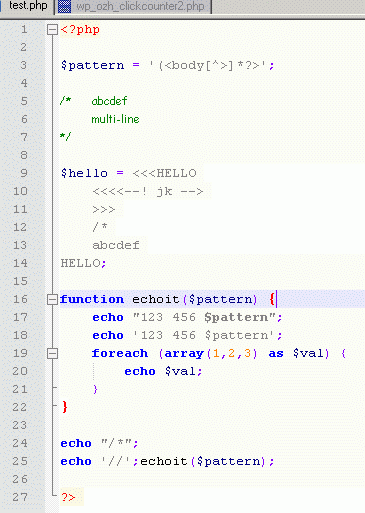
Syntax highlighting is just… perfect. The heredoc does not fool the software, line 17 and 18 are perfectly shown. The only thing I'd miss is the ability to fold comment blocks (line 5 to 7) but it's pretty minor to be honest.
Edit: Klaue, a reader in comments, points out that you can actually fold comments. It just doesn't work with PHP, apparently. Sounds like a bug then!

Notepad++ passing the 10 second test, I looked at the rest of features and abilities a simple glance and screenshot cannot reveal. To my pleasure, everything I need is here: search and replace with regexp, bookmarks within your text files, 3rd party plugins, loading and saving "sessions" to work on a predefined group of files. The software came with a very very handy plugin that shows real time a list of functions defined in your text file, which makes it really easy to navigate through your code with a single click on the function name.
In short, I love this software. Did I mention this is freeware ? Give it a try, you'll love it or I'll refund !
Thanks for pointing that out. Seems to be a problem with the flatlands monakai color scheme, it doesn't identify variables.
My old standby twilight shows off the syntaxting better. http://i.imgur.com/xKV1Mqa.png
It does still fail on 25.. I also hovered over the gutter to demo the folding points. Although any selected text can be folded.
Here I have changed color schemes again, and also folded the comment by selecting it and folding.
http://i.imgur.com/khOHuQR.png
Looks like I am switching back to twilight, i don't know how that didn't bother me.
I know this post is quote old, however I wanted to point out that EditPadPro now does successfully pass your test using the default PHP highlighting scheme. EditPadPro's syntax highlighting engine uses regex, and is incredibly robust. Using the free scheme editor, the schemes can also be easily modified.
http://imgur.com/xImTsj0
Using Editpad Pro 7.3.6 with the default PHP syntax highlighter, it passes all your tests with flying colours.
EditPad Pro also includes a syntax highlighting editor, so you can customise existing schemes are create new ones with ease.
http://imgur.com/Gc27QQl