
I've started to play a bit with Xdebug, a PHP extension that's designed to provide profiling information for PHP scripts and script execution analysis, amongst other things. This is fun, this is interesting, and this is invaluable when you really want to optimize the last bits of a script or a function.
My test install is running XAMPP on Windows, and activation is dead easy since the precompiled php_xdebug.dll is bundled with the PHP distribution. Installation on any other system shouldn't be really harder anyway, assuming you have access to the php.ini file and can add some extensions to PHP
With XAMPP for Windows, you just have to add the following to your php.ini (usually located in xampp/apache/bin)
zend_extension_ts = "C:\path\to\xampp\php\extensions\php_xdebug.dll"Then add something like the following section. I haven't really tuned this yet, these are mostly default and "do everything you can do" options.
[xdebug]
xdebug.auto_trace = 1
xdebug.collect_includes = 1
xdebug.collect_params = 1
xdebug.collect_return = 1
xdebug.default_enable = 1
xdebug.extended_info = 1
xdebug.show_local_vars = 0
xdebug.show_mem_delta = 1
xdebug.trace_format = 1
xdebug.trace_options = 0
xdebug.trace_output_dir ="C:\path\to\xampp\tmp"
; Remote
xdebug.remote_enable=1
xdebug.remote_mode="req"
xdebug.remote_host=127.0.0.1
xdebug.remote_port=17869
xdebug.idekey=<idekey>

; Mode 1
xdebug.remote_handler="gdb"
xdebug.auto_profile = 1
xdebug.auto_profile_mode = 2
xdebug.output_dir = "C:\path\to\xampp\tmp"

; Mode 2
xdebug.remote_handler="DBGp"
xdebug.profiler_enable = 1
xdebug.profiler_output_dir = "C:\path\to\xampp\tmp"
xdebug.profiler_output_name = "debug.out"

xdebug.dump.SERVER = REMOTE_ADDR,REQUEST_METHOD
Now, don't forget to restart or reload the Apache so changes can apply. Result of this ? Whenever you run a PHP script, a trace file is created in the tmp directory, containing informations about how many times a function was called, how many milliseconds it took, and such.
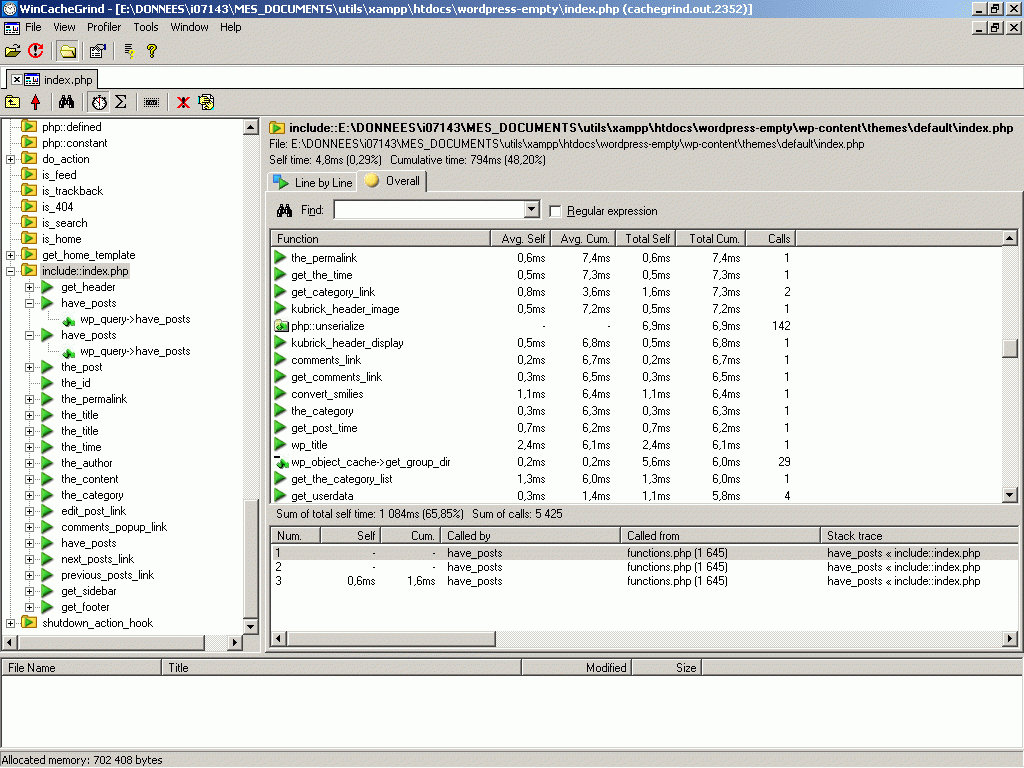
The file itself is not very human readable, and on Windows you need WinCacheGrind, a freeware viewer for files generated by xdebug.
For instance, check this screenshot for the kind of results that a front page call on WordPress produces. It makes spotting suspiciously CPU greedy functions a trivial task, can help you understand the code flow and can give hints on how optimize your code.
This is just what I was looking for! Thanks.
They should post something like this on apachefriends.org AND xdebug.org.
i ve installed xampp , now i need to know how to start using php and mysql , where do i need to store the php code typed on any editor. i have had a hard time figuring out what to do ,
I wrote similar article few months ago, you can read it here:
http://hosaka.blogspot.com/2006/12/profiling-php-with-xdebug-and.html
This is just what I was looking for! Thanks.
Nice article! It is still useful (i was looking for xdebug options list) for me even after 2 years:)
Nice post, great to see something about xdebug written in plain English not pure jargon! Particular thanks for the full php.ini
One question: what's your reason for using the port setting xdebug.remote_port=17869 over the xdebug default port 9000? Is this a XAMPP thing?
I'm trying to figure out if this might have anything to do with the problems I'm having getting it to work.
Alan S » yeah, probably the default in XAMPP, I don't think I would have bothered changing that