On: 2005/09/03 Viewed: 245143 times

In every Wordpress theme there are places that are supposed to be edited and customized by the end user who is using the theme : an “About you” block to fill in, a loop to customize when you want to add “Asides” post style, some CSS to tweak to use an personal image in header, etc…

The problem is : most bloggers are not PHP or HTML expert, can’t tell the difference between an HTML tag and a PHP tag, and simple editing of templates can be hazardous and tedious to them. Adding an admin menu in your theme ensures that end users can customize things without editing source files, just as naturally as changing a Wordpress option in the admin area.

Wordpress Theme Toolkit is a PHP class that gives Wordpress theme authors the opportunity of creating a persistent admin menu for their theme as easily as editing 3 lines in a file.

You are a theme author ? Have enough skills to edit three lines ? Add an admin menu to your theme ! (click to enlarge)
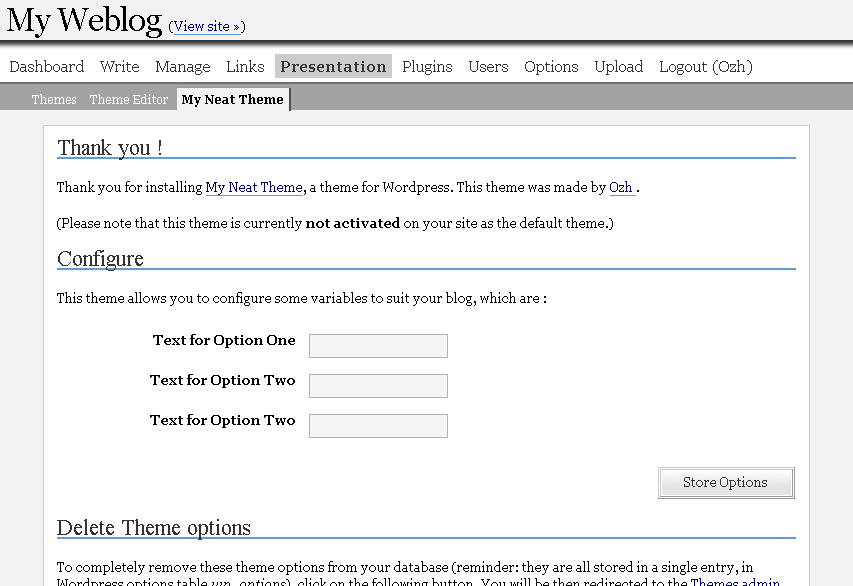
Theme Toolkit : admin menu example

Just to be sure : Wordpress Theme Toolkit is not a theme with an admin menu. It is something that makes adding an admin menu to an existing theme as easy as 1-2-3.

This long article is divided in shorter sections :

  1. Intro : well, here.
  2. Overview : a quick tour about features and how easy things are.
  3. Manual : detailed features and how-to
  4. Download ! : files and credits.
  5. Ideas and Examples : suggestions and ideas of what you could add to your theme … and a real Wordpress Theme as an example of use.

Related posts

Page: #1 #2 #3 #4 #5

Metastuff

This page "Wordpress Theme Toolkit" was posted on 03/09/2005 at 2:36 pm
Watch this discussion : Comments RSS 2.0. You can trackback this post from your own site

154 Blablas

    Pages: « 1 2 3 4 5 6 7 [8] Show All

  1. 141
    Motti Israel »
    replied, on 29/Jun/08 at 11:08 am # :

    Just wanted to say thank you for that wonderful Kit.

  2. 142
    Braincast » Storelicious» Pr... United States »
    pingback on 01/Jul/08 at 11:07 am # :

    [...] Theme ToolKit [...]

  3. 143
    RodeWorks » WordPress Theme Toolki... United States »
    pingback on 01/Jul/08 at 1:28 pm # :

    [...] Wordpress Theme Toolkit « planetOzh [...]

  4. 144
    Nuevo Theme para mi blog | Omar Corrales... United States »
    pingback on 03/Jul/08 at 4:54 am # :

    [...] pensado liberar el theme WP-Resurrection pero como queria añadirle algunas opciones intente usar Wordpress Theme Toolkit pero tuve algunos errores con el y la verdad no soy tan experto en PHP como para arreglarlo. [...]

  5. 145
    The P! Company - iamnotagoodartist United States »
    pingback on 04/Jul/08 at 5:41 am # :

    [...] their latest sketch shoved down the throat of their visitors. With some help from planetOzh’s Theme Toolkit, I put together a YouTube embed box that can be easily changed from the admin [...]

  6. 146
    Agregar Opciones a tus themes | Omar Cor... United States »
    pingback on 09/Jul/08 at 12:32 pm # :

    [...] Theme Toolkit Puede ser el mas conocido de todos, Lo use en versiones anteriors de wordpress, pero ahora me da error. Puede ser por mi poco conocimiento de PHP, pero es muy bueno! [...]

  7. 147
    cet Sweden »
    wrote, on 14/Jul/08 at 9:12 pm # :

    i cant do it.

  8. 148
    Minyx 2.0 - Theme Wordpress — Simp... United States »
    pingback on 19/Jul/08 at 8:23 pm # :

    [...] Theme ToolKit [...]

  9. 149
    wpblogger China »
    commented, on 04/Aug/08 at 4:34 am # :

    That’s great, I have been looking for the solution, found here finally, thanks.

  10. 150
    Author description outside the WP main l... United States »
    pingback on 12/Aug/08 at 11:27 pm # :

    [...] also seems quite interesting, and helped me in my original attempt to display this info using the Planet Ozh WordPress Theme Toolkit functions file (I may talk about the Theme Toolkit in a following article or tutorial in this [...]

  11. 151
    My Comment Count is Bigger Than Your Com... United States »
    pingback on 23/Aug/08 at 11:17 pm # :

    [...] WordPress Theme Toolkit [...]

  12. 152
    Abhishek Australia »
    wrote, on 25/Aug/08 at 3:45 am # :

    Thanks for the solution !!

  13. 153
    WordPress Theme Toolkit: Anything You Wa... United States »
    pingback on 28/Aug/08 at 4:51 pm # :

    [...] WordPress Theme Toolkit is a tool that allows theme authors add an admin menu as easily as editing 3 lines, and it powers [...]

  14. 154
    Andrea Panama »
    wrote, on 01/Sep/08 at 3:23 am # :

    Thanks man. Very useful to those of us who need to knock out lots of different blogs…

Pages: « 1 2 3 4 5 6 7 [8] Show All

Leave a Reply

Comment Guidelines or Die

  • HTML: You can use these tags: <a href=""> <em> <i> <b> <strong> <blockquote>
  • Posting code: Post raw code (no <> &lt; etc) within appropriate tags : [php][/php], [css][/css], [html][/html], [js][/js], [sql][/sql], [xml][/xml], or generic [code][code]
  • Gravatars: Curious about the little images next to each commenter's name ? Go to Gravatar.
  • Spam: Various spam plugins on patrol. I'll put pins in a Voodoo doll if you spam me.
  • I will mark as Spam test comments, all comments with SEO names (ie "My Cool Online Shop" instead of "Joe") or containing forum-like signatures.

Close
E-mail It