On: 2005/09/03 Viewed: 234271 times

In every Wordpress theme there are places that are supposed to be edited and customized by the end user who is using the theme : an “About you” block to fill in, a loop to customize when you want to add “Asides” post style, some CSS to tweak to use an personal image in header, etc…

The problem is : most bloggers are not PHP or HTML expert, can’t tell the difference between an HTML tag and a PHP tag, and simple editing of templates can be hazardous and tedious to them. Adding an admin menu in your theme ensures that end users can customize things without editing source files, just as naturally as changing a Wordpress option in the admin area.

Wordpress Theme Toolkit is a PHP class that gives Wordpress theme authors the opportunity of creating a persistent admin menu for their theme as easily as editing 3 lines in a file.

You are a theme author ? Have enough skills to edit three lines ? Add an admin menu to your theme ! (click to enlarge)
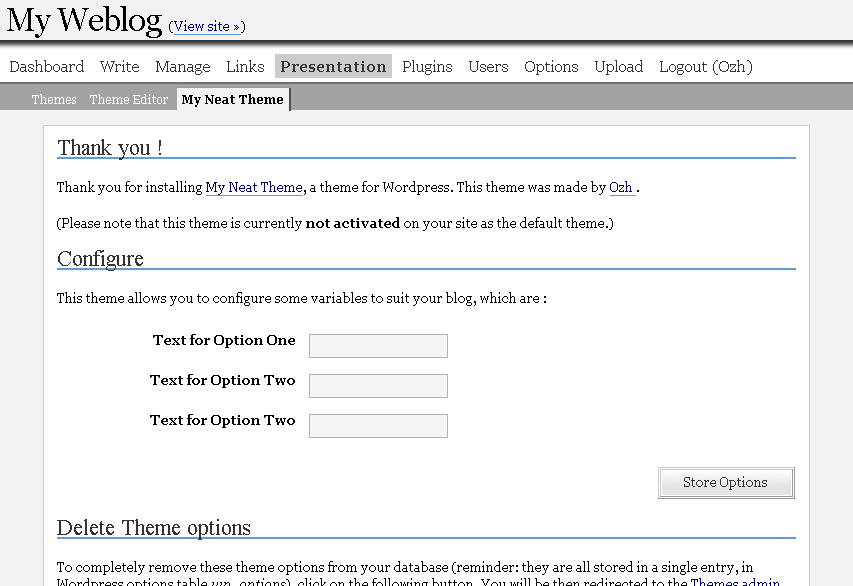
Theme Toolkit : admin menu example

Just to be sure : Wordpress Theme Toolkit is not a theme with an admin menu. It is something that makes adding an admin menu to an existing theme as easy as 1-2-3.

This long article is divided in shorter sections :

  1. Intro : well, here.
  2. Overview : a quick tour about features and how easy things are.
  3. Manual : detailed features and how-to
  4. Download ! : files and credits.
  5. Ideas and Examples : suggestions and ideas of what you could add to your theme … and a real Wordpress Theme as an example of use.

Related posts

Page: #1 #2 #3 #4 #5

Metastuff

This page "Wordpress Theme Toolkit" was posted on 03/09/2005 at 2:36 pm
Watch this discussion : Comments RSS 2.0. You can trackback this post from your own site

145 Blablas

    Pages: « 1 2 3 4 5 6 [7] 8 » Show All

  1. 121
    Minyx 2.0 | Infected-FX| tutoriales, rec... United States »
    pingback on 20/Aug/07 at 4:49 am # :

    [...] Theme ToolKit [...]

  2. 122
    ladynada United States »
    wrote, on 04/Sep/07 at 5:27 am # :

    Hi,
    how do you avoid conflicts with themes that already have options? I get the dreaded headers already sent with the WP-Andreas09 2.1 theme because it has the color options and reloads the same page with an & option.

    thanks,
    nada

  3. 123
    Ozh France »
    wrote, on 04/Sep/07 at 9:32 pm # :

    ladydana » don’t know this theme in particular, but it depends how theme authors implement menus. You should discuss this with the theme author.

  4. 124
    SEO Blogger United States »
    commented, on 22/Nov/07 at 4:42 am # :

    Hi, I’ve tried to create other theme sub-menus to break down the options for “Theme Config,” “Menu Config” & “Ads Config” (by saving the themetoolkit.php as menutoolkit.php & creating a new themetoolkit function as menutoolkit function, etc…).

    Anyway, I have successfully create the 3 theme sub-menus (Theme Configuration, Ads Configuration & Menu Configuration). However, every time I tried to save a configuration for one of the configurations, the other two default options becomes “empty,” thus messing up the theme.

    Anyway, was wondering if you can give some pointer on how to “Save Options” for one and not delete the other options.

    ~The SEO Blogger~
    P.S. I’m still digging the themetoolkit =P. I just want to take it to another level (by having separate/organize/short/no-scroll theme config menus for my SEO theme =).

    …Of course, i can take the easy way out and have the user of my theme fill in all the 100+ options in one lonngggg sroll before “Save Options” (I’m using it for the whole style.php, so you get how long that is !)…

    Anyway, please send me an email (with the answer ;) if you have some time.

    Thank you.

  5. 125
    SEO Blogger United States »
    thought, on 22/Nov/07 at 5:06 am # :

    Hmn… I’m thinking it’s the plugination & deplugination functions… Well, I’m not a php programmer so…

    Anyway, I did create an adstoolkit.php & ads-functions.php (for the Ads Configuration menu layout), a menutoolkit.php & menu-functions.php (for Menu Config options page) and, of course, themetoolkit.php & functions.php (for general Theme Config options).

    Add these lines into the respective __-toolkit.php file to create the theme sub-menu pages:

    1. add_theme_page(’Configure Ads’, /*$this->infos['theme_name']*/’Ads Configurations’, ‘edit_themes’, ‘ads-functions.php’, array(&$this,’admin_menu’));

    2. add_theme_page(’Configure Theme’, /*$this->infos['theme_name']*/’Theme Configurations’, ‘edit_themes’, ‘functions.php’, array(&$this,’admin_menu’));

    3. add_theme_page(’Configure Menu’, /*$this->infos['theme_name']*/’Menu Configurations’, ‘edit_themes’, ‘menu-functions.php’, array(&$this,’admin_menu’));

    I also changed every instant of the themetoolkit() function to the respective functions:
    1. adstoolkit()
    3. menutoolkit()

    *Also, I add the

    if(function_exists(’themetoolkit’) themetoolkit (
    ‘mytheme’,
    array(

    *so when I don’t have the themetoolkit.php installed, it doesn’t throw the error.

    Anyway, I hope I’ve asked good enough questions and given you enough information (so you can help =)…

    Thanks again for the themetoolkit ;)…

    ~The SEO Blogger~
    a.k.a WorldWiseWebDesign(er).com
    –as the result of the themetoolkit!

  6. 126
    Deluxe Cars | Infected-FX| tutoriales, r... United States »
    pingback on 03/Dec/07 at 4:14 pm # :

    [...] Theme ToolKit [...]

  7. 127
    Infected Mexico »
    commented, on 02/Mar/08 at 2:33 am # :

    Hi Ozh! I have a doubt, in your example (asides) How can I get the name of the category? is for reuse in another loop.

    I hope you can help me.
    Regards ^^

  8. 128
    Ozh France »
    said, on 02/Mar/08 at 11:07 am # :

    Infected » Sorry, I dont get the question

  9. 129
    Infected Mexico »
    thought, on 03/Mar/08 at 11:45 am # :

    Ozh Hello again, thank you for responding, for example in the "panel" user writes category "Asides" How could I get that value the user typed to use for example:

    PHP:
    1. WP_Query("category="the_value_users_write"&showposts=1");

    Thank you again :)

  10. 130
    Ozh France »
    thought, on 03/Mar/08 at 10:33 pm # :

    Infected » Well, it's just as explained in this page: use something like $mytheme->option['asides']

  11. 131
    Infected Mexico »
    replied, on 11/Mar/08 at 2:04 pm # :

    Oh! thank you Ozh!! You're right.
    :$ Sorry, I had not seen ^^

  12. 132
    ????wordpress?? » Freerainbow &raq... United States »
    pingback on 12/Apr/08 at 9:02 am # :

    [...] ???????????——Wordpress Theme Toolkit ? Unnamed 0.4.1?Wordpress Theme Toolkit ??? WordPress ?? Ozh ???????? WordPress ????????????Ozh ???????????WordPress?????????????????????????????????????????????????????????????? Unnamed 0.4 ???????????? WordPress 2.3-Alpha ?????? Theme Toolkit ?????? [...]

  13. 133
    sohbet Turkey »
    thought, on 13/May/08 at 10:58 am # :

    thank

  14. 134
    WordPress Portfolio » Blog Archive... United States »
    pingback on 14/May/08 at 11:59 am # :

    [...] Theme ToolKit [...]

  15. 135
    WordPress Portfolio » Blog Archive... United States »
    pingback on 14/May/08 at 11:59 am # :

    [...] Theme ToolKit [...]

  16. 136
    My Today’s Diigo 05/23/2008 «... Canada »
    pingback on 24/May/08 at 1:36 am # :

    [...] WordPress Theme Toolkit « planetOzh [...]

  17. 137
    Coffee Time » Storelicious» ... United States »
    pingback on 29/May/08 at 9:22 am # :

    [...] Theme ToolKit [...]

  18. 138
    WP Folio XL » Storelicious» ... United States »
    pingback on 29/May/08 at 9:23 am # :

    [...] Theme ToolKit [...]

  19. 139
    Deluxe Cars| Amazing WordPress Portfolio... United States »
    pingback on 02/Jun/08 at 2:59 am # :

    [...] Theme ToolKit [...]

  20. 140
    Coffee Time | Infected-FX United States »
    pingback on 12/Jun/08 at 4:38 am # :

    [...] Theme ToolKit [...]

Pages: « 1 2 3 4 5 6 [7] 8 » Show All

Leave a Reply

Comment Guidelines or Die

  • HTML: You can use these tags: <a href=""> <em> <i> <b> <strong> <blockquote>
  • Posting code: Post raw code (no <> &lt; etc) within appropriate tags : [php][/php], [css][/css], [html][/html], [js][/js], [sql][/sql], [xml][/xml], or generic [code][code]
  • Gravatars: Curious about the little images next to each commenter's name ? Go to Gravatar.
  • Spam: Various spam plugins on patrol. I'll put pins in a Voodoo doll if you spam me.
  • I will mark as Spam test comments, all comments with SEO names (ie "My Cool Online Shop" instead of "Joe") or containing forum-like signatures.

Close
E-mail It