In every Wordpress theme there are places that are supposed to be edited and customized by the end user who is using the theme : an “About you” block to fill in, a loop to customize when you want to add “Asides” post style, some CSS to tweak to use an personal image in header, etc…
The problem is : most bloggers are not PHP or HTML expert, can’t tell the difference between an HTML tag and a PHP tag, and simple editing of templates can be hazardous and tedious to them. Adding an admin menu in your theme ensures that end users can customize things without editing source files, just as naturally as changing a Wordpress option in the admin area.
Wordpress Theme Toolkit is a PHP class that gives Wordpress theme authors the opportunity of creating a persistent admin menu for their theme as easily as editing 3 lines in a file.
You are a theme author ? Have enough skills to edit three lines ? Add an admin menu to your theme ! (click to enlarge)
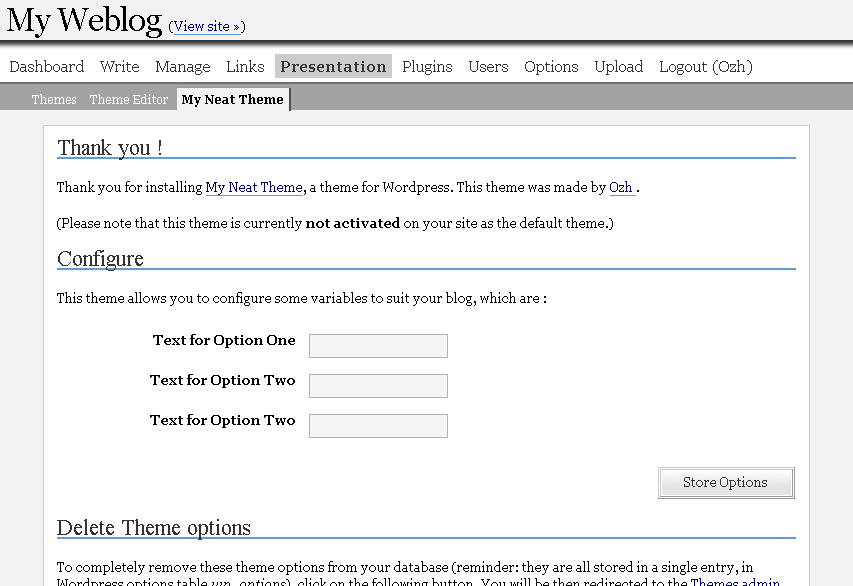
Just to be sure : Wordpress Theme Toolkit is not a theme with an admin menu. It is something that makes adding an admin menu to an existing theme as easy as 1-2-3.
This long article is divided in shorter sections :
- Intro : well, here.
- Overview : a quick tour about features and how easy things are.
- Manual : detailed features and how-to
- Download ! : files and credits.
- Ideas and Examples : suggestions and ideas of what you could add to your theme … and a real Wordpress Theme as an example of use.
Related posts
Page: #1 #2 #3 #4 #5Metastuff
148 Blablas
Pages: « 1 2 3 4 5 [6] 7 8 » Show All
pingback on 20/Jan/07 at 9:26 am # :
[...] 说Faunaå†…ç§€æ˜¯å› ä¸ºå®ƒä½¿ç”¨äº†Ozhçš„WordPress Theme Toolkit:WordPress Theme Toolkit是一款为主题设计者开å‘çš„æ’件,它å…è®¸è®¾è®¡è€…ä¸ºè‡ªå·±çš„ä½œå“æ·»åŠ ä¸°å¯Œçš„è‡ªå®šä¹‰é€‰é¡¹ï¼Œä»Žè€Œæ»¡è¶³ç”¨æˆ·çš„ä¸åŒéœ€æ±‚ã€‚æ— è®ºæ˜¯å¦å…·å¤‡XHTML或CSS的相关知识,用户都å¯ä»¥é€šè¿‡â€œCurrent Theme Optionsâ€è½»æ˜“的完æˆç½‘页图片的更æ¢ã€æ¨¡ç‰ˆå¸ƒå±€çš„调整以åŠèƒŒæ™¯è‰²å½©çš„修改ç‰åŸºæœ¬æ“ä½œã€‚è€Œè¿™ç¯‡æ–‡ç« çš„ä¸»è§’åˆ™æ˜¯æœ€èƒ½ä½“çŽ°WordPress Theme Toolkit精髓的一款主题,å¯ä»¥è¯´æ˜¯Fauna放大了这个æ’件的作用。 [...]
pingback on 03/May/07 at 4:49 pm # :
[...] Hablando de temas para Wordpress: Theme Toolkit. Archivado en: CMS diseño web minipost Wordpress [...]
pingback on 07/May/07 at 8:33 am # :
[...] 贫僧先æ¥ä»‹ç»ä¸€ä¸‹ä»Šå¤©çš„主角——Wordpress Theme Toolkit å’Œ Unnamed 0.4.1:Wordpress Theme Toolkit 是著å WordPress 达人 Ozh å¼€å‘的专用于编写 WordPress 模æ¿åŽå°ç®¡ç†é¡µé¢çš„工具(Ozh å¼€å‘了很多ç»å…¸ä¸”实用的WordPressæ’件和工具,施主å¯ä»¥åœ¨è¿™é‡Œæ‰¾åˆ°æ›´å¤šå¥½çŽ©çš„ä¸œè¥¿ï¼‰ã€‚å°½ç®¡å·²ç»æœ‰å¾ˆä¹…没有更新,但ç»è¿‡æµ‹è¯•,å‘布于ä¹ä¸ªæœˆå‰çš„ã€å°†è¯¥å·¥å…·æ€§èƒ½åŽ‹æ¦¨æ®†å°½çš„ Unnamed 0.4 至今ä»èƒ½éžå¸¸ç¨³å®šçš„工作在 WordPress 2.3-Alpha å¹³å°ä¸‹ã€‚ [...]
replied, on 22/May/07 at 8:56 pm # :
Are you cool with modifying your code? I noticed a couple of people wanting to add cases to it. I will be redistributing it, but will leave attribution intact. It’s not for profit.
commented, on 22/May/07 at 9:57 pm # :
I’m pretty cool with this indeed :)
Please leave attribution intact so that people know where to refer for the original documentation etc, and change the version to something like “1.2+dick” or whatever to clearly identify the fork : I don’t want any support request regarding your modifications :)
pingback on 26/May/07 at 1:53 am # :
[...] Theme Toolkit - Configuración del theme [...]
pingback on 28/May/07 at 8:08 am # :
[...] Theme Toolkit - Configuración del theme [...]
pingback on 01/Jun/07 at 9:35 am # :
[...] WordPress May 31st, 2007 Dentro del desarrollo web Spiga ha ganado gran “expertise” en el manejo de una de las más utilizados plataformas de administración de contenidos conocida como WordPress. Utilizando esta plataforma y las diversas herramientas que ofrece como widgets logramos generar una interfaz gráfica (GUI) donde el usuario final tiene la posibilidad de modificar aspectos gráficos, estructurales y funcionales del sitio sin necesidad de conocimientos de programación usando Theme ToolKit. [...]
pingback on 06/Jun/07 at 3:45 pm # :
[...] intentando, de entrada he podido generar dos themes usando los widgets y uno de ellos mezclado con WordPress Theme Toolkit que hasta el momento ha sido una herramienta a la que le he podido sacar mucho provecho y tiene un [...]
commented, on 08/Jun/07 at 10:02 am # :
hi, is there a way to show a second admin tab?
nice toolkit btw. :)
said, on 08/Jun/07 at 11:38 pm # :
Steffen » never tried. You could try to duplicate everything (themetoolkit2.php with class themetoolkit2), should probably work.
wrote, on 09/Jun/07 at 6:01 pm # :
thx, i try it.
can i use php-code in the textarea? how i have to show it?
commented, on 13/Jun/07 at 8:53 pm # :
WordPress May 31st, 2007 Dentro del desarrollo web Spiga ha ganado gran “expertise†en el manejo de una de las más utilizados plataformas de administración de contenidos conocida como WordPress. Utilizando esta plataforma y las diversas herramientas que ofrece como widgets logramos generar una interfaz gráfica (GUI) donde el usuario final tiene la posibilidad de modificar aspectos gráficos, estructurales y funcionales del sitio sin necesidad de conocimientos de programación usando Theme ToolKit. […]
pingback on 14/Jun/07 at 5:31 pm # :
[...] been working on getting Simple In Pink up to a better standard. I decided to use planetOzh’s WordPress Theme Toolkit to add some theme options. Simple In Pink has an “About” box on the front page. [...]
commented, on 18/Jun/07 at 4:42 pm # :
I liked your Wordpress Theme Toolkit. Just what I need to help me revamp my blog.
Thanks!
pingback on 22/Jun/07 at 2:07 pm # :
[...] schön schlank und lässt sich sogar noch direkt im Admin-Bereich ein wenig anpassen dank Wordpress Theme Toolkit. Dazu kommt, dass die Farben sogar zum Namen des Webservers passen, was will man [...]
pingback on 29/Jun/07 at 11:55 am # :
[...] an updated version of the Simple In Pink theme, I decided to play around with planetOzh’s WordPress Theme Toolkit, to try and add a few options into the theme, so anyone that wanted to use the theme, [...]
thought, on 04/Jul/07 at 11:56 am # :
I try it .good!
pingback on 12/Jul/07 at 3:11 am # :
[...] Theme ToolKitSin duda uno de los mejores plugins que he encontrado, pueden facilitar mucho las cosas para el usuario final añadiéndole parámetros dependiendo de las necesidades [...]
pingback on 20/Aug/07 at 4:33 am # :
[...] Theme ToolKit [...]