On: 2005/09/03 Viewed: 240087 times

In every Wordpress theme there are places that are supposed to be edited and customized by the end user who is using the theme : an “About you” block to fill in, a loop to customize when you want to add “Asides” post style, some CSS to tweak to use an personal image in header, etc…

The problem is : most bloggers are not PHP or HTML expert, can’t tell the difference between an HTML tag and a PHP tag, and simple editing of templates can be hazardous and tedious to them. Adding an admin menu in your theme ensures that end users can customize things without editing source files, just as naturally as changing a Wordpress option in the admin area.

Wordpress Theme Toolkit is a PHP class that gives Wordpress theme authors the opportunity of creating a persistent admin menu for their theme as easily as editing 3 lines in a file.

You are a theme author ? Have enough skills to edit three lines ? Add an admin menu to your theme ! (click to enlarge)
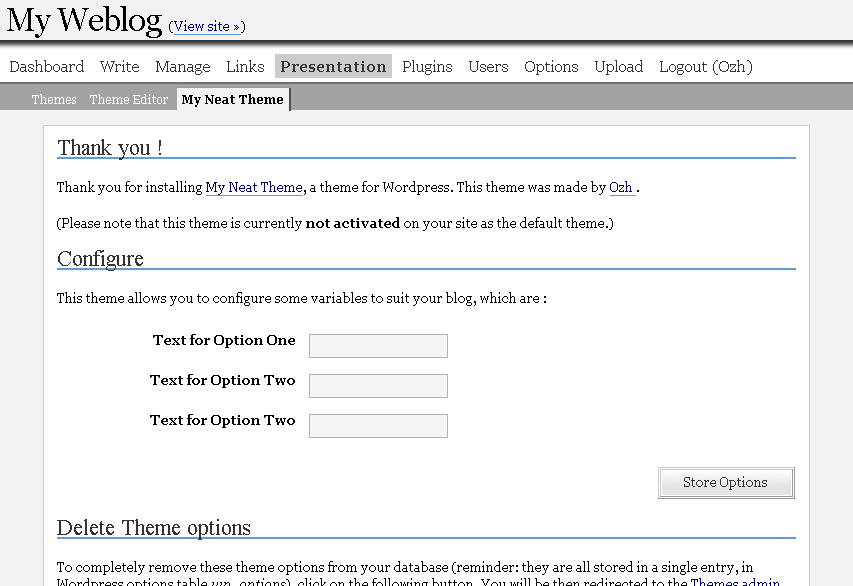
Theme Toolkit : admin menu example

Just to be sure : Wordpress Theme Toolkit is not a theme with an admin menu. It is something that makes adding an admin menu to an existing theme as easy as 1-2-3.

This long article is divided in shorter sections :

  1. Intro : well, here.
  2. Overview : a quick tour about features and how easy things are.
  3. Manual : detailed features and how-to
  4. Download ! : files and credits.
  5. Ideas and Examples : suggestions and ideas of what you could add to your theme … and a real Wordpress Theme as an example of use.

Related posts

Page: #1 #2 #3 #4 #5

Metastuff

This page "Wordpress Theme Toolkit" was posted on 03/09/2005 at 2:36 pm
Watch this discussion : Comments RSS 2.0. You can trackback this post from your own site

149 Blablas

    Pages: « 1 2 3 4 [5] 6 7 8 » Show All

  1. 81
    Karthik India »
    thought, on 04/Jul/06 at 1:02 pm # :

    hey i am designing a theme and i wanted a query like this to be generated.. in a function called mytheme_asides()

    // query_posts(’category_name=”asides”&showposts=4′);

    how do i do it.. i want “asides” to be replaced by $mytheme->options['asides'] and 4 to be replaced by $mytheme->options['asides_num']..

    please help me out..

  2. 82
    aseed France »
    said, on 31/Jul/06 at 8:53 am # :

    Great job merci beaucoup
    sympa knorr ;-)

  3. 83
    sapinto Chile »
    wrote, on 22/Sep/06 at 7:42 am # :

    crystal.

    nice work dude ;)

  4. 84
    John Ireland »
    replied, on 20/Oct/06 at 6:34 am # :

    Thank you so much. I am no expert with php and the toolkit has give me loads of options to edit my own blog. This is such a great tool and thank you again!

  5. 85
    Eugen Tuning Germany »
    thought, on 24/Oct/06 at 10:59 pm # :

    Ozh , thanks for tool, great idea. downloaded and installed, but must test in my testblog :)

  6. 86
    arena France »
    replied, on 25/Oct/06 at 12:42 am # :

    Bonjour,

    j’ai juste rajouté ces quelques lignes dans la fonction print :

    case ’select’:
    print $matches[1].”\n”;
    print “”;
    while ($items) {
    $v=array_shift($items);
    $t=array_shift($items);
    $selected=”;
    if ($v == $this->option[$key]) $selected=’ selected’;
    print “$t\n”;
    }
    print “”;
    break;

    et ca marche !!!!!!!!

  7. 87
    Sam Devol :: WordPress Theme: missunders... United States »
    pingback on 30/Oct/06 at 6:22 pm # :

    [...] The sidebar is fixed (static), but the header and content-area are fluid to accommodate different sized screens/browsers. I included the WordPress Theme Toolkit by Ozh for user-friendliness. For style and functionality I have included some plugins: jspullquotes by Viper007Bond (for the cute magazine-style pullquotes), Sociable by Peter Harkins (adds Social Bookmarking links to the end of each post), Live Comment Preview by Jeff Minard and Iacovos Constantinou, Optimal Title by Aaron Schaefer (reverses order of post-title/blog-title for SEO/Search friendliness) and Related Posts by By Alexander Malov & Mike Lu (lists related posts at the end of each post). [...]

  8. 88
    Sam Devol :: WordPress theme: Corporate ... United States »
    pingback on 30/Oct/06 at 6:50 pm # :

    [...] Here is a newsletter-style 2-column with sidebar theme for WordPress which allows some control over which categories are displayed in each column. I included the WordPress Theme Toolkit by Ozh for user-friendliness. This theme is a modified version of Corporate Slave, by dreamLogic . [...]

  9. 89
    Update: Widgetized October Special - 5Th... United States »
    pingback on 06/Nov/06 at 9:07 am # :

    [...] Now distributed with multiple colors schemes - blue, pink, green, brown, red, and orange - controlled via the Theme Presentations tab thanks to the WordPress Theme Toolkit. [...]

  10. 90
    una prueba | Un tipo X (Cómic blog) United States »
    pingback on 07/Nov/06 at 8:25 am # :

    [...] Usamos Wordpress Theme Toolkit [...]

  11. 91
    Taly OnLine » Un camino de ida United States »
    pingback on 15/Nov/06 at 1:15 am # :

    [...] Cada segundo que paso online significa incorporar un nuevo conocimiento: desde la lectura del diario ni bien me levanto, hasta aprender a usar el wordpress theme toolkit para ponerselos a mis themes. Desde leer las principales tres revistas medicas todos los días hasta la verdadera historia de Jean y Dark Phoenix. [...]

  12. 92
    Martijn Stegink Netherlands »
    thought, on 03/Dec/06 at 11:54 pm # :

    I use your toolkit in my CMS theme. Thanks for creating and sharing this nice tool. A suggestion: it would be nice to be able to add a dropdown list based in a query in the options.

  13. 93
    Widgetized October Special WordPress The... United States »
    pingback on 10/Dec/06 at 7:50 am # :

    [...] Now distributed with multiple colors schemes - blue, pink, green, brown, red, and orange - controlled via the Theme Presentations tab thanks to the WordPress Theme Toolkit. [...]

  14. 94
    Infected-FX Mexico »
    replied, on 28/Dec/06 at 4:20 pm # :

    Hi, i’m new using this great featured for themes, but i have a question in the implementation for this.

    I am trying to use conditional for the functions, if they exist that they are and but that they show another thing, but me it does not respect it.

    For example i have a function call inphecthyuz_codeone in my theme put this


    < ? php if (function_exists('inphecthyuz_codeone')) : ? >
    < p >< ? php inphecthyuz_codeone(); ? > < /p >
    < ? php else : ? >
    < h2 >the other thing here
    < ? php endif; ? >

    any idea? :( pls!!

    Thank you!! :) and greetings.

  15. 95
    Kipit France »
    said, on 28/Dec/06 at 6:52 pm # :

    To use it with WPmu (Worpress-Multiuser), as $wp_version=’wordpress-mu-1.0′ , drop WP 2.0 (and 1.0) specific code, assuming that current version of WPmu is based upon WP-2.0

  16. 96
    Ozh France »
    wrote, on 28/Dec/06 at 7:52 pm # :

    InfectedFX » your PHP code is correct. The thing is, function_exists is sometimes a bit touchy : at compilation time, PHP sometimes doesn’t know if the function will exists or not. This can typically happen when your function_exists test is enclosed in another test, or a class.

    However, there is no reason why a function you’re defining in your theme would not exist. So I’m not sure you really need this test :)

  17. 97
    Money From Great Britain (UK) »
    said, on 05/Jan/07 at 11:09 am # :

    The more code that is added the slower everything will start to run though correct or am I wrong? Is it a noticable shift in performance?

  18. 98
    Ozh France »
    thought, on 06/Jan/07 at 12:36 am # :

    MF » take a look at how many thousands of lines of code are run in WP every time a page is loaded. Adding a single 40 line class and 20 lines of functions code is… nothing :)

  19. 99
    test Germany »
    said, on 14/Jan/07 at 2:51 am # :

    Sehr gut!

  20. 100
    Andy Wibbels United States »
    thought, on 19/Jan/07 at 3:04 pm # :

    Toyed with getting a option type for dropdown menus. Here’s what I came up with - still testing it:

    case ‘dropdown’:
    print $matches[1].”\n”;
    print “”;
    while ($items) {
    $v=array_shift($items);
    $t=array_shift($items);
    $checked=”;
    if ($v == $this->option[$key]) $checked=’selected’;
    print ” $t”;
    if (@$items) print “\n”;
    }
    print “”;
    print “”;
    break;

Pages: « 1 2 3 4 [5] 6 7 8 » Show All

Leave a Reply

Comment Guidelines or Die

  • HTML: You can use these tags: <a href=""> <em> <i> <b> <strong> <blockquote>
  • Posting code: Post raw code (no <> &lt; etc) within appropriate tags : [php][/php], [css][/css], [html][/html], [js][/js], [sql][/sql], [xml][/xml], or generic [code][code]
  • Gravatars: Curious about the little images next to each commenter's name ? Go to Gravatar.
  • Spam: Various spam plugins on patrol. I'll put pins in a Voodoo doll if you spam me.
  • I will mark as Spam test comments, all comments with SEO names (ie "My Cool Online Shop" instead of "Joe") or containing forum-like signatures.

Close
E-mail It