
Warning: hefty explanations and documentation. On a rush? Give the demo a try. Chances are you'll understand right away what and how. Then download. Then please read here.
Current version: 2.0 for WordPress 2.5+ See below for older versions.
You most certainly have two types of visitors on your blog : some returning readers, and a majority of first time visitors. Returning readers come to your site for its content and for what you write. First time visitors, and mostly search engine visitors, come because they are looking for something particular, look at the page, and leave.
The first obvious thought that comes to mind when you want to monetize your blog is: "I'm going to put ads and banners everywhere". By doing so, you won't add any value or service to regular readers, who are not likely to click on your ads. By doing so, you'll also probably won't do justice to your finely handcrafted pixel polished WordPress theme. By not serving ads to your regular visitors, chances are you'll both lose little money and show your readers you're treating them differently.
Therefore, the second obvious thought about blog monetization is : "I wish I could display a lot of ads to those coming once never returning readers, but not bother my regular fans". Enter Who Sees Ads, the ultimate ad management plugin.
Who Sees Ads ?
So, who sees ads ? Now it's up to you.
Who Sees Ads is an advanced ad management plugin that lets you decide who will see your ads, depending on user defined conditions. The association of an ad and these conditions is called a context: a set of circumstances you define, that will eventually display or not an ad.
For instance, you could consider the following criteria: Is the visitor a regular reader? Does this visitor come from a search engine? Is the visitor currently reading a recent post, or something really old?
Live demo
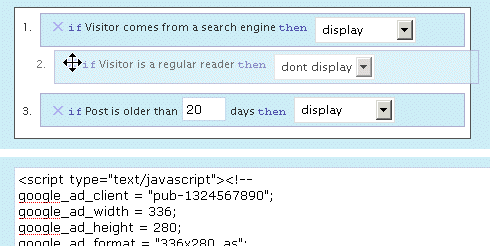
The plugin is active here, to display an ad on top of the right sidebar. Depending on the context, you could see it or not. Its display rules are:
- display if visitors comes from a search engine
- don't display if the visitor is a regular reader
- always display
The ad behavior is defined by the first rule that is matched. Visit the main page of my blog: as I've defined a "Regular reader" here (someone who has read at least 2 pages over the last 10 days), you're now a regular reader, hence rule #2 apply and you don't see the ad any longer. Now go to Google and click on the first result to come back here: rule #1 now applies, and you'll see the ad.
Define Contexts
Ad code + Display rules = Context
You already probably have the Ad code : it can be plain HTML (a text link, a image banner) or Javascript (your Adsense code). Let's define the display rules.
Who Sees Ads offers a very intuitive and powerful visual interface to create your context and pick display rules, in which you naturally select and order them with your mouse. The interface also offers a convenient way to duplicate, rename and delete your contexts.
Have a look and play a bit with this demo. You'll love it.
Display Rules
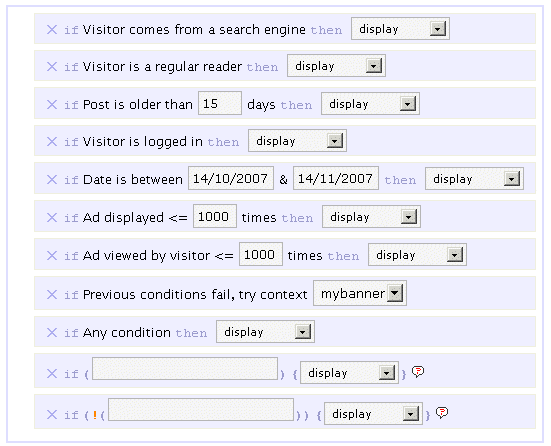
By default, you can pick or mix any of the following rules :
- If Visitor comes from a search engine, display / don't display
- If Visitor is a regular reader, display / don't display
- If Post is older than XX days, display / don't display
- If Visitor is logged in, display / don't display
- If Date is between specified date interval, display / don't display
- If Ad has been showed less than XX times, display / don't display
- If This visitor has viewed this ad less than XX times, display / don't display
- If All previous conditions fail, try another context
- If Any condition, display / don't display
The ad behavior will be eventually decided by the first rule which is matched. For instance, if you want to display an ad only for search engine visitors, you'll pick the following :
- If Visitor comes from a search engine, display
- If Any condition, don't display
If no rule is matched, nothing displays, so the second rule in the above example is actually optional.
I made up a list of example display rules, be sure to check them.
Advanced Display Rules
 You can use PHP functions and make your own custom advanced display rules. Want to display something on home page only ? if (is_home()) display will be your custom display rule.
You can use PHP built-in, WordPress internal, or your own functions. Your brain is the limit.
Please note: you obviously need to know a bit of PHP in order to use the advanced display rules. By default, they are not enabled. If you want them active, edit the beginning of the script and set $wp_ozh_wsa['iknowphp'] to true. This requires your agreement on being on your own if you break your site or if ads don't show as expected.
There are two advanced custom display rules :
- If ( condition ), display / don't display
- If !( condition ), display / don't display
The if and if not rules are working the same, I just thought it could be more convenient in some cases to use an if not rather than an if, and this way you also have two custom rules for the price of one :)
Again, check the example display rules to get an idea of how powerful it is.
Features
Simple and Effective Ad Management
Even if you're not using Who Sees Ads to fine tune display rules, it will make your life easier. Pasting <?php wp_ozh_wsa('google-336-280') ?> in your PHP templates such as sidebar.php is a lot easier than cut and pasting 10 lines of javascript, especially if you decide later to change the javascript across multiple files.
Use it inline or in PHP templates
Create contexts and display ads either in your PHP files on within your posts and pages :
- <?php wp_ozh_wsa('mybanner') ?> in your PHP files such as sidebar.php
- <!--wsa:mybanner--> within posts and pages
Visual interface
If you haven't tried it already, play with the demo. It's not functional of course, but it will show you own the interface lets you visually create contexts, and easily rename, duplicate and delete ads.
Help Wizard
A togglable introductory help contains a handy wizard that will assist you, creating your two first rules. Click on the image for a screenshot of the Wizardry.

Posting help
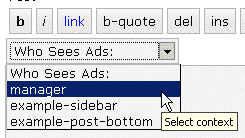
Within the Post/Edit interface, you'll find a convenient drop down selection to easily insert context you will have created (if you create just one context, the select is replaced with a button)
Google Adsense and Yahoo Publisher Compliant
Per terms of use, YPN (TOS) and Adsense (TOS) impose a maximum number of ads in a page, as follow (as of writing):
- YPN: 3 ads per page
- Adsense :
- 3 ads
- 2 search boxes
- 3 link units
- 3 referral units
Who Sees Ads fully complies to these restriction, and will display ads of a particular type up to the maximum number allowed.
Google Adsense and Yahoo Publisher Compliant, part 2
Per terms of use, YPN and Adsense don't allow ads on error pages such as 404 pages, and on pages that are not viewable by their system.
Who Sees Ads also complies to this policy, and ads won't be displayed on 404 error pages, and on draft posts a publisher is previewing.
Admin Clicks Safety
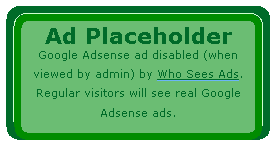 Admin Click Safety is an option that will prevent you from accidentally clicking on your own ads (Adsense or Yahoo Publisher), replacing them by a placeholder when viewed by the blog admin.
Regular visitors, of course, will see actual ads if applicable. Days of "oops I clicked it!" are over.
Widget support
Who Sees Ads is now supporting widgetized themes for easier ad management.
Custom Preferences Hacking
Advanced users with some PHP editing knowledge can now define a custom set of preferences or behaviors that will override Who Sees Ads' defaults. The plugin comes with an example my_options_sample.php file. Rename it my_options.php, edit it, and never lose any change you'd make when you upgrade the plugin.
3rd party plugin compatibility: Adsense Deluxe and Adsense Manager
For those who are already using Adsense Deluxe or Adsense Manager to manage your Adsense ads, you can seamlessly make the transition to Who Sees Ads and give it a try without uninstalling them. Instead of pasting the actual Adsense code when you create a context, just enter something like the following examples, depending on what plugin you're using:
- <!--adsense#mybanner-->
- adsensem_ad('mybanner')
- adsense_deluxe_ads('mybanner')
Please note: compatibility with these 2 plugins has been implemented to allow easy testing before adopting. I personally find Who Sees Ads much more powerful and efficient, and don't see the point of using it side by side with another ad management plugin. I will not continue support of these plugins if their code evolves and changes so that it breaks with my plugin.
Rotating Ads
You can define only 1 context and assign it as much ad code as you want. You just need to specify your custom code separator in my_options.php and you're done. Example, defining the string *** CODE *** as a separator:
- <img src="banner1.jpg" alt="Banner 1" />
- *** CODE ***
- <img src="banner2.jpg" alt="Banner 2" />
- *** CODE ***
- <img src="banner3.jpg" alt="Banner 3" />
Completely dynamic
The content managed by Who Sees Ads and whether it should display or not is processed dynamically on every visit for every visitor, to ensure maximum efficiency and make sure each visitor receives the treatment it deserves. The drawback of this aspect is that the plugin is not compatible with cache plugins, which generate each page once and serve the same static file to each subsequent visitors.
Download
ozh-who-sees-ads.zip
Extract and upload to your blog, preserving directory structure if any.
Note: download counter here and stats on wordpress.org may differ and reflect the number of downloads before this plugin was hosted on the plugin directory
PHP Template usage
The regular PHP call you will insert in your PHP templates is the following:
- <?php wp_ozh_wsa('myad'); ?>
However, you can pass an additional parameter to turn off output and have the ad code returned instead:
- <?php $code = wp_ozh_wsa('myad', false); ?>
By default, the plugin returns an HTML comment when no ad has to be displayed, for instance:
- <!-- WSA: rules for context 'myad' did not apply -->
A complete example of how to use WSA with your own functions would be something like:
- <?php
- $code = wp_ozh_wsa('myad', false);
- if (strpos($code,'<!-- WSA') !== false) {
- // plugin returned actual code, do something with it
- ...
- } else {
- // plugin returned no code to be displayed
- }
- ?>
Examples and advanced use
The obvious usage of this plugin is to display ads with rules as :
- Display ad when user comes from a search engine
- Don't display ads to my regular readers
- Display ads on old stuff, don't display on fresh posts
But you can also :
Greet your returning visitors
You can display ads, or really anything. For instance, display something only to your regular readers: a "welcome back" message, or a special offer you don't want them to miss.
Geo target !
In conjunction with my own IP to Nation plugin, you can easily target visitor from a particular country. For instance, you've always wanted to display Yahoo Publisher ads to American visitors only, as Yahoo suggestscompells? Easy, your context simply has to use the following custom if rule:
if (wp_ozh_getCountryName(0) == 'United States'), display
Check the example display rules for more ideas of usage.
Older version
Download: Who Sees Ads 1.3.3 for WordPress 2.3.3-
Question?
If you have a question, read all the comments: the answer *is* there.
[…] © Who See Ads Sitenizde reklam yay?nlaman?z?, bu reklamlar? istedi?iniz ki?ilerin görmesini […]
[…] die aus dem Text die Schlüsselwörter ausließt. Auf ein anpassen des neuen Plugins Who Sees Ads verzichte ich an dieser Stelle, währe ein Feture Wunsch an den Programmierer […]
[…] Who Sees Ads -Another powerful ad management plugin like the previous one but with a control panel where you can set things like how old a post has to be to display ads, etc. I am still torn between the two but I have to use them both to find out which one I like better. […]
Hi Ozh,
I think the first version of this post had a link to a page written by someone else. This page went into more details about the rationale behind "Who sees ads"
I have racked my brain trying to remember where that was, but I have CRS, I am afraid.
Could you ever so kindly jog my memory?
Tim
Tim VB » http://fortuito.us/2007/05/how_ads_really_work_superfans_1 ?
Sweet! Thanks, Ozh. You da man!
Hi Ozh,
It seem the adsense rules not working, my website only can show 4 maximum number of ads. I must edit the plugin to make it working.
And another problem I figure is cannot save/edit more context if already have 6-7 context. Its always showing "Warning: Invalid argument supplied for foreach() in /home/creend/public_html/wp-content/plugins/ozh-who-sees-ads/wp_ozh_whoseesads_admin.php on line 1393"
Or maybe this plugin have limitation number to save context?
Sorry for my bad english.
Thanks
[…] Ozh’ Who Sees Ads – Este Plugin para monetizar o blog mostra qualquer tipo de anuncio de programa de afiliados para Blogs com várias regras. O que faz de Ozh um dos melhores plugins para ganhar dinheiro com seu blog é a capacidade de mostrar diferentes anuncios dependendo como o visitante chegou ao seu site. Se ele entrou por um link você mostra um anuncio, se ele chegou pelo Google você mostra outro! Muito legal! Smart Ads – Automaticamente insere o Adsense, exclui categorias e mínimo de palavras […]
[…] wirklich sehr gutes WordPress-Plugin ist Who Sees Ads. Es ist seit heute auf Majeres.de aktiv und soll meinen lieben Stammleser ein adsensefreies Lesen […]
[…] wtyczki, przed dos?ownie chwil? zainstalowa?em jeszcze jedn? wtyczk?, tym razem jest to: Ozh' Who Sees Ads. Teoretycznie s?u?y ona do wy?wietlania reklam, w praktyce jednak mo?na jej u?y? do […]
[…] you are using WordPress as a blogging platform, the Who Sees Ads allows you to target ads to different sections of users, it is definitely a must […]
[…] Ozh’ Who Sees Ads – Who Sees Ads??Wordperss????????????. ????????????????, ???????????, ????????. ???? […]
[…] http://planetozh.com/blog/my-projects/wordpress-plugin-who-sees-ads-control-adsense-display […]
[…] Ozh’ Who Sees Ads – Who Sees Ads??Wordperss????????????. ????????????????, ???????????, ????????. ???? […]
This is an awesome, awesome plugin. Thank you so much for it. I have it working nicely and am now looking at the geo targeting functionality. That has huge potential. You are very cool ;)
Hi Ohz,
Thanks for the Who Sees Ads Plugin. I've been looking for an ad plugin and this one ticks all the boxes I had. The place holder is a great idea, especially for Google Adsense.
I also like the suggestion for welcoming back visitors with other text and promotions. Great use that I'll definitely work into one of my blogs.
I am looking forward to using it alot!
Hi
Do you have WordPress MU version for this plugin?
regard
ishara » There is no WPMU version specifically, although this one should work fine.
[…] meinem Blog besuchen, nicht mit Werbung bombadieren will verwendet ich das WordPress-Plugin "Who Sees Ads". Damit kann man genau einstellen, wann – wer – welche Werbung sehen soll (von Adblock […]
[…] prize winner: Who Sees Ads by Ozh – Who Sees Ads is a wonderfully useful plugin that lets you determine who sees the ads on […]
[…] blogwalking aksi blogwalking. Blogywalkie nemuin plugin bagus nih, namanya: WhoSeeAds. Jadi, WhoSeeAds adalah plugin yang mampu untuk menampilkan iklan (AdSense misalnya) HANYA dengan […]
Does anybody know how to put this into practice:
Display when coming from search-engines, except when landing page is post 50.
I tried this without success:
if Visitor comes from a search engine then display
if(!(is_single('50'))){don't display}
I also tried reversing the order.
Thanks,
Eddie
[…] 2. Who Sees Ads […]
[…] Who sees ads is a great plugin that allows you to set who sees adsense and other ads on your sites. For example, you can set an ad to display only to search engine visitors. You can also restrict ads on any given post or page. This plugin takes some time to fully grasp, and I highly recommend that you read through the instructions on the plugin page. If you still have questions, feel free to contact me. […]
[…] used Who Sees Ads plugin to display the signup box above the content. I made the settings in such a way that users who visit […]
[…] but there is actually a WordPress plugin that actually does that, available on this site (planetozh.com) From the site, here is a list of […]
[…] 320 © Who See Ads Sitenizde reklam yay?nlaman?z?, bu reklamlar? istedi?iniz ki?ilerin görmesini sa?lar. […]
[…] © Who See Ads Sitenizde reklam yay?nlaman?z?, bu reklamlar? istedi?iniz ki?ilerin görmesini […]
[…] ??????????wordpress?Who Sees Ads??????????????????????? […]
[…] saya menggunakan plugin who see ads yang bisa memfilter pengunjung berdasarkan kondisi seperti […]
Hi there I get this when I try to edit my ad context "Warning: Invalid argument supplied for foreach() in /home/creend/public_html/wp-content/plugins/ozh-who-sees-ads/wp_ozh_whoseesads_admin.php on line 1393" Any idea what's causing it?
Also, I can't seem to get the rotating ads function to work. Can anyone help? It just shows up everything in that context with the code for **** ROTATE **** between.
Thanks, this is a great plugin.
Hi Ozh,
Thanks for nice plugin.
I think there is a bug here:
wp_ozh_whoseesads.php line:841
Must be:
Not: I couldn't tested but can you add an option admin menu for display only wpmu admins?
I really like this plug in because it is the only one of its kind. But I have a feature request.
It would great if we could show the ads based on the country IP of the visitor!
For example, some affiliate networks, pay onlly for US traffic.
I hope you can do something about this.
koko » This plugin + my IP to Nation plugin, as explained right here in this page.
[…] Plugins Consolation Prize Winner – Ozh for Who Sees Ads WordPress […]
Cool plugin… Just a question: is ther any way to know the IP of the visitor? I need some specific IPs to be free of ads.
Thanks!!!
[…] that last one – if you run a WordPress blog and you get a decent amount of search traffic, try the Who Sees Ads plugin. This will show ads only on archive & single post pages, and just to people coming from search […]
[…] Source from http://planetozh.com […]
[…] There always seems to be a fresh supply of WordPress plugins that control advertisement and banner delivery. This is no surprise seeing as how WordPress has proven itself to be a great selling tool. Among all of these WordPress plugins, though, there are only a few that really stand out, one of which is Who Sees Ads! […]
Great plugin… You cannot find many plugins as professionally developed, documented and supported like this. User-friendly design… Near perfect…
Thanks Ozh!
[…] Who See Ads: Gerenciamento avançado onde você decide quem deverá visualizar os anúncios […]
[…] Official Comments: Damit werden die Admin Kommentare mit einer anderen Hintergrund Farbe versehen. Ozh' Who Sees Ads: Damit kann bestimmt werden wer welche Werbung sehen soll. Post Teaser: Es wird nach einer frei […]
[…] WordPress plugin Who Shows Ads enables adding very simple to extremely complex rulesets for when, where and how to show […]
[…] Who Sees Ads – Makes ads or other elements conditionally displayed […]
[…] al plugin Who Shows Ads si possono impostare delle regole sul proprio blog in modo da decidere a chi mostrare gli annunci […]
[…] Pastikan plugin wordpress yang namanya 'Who See Ads' sudah terinstall di blog wordpress […]
I don't know really if it's possible already, but i would love to execute PHP in the code so I could integrate other Ad-Plugins in your's. Sorry for my bad english ;)
sinserely, .wired
[…] å gjøre noe med dette på denne bloggen. Jeg har installert en wordpress-plugin ved navn "Who Sees Ads?" som lar meg sette opp regler for når reklamen skal bli vist og ikke. Det er mange […]
[…] If you have a WordPress blog, it may be worth using the Who Sees Ads plugin so that only search engine traffic see Adsense ads. I haven't done this on this blog yet as […]
[…] Who See Ads – afi?area bannerelor publicitare în mod aleatoriu, auto-refresh ?i anumitor […]