
Warning: hefty explanations and documentation. On a rush? Give the demo a try. Chances are you'll understand right away what and how. Then download. Then please read here.
Current version: 2.0 for WordPress 2.5+ See below for older versions.
You most certainly have two types of visitors on your blog : some returning readers, and a majority of first time visitors. Returning readers come to your site for its content and for what you write. First time visitors, and mostly search engine visitors, come because they are looking for something particular, look at the page, and leave.
The first obvious thought that comes to mind when you want to monetize your blog is: "I'm going to put ads and banners everywhere". By doing so, you won't add any value or service to regular readers, who are not likely to click on your ads. By doing so, you'll also probably won't do justice to your finely handcrafted pixel polished WordPress theme. By not serving ads to your regular visitors, chances are you'll both lose little money and show your readers you're treating them differently.
Therefore, the second obvious thought about blog monetization is : "I wish I could display a lot of ads to those coming once never returning readers, but not bother my regular fans". Enter Who Sees Ads, the ultimate ad management plugin.
Who Sees Ads ?
So, who sees ads ? Now it's up to you.
Who Sees Ads is an advanced ad management plugin that lets you decide who will see your ads, depending on user defined conditions. The association of an ad and these conditions is called a context: a set of circumstances you define, that will eventually display or not an ad.
For instance, you could consider the following criteria: Is the visitor a regular reader? Does this visitor come from a search engine? Is the visitor currently reading a recent post, or something really old?
Live demo
The plugin is active here, to display an ad on top of the right sidebar. Depending on the context, you could see it or not. Its display rules are:
- display if visitors comes from a search engine
- don't display if the visitor is a regular reader
- always display
The ad behavior is defined by the first rule that is matched. Visit the main page of my blog: as I've defined a "Regular reader" here (someone who has read at least 2 pages over the last 10 days), you're now a regular reader, hence rule #2 apply and you don't see the ad any longer. Now go to Google and click on the first result to come back here: rule #1 now applies, and you'll see the ad.
Define Contexts
Ad code + Display rules = Context
You already probably have the Ad code : it can be plain HTML (a text link, a image banner) or Javascript (your Adsense code). Let's define the display rules.
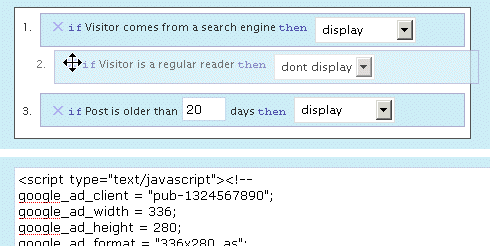
Who Sees Ads offers a very intuitive and powerful visual interface to create your context and pick display rules, in which you naturally select and order them with your mouse. The interface also offers a convenient way to duplicate, rename and delete your contexts.
Have a look and play a bit with this demo. You'll love it.
Display Rules
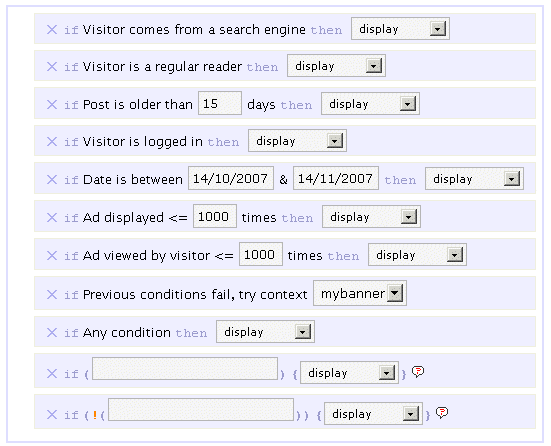
By default, you can pick or mix any of the following rules :
- If Visitor comes from a search engine, display / don't display
- If Visitor is a regular reader, display / don't display
- If Post is older than XX days, display / don't display
- If Visitor is logged in, display / don't display
- If Date is between specified date interval, display / don't display
- If Ad has been showed less than XX times, display / don't display
- If This visitor has viewed this ad less than XX times, display / don't display
- If All previous conditions fail, try another context
- If Any condition, display / don't display
The ad behavior will be eventually decided by the first rule which is matched. For instance, if you want to display an ad only for search engine visitors, you'll pick the following :
- If Visitor comes from a search engine, display
- If Any condition, don't display
If no rule is matched, nothing displays, so the second rule in the above example is actually optional.
I made up a list of example display rules, be sure to check them.
Advanced Display Rules
 You can use PHP functions and make your own custom advanced display rules. Want to display something on home page only ? if (is_home()) display will be your custom display rule.
You can use PHP built-in, WordPress internal, or your own functions. Your brain is the limit.
Please note: you obviously need to know a bit of PHP in order to use the advanced display rules. By default, they are not enabled. If you want them active, edit the beginning of the script and set $wp_ozh_wsa['iknowphp'] to true. This requires your agreement on being on your own if you break your site or if ads don't show as expected.
There are two advanced custom display rules :
- If ( condition ), display / don't display
- If !( condition ), display / don't display
The if and if not rules are working the same, I just thought it could be more convenient in some cases to use an if not rather than an if, and this way you also have two custom rules for the price of one :)
Again, check the example display rules to get an idea of how powerful it is.
Features
Simple and Effective Ad Management
Even if you're not using Who Sees Ads to fine tune display rules, it will make your life easier. Pasting <?php wp_ozh_wsa('google-336-280') ?> in your PHP templates such as sidebar.php is a lot easier than cut and pasting 10 lines of javascript, especially if you decide later to change the javascript across multiple files.
Use it inline or in PHP templates
Create contexts and display ads either in your PHP files on within your posts and pages :
- <?php wp_ozh_wsa('mybanner') ?> in your PHP files such as sidebar.php
- <!--wsa:mybanner--> within posts and pages
Visual interface
If you haven't tried it already, play with the demo. It's not functional of course, but it will show you own the interface lets you visually create contexts, and easily rename, duplicate and delete ads.
Help Wizard
A togglable introductory help contains a handy wizard that will assist you, creating your two first rules. Click on the image for a screenshot of the Wizardry.

Posting help
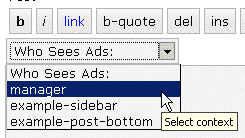
Within the Post/Edit interface, you'll find a convenient drop down selection to easily insert context you will have created (if you create just one context, the select is replaced with a button)
Google Adsense and Yahoo Publisher Compliant
Per terms of use, YPN (TOS) and Adsense (TOS) impose a maximum number of ads in a page, as follow (as of writing):
- YPN: 3 ads per page
- Adsense :
- 3 ads
- 2 search boxes
- 3 link units
- 3 referral units
Who Sees Ads fully complies to these restriction, and will display ads of a particular type up to the maximum number allowed.
Google Adsense and Yahoo Publisher Compliant, part 2
Per terms of use, YPN and Adsense don't allow ads on error pages such as 404 pages, and on pages that are not viewable by their system.
Who Sees Ads also complies to this policy, and ads won't be displayed on 404 error pages, and on draft posts a publisher is previewing.
Admin Clicks Safety
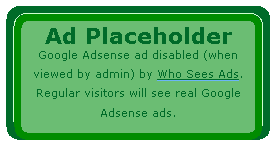 Admin Click Safety is an option that will prevent you from accidentally clicking on your own ads (Adsense or Yahoo Publisher), replacing them by a placeholder when viewed by the blog admin.
Regular visitors, of course, will see actual ads if applicable. Days of "oops I clicked it!" are over.
Widget support
Who Sees Ads is now supporting widgetized themes for easier ad management.
Custom Preferences Hacking
Advanced users with some PHP editing knowledge can now define a custom set of preferences or behaviors that will override Who Sees Ads' defaults. The plugin comes with an example my_options_sample.php file. Rename it my_options.php, edit it, and never lose any change you'd make when you upgrade the plugin.
3rd party plugin compatibility: Adsense Deluxe and Adsense Manager
For those who are already using Adsense Deluxe or Adsense Manager to manage your Adsense ads, you can seamlessly make the transition to Who Sees Ads and give it a try without uninstalling them. Instead of pasting the actual Adsense code when you create a context, just enter something like the following examples, depending on what plugin you're using:
- <!--adsense#mybanner-->
- adsensem_ad('mybanner')
- adsense_deluxe_ads('mybanner')
Please note: compatibility with these 2 plugins has been implemented to allow easy testing before adopting. I personally find Who Sees Ads much more powerful and efficient, and don't see the point of using it side by side with another ad management plugin. I will not continue support of these plugins if their code evolves and changes so that it breaks with my plugin.
Rotating Ads
You can define only 1 context and assign it as much ad code as you want. You just need to specify your custom code separator in my_options.php and you're done. Example, defining the string *** CODE *** as a separator:
- <img src="banner1.jpg" alt="Banner 1" />
- *** CODE ***
- <img src="banner2.jpg" alt="Banner 2" />
- *** CODE ***
- <img src="banner3.jpg" alt="Banner 3" />
Completely dynamic
The content managed by Who Sees Ads and whether it should display or not is processed dynamically on every visit for every visitor, to ensure maximum efficiency and make sure each visitor receives the treatment it deserves. The drawback of this aspect is that the plugin is not compatible with cache plugins, which generate each page once and serve the same static file to each subsequent visitors.
Download
ozh-who-sees-ads.zip
Extract and upload to your blog, preserving directory structure if any.
Note: download counter here and stats on wordpress.org may differ and reflect the number of downloads before this plugin was hosted on the plugin directory
PHP Template usage
The regular PHP call you will insert in your PHP templates is the following:
- <?php wp_ozh_wsa('myad'); ?>
However, you can pass an additional parameter to turn off output and have the ad code returned instead:
- <?php $code = wp_ozh_wsa('myad', false); ?>
By default, the plugin returns an HTML comment when no ad has to be displayed, for instance:
- <!-- WSA: rules for context 'myad' did not apply -->
A complete example of how to use WSA with your own functions would be something like:
- <?php
- $code = wp_ozh_wsa('myad', false);
- if (strpos($code,'<!-- WSA') !== false) {
- // plugin returned actual code, do something with it
- ...
- } else {
- // plugin returned no code to be displayed
- }
- ?>
Examples and advanced use
The obvious usage of this plugin is to display ads with rules as :
- Display ad when user comes from a search engine
- Don't display ads to my regular readers
- Display ads on old stuff, don't display on fresh posts
But you can also :
Greet your returning visitors
You can display ads, or really anything. For instance, display something only to your regular readers: a "welcome back" message, or a special offer you don't want them to miss.
Geo target !
In conjunction with my own IP to Nation plugin, you can easily target visitor from a particular country. For instance, you've always wanted to display Yahoo Publisher ads to American visitors only, as Yahoo suggestscompells? Easy, your context simply has to use the following custom if rule:
if (wp_ozh_getCountryName(0) == 'United States'), display
Check the example display rules for more ideas of usage.
Older version
Download: Who Sees Ads 1.3.3 for WordPress 2.3.3-
Question?
If you have a question, read all the comments: the answer *is* there.
[…] version of Ozh's brilliant Who Sees Ads plugin (or you can customize it yourself from his release) and in each theme you'll see a bit of code that looks pretty much like this in a nicely […]
[…] version of Ozh's brilliant Who Sees Ads plugin (or you can customize it yourself from his release) and in each theme you'll see a bit of code that looks pretty much like this in a nicely […]
Hi, Is there anyway to block an IP address from seeing ads instead of country.
Please advise. Thanks in advance
Tony » if ( $_SERVER["REMOTE_ADDR"] == "12.13.14.15" ) then { don't display }
Thanks for the plug in
[…] accomplish this, here’s a plugin from OZ, called “Who Sees Ads“. It’s been there for quite some time, but I’m unsure if anyone have used this plugin to this […]
[…] to not keep nagging your readers, I recommend using Ozh's Who Sees Ads plugin to only display this section to semi-new visitors […]
[…] limit how intrusive ads are on this and other sites I run. One way I've done that is with the Ozh Who Sees Ads plugin for […]
[…] 1??Who Sees Ads?????????????????????????Plugin? […]
Oh, This is the best Adsense plugin out there. Thank you very much.
[…] Ozh' Who Sees Ads – Allows you to set several options for when an add gets displayed. Some of the most interesting ones are if the reader comes from a search engine, was published between certain dates, is older than X number of days and more. […]
[…] 4 – Who Sees Ads ? Manage your Ads, Control Who Sees Them « planetOzh […]
[…] Ozh’ Who Sees Ads – Allows you to set several options for when an add gets displayed. Some of the most interesting ones are if the reader comes from a search engine, was published between certain dates, is older than X number of days and more. […]
[…] Ozh’ Who Sees Ads […]
Hi There,
It doesn't seem to work for me!
I'll keep messing around though.
Where does WSA saves there context?
Robby » Everything regarding WSA is saved in the same entry in wp_options
Hi Ozh,
The idea behind the plugin is great! I tried it on my blog (the link is in my name), which is with WordPress 2.6.2 and Cutline theme by Chris Pearson – but it breaks the theme (the elements of the layout) and also does not show the content of the post itself – only the title, the comments, the sidebars (heavily messed around the layout).
I tried the plugin on another blog of mine, again under wp 2.6.2 and it works great (the blog is Alabala.org). I did absolutely the same adjustments and out the right code in the right places in both cases.
What could be the problem with the layout and the lact of the content of the posts in the first case? Could you please advise?
I will apreciate your comment very much! The plugin deserves to be used.
Todor Christov » Can't help on this: besides the theme specific stuff it depends what display rules you chose. This seems to be a CSS/layout problem, which is not what my plugin is about or interferes with.
Thank you for your feedback.
The rules are:
If from Search Engine – display.
If regular users – do not display.
If post older than 15 days – display.
I understand that it might be exactly from CSS, but decided to give you some additional information in case you can "see" something in it.
And a final clue – I have just put the Adsense code manually after the Title and before the post – without using the plugin – directly in Single.php.
It works without any problem. Absolutely the same ad zone – 336×280, but without the plugin – works perfect (but it also shows ads to all visitors).
Just in case it can help…
Hi Ozh,
I truely like your plugin. It so amazing. But i have problem while trying to post. Because im using Atahualpa Theme, i cant use the syntax for within posts or pages.
The syntax appear become an ordinary text. :( and in admin page, within the Post/Edit interface, theres no drop down selection for context i have make.
How i can fix this problem?
Thanks
Im sorry its my fault… Your plugin working well.. its me who not notice to view in post page as html code…
Thanks
hi,
im have problem while trying to save or update context.
its appear warning like this "Warning: Invalid argument supplied for foreach() in /home/creend/public_html/wp-content/plugins/ozh-who-sees-ads/wp_ozh_whoseesads_admin.php on line 1393"
how i can fix it?
thanks
[…] noch wenige bis gar keine Werbebanner mehr angezeigt werden. Grund hierfür ist das Plugin "Who See Ads", mit welchem man mit selbst zu definierenden Regeln bestimmen bzw. steuern kann, wem welche […]
[…] Ozh’ Who Sees Ads – Who Sees Ads??Wordperss????????????. ????????????????, ???????????, ????????. ???? […]
[…] ?? ??????? ???? ?? ?????????? ????? ?? ??????? Who Sees Ads ? Manage your Ads, Control Who Sees Them « planetOzh Who Sees Ads WordPress PluginWho Sees Ads is an advanced ad management plugin that lets you decide […]
[…] Adsense-Anzeigen im Lesefluß hindern. Aus diesem Grund habe ich mit dem WordPress Plugin Who-See-Ads Regeln geschaffen wann welche Banner angezeigt werden […]
[…] letzten Monaten seine Arbeit hier auf dem Blog gemacht hat, habe ich in den letzten Tagen auf das Ozh' Who Sees Ads PlugIn […]
[…] Who Sees Ads est un plugin wordpress vous permettant de configurer l'affichage de vos pubs sur votre blog pour que celles-ci s'affiche ou non, selon certaines conditions. Je m'explique, si un de vos visiteurs viens d'un moteur de recherche, vous pouvez décider si celui-ci aura votre pubs ou non. […]
[…] ???????????, ????????. ???? WP125 – 125*125?????????????????, […]
Hello, i am putting a piece of php code in between my google adsense code to rotate the pub id. When viewing the source code on the website, the php code is showing as exact code and not replacing or putting in what the php code should be calling.
Example
Last message got messed up a bit. Any how, is it possible to put some php code in so we can change the pub id?
Adam » the ad parameter cannot be PHP code when entered via the interface
Ozh,
Thank you for your response. Perhaps you may have a solution or know of a solution to this. I would like to do some sort of Rev Share with Adsense and use your plugin to control how ads are displayed. I found an Adsense Share plugin,
http://www.ringofblogs.com/2007/10/07/adsense-revenue-sharing-plugin-for-wordpress-mu/#comment-7668
And it works by putting a PHP variable in the pub id section.
Any ideas on how this can be accomplished? I am thinking if I could put that PHP variable in the pub Id section, it might work.
Adam » Create multiple adsense ads, then use the rotate feature. I don't have any more suggestion.
Are you available for paid consultation?
Adam » depends mostly on budget and time frame. Shoot an email to ozh at planetozh dot com with everything I should know
[…] Ozh’ Who Sees Ads […]
[…] durch Who See Ads […]
[…] Ozh’ Who Sees Ads – Who Sees Ads??Wordperss????????????. ????????????????, ???????????, ????????. ???? […]
Great plugin, I've been looking for something like that for quite a time – thank you so much.
Though, when trying to integrate the snippet into a post, I get he following error:
Parse error: syntax error, unexpected ';' in /www/htdocs/…/wp-content/plugins/ozh-who-sees-ads/wp_ozh_whoseesads.php(277) : eval()'d code on line 1
Any idea about that?
Tony » You didn't enter valid PHP code.
Hi Ozh,
I wanted a way to control what posts visitors will see when they land on my page and this seems to be a great solution if I can make it work.
Will this work on posts instead of ads?
Can I refine the context to include a custom user option from the database? (registered users with a custom option "level"="newbie")
I'm excited to test it out but wanted your opinion too. I'll update when I get it to work.
[…] Who Sees Ads von Ozh können Anzeigen nach unterschiedlichen Kriterien angezeigt werden. Einige der Optionen sind: Zeige Anzeigen wenn der Besucher über eine Suchmaschine kommt, zeige regulären Lesern keine Anzeigen, zeige immer Anzeigen. Bookmarks setzen: Diese Icons verlinken auf Bookmark Dienste bei denen Nutzer neue Inhalte finden und mit anderen teilen können. […]
[…] Ozh’ Who Sees Ads – Who Sees Ads??Wordperss????????????. ????????????????, ???????????, ????????. ???? […]
I just can't my_rotatecode_separator work. What value can i give to "my_rotatecode_separator" and how exactly should I insert it in the Ad Code. It just puts the whole thing in my site. All the banners with "my_rotatecode_separator" between.
[…] Who Sees Ads – Makes ads or other elements conditionally displayed […]
I can't get this to work. In the demo, there are Ajax features. Is that something new, or is it included on 1.3.3 as well and just conflicting with something?
[…] 1??Who Sees Ads???????????????????plugins??? […]