
Warning: hefty explanations and documentation. On a rush? Give the demo a try. Chances are you'll understand right away what and how. Then download. Then please read here.
Current version: 2.0 for WordPress 2.5+ See below for older versions.
You most certainly have two types of visitors on your blog : some returning readers, and a majority of first time visitors. Returning readers come to your site for its content and for what you write. First time visitors, and mostly search engine visitors, come because they are looking for something particular, look at the page, and leave.
The first obvious thought that comes to mind when you want to monetize your blog is: "I'm going to put ads and banners everywhere". By doing so, you won't add any value or service to regular readers, who are not likely to click on your ads. By doing so, you'll also probably won't do justice to your finely handcrafted pixel polished WordPress theme. By not serving ads to your regular visitors, chances are you'll both lose little money and show your readers you're treating them differently.
Therefore, the second obvious thought about blog monetization is : "I wish I could display a lot of ads to those coming once never returning readers, but not bother my regular fans". Enter Who Sees Ads, the ultimate ad management plugin.
Who Sees Ads ?
So, who sees ads ? Now it's up to you.
Who Sees Ads is an advanced ad management plugin that lets you decide who will see your ads, depending on user defined conditions. The association of an ad and these conditions is called a context: a set of circumstances you define, that will eventually display or not an ad.
For instance, you could consider the following criteria: Is the visitor a regular reader? Does this visitor come from a search engine? Is the visitor currently reading a recent post, or something really old?
Live demo
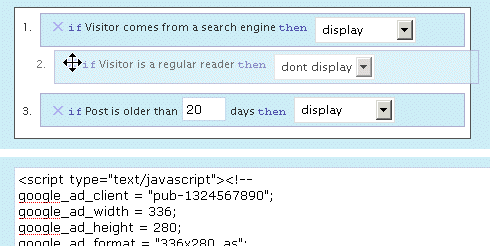
The plugin is active here, to display an ad on top of the right sidebar. Depending on the context, you could see it or not. Its display rules are:
- display if visitors comes from a search engine
- don't display if the visitor is a regular reader
- always display
The ad behavior is defined by the first rule that is matched. Visit the main page of my blog: as I've defined a "Regular reader" here (someone who has read at least 2 pages over the last 10 days), you're now a regular reader, hence rule #2 apply and you don't see the ad any longer. Now go to Google and click on the first result to come back here: rule #1 now applies, and you'll see the ad.
Define Contexts
Ad code + Display rules = Context
You already probably have the Ad code : it can be plain HTML (a text link, a image banner) or Javascript (your Adsense code). Let's define the display rules.
Who Sees Ads offers a very intuitive and powerful visual interface to create your context and pick display rules, in which you naturally select and order them with your mouse. The interface also offers a convenient way to duplicate, rename and delete your contexts.
Have a look and play a bit with this demo. You'll love it.
Display Rules
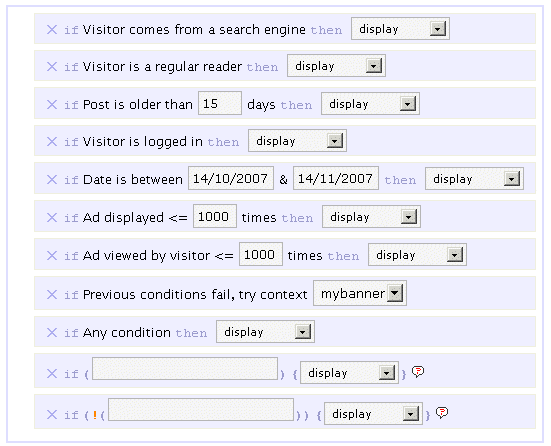
By default, you can pick or mix any of the following rules :
- If Visitor comes from a search engine, display / don't display
- If Visitor is a regular reader, display / don't display
- If Post is older than XX days, display / don't display
- If Visitor is logged in, display / don't display
- If Date is between specified date interval, display / don't display
- If Ad has been showed less than XX times, display / don't display
- If This visitor has viewed this ad less than XX times, display / don't display
- If All previous conditions fail, try another context
- If Any condition, display / don't display
The ad behavior will be eventually decided by the first rule which is matched. For instance, if you want to display an ad only for search engine visitors, you'll pick the following :
- If Visitor comes from a search engine, display
- If Any condition, don't display
If no rule is matched, nothing displays, so the second rule in the above example is actually optional.
I made up a list of example display rules, be sure to check them.
Advanced Display Rules
 You can use PHP functions and make your own custom advanced display rules. Want to display something on home page only ? if (is_home()) display will be your custom display rule.
You can use PHP built-in, WordPress internal, or your own functions. Your brain is the limit.
Please note: you obviously need to know a bit of PHP in order to use the advanced display rules. By default, they are not enabled. If you want them active, edit the beginning of the script and set $wp_ozh_wsa['iknowphp'] to true. This requires your agreement on being on your own if you break your site or if ads don't show as expected.
There are two advanced custom display rules :
- If ( condition ), display / don't display
- If !( condition ), display / don't display
The if and if not rules are working the same, I just thought it could be more convenient in some cases to use an if not rather than an if, and this way you also have two custom rules for the price of one :)
Again, check the example display rules to get an idea of how powerful it is.
Features
Simple and Effective Ad Management
Even if you're not using Who Sees Ads to fine tune display rules, it will make your life easier. Pasting <?php wp_ozh_wsa('google-336-280') ?> in your PHP templates such as sidebar.php is a lot easier than cut and pasting 10 lines of javascript, especially if you decide later to change the javascript across multiple files.
Use it inline or in PHP templates
Create contexts and display ads either in your PHP files on within your posts and pages :
- <?php wp_ozh_wsa('mybanner') ?> in your PHP files such as sidebar.php
- <!--wsa:mybanner--> within posts and pages
Visual interface
If you haven't tried it already, play with the demo. It's not functional of course, but it will show you own the interface lets you visually create contexts, and easily rename, duplicate and delete ads.
Help Wizard
A togglable introductory help contains a handy wizard that will assist you, creating your two first rules. Click on the image for a screenshot of the Wizardry.

Posting help
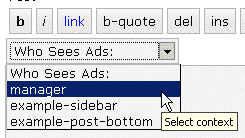
Within the Post/Edit interface, you'll find a convenient drop down selection to easily insert context you will have created (if you create just one context, the select is replaced with a button)
Google Adsense and Yahoo Publisher Compliant
Per terms of use, YPN (TOS) and Adsense (TOS) impose a maximum number of ads in a page, as follow (as of writing):
- YPN: 3 ads per page
- Adsense :
- 3 ads
- 2 search boxes
- 3 link units
- 3 referral units
Who Sees Ads fully complies to these restriction, and will display ads of a particular type up to the maximum number allowed.
Google Adsense and Yahoo Publisher Compliant, part 2
Per terms of use, YPN and Adsense don't allow ads on error pages such as 404 pages, and on pages that are not viewable by their system.
Who Sees Ads also complies to this policy, and ads won't be displayed on 404 error pages, and on draft posts a publisher is previewing.
Admin Clicks Safety
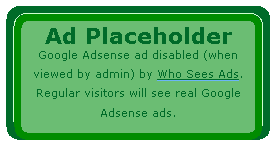 Admin Click Safety is an option that will prevent you from accidentally clicking on your own ads (Adsense or Yahoo Publisher), replacing them by a placeholder when viewed by the blog admin.
Regular visitors, of course, will see actual ads if applicable. Days of "oops I clicked it!" are over.
Widget support
Who Sees Ads is now supporting widgetized themes for easier ad management.
Custom Preferences Hacking
Advanced users with some PHP editing knowledge can now define a custom set of preferences or behaviors that will override Who Sees Ads' defaults. The plugin comes with an example my_options_sample.php file. Rename it my_options.php, edit it, and never lose any change you'd make when you upgrade the plugin.
3rd party plugin compatibility: Adsense Deluxe and Adsense Manager
For those who are already using Adsense Deluxe or Adsense Manager to manage your Adsense ads, you can seamlessly make the transition to Who Sees Ads and give it a try without uninstalling them. Instead of pasting the actual Adsense code when you create a context, just enter something like the following examples, depending on what plugin you're using:
- <!--adsense#mybanner-->
- adsensem_ad('mybanner')
- adsense_deluxe_ads('mybanner')
Please note: compatibility with these 2 plugins has been implemented to allow easy testing before adopting. I personally find Who Sees Ads much more powerful and efficient, and don't see the point of using it side by side with another ad management plugin. I will not continue support of these plugins if their code evolves and changes so that it breaks with my plugin.
Rotating Ads
You can define only 1 context and assign it as much ad code as you want. You just need to specify your custom code separator in my_options.php and you're done. Example, defining the string *** CODE *** as a separator:
- <img src="banner1.jpg" alt="Banner 1" />
- *** CODE ***
- <img src="banner2.jpg" alt="Banner 2" />
- *** CODE ***
- <img src="banner3.jpg" alt="Banner 3" />
Completely dynamic
The content managed by Who Sees Ads and whether it should display or not is processed dynamically on every visit for every visitor, to ensure maximum efficiency and make sure each visitor receives the treatment it deserves. The drawback of this aspect is that the plugin is not compatible with cache plugins, which generate each page once and serve the same static file to each subsequent visitors.
Download
ozh-who-sees-ads.zip
Extract and upload to your blog, preserving directory structure if any.
Note: download counter here and stats on wordpress.org may differ and reflect the number of downloads before this plugin was hosted on the plugin directory
PHP Template usage
The regular PHP call you will insert in your PHP templates is the following:
- <?php wp_ozh_wsa('myad'); ?>
However, you can pass an additional parameter to turn off output and have the ad code returned instead:
- <?php $code = wp_ozh_wsa('myad', false); ?>
By default, the plugin returns an HTML comment when no ad has to be displayed, for instance:
- <!-- WSA: rules for context 'myad' did not apply -->
A complete example of how to use WSA with your own functions would be something like:
- <?php
- $code = wp_ozh_wsa('myad', false);
- if (strpos($code,'<!-- WSA') !== false) {
- // plugin returned actual code, do something with it
- ...
- } else {
- // plugin returned no code to be displayed
- }
- ?>
Examples and advanced use
The obvious usage of this plugin is to display ads with rules as :
- Display ad when user comes from a search engine
- Don't display ads to my regular readers
- Display ads on old stuff, don't display on fresh posts
But you can also :
Greet your returning visitors
You can display ads, or really anything. For instance, display something only to your regular readers: a "welcome back" message, or a special offer you don't want them to miss.
Geo target !
In conjunction with my own IP to Nation plugin, you can easily target visitor from a particular country. For instance, you've always wanted to display Yahoo Publisher ads to American visitors only, as Yahoo suggestscompells? Easy, your context simply has to use the following custom if rule:
if (wp_ozh_getCountryName(0) == 'United States'), display
Check the example display rules for more ideas of usage.
Older version
Download: Who Sees Ads 1.3.3 for WordPress 2.3.3-
Question?
If you have a question, read all the comments: the answer *is* there.
Is it possible to continue showing ads to a reader after they leave the first page from the search engine (when a reader browses other pages on my site)?
I show readers ads when they come from search engines, but if they browse further in my page ads are no longer displayed (referral is no longer search engine, but my own site). I would like to enable ads to be shown for the whole visit, not just the first page.
Increase your online revenue with 13 WordPress AdSense plugins…
AdSense is indeed a fine tool to generate some cool cash online. The problem with many young bloggers is that they simply don’t use the AdSense units to optimal use. By optimal use I mean, getting the maximum from the ads using the least resources.Ma…
Oh awesome, I always wanted something like this. I`ll probably be adding this pluggin pretty soon. Thanks.
I love the idea of this plugin, but does it work with wp-cache installed?
Jacob Share » As stated in this page: no.
[…] Who Sees Ads : 2.0 (Ad Management Plugin) […]
[…] Download Here Submit a Quick Rating: Loading … Submit a Review […]
[…] Tage sind vergangen und am Dienstag gab es auch noch ein kleines Problem. Mein Rotationsplugin (Who sees Ads) wollte ein Update und natürlich erkannte es danach den Rotationscode nicht mehr und so wurde an […]
[…] plugin I'm using to make this happen is called Who Sees Ads. It's a very easy install and […]
[…] 7. Who Sees Ads […]
[…] ad management out of the box. That's crazy. Plugins handle this way better. For instance, Who Sees Ads?, If you're not afraid of getting your hands dirty with PHP, or Ad-Minister, if you're […]
Very good idea but I drop my cookies several times a day, so I'm pretty much always a 'unique'. Also my FF deletes my cookies on exit. But guess I'm unique :P
Thanks I'll give it a try.
Wow, this is the plugin that I was looking for. Thanks bro :-)
[…] ai visitatori provenienti dai motori di ricerca (su WordPress si può fare installando questo plugin). Darran Rowse, invece, racconta la sua esperienza e spiega come ha aumentato il CTR del 40% […]
[…] $10,000 College Scholarship for student bloggers May 13th, 2008 by Sita ! 1 views var ipad_url="http://binaryday.com/2008/05/13/10000-college-scholarship-for-student-bloggers/"; var ipad_format="{small/big}"; var ipad_color="{color}"; If you are a student and you have a blog, then you may consider applying for a $10,000 scholarship at College Scholarships. […]
[…] However now you can control the display of the advertisements using who sees ad plugin for wordpress […]
[…] Who Sees Ads – ????????? ?????? ??????? ?????? ??????? ??? ?????? ???????? […]
[…] helps enhance the experience and extend its capabilities. One of the plugins that I installed is PlanetOz's Who Sees Ads plugin. If you hate ads cluttering your blog yet cannot do away with them because of the trickle of […]
[…] bekommen den Kram hoffentlich erst gar nicht zu Gesicht – sofern das Plugin whoseesads wie angedacht funktioniert. In dieser Form empfinde ich Werbung noch als recht unaufdringlich, […]
[…] Who Sees Ads – ????????? ?????? ??????? ?????? ??????? ??? ?????? ???????? […]
[…] Who Sees Ads – ????????? ?????? ??????? ?????? ??????? ??? ?????? ???????? […]
[…] targeting the 2.5 release of WordPress. Last year the contest generated some great plugins like Who Sees Ads, WordPress Automatic Upgrade, MyDashboard, and the grand prize winner, OneClick. Now that […]
[…] BTW, if you do decide to use any of these advertisers, I have recently been experimenting with the Who Sees Ads plugin, and it seems like a great piece of […]
[…] ?????????? WordPress Organizer – ????????? ?????? ? ?????????? Who Sees Ads – ????????? ?????? ??????? ?????? ??????? ??? ?????? […]
[…] ??????????????????????? Google Adsense ????????????????????????????????????????????????????????????????????????????? Who Sees Ads? […]
[…] Who Sees Ads ? Manage your Ads, Control Who Sees Them (tags: plugin, wordpress, pub) […]
How I can delete the WSA button from edit interface?
Oh, I'm so stupid :D "make your own my_options.php with latest plugin and disable the editor buttons."
[…] ??????????????????????? Google Adsense ????????????????????????????????????????????????????????????????????????????? Who Sees Ads? […]
I saw a functionality in WhyDoWork AdSense plugin, but that plugin's not as slick or feature-rich as WSA. Besides, it doesn't have useful features like showing ads only to search visitors.
The feature is that it can show ads in all the normal positions (top left, top, top right, bottom left, bottom, bottom right) and also within the post, in middle, middle left and middle right. That means that the ad is about halfway down the post, and will induce more clicks. That, coupled with the already present feature in WSA of showing ads to only search visitors, can increase earnings.
It'd be great if you could integrate this feature in WSA. I'll surely donate a small amount (my blog's not yet generating higher three figures ;) ) if you make that happen. :D
[…] AdSense (ou qualquer outro) apenas para os visitantes vindos de sites de busca. Trata-se do Who see ads. Ele é muito versátil, permitindo criar seções para as publicidades e diferenciar o conteúdo […]
[…] Who Sees Ads? […]
[…] Who Sees Ads? […]
[…] Who Sees Ads – Makes ads or other elements conditionally displayed […]
Man kudos I would love to know how the hell I missed this plugin. Thank you for providing such an awesome tool.
Vic
Some nice plugin you got there. Ty
Hi There
This plug-in sounds awesome! I will definitely be testing this out on my blogs, and with your great tutorial and explaination of all of the features, I'm sure that it will be easy to use.
If it proves to be everything you promise (as I'm sure it will)… expect a lot of traffic here soon from my home-business organisation.
This will be one tool that they could definitely use.
[…] Who Sees Ads – Rendre l'affichage des annonces ou d'autres éléments sous condition […]
[…] Who Sees Ads – ????????? ?????? ??????? ?????? ??????? ??? ?????? ???????? […]
Hi,
excellent plugin, thanks for sharing it.
I tried to use it on an specific WordPress theme ProSense Redux but when the Adsense ads do not show up (I entered directly or as regular user) the theme screws up i.e some Ads show up in the wrong place overlapping texts, etc
Is this an issue with the pluggin, an issue with an specific theme that needs to be used or and interface problem? When I mean interface problem I meant the interface between my keyboard and my chair…
Thanks
Héctor
Hector » Well, I can't know. Could be either something particular with this theme, or the way you configured your context in WSA…
Is there any specific requirement for the Plugin? for example, I think I have read about Templates that are "fixed", but I'm not sure…so I imagine something like a template based in tables…
I'll try to dig more
thanks
Héctor
I have enabled this plugin on my blog today. However what I want is that the ads get displayed only when :
1: Visitor comes from a search engine.
2: The same visitor goes to another page or article on the blog.
So primarily I want that the adsense ads should keep on getting displayed to these visitors on every post and not just the post on which they land.
Whats the way to do it ?
Abhijeet Mukherjee » First part of the answer is: this is a very bad idea. Visitors coming from a search engine are likely to click an ad on first page because your content might not be what they're looking for. But if they click on an internal link to visit another page, then that's because they're interesting in your content. They've become potential loyal readers, so treat them as loyal readers already.
Second part is: you need to create a custom function setting up a short timespan cookie when someone comes from a search engine, and test for that cookie on every page load.
HELLO,OZH
Your this plugin is perfect?but it could only be used as a plugin of wp?is not it a good idea improving it to an independent ad manage system?
lihe » Probably. The thing is, I'm only interested in WordPress :)
[…] to plugin authors and help them develop fantastic plugins such as WordPress Automatic Upgrade and Who Sees Ads which were both winners in the last plugin competition. (No Ratings Yet) Loading … […]
Great ad tool!
Im also need plugin to distribute money to authors on whose page ad was shown.
[…] Who Sees Ads ? Manage your Ads, Control Who Sees Them « planetOzh Who Sees Ads is an advanced ad management plugin that lets you decide who will see your ads, depending on user defined conditions. The association of an ad and these conditions is called a context: a set of circumstances you define, that will eventually d (tags: wp plugins advertisement) […]
[…] visitors but there are only a few of them which allow you to determine to whom and when you should. Who Sees Ads does help you to determine to whom and when you should display advertisements, though, there is a […]