
Warning: hefty explanations and documentation. On a rush? Give the demo a try. Chances are you'll understand right away what and how. Then download. Then please read here.
Current version: 2.0 for WordPress 2.5+ See below for older versions.
You most certainly have two types of visitors on your blog : some returning readers, and a majority of first time visitors. Returning readers come to your site for its content and for what you write. First time visitors, and mostly search engine visitors, come because they are looking for something particular, look at the page, and leave.
The first obvious thought that comes to mind when you want to monetize your blog is: "I'm going to put ads and banners everywhere". By doing so, you won't add any value or service to regular readers, who are not likely to click on your ads. By doing so, you'll also probably won't do justice to your finely handcrafted pixel polished WordPress theme. By not serving ads to your regular visitors, chances are you'll both lose little money and show your readers you're treating them differently.
Therefore, the second obvious thought about blog monetization is : "I wish I could display a lot of ads to those coming once never returning readers, but not bother my regular fans". Enter Who Sees Ads, the ultimate ad management plugin.
Who Sees Ads ?
So, who sees ads ? Now it's up to you.
Who Sees Ads is an advanced ad management plugin that lets you decide who will see your ads, depending on user defined conditions. The association of an ad and these conditions is called a context: a set of circumstances you define, that will eventually display or not an ad.
For instance, you could consider the following criteria: Is the visitor a regular reader? Does this visitor come from a search engine? Is the visitor currently reading a recent post, or something really old?
Live demo
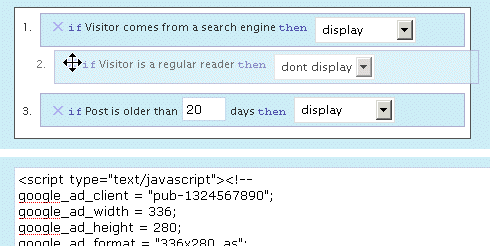
The plugin is active here, to display an ad on top of the right sidebar. Depending on the context, you could see it or not. Its display rules are:
- display if visitors comes from a search engine
- don't display if the visitor is a regular reader
- always display
The ad behavior is defined by the first rule that is matched. Visit the main page of my blog: as I've defined a "Regular reader" here (someone who has read at least 2 pages over the last 10 days), you're now a regular reader, hence rule #2 apply and you don't see the ad any longer. Now go to Google and click on the first result to come back here: rule #1 now applies, and you'll see the ad.
Define Contexts
Ad code + Display rules = Context
You already probably have the Ad code : it can be plain HTML (a text link, a image banner) or Javascript (your Adsense code). Let's define the display rules.
Who Sees Ads offers a very intuitive and powerful visual interface to create your context and pick display rules, in which you naturally select and order them with your mouse. The interface also offers a convenient way to duplicate, rename and delete your contexts.
Have a look and play a bit with this demo. You'll love it.
Display Rules
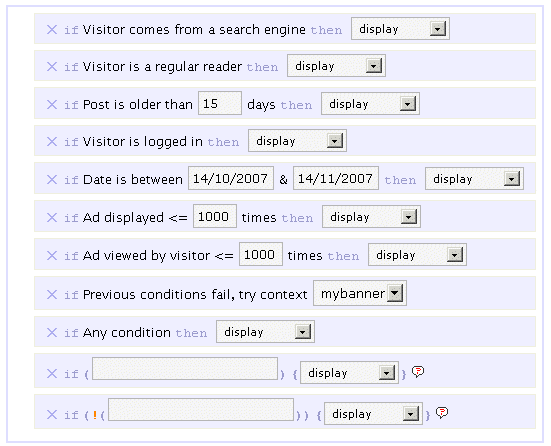
By default, you can pick or mix any of the following rules :
- If Visitor comes from a search engine, display / don't display
- If Visitor is a regular reader, display / don't display
- If Post is older than XX days, display / don't display
- If Visitor is logged in, display / don't display
- If Date is between specified date interval, display / don't display
- If Ad has been showed less than XX times, display / don't display
- If This visitor has viewed this ad less than XX times, display / don't display
- If All previous conditions fail, try another context
- If Any condition, display / don't display
The ad behavior will be eventually decided by the first rule which is matched. For instance, if you want to display an ad only for search engine visitors, you'll pick the following :
- If Visitor comes from a search engine, display
- If Any condition, don't display
If no rule is matched, nothing displays, so the second rule in the above example is actually optional.
I made up a list of example display rules, be sure to check them.
Advanced Display Rules
 You can use PHP functions and make your own custom advanced display rules. Want to display something on home page only ? if (is_home()) display will be your custom display rule.
You can use PHP built-in, WordPress internal, or your own functions. Your brain is the limit.
Please note: you obviously need to know a bit of PHP in order to use the advanced display rules. By default, they are not enabled. If you want them active, edit the beginning of the script and set $wp_ozh_wsa['iknowphp'] to true. This requires your agreement on being on your own if you break your site or if ads don't show as expected.
There are two advanced custom display rules :
- If ( condition ), display / don't display
- If !( condition ), display / don't display
The if and if not rules are working the same, I just thought it could be more convenient in some cases to use an if not rather than an if, and this way you also have two custom rules for the price of one :)
Again, check the example display rules to get an idea of how powerful it is.
Features
Simple and Effective Ad Management
Even if you're not using Who Sees Ads to fine tune display rules, it will make your life easier. Pasting <?php wp_ozh_wsa('google-336-280') ?> in your PHP templates such as sidebar.php is a lot easier than cut and pasting 10 lines of javascript, especially if you decide later to change the javascript across multiple files.
Use it inline or in PHP templates
Create contexts and display ads either in your PHP files on within your posts and pages :
- <?php wp_ozh_wsa('mybanner') ?> in your PHP files such as sidebar.php
- <!--wsa:mybanner--> within posts and pages
Visual interface
If you haven't tried it already, play with the demo. It's not functional of course, but it will show you own the interface lets you visually create contexts, and easily rename, duplicate and delete ads.
Help Wizard
A togglable introductory help contains a handy wizard that will assist you, creating your two first rules. Click on the image for a screenshot of the Wizardry.

Posting help
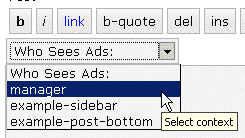
Within the Post/Edit interface, you'll find a convenient drop down selection to easily insert context you will have created (if you create just one context, the select is replaced with a button)
Google Adsense and Yahoo Publisher Compliant
Per terms of use, YPN (TOS) and Adsense (TOS) impose a maximum number of ads in a page, as follow (as of writing):
- YPN: 3 ads per page
- Adsense :
- 3 ads
- 2 search boxes
- 3 link units
- 3 referral units
Who Sees Ads fully complies to these restriction, and will display ads of a particular type up to the maximum number allowed.
Google Adsense and Yahoo Publisher Compliant, part 2
Per terms of use, YPN and Adsense don't allow ads on error pages such as 404 pages, and on pages that are not viewable by their system.
Who Sees Ads also complies to this policy, and ads won't be displayed on 404 error pages, and on draft posts a publisher is previewing.
Admin Clicks Safety
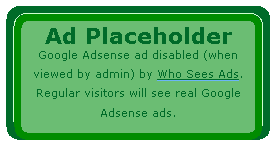 Admin Click Safety is an option that will prevent you from accidentally clicking on your own ads (Adsense or Yahoo Publisher), replacing them by a placeholder when viewed by the blog admin.
Regular visitors, of course, will see actual ads if applicable. Days of "oops I clicked it!" are over.
Widget support
Who Sees Ads is now supporting widgetized themes for easier ad management.
Custom Preferences Hacking
Advanced users with some PHP editing knowledge can now define a custom set of preferences or behaviors that will override Who Sees Ads' defaults. The plugin comes with an example my_options_sample.php file. Rename it my_options.php, edit it, and never lose any change you'd make when you upgrade the plugin.
3rd party plugin compatibility: Adsense Deluxe and Adsense Manager
For those who are already using Adsense Deluxe or Adsense Manager to manage your Adsense ads, you can seamlessly make the transition to Who Sees Ads and give it a try without uninstalling them. Instead of pasting the actual Adsense code when you create a context, just enter something like the following examples, depending on what plugin you're using:
- <!--adsense#mybanner-->
- adsensem_ad('mybanner')
- adsense_deluxe_ads('mybanner')
Please note: compatibility with these 2 plugins has been implemented to allow easy testing before adopting. I personally find Who Sees Ads much more powerful and efficient, and don't see the point of using it side by side with another ad management plugin. I will not continue support of these plugins if their code evolves and changes so that it breaks with my plugin.
Rotating Ads
You can define only 1 context and assign it as much ad code as you want. You just need to specify your custom code separator in my_options.php and you're done. Example, defining the string *** CODE *** as a separator:
- <img src="banner1.jpg" alt="Banner 1" />
- *** CODE ***
- <img src="banner2.jpg" alt="Banner 2" />
- *** CODE ***
- <img src="banner3.jpg" alt="Banner 3" />
Completely dynamic
The content managed by Who Sees Ads and whether it should display or not is processed dynamically on every visit for every visitor, to ensure maximum efficiency and make sure each visitor receives the treatment it deserves. The drawback of this aspect is that the plugin is not compatible with cache plugins, which generate each page once and serve the same static file to each subsequent visitors.
Download
ozh-who-sees-ads.zip
Extract and upload to your blog, preserving directory structure if any.
Note: download counter here and stats on wordpress.org may differ and reflect the number of downloads before this plugin was hosted on the plugin directory
PHP Template usage
The regular PHP call you will insert in your PHP templates is the following:
- <?php wp_ozh_wsa('myad'); ?>
However, you can pass an additional parameter to turn off output and have the ad code returned instead:
- <?php $code = wp_ozh_wsa('myad', false); ?>
By default, the plugin returns an HTML comment when no ad has to be displayed, for instance:
- <!-- WSA: rules for context 'myad' did not apply -->
A complete example of how to use WSA with your own functions would be something like:
- <?php
- $code = wp_ozh_wsa('myad', false);
- if (strpos($code,'<!-- WSA') !== false) {
- // plugin returned actual code, do something with it
- ...
- } else {
- // plugin returned no code to be displayed
- }
- ?>
Examples and advanced use
The obvious usage of this plugin is to display ads with rules as :
- Display ad when user comes from a search engine
- Don't display ads to my regular readers
- Display ads on old stuff, don't display on fresh posts
But you can also :
Greet your returning visitors
You can display ads, or really anything. For instance, display something only to your regular readers: a "welcome back" message, or a special offer you don't want them to miss.
Geo target !
In conjunction with my own IP to Nation plugin, you can easily target visitor from a particular country. For instance, you've always wanted to display Yahoo Publisher ads to American visitors only, as Yahoo suggestscompells? Easy, your context simply has to use the following custom if rule:
if (wp_ozh_getCountryName(0) == 'United States'), display
Check the example display rules for more ideas of usage.
Older version
Download: Who Sees Ads 1.3.3 for WordPress 2.3.3-
Question?
If you have a question, read all the comments: the answer *is* there.
Eddie » use advanced display rules, and the WP function in_category(number). See somewhere in comments for details.
This is a nice plugin, but there's a little bug: it isn't "theme-enabled". In WP docs, I found that a widget must adhere to the following "pattern":
IMHO, "wp_ozh_wsa_widgetize" must be changed to match this pattern, because a lot of themes will "broke".
BTW, it su*** to hardcode every ad to workaround this problem.
OK… I found a solution to create a better widget. Just need to add this code:
And change this:
To:
Hello,
I wondering if you managed to get this plugin to work with wp-cache?
Peer Wandiger » Unfortunately, no.
Can you add the ability to check for recent comments, perhaps to supplement the "Visitor is a regular reader" option?
Two more suggestions:
Instead of just show ad/don't show ad, include options to show a different ad as well. Also, even with the "Admin Clicks Safety" function, ads should show up in the correct size, so check to see which ad is actually going to be shown-for example, the "if Previous conditions fail, try context…" display rule might change to a differently sized ad or even one that isn't Adsense/YPN, which you shouldn't block.
Yet another suggestion:
Either in addition to or instead of the "Ad viewed…" display rule, have a way that after a duration of a certain number of days, the view count gets reset.
Ben » A number of things you'd like to do is already doable with some custom functions and the advanced display rules. Check the examples for more infos. The "Show another ad if conditions don't match" feature is already implemented.
Hi Ozh.
I have a ruleset that shows ads only to visitors coming from a search engine. This works great, and I have a good ctr. However, I want the ads to show for these visitor when they continue to browse my website (most of them visit a page or two after the initial page). Is there a way to do this?
To summarize: Show ads to visitors from search engines, even when they browse further.
Never show to anyone not initially coming from a search engine.
Thanks for you help so far. Hopefully, this is possible to.
Hi Ozh. Please keep updating this plugin with new features as it is very unique and rare.
I've been using this great plugin for sometime but just started to use it together with ip2nation. I encountered a problem where the ads just don't display based on the countries. Here's the chain:
ad1: targets visitors from country 1
else go to ad2
ad2: targets visitors from country 2
else go to ad3
ad3: any conditions
But all I get is ad3. No ad1 or ad2.
Great plugin. For anyone who sees quite a bit of social media traffic which is notorious for not clicking on ads, it's a great way to avoid pricing penalties for low CTR.
I did want to mention that I encountered conflicts between Image Manager 2.41 and Who Sees Ads.
With Image Manager active, I'm unable to drag rules around in Who Sees Ads' configuration screen.
With Who Sees Ads active, Image Manager is unable to insert images into a post.
The workaround is simply to deactivate one or the other depending on what you're up to.
Regardless, thanks for the great plugin.
Awesome plugin. Just what i was looking for.
Thanks
I'm struggling with something here. If I want a user who is a contributor (level_1) or higher to NOT see ads, but everybody else to see ads, what would be the context?
I've tried this, but when I log out (I'm a user level_10) of wordpress, I still don't see ads.
Never mind – I figured it out. Thanks for the plugin.
Has anyone else had an issue getting the code to work on the homepage?
I've got lots of ads setup to display within each specific category but the homepage rule as given in the example will not display.
Any ideas?
This is a great plugin, I use it fully integrated with my theme, I edited the theme's core files and added the ad codes to the loop on WPmu, so all I have to do is on each blog to create the ad units with the same name and the ad is automatically displayed on a per blog basis. I love this, very good work!
One suggestion, like the K2 sidebar handler, there should be a way to download a file that will contain all the information and configuration that you have set up on your blog, and can then upload it and load it as a backup. This will really make it easier for people like me running on WPmu or that have multiple blogs and don't really like to create the same 10 ad units every time.
Nice plugin.
Thanks.
Hi Ozh,
Great plugin. I believe I just found a bug: Google Link units are being accounted as regular Google Ads when doing the ads per page limit calculation.
I can't wait for this plug-in to work with WP-Super-Cache. Any news on that?
Keep up the great job!
Great plug in, does it work with WP 2.5? Thanks.
I used this two rules
# If Visitor comes from a search engine, display
# If Any condition, don't display
entered a name and the ad code – but I still can see my ads:
Any hints what I did wrong?
http://www.alterfalter.de/2008/04/02/dita-von-teese-the-sun-und-bild-entdecken-8-jahre-alten-lesben-porno/
Stefan » Don't know.
Do I use your code instead of the original ad code (haven't tried that yet) or is it an add-on to the original ad code (that's what I thought it is).
Hello,
How we can make like this:
From 08.00 to 12.00 show ad1
from 12.00 to 15.00 show ad2
from 15.00 to 08.00 show ad3
And one more question:
Can we show ads randomly
After installing WordPress 2.5 this plugin no longer work correctly. The plugin still does what it should do, but I can't edit any contexts.
thanks for plugin. perfect
[…] ad management out of the box. That's crazy. Plugins handle this way better. For instance, Who Sees Ads?, If you're not afraid of getting your hands dirty with PHP, or Ad-Minister, if you're […]
[…] etc…) but also to every other plugin pages. Seriously, half of the support question I've had with Who Sees Ads were because of WP-ContactForm adding its crappy javascript everywhere it could, including my […]
Ozh, thanks for the great plugin. I have an interesting dilemma that may or may not be "Who sees ads" related. I use forum software called Simple:Press Forum – nice forum plugin for WordPress.
It uses hooks to allow the user to insert text/code (i.e. ads) in certain places in the forum. I use "Who sees ads" to serve ads to everybody except those who pay a yearly fee.
If I place AdWords java directly into the hook template of the forum plugin, the ad serves correctly. If I place the script via "Who Sees Ads", it serves the script twice. (It actually serves anything from "Who Sees Ads" twice.) I've tried it with contexts that work correctly elsewhere on the site too – no matter what I put in the context, it is served twice.
Any ideas?
By the way, Ozh, here is what the author of the Simple:Press Forum plugin thought might be the issue:
"The plugin [Who See Ads] is almost certainly echoing its output to the screen and so is the forum so that would explain why you see it twice. Does the plugin have the option to 'return' its output to your code so you can then pass it through to the forum to display? It really should be enabled to do that…"
I'm not a programmer, but I hope that helps.
Taylor » From the doc here: "$code = wp_ozh_wsa('myad', false);" to get the ad returned, not displayed.
I don't know your forum plugin and how you're supposed to use this code but this is what the author asked you.
Ozh, thanks – and my apologies for missing this on here. As I said, I'm not a programmer and sometimes I get lost in the code.
Anyway, that works perfectly – placed it in the forums hook template and it works beautifully.
I hope my small contribution is sufficient for my inability to read this page!
Hi Stefan,
I'm using the post-teaser plugin and wondered whether there was way to my ads displaying as Michel Fortin has on his blog at http://www.michelfortin.com – i.e. he has different ads displaying on the front page under his teaser rather than the same throughout his blog posts.
I think he uses the AdSense Deluxe plugin.
Hopefully, just simple but I've been trying different things for weeks without success.
Thanks Stefan,
Trish
[…] die Werbung anzuzeigen verwende ich das WordPress-Plugin Who see ads, da man damit problemlos einstellen kann, welche User Werbung und welche User keine Werbung, bzw. […]
In the past this plugin didn't work with the Image Browser plugin. In the write area it stopped the image browser button from working (popping up). Has that issue been fixed with this version?
Dana :)
Dana » How should I know? I contacted the author twice suggesting fixes for his plugin, never got a reply. I know he's supposed to be working on his plugin(s) at the moment, you should try to contact him. Hint for him: this post.
Hi,
Just start on blog hobby , though of download this for try run.
By the way Stefan,
I don't think I made myself clear in the above comment, I am using the Who Sees Ads plugin, but want to know how to have different ads on my home page as Michel Fortin does at http://www.michelfortin.com.
Thanks,
Trish
Ozh,
Some of the admin functionality of Who Sees Ads was not working for me in Firefox 3 due to a conflict between Prototypes getElementsByClassName function and Firefox's version of the function. You can read about it at ejohn.org/blog/getelementsbyclassname-pre-prototype-16/.
I was able to get Who Sees Ads to work by modifying wp_ozh_whoseesads_admin.php file per the above website.
Scott.
Scott » thanks for the notice. I'll change the code in WSA.
[…] kurzem habe ich das WordPress-Plugin "Who Sees Ads?" im Einsatz. Damit lässt sich festlegen, welcher Blog-Besucher welche Werbung angezeigt […]
[…] in Beiträgen.) – Ads Manager (Benutze ich für die Werbeplazierung unter Beiträgen.) – Who Sees Ads ? (Benutze ich wegen des Regelsystems, wann wer welche Werbung sieht.) – Für Contaxebenutzer kommt […]
[…] from Free Geography Tools left a comment that really made my day: Who Sees Ads is one of a very small handful of plugins I consider essential to my site. I tend to be a bit lazy […]
plugin doesn't work for me.
I set it to only disply adsense if visitor comes from a search engine. But regardless of where I come from, I keep seeing the ads.
Nirav » if it doesnt work for you it's because you got something wrong, obviously.
[…] the spring and summer, giving each two or three weeks to see what works best. I plan on using the Who Sees Ads plugin to make most ads not show to regular readers, but you'll still see them until the […]
[…] 1??Who Sees Ads?????????????????????????Plugin? […]
[…] A plugin to selectively display the AdSense ads ( Super Cool ) A great plugin that allows you to decide whom the AdSense ads should be shown to. you can decide from search engine traffic, direct hits, older posts etc. lot of options and a brilliant idea to increase your revenue. Read More ¦del.icio.us¦ Digg it¦ Newsvine¦ reddit¦ Google¦ Netscape¦ Squidoo¦ StumbleUpon¦ Post a Comment […]