
Warning: hefty explanations and documentation. On a rush? Give the demo a try. Chances are you'll understand right away what and how. Then download. Then please read here.
Current version: 2.0 for WordPress 2.5+ See below for older versions.
You most certainly have two types of visitors on your blog : some returning readers, and a majority of first time visitors. Returning readers come to your site for its content and for what you write. First time visitors, and mostly search engine visitors, come because they are looking for something particular, look at the page, and leave.
The first obvious thought that comes to mind when you want to monetize your blog is: "I'm going to put ads and banners everywhere". By doing so, you won't add any value or service to regular readers, who are not likely to click on your ads. By doing so, you'll also probably won't do justice to your finely handcrafted pixel polished WordPress theme. By not serving ads to your regular visitors, chances are you'll both lose little money and show your readers you're treating them differently.
Therefore, the second obvious thought about blog monetization is : "I wish I could display a lot of ads to those coming once never returning readers, but not bother my regular fans". Enter Who Sees Ads, the ultimate ad management plugin.
Who Sees Ads ?
So, who sees ads ? Now it's up to you.
Who Sees Ads is an advanced ad management plugin that lets you decide who will see your ads, depending on user defined conditions. The association of an ad and these conditions is called a context: a set of circumstances you define, that will eventually display or not an ad.
For instance, you could consider the following criteria: Is the visitor a regular reader? Does this visitor come from a search engine? Is the visitor currently reading a recent post, or something really old?
Live demo
The plugin is active here, to display an ad on top of the right sidebar. Depending on the context, you could see it or not. Its display rules are:
- display if visitors comes from a search engine
- don't display if the visitor is a regular reader
- always display
The ad behavior is defined by the first rule that is matched. Visit the main page of my blog: as I've defined a "Regular reader" here (someone who has read at least 2 pages over the last 10 days), you're now a regular reader, hence rule #2 apply and you don't see the ad any longer. Now go to Google and click on the first result to come back here: rule #1 now applies, and you'll see the ad.
Define Contexts
Ad code + Display rules = Context
You already probably have the Ad code : it can be plain HTML (a text link, a image banner) or Javascript (your Adsense code). Let's define the display rules.
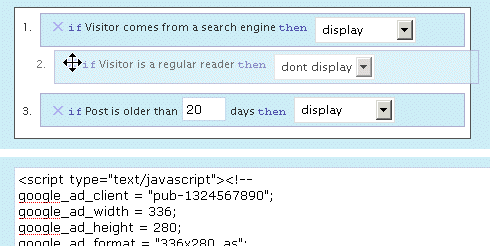
Who Sees Ads offers a very intuitive and powerful visual interface to create your context and pick display rules, in which you naturally select and order them with your mouse. The interface also offers a convenient way to duplicate, rename and delete your contexts.
Have a look and play a bit with this demo. You'll love it.
Display Rules
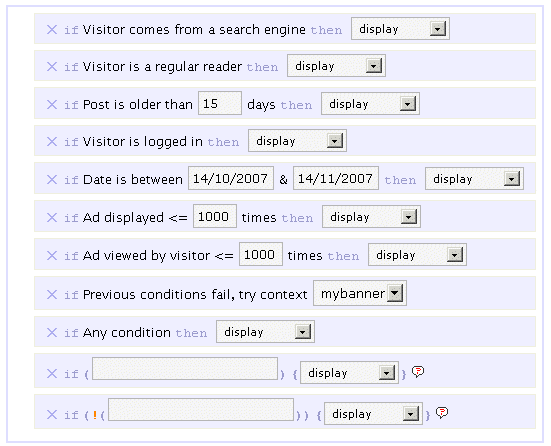
By default, you can pick or mix any of the following rules :
- If Visitor comes from a search engine, display / don't display
- If Visitor is a regular reader, display / don't display
- If Post is older than XX days, display / don't display
- If Visitor is logged in, display / don't display
- If Date is between specified date interval, display / don't display
- If Ad has been showed less than XX times, display / don't display
- If This visitor has viewed this ad less than XX times, display / don't display
- If All previous conditions fail, try another context
- If Any condition, display / don't display
The ad behavior will be eventually decided by the first rule which is matched. For instance, if you want to display an ad only for search engine visitors, you'll pick the following :
- If Visitor comes from a search engine, display
- If Any condition, don't display
If no rule is matched, nothing displays, so the second rule in the above example is actually optional.
I made up a list of example display rules, be sure to check them.
Advanced Display Rules
 You can use PHP functions and make your own custom advanced display rules. Want to display something on home page only ? if (is_home()) display will be your custom display rule.
You can use PHP built-in, WordPress internal, or your own functions. Your brain is the limit.
Please note: you obviously need to know a bit of PHP in order to use the advanced display rules. By default, they are not enabled. If you want them active, edit the beginning of the script and set $wp_ozh_wsa['iknowphp'] to true. This requires your agreement on being on your own if you break your site or if ads don't show as expected.
There are two advanced custom display rules :
- If ( condition ), display / don't display
- If !( condition ), display / don't display
The if and if not rules are working the same, I just thought it could be more convenient in some cases to use an if not rather than an if, and this way you also have two custom rules for the price of one :)
Again, check the example display rules to get an idea of how powerful it is.
Features
Simple and Effective Ad Management
Even if you're not using Who Sees Ads to fine tune display rules, it will make your life easier. Pasting <?php wp_ozh_wsa('google-336-280') ?> in your PHP templates such as sidebar.php is a lot easier than cut and pasting 10 lines of javascript, especially if you decide later to change the javascript across multiple files.
Use it inline or in PHP templates
Create contexts and display ads either in your PHP files on within your posts and pages :
- <?php wp_ozh_wsa('mybanner') ?> in your PHP files such as sidebar.php
- <!--wsa:mybanner--> within posts and pages
Visual interface
If you haven't tried it already, play with the demo. It's not functional of course, but it will show you own the interface lets you visually create contexts, and easily rename, duplicate and delete ads.
Help Wizard
A togglable introductory help contains a handy wizard that will assist you, creating your two first rules. Click on the image for a screenshot of the Wizardry.

Posting help
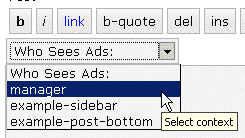
Within the Post/Edit interface, you'll find a convenient drop down selection to easily insert context you will have created (if you create just one context, the select is replaced with a button)
Google Adsense and Yahoo Publisher Compliant
Per terms of use, YPN (TOS) and Adsense (TOS) impose a maximum number of ads in a page, as follow (as of writing):
- YPN: 3 ads per page
- Adsense :
- 3 ads
- 2 search boxes
- 3 link units
- 3 referral units
Who Sees Ads fully complies to these restriction, and will display ads of a particular type up to the maximum number allowed.
Google Adsense and Yahoo Publisher Compliant, part 2
Per terms of use, YPN and Adsense don't allow ads on error pages such as 404 pages, and on pages that are not viewable by their system.
Who Sees Ads also complies to this policy, and ads won't be displayed on 404 error pages, and on draft posts a publisher is previewing.
Admin Clicks Safety
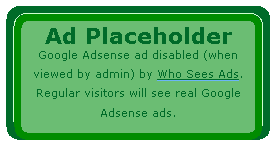 Admin Click Safety is an option that will prevent you from accidentally clicking on your own ads (Adsense or Yahoo Publisher), replacing them by a placeholder when viewed by the blog admin.
Regular visitors, of course, will see actual ads if applicable. Days of "oops I clicked it!" are over.
Widget support
Who Sees Ads is now supporting widgetized themes for easier ad management.
Custom Preferences Hacking
Advanced users with some PHP editing knowledge can now define a custom set of preferences or behaviors that will override Who Sees Ads' defaults. The plugin comes with an example my_options_sample.php file. Rename it my_options.php, edit it, and never lose any change you'd make when you upgrade the plugin.
3rd party plugin compatibility: Adsense Deluxe and Adsense Manager
For those who are already using Adsense Deluxe or Adsense Manager to manage your Adsense ads, you can seamlessly make the transition to Who Sees Ads and give it a try without uninstalling them. Instead of pasting the actual Adsense code when you create a context, just enter something like the following examples, depending on what plugin you're using:
- <!--adsense#mybanner-->
- adsensem_ad('mybanner')
- adsense_deluxe_ads('mybanner')
Please note: compatibility with these 2 plugins has been implemented to allow easy testing before adopting. I personally find Who Sees Ads much more powerful and efficient, and don't see the point of using it side by side with another ad management plugin. I will not continue support of these plugins if their code evolves and changes so that it breaks with my plugin.
Rotating Ads
You can define only 1 context and assign it as much ad code as you want. You just need to specify your custom code separator in my_options.php and you're done. Example, defining the string *** CODE *** as a separator:
- <img src="banner1.jpg" alt="Banner 1" />
- *** CODE ***
- <img src="banner2.jpg" alt="Banner 2" />
- *** CODE ***
- <img src="banner3.jpg" alt="Banner 3" />
Completely dynamic
The content managed by Who Sees Ads and whether it should display or not is processed dynamically on every visit for every visitor, to ensure maximum efficiency and make sure each visitor receives the treatment it deserves. The drawback of this aspect is that the plugin is not compatible with cache plugins, which generate each page once and serve the same static file to each subsequent visitors.
Download
ozh-who-sees-ads.zip
Extract and upload to your blog, preserving directory structure if any.
Note: download counter here and stats on wordpress.org may differ and reflect the number of downloads before this plugin was hosted on the plugin directory
PHP Template usage
The regular PHP call you will insert in your PHP templates is the following:
- <?php wp_ozh_wsa('myad'); ?>
However, you can pass an additional parameter to turn off output and have the ad code returned instead:
- <?php $code = wp_ozh_wsa('myad', false); ?>
By default, the plugin returns an HTML comment when no ad has to be displayed, for instance:
- <!-- WSA: rules for context 'myad' did not apply -->
A complete example of how to use WSA with your own functions would be something like:
- <?php
- $code = wp_ozh_wsa('myad', false);
- if (strpos($code,'<!-- WSA') !== false) {
- // plugin returned actual code, do something with it
- ...
- } else {
- // plugin returned no code to be displayed
- }
- ?>
Examples and advanced use
The obvious usage of this plugin is to display ads with rules as :
- Display ad when user comes from a search engine
- Don't display ads to my regular readers
- Display ads on old stuff, don't display on fresh posts
But you can also :
Greet your returning visitors
You can display ads, or really anything. For instance, display something only to your regular readers: a "welcome back" message, or a special offer you don't want them to miss.
Geo target !
In conjunction with my own IP to Nation plugin, you can easily target visitor from a particular country. For instance, you've always wanted to display Yahoo Publisher ads to American visitors only, as Yahoo suggestscompells? Easy, your context simply has to use the following custom if rule:
if (wp_ozh_getCountryName(0) == 'United States'), display
Check the example display rules for more ideas of usage.
Older version
Download: Who Sees Ads 1.3.3 for WordPress 2.3.3-
Question?
If you have a question, read all the comments: the answer *is* there.
[…] 今天åšå®¢è”盟è¦ä»‹ç»çš„wordpressçš„Who Sees Adsæ’件,就是为了让è€è¯»è€…和新读者看到ä¸åŒçš„广告。 […]
[…] 1. Who Sees Ads (Author: Ozh) Ads can be controlled according to the users loyalty (Whether the user is regular visitor to the site), or user's referrer (Whether user came directly from a link, or through a search engine), or the aga of the post (How old the post is)..etc..and it generate Adsense code according to the setting, which can be set via the interface. Download link : http://planetozh.com/blog/my-projects/wordpress-plugin-who-sees-ads-control-adsense-display/#downloa… […]
[…] æ’件主页,æ¥è‡ªOzh, åšå®¢è”盟有一篇更详细的介ç»æ–‡ä»¶ï¼Œç‚¹è¿™é‡Œ […]
Hi Ozh,
I love the concept behind this plugin. However, I'm having a bit of a problem getting it working. I'd like to disable ads for regular readers, but that rule won't work for me. It looks like the "visit_lasttime" cookie isn't being set on my site. But the visit counter does increment. Any suggestions?
Thanks,
Andrew
Andrew » just checked your blog, indeed one cookie only is set, which doesn't really make any sense since both cookies are written by the same function and there's no test that could prevent the second one from being written. Usually I'd suspect a conflicting plugin… Honestly: I don't know.
[…] consolation prize winner is Ozh for Who Sees Ads. WhoSeesAds is a wonderfully useful plugin that lets WordPress users determine whe sees the ads on […]
[…] consolation prize winner is Ozh for Who Sees Ads. WhoSeesAds is a wonderfully useful plugin that lets WordPress users determine whe sees the ads on […]
Thanks for your quick reply. I just figured out the problem: my host hasn't upgraded to PHP 5 yet (it runs 4.4.4). On line 428 of wp_ozh_whoseesads.php you used $_SERVER['REQUEST_TIME'] to get the server's timestamp. But this variable only exists as of PHP 5.1. I changed that line to use time(), and everything works perfectly now!
Kudos on the great plugin. Hopefully my little discovery will help others down the road.
Andrew
Andrew » nice catch! I'm updating the code right now, thanks for the notice
[…] Prize The consolation prize winner is Ozh for Who Sees Ads. WhoSeesAds is a wonderfully useful plugin that lets WordPress users determine whe sees the ads on your […]
[…] Consolation Prize […]
[…] as "Consolation Prize":) at the WordPress Plugin Competition, with my (uberleet) plugin Who Sees Ads (also known as "The Ultimate Ad Management […]
[…] consolation prize winner is Ozh for Who Sees Ads. WhoSeesAds is a wonderfully useful plugin that lets WordPress users determine whe sees the ads on […]
[…] Premio consuelo: Who Sees Ads […]
[…] Who Sees Ads – 訪å•è€…ã®æ¡ä»¶ï¼ˆåˆã‚ã¦ããŸäººã‹å¸¸é€£ã•ã‚“ã‹ãªã©ï¼‰ã«ã‚ˆã£ã¦è¡¨ç¤ºã™ã‚‹åºƒå‘Šã‚’コントãƒãƒ¼ãƒ«ã™ã‚‹ã€‚賞å“ã¨ã—㦠Pajama Mommy よりホスティングサービスã¨Wallhogs.com より 48″ wallhog ãŒé€ã‚‰ã‚Œã‚‹ã€‚ “ã«ã‚…ーã™â€ ã‚¿ã‚°ã®æœ€è¿‘ã®æŠ•ç¨¿WordPress 2.3 リリーススケジュールMovableType 4 対 WordPress 2.2bbPress ã®æ—¥æœ¬èªžãƒªã‚½ãƒ¼ã‚¹Sandbox テーマコンテストã®å‹è€…ã¯â€¦WordPress 2.2.2 用日本語リソースã¨æ—¥æœ¬èªžãƒªã‚½ãƒ¼ã‚¹å…¥ã‚Š WordPress 2.2.2 […]
[…] ganador del premio de consolación ha sido Ozh por su plugin Who Sees Ads. WhoSeesAds es un maravillo e útil módulo que permite a los usuarios de WordPress determinar que […]
[…] Premio di consolazione a Ozh con Who sees ads. […]
[…] Prize Winner: Ozh for the Who Sees Ads […]
WordPress Plugin 大賽…
å‰ä¸ä¹… Weblog Tools Collection è¾¦äº†ä¸€é … WordPress Plugin Competition 的比賽,今天çµæžœå‡ºçˆäº†ï¼š
佳作是 Who Sees Ads,å¯ä»¥è®“ä½ æŽ§åˆ¶å»£å‘Šè¦åœ¨ä»€éº¼æƒ…æ³ä¸‹å‡ºç¾ã€‚基本的想法是:常客ä¸æœƒåŽ»é»žå»£å‘Šæ‰€ä»¥ä¹Ÿä¸….
[…] Prize: Who Sees Ads by […]
[…] de consolare – Câştigat de Ozh cu Who Sees Ads. Pluginul introduce blocuri de reclame în anumite porÅ£iuni ale blogului dar care să […]
[…] Ultimate ad management plugin è un plugins per WordPress che ti permette di configurare in modo dettagliato le esposizioni dei tuoi banner adsense grazie a delle istruzioni condizionali che puoi configurare come meglio ritieni opportuno. […]
[…] ödülü: Who Sees Ads e gitti,Bu eklenti blogumuzdaki kullanıcıların ziyaret sıklığına göre,yazının yayınlanma […]
[…] Who Sees Ads is on the road to becoming one of the most useful plugins released for the commercial or profit blogger. Of course, much like the AdSense Deluxe plugin, this plugin can potentially be used to display various types of information however you want and to whomever you want, not just AdSense or contextual ads. […]
[…] for WordPress are stepping up to the plate as well. I've been playing around with Ozh's Who-Sees-Ads plugin here on Zoomstart. It allows you to target ads using any number of parameters, both default and […]
[…] Who Sees Ads ? Manage your Ads, Control Who Sees Them (tags: wordpress plugin) […]
[…] Plugins Consolation Prize Winner – Ozh for Who Sees Ads WordPress […]
[…] you still want to use CPC Ads or affiliate links and have a WordPress powered blog, then you should install this WordPress plugin to better target who sees your Ads. If you get a lot of search engine traffic the best way to […]
I suggest you an extra display role.
There is a lot of script that track the click on adsense and YPN network. Why doesn't add a control about the numbers of clicks during a time period?
It should be very useful to prevent a click fraud!
For example you can add a role:
if visitor have just clicked the advert (and the admin can choose the number of clicks during a time period)
Here you can find javascript to monitor the click on advert:
http://www.eggheadcafe.com/articles/adsense.asp
[…] Who Sees Ads WordPress Plugin […]
Leonardo » a number of clicks on an ad is a statistical information, not a condition you would use to show or hide an Adsense or YPN ad. Plus, if a visitor clicks on a ad… he's gone. No need to set up any condition for him on your blog. He's gone.
There are already WP plugins implementing this kind of tracker.
[…] als x mal da war zählt fortan zu den Stammlesern). Nur bin ich dann noch zufällig auf "Who Sees Ads?" gestoßen. Mit diesem Plugin lässt sich die Anzeige von Werbung tatsächlich sehr genau […]
Plugins para WordPress: ganadores del concurso…
Finalmente se conocen los ganadores del concurso de plugins para WordPress de Weblog Tools Collection; los 4 premiados son plugins realmente útiles aunque sólo use uno como test y nada más.Ganador: OneClick y esto es un más que justo ganador, bási…
[…] premio de "consolación" ha ido a parar al plugin Who Sees Ads es un maravilloso y útil plugins que te permite determinar quien ve la publicidad de AdSense en tu […]
Just wanted to let you know that the WP Plugins Database is out of sync. It lists 1.0 as the latest version but it looks like 1.01 is actually the most recent.
Great work and thanks for sharing!
This plugin interferes with the Image Browser plugin. In the "Write" area the Image Browser button when clicked on will not open. Can the who sees ads fuction be removed from the "Write" area because I really do not need it?
:)
http://fredfred.net/skriker/index.php/iimage-browser
Dana » in wp_ozh_whoseesads_admin.php, comment out (or simply remove) the last line:
Thank you ozh, it worked perfectly.
Wonderful plugin btw :)
Hey there,
I'm one of those users that don't bother with ads, though I've tried it once. The problem was that I never had enough readers to make the ads worth-while. Now, after stumbling over this little ingenious plugin, I think I'll start putting in-post ad-blocks in again just for the sake of getting to use your plugin. Great stuff! :)
This is just fantastic! A tool I must say to develop good relations with readers. It goes into all my blogs the next time I have an hour free! Great work! Thanks a ton.
I made a "don't display for visitors logged in" rule, copied the ad's text (it's a goggle ad sense ad) into the context box, etc.
Then I logged out and logged in as someone else (on the same computer) … so I could be a "registered visitor" and the ad is still visible. What am I doing wrong?
Thanks Ozh,
This is fascinating. Dynamically displayed ads. I don't had Adsense on my blog but now I am willing to give it a shot. I can't wait to install my first French plug-in:)
Now my site will be chic for sure!
Nice plugin i want try.
Just suggestion i think if this plugin can using for block vistor come from a country we not want seem adsense, just for discover invalid clik if used share ip i sure this plugin as the best plugin in the future.
Great Plug-in, works perfect.
Is it possible to modify the rules that a User from a Search-Engine sees the ad on all pages he is navigating and not just on the firt link from search engine? My rules are just Search-Engine Users see ads, any other condition no ads.
Thanks a lot…
Peter » Well, it's always possible to do anything with some coding, but this seems really like a bad idea. Why? Because the whole main purpose of this plugin is to treat differently people reading only one page after a search engine referral, from people willing to discover your blog. When someone lands on your site, they basically have 2 options : either go away on next click, so your hope is this click will be on an ad, or read on, and in such a case it's because your content interest them, not your ads. They just won't click ads. Why make your site more ugly than needed with ads and banners then? Your winning strategy when someone actually starts visiting your blog after he's reached it for first time is to convert them into regular reader (ie make them subscribe to your feed, or browse through the site, etc)
Hi Ozh,
I did not see this fact from your side of view, your absolutly right. Thank you for this tip ;)
Amazing, I Love your Plugin, it's fantatic.
Greetz Freetagger
I love this plugin! Thanks so much for your hard work and documentation. After searching through this site I couldn't find a way to filter by browser. For example, I'd like to use this for Google Adsense Firefox signups, but I only want IE users to see it. Is this possible?
Thanks!
Laundro » interesting question :) I may indeed add a display rule for it if there is some demand, but for now you just have to do the following :
– enable the advanced display rules (the iknowphp bit)
– as a display rule, use the following :
Ozh,
That code was just what I needed and worked like a charm!
Thanks!!!