
One of the first things I wanted to improve in the admin area of my WordPress blog, back in the 1.5 days, was the header menu. I wanted to be able to reach any admin page in one click, instead of first clicking on the first level link ("Manage" for example) and then only on a submenu link ("Comments") So came a very neat plugin : the WordPress Admin Drop Down Menu
When WordPress 2.7 and its new and optimized user interface came, I thought there was still room for improvements: a horizontal menu gave the admin area more of a "desktop application" feel, and I think it's superior to a vertical menu. So I updated the WordPress Admin Drop Down Menu.
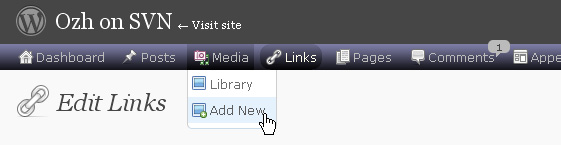
Download
Get the plugin :
ozh-admin-drop-down-menu.zip
Extract and upload to your blog, preserving directory structure.
Note: download counter here and stats on wordpress.org may differ and reflect the number of downloads before this plugin was hosted on the plugin directory
Activate and enjoy. Another friendly install & forget piece of PHP.
Features
- Customizable color scheme with a neat color picker
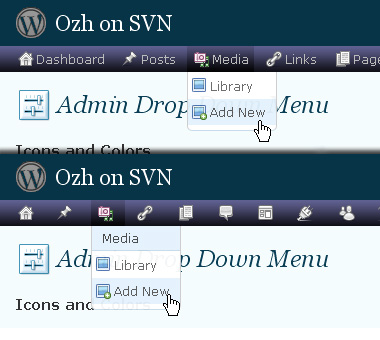
- Normal mode for regular users, compact mode for real estate maniacs, minimal mode for those who never have enough
- Optional cute icons from FamFamFam
- Enhanced compatibility with handheld devices
- Joy and happiness for every day
Javascript is involved for advanced features and to make stuff compatible with MSIE6, but on any decent browser everything works even with Javascript disabled.
Super neat color picking.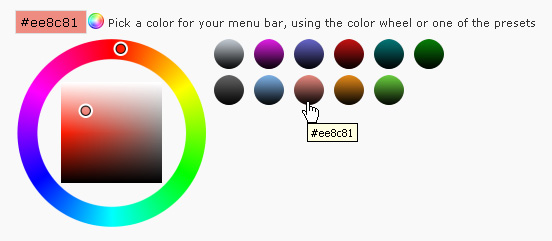
Any color you'll love.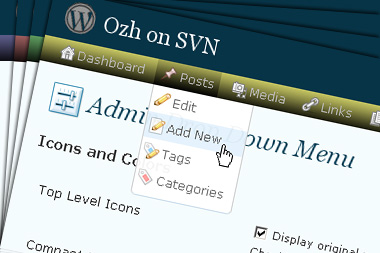
Normal or compact display.
Browser compatibility
The plugin has been developed on Firefox 3, Chrome and MSIE7. It should do fine with MSIE6 and Safari too.
There are glitches with Firefox 2 and Camino which both use a deprecated rendering engine. There are also glitches with Opera. I won't fix these, but if anyone wants to submit a CSS patch to resolve one of these issue, you're welcome :)
Developer friendly
The plugin comes with a wickedly cool API that will allow other plugin developers to interact with it, like adding your own custom icon for your plugin. Read the API for Coders page for examples and documentation. Also, all elements the plugin produces get custom CSS classes and id's to allow easy styling or selecting.
Translations
The plugin is ready for interglobanalization and there is a .pot template file included so polyglots can even make their own translation and sent the .mo and .po files to me that I'll include in the package.
The plugin comes with the following translations, in no particular order:
- Turkish, thanks to Baris Ünver
- Korean, thanks to Jong-In Kim
- Spanish, thanks to Karin Sequen
- Italian, thanks to Gianni Diurno
- Deutsch, thanks to Frasier Crane
- Russian, thanks to Fat Cow
- Brazilian Portuguese, thanks to Renato Tavares
- Greek, thanks to Friedlich
- Belorussian, thanks to ilyuha
- Hebrew, thanks to Amiad Bareli
- Romanian, thanks to Octav
- Ukrainian , thanks to wpp.pp.ua and Jurko Chervony
- Traditional Chinese, thanks to Paogray and Joan Wang
- Dutch, thanks to Cees van den Heuvel
- Slovak, thanks to Branco from WebHostingGeeks.com
And maybe more since I might totally forget to update this list :)
Older Versions
All my plugins are designed to run on the latest WordPress version available. Upgrade WordPress whenever a new version is out, or be sorry when your site gets compromised.
If for some unintelligent reason you need to get an older version of this plugin, it might be available, yet totally unsupported or recommended. Check here: Other versions.
Feedback, Bug report, Feature request
Sure. Feed me back. Like it? Blog about it. Love it? Click on the download link, see the Paypal button appear, and give it some clicks!
If you're reporting bugs, you're welcome, but please provide a screenshot and informations about your browser & your OS. I'm not supporting deprecated blogs or plugins or browsers, and I can't respond to incomplete bug reports.
If you're suggesting a feature, you're welcome too, but I won't add an admin menu on the public side of the blog, on top of pages. If you're looking after having this menu fixed on top of page, check this companion plugin that works as a plugin to this plugin: Admin Menus Fixed.
A short while ago WP 3.3 told me to update ADDM to 3.6.2 so I did the update. Sadly, it's still not breaking long lists.
Cheers for all your efforts to fix this, Ozh.
Hi,
Thanks for the faster Update for the WP3.3.
You can put please the speech blisters downward.
Of the new Adminbar are covered above.
That would be great, which I also the speech blisters would not like to do without.
Any news on an Ozh’ plugin update to resolve the WP 3.3 admin bar issues?
astropeg » what's the issue exactly? screenshot? Everything works fine on my 3.3 blogs
Thanks for your fast reply Ozh!
Due to comments on this forum about errors resulting from most recent WP 3.3 upgrade, I delayed updating WP.
From the sound of your response, it seems there are no error so I'll go ahead and do the WP update and provide screen shots if any errors occur.
Thanks again for your great plugin!
Hi Ozh
Did a reinstall of v3.6.2 and still can't get long lists to break.
The same problem happens when I use IE instead of the usual Firefox.
FWIW, I’m now running XP Pro, Firefox 8.0, WP 3.3
If you need a list of my active plugins, have a shufty at http://beardedgit.com/?page_id=481
If you need any more info or a screenshot please let me know.
Cheers,
BG!
p.s. we had simlar trouble back in March 2011, see comment 1467
Here's a pic of my current layout with WordPress 3.3.
I love the Ozh Admin Drop Down Menu and bought a beer too.
The new embedded coded header in WP3.3 is klunky, requires duplicate clicks, and seems premature without completely thinking through what's intended.
http://www.brianhayes.com/pics/ozh-admin-WP3.3.jpg
is ist planned to merge the OZH admin bar and the WordPress Admin Bar to one?
Nice Addon, i love it!
Having trouble on one of my sites. When activated shows another menu on the left side of the screen next to the original wordpress menu and pushes everything below that menu. Any suggestions on how to fix this?
Sorry forgot to show a screenshot in my last reply
http://www.5wills.com/01/Clip1.jpg
@Dave
With the plugin enabled, the standard menu shouldn't display at all. Are you running and Admin theme?
@Udo
From what I've seen in the forums, the Admin Bar is now a target for some plugins to add their own menus/links. WP-Super Cache and Joost's SEO plugins both do this and there's discussion on whether there should be a drop-down made available to put these in, so that the bar real estate doesn't quickly become exceeded. For my $0.02, that's what the long existing Settings and Tools menus are for.
@Brian Hayes
Agreed on the Admin Bar too many clicks. What's the point of having a drop-down show up for the "Visit Site" link? That menu header already goes there. Another peeve is the fascination of always sticking something on the right end of any bar that there is available. v3.2, had two menus over there but I could move them to the left with my companion plugin; where everything else is. v3.3 page code sequence ensures that this isn't possible now. :\ At least I haven't found a way… yet.
Not sure what you mean by Admin theme. I am using a premium theme from iThemes. I have a few other sites and use your plugin on all of them with no problems. The only difference is that I was using a different theme (from the same company)on this site. I deleted the old theme and uploaded the same one I'm using on the other sites. Since writing my first post I have rebuilt the site from the beginning and your plugin works fine. There must have been something in the old theme that did not get deleted. Thanks for the reply, I'll be buying you a beer soon. Dave
Good WordPress Plugin. I like it.
Ozh, I can only guess that astropeg is referring to the Z-axis of the WP 3.3 admin bar being greater than that of the OZH admin bar. It's a minor thing, but the WP 3.3 bar cuts off the top of the bubble listing the number of updates, for instance. I only spent about a minute fooling with the CSS, but didn't manage to fix it.
But it's such a minor thing, this is a great plugin. I really love how much real estate it gives me. Thanks for releasing it to the public!
After update (WP 3.3.1, ADDM 3.6.2) breaking long menu list not works :-(
@Julian @astropeg
Hmmm, I'm not getting speech bubbles with the current version; whether my Admin Menus Fixed plugin is activated or not. The only time a number shows up is if I disable Compact Mode, so that the text for each menu shows. Then, there is a number in the menu heading, but not in a bubble like in earlier versions. The 3.3.x Admin Bar has its own bubbles for comments and updates, so duplicating this function just takes up screen real estate (and adds code). Back when the bar could be disabled, the bubbles preformed a necessary function.
It doesn't work on iPhone….. Not good dude! Think mobile, mobile, mobile:)
Great plugin, but it causes, that this plugin "CMS Page Order" don't work, because then "CMS Page Order" shows POSTs instead of PAGES – and I figured out, that it is your plugin, that causes this error :-((
Thank you for great plugin.
Recently I've got very strange problem (and actually not quite sure that problem with plugin). After I update my Chrome to version 17, console menu items in WordPress (with you plugin) spreaded out. When plugin is off – this problem gone (but also gone customized menus – standart ones is ok).
Can you please advice.
Thank you,
Eugene
Emaster » Yes, I've had a few reports already that Chrome 17 breaks the menus. Will fix when/if I have time. Note that I'm not a Chrome user myself, might be better to contribute a patch to the CSS file :)
The problem with Chrome 17.x can be fixed with a little quick dirty fix…
1. Open file /inc/adminmenu.css.php
2. Go to line 103.
3. Change line to look like this:
4. Clear your browser cache and reload the page.
Using !important would be only a temporary fix. But it works for the moment until Ozh gets time to do a better fix ;)
Thank you OZH, and thank you Samuel for solution.
Eugene
I got the same problem as Chris with the plugin called "CMS Page Order" but I don't want to pass on your drop down menus nor the other plugin.
Is there any solution? Thanks!
There is a bug in file core.php
When the user has not admin capability and option "Minimal Mode" is checked, the menu Logout is not displayed. To fix it, change:
add_users_page(__('Log Out'), __('Log Out'), 1, 'ozh_admin_menu_logout');
to:
add_users_page(__('Log Out'), __('Log Out'), 'read', 'ozh_admin_menu_logout');
I love your plugin, I use it to get to my clients pages right from my dashboard. But seems that it is showing up on my clients profile pages now. Is there some code I can add to my themes functions.php file to stop subscriber from seeing the drop down?
Sorry, I love your plugin as well. But asked question on wrong site.
Tried the newest version of OZ toolbar v3.6.3, and while overall it works with WP v3.3, the WP toolbar persists on top. This also truncates the little balloons as Silbereis posted in December.
Thanks.
Vinny.
Every time I attempt to perform any action with Ozh Drop Down Menu, I get logged out of admin and taken to my site Home page.
e.g If I attempt to update to latest version, I get returned to site Home page.
If I attempt to deactiivate I get returned to Home page.
etc etc
I then manually deleted plugin, reinstalled but still this happens and now I can't even Activate plugin.
I am running
Ozh Drop Down Version 3.6.3
WP 3.3.1
PHP 5.2.17
Any ideas why this happens
I LOVE this plugin so much that I can't blog without it! But I was wondering if in a future version that there would be the ability to change the menu bar's text color. I like to make my menu bar a similar color to the front page theme, but most of the time the colors are too light to read the light grey text, so I have to use a different color. Thanks for this great plugin!
Hi,
Every time I attempt to update Ozh' Admin Drop Down Menu to version 3.6.3, I get logged out of the admin page and taken to the site's homepage and I am umable to update the plugin.
I am running
WP Version 3.3.1
PHP Version 5.2.17
jim mccann » delete the plugin folder manually (via FTP) and reinstall
Hey, super tool. Just a quick question: I know that your admin bar was originally build to replace the Admin Menu Bar on the side. However I am looking for a solution to have both: Your Admin Bar IN ADDITION to the standard WP menubar on the side… . This is, because customers could then easier accept your toolbar, since they still have the old navigation bar to navigate on the side (as they are used to). Do you think it would be possible to add another option: Show WP Standard Menu, to your plugin, so one can choose, to show the standard wp menu as well?
May sound to you like a kind of weird question, but I am asking, since I really love your admin bar and want to implement this for my users, but I got their feedback, being afraid trying, since they fear loosing what they got used to in the past… .
Looking forward to your answer,
Arne
Hi
I am experiencing the same issue as Dave but don't understand how to correct it.
http://www.5wills.com/01/Clip1.jpg
I have no plugins installed. I use it on 30 other sites with different templates and no issues whatsoever.
Please help. I can't function without this awesome plugin. It's like driving on the wrong side of the road and it is very dangerous unless you drive very, very slow! ;)
Bill » there's a test file in the plugin directory. Load it in your browser.
Thanks for the reply but I am unclear as to which plugin directory you refer to…
Bill » yoursite/wp-content/plugins/ozh-admin-drop-down-menu/test.html
Hi. Several post up (1577) I never received a response. Is this an isolated incident?
Ozh, I do not see the CSS. I tested on other sites on the same server and I can see the CSS. Any suggestions?
Bill » there's probably a rule in a .htaccess file somewhere that prevents execution of PHP files under the wp-content directory
It turns out that there were some server permission settings that needed changing. I was having issues with a theme displaying errors. The server support changed some settings somewhere and voila! the theme worked fine and then the plugin started playing ball too.
how do i completely uninstall this plugin,i wish to revert back to the side bar menu – the uninstall does not work !
wp 3.3.2
Hey,
Seems the option "Break Long Lists" no longer works with WordPress Version 3.3.2.
Simply has no effect, no matter what I set it to.
Thanks,
Will
Since my previous post, I have investigated and created a fix for minimizing (hiding the wordpress top menu) in WordPress 3.2.2
Please see the code changes on my blog here http://badlywired.com/technical-stuff/2012/05/04/ozh-admin-drop-down-menu-css-fix-for-wordpress-3-2-2/
Hope that helps
I have appreciated your plugin for a long time, but I just got an Android tablet and have to deactivate the plugin to maintain websites. The submenu items just don't respond to taps!
Anybody have issues with IE8 bar reverting to side position randomly?
I've been using you plugin forever. But just installed in new WP 3.4.2, and it doesn't work. Menu appears with cut-off icons on the left. Is this bug with new WP3.4.2?
Works on my 3.4.2 and on 3.5 in FireFox, Chrome and IE. Browser issue, perhaps?
No. I've tried it in several browsers. Also tried disabling all other plugins, and changing themes. Original vertical WP menu remains on the left, while the Ozh menu appears vertically next to it, but widely spaced.
http://tglass118.com/screenshot.png
Also tried the test.html file in ozh folder and did not see the css. So somehow it's one of the three problems mentioned there. But I don't know how to fix them. I'm using this plugin successfully on other sites.
@Ted,
I get the same issue occasionally, but not all the time.
I do have an issue that I've just figured out. On many of my plugin admin pages, including the plug list page, the buttons or links on the bottom of the page are BELOW the edge of the admin footer. As an example, I was just working with Post Snippets on my site, and the ADD NEW SNIPPET button was unavailable to click on because it was below the top edge of the admin footer. I turned off the Admin Drop Down plugin, and the buttons showed up above the top lip of the footer. This same problem is on a variety of my plugins on my site. Where would be the appropriate place to put some extra breaks/linefeeds/etc to resolve this problem?
Love the plugin…it is always the FIRST plugin I install on every WP site I create.
About 20 3.4.2 sites with no problems… with my desktop PC. However, it's unusable with my iPad. The menus are not touch-capable and give only the top item.