
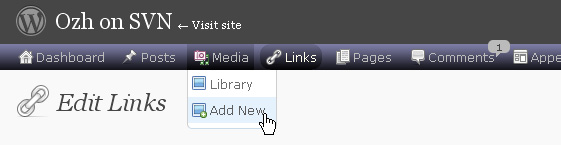
One of the first things I wanted to improve in the admin area of my WordPress blog, back in the 1.5 days, was the header menu. I wanted to be able to reach any admin page in one click, instead of first clicking on the first level link ("Manage" for example) and then only on a submenu link ("Comments") So came a very neat plugin : the WordPress Admin Drop Down Menu
When WordPress 2.7 and its new and optimized user interface came, I thought there was still room for improvements: a horizontal menu gave the admin area more of a "desktop application" feel, and I think it's superior to a vertical menu. So I updated the WordPress Admin Drop Down Menu.
Download
Get the plugin :
ozh-admin-drop-down-menu.zip
Extract and upload to your blog, preserving directory structure.
Note: download counter here and stats on wordpress.org may differ and reflect the number of downloads before this plugin was hosted on the plugin directory
Activate and enjoy. Another friendly install & forget piece of PHP.
Features
- Customizable color scheme with a neat color picker
- Normal mode for regular users, compact mode for real estate maniacs, minimal mode for those who never have enough
- Optional cute icons from FamFamFam
- Enhanced compatibility with handheld devices
- Joy and happiness for every day
Javascript is involved for advanced features and to make stuff compatible with MSIE6, but on any decent browser everything works even with Javascript disabled.
Super neat color picking.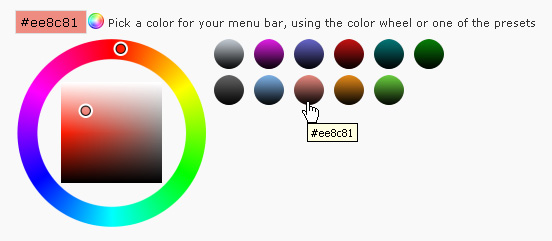
Any color you'll love.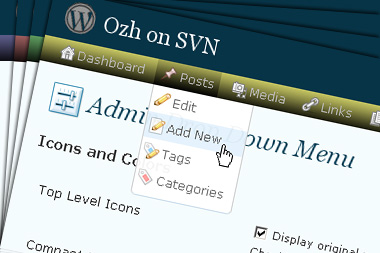
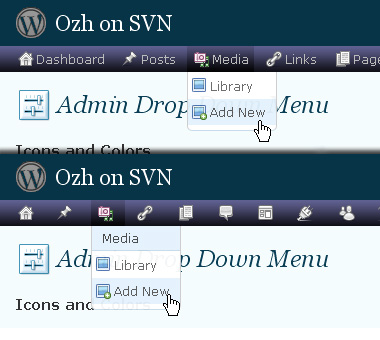
Normal or compact display.
Browser compatibility
The plugin has been developed on Firefox 3, Chrome and MSIE7. It should do fine with MSIE6 and Safari too.
There are glitches with Firefox 2 and Camino which both use a deprecated rendering engine. There are also glitches with Opera. I won't fix these, but if anyone wants to submit a CSS patch to resolve one of these issue, you're welcome :)
Developer friendly
The plugin comes with a wickedly cool API that will allow other plugin developers to interact with it, like adding your own custom icon for your plugin. Read the API for Coders page for examples and documentation. Also, all elements the plugin produces get custom CSS classes and id's to allow easy styling or selecting.
Translations
The plugin is ready for interglobanalization and there is a .pot template file included so polyglots can even make their own translation and sent the .mo and .po files to me that I'll include in the package.
The plugin comes with the following translations, in no particular order:
- Turkish, thanks to Baris Ünver
- Korean, thanks to Jong-In Kim
- Spanish, thanks to Karin Sequen
- Italian, thanks to Gianni Diurno
- Deutsch, thanks to Frasier Crane
- Russian, thanks to Fat Cow
- Brazilian Portuguese, thanks to Renato Tavares
- Greek, thanks to Friedlich
- Belorussian, thanks to ilyuha
- Hebrew, thanks to Amiad Bareli
- Romanian, thanks to Octav
- Ukrainian , thanks to wpp.pp.ua and Jurko Chervony
- Traditional Chinese, thanks to Paogray and Joan Wang
- Dutch, thanks to Cees van den Heuvel
- Slovak, thanks to Branco from WebHostingGeeks.com
And maybe more since I might totally forget to update this list :)
Older Versions
All my plugins are designed to run on the latest WordPress version available. Upgrade WordPress whenever a new version is out, or be sorry when your site gets compromised.
If for some unintelligent reason you need to get an older version of this plugin, it might be available, yet totally unsupported or recommended. Check here: Other versions.
Feedback, Bug report, Feature request
Sure. Feed me back. Like it? Blog about it. Love it? Click on the download link, see the Paypal button appear, and give it some clicks!
If you're reporting bugs, you're welcome, but please provide a screenshot and informations about your browser & your OS. I'm not supporting deprecated blogs or plugins or browsers, and I can't respond to incomplete bug reports.
If you're suggesting a feature, you're welcome too, but I won't add an admin menu on the public side of the blog, on top of pages. If you're looking after having this menu fixed on top of page, check this companion plugin that works as a plugin to this plugin: Admin Menus Fixed.
And finally here is the uncut link to the screenshot of the “submenu wider than screen” problem:
http://img287.imagevenue.com/img.php?image=38241_AdminMenu_122_506lo.jpg
i'm having exactly the same problem as Tom. TY
Trying to set the menu to be fixed at the top, so that it is always visible when scrolling down the browser. I have been able to get the menu fixed to top and page body in its proper place (everything shows properly at the top of the page body – i.e. help, screen options, etc.)
One remaining problem I cannot figure out – in both IE and Firefox – the secondary/drop-down menu is hidden behind the page body. There are several element z-index settings in the admin toolbar css – which one(s) in particular are the correct ones to change the setting of -AND- what new numercial value should they be set at to raise them to be the topmost element layer (viewable over the page body) please??
Love your admin toolbar plugin – Thank you!
LL
Hi Ozh,
I did see the wide two-column on one of my blogs. I have another report, however. WP 3.1 loses the Super Admin menu, so the entries for it end up getting moved into other menus. The Domain Mapping plugin entries, for instance, get shunted into the Tools menu; resulting in two "Domain Mapping" entries and one "Domains" entry when logged in as Network Admin. I have no clue how you'd go about approaching this, other than to re-create the Super Admin menu, so they'd all fall back where they were.
An unrelated issue, as it did this in earlier versions, is that when logged in as a lower level user, the Admin Drop Down Menu is shifted to the right by about 50px. No idea why this would be.
Thanks for this and YOURLS!
@Leopard-Lady
I've done this. Have had it fixed through six or eight versions, now. WP 3.1, however, is a real conundrum, what with the way they took over the top of the admin screens with more menus. Only way I could get it to work in an efficient manner was to hack the core admin CSS files along with Oxh's; placing Ozh's just below the Admin Bar and shifting the light grey bar down. I also thinned the latter quite a bit. It scrolls with the page content, the other two don't. I'd get rid of the admin bar but I like the Sites Menu in it. Ozh will most likely come up with a replacement for both standard bars and we can get our screens back.
The core edits are too extensive to go into here but, now that I have it working, I'm going to try to edit Ozh's such that it overrides the standard and then return the core files to their original state.
@BJ Johnson – thanks for your reply. As it was, I was attempting to do that on a WP 3.0.4 install that will soon be updated to WP 3.1.
I will wait to tackle this again when the customer server settings are fixed to allow the upgrade to WP 3.1.
Thanks for your reply!
LL
Suggestion: When hitting the red bubble, when there is an updated plugin, I would like to be redirected to the same update page as is from the Panel menu
@Leopard-Lady
v3.0.x is easy in comparison. Well, it was after a lot of trials. Try this:
Fixed WordPress Admin Menus with Ozh's Drop Down
@BJ Johnson – that did it!! Thank you!!
I feel so stupid for not thinking to comment out the overflow:hidden; – here I wasted a bunch of time thinking it was one of the z-index settings… duh on my part… how many time did I look at that and see "hidden" and it still didn't dawn on me… LOL @ self.
An FYI for anyone else making this change – I have a half dozen plugins that do not list themselves under tools or settings groups, instead creating their own setting links on the toolbar, which pushes Ozh menu into a 2 line menu. In this case you simply need to adjust the
margin-top:25px !important;
to
margin-top:54px !important;
The 54px setting will set it in perfect placement to accomodate the double menu bars.
Thanks again for your help BJ Johnson – you rock!!
LL
To all » missing icons in Network admin & menu resizing problem is fixed in 3.5 I've just committed. Happy updating!
I see no network link or icon while on blog dashboard?
Sorry i forgot to elaborate, no network link with new version 3.5?
Hey, I was wondering if you could add a couple of features
One being the new 3.1 front end menu having the same menu style.
And the second being an option to have the menu float on top.
I have added the second to my own blog manually, but thought it could be a awesome and easy to add feature (and then i don't have to re-add it myself manually each time.
:)
I have been using your plugin for awhile – thanks. The function to break the long lists of drop downs broke for me with 3.1, and the latest update to your plugin (3.5.1) didn't fix that issue for me, despite the fact that I saw the bug and supposed fix mentioned in the changelog.
Hi Ozh,
Well, I went and did it. My companion plugin hit the WordPress Plugin Directory this afternoon. Thank you for the encouragement to write it. Fun, all around. Please let me know your thoughts and where I can improve. There's probably stuff in there I don't need or could do differently (just couldn't get wp_enqueue_styles to work). PHP is new for me. I cut my teeth on Fortran and PL1 but any day one can learn something is a good day.
Thanks, again.
All the best,
BJ
Hi Ozh!
Thanks for plugin' my plugin. :) Much appreciated!
The whole experience has been great. Further makes me want to write a whole plugin one of these days. I'll have to learn a lot more PHP first. One step at a time…
BJ
Hi again, Ozh
I've just updated to v3.5 and it all works fine except that long lists have stopped breaking when over the specified number of menu entries.
My "Settings" list is usually 29 items long. Pre-v3.5 I had it set to break at 15 and it did indeed break into 2 columns as expected. Now I'm on v3.5 it doesn't break and I now have to scroll the page to see the end of it.
By way of a demo, I disabled all plugins except this one and Akismet and then I reset the "break after" number to 4. As you can see in the screenshot at http://beardedgit.smugmug.com/gallery/8726268_DVw75#1212849729_tpsFv the "Settings" list hasn't broken and is still at 8 items.
I'm running XP Pro, Firefox 3.6.15, WP 3.1
The same problem happens when I use IE 8.0.6001 instead of Firefox.
If you need a list of my active plugins, have a shufty at http://beardedgit.com/?page_id=481
If you need any more info please let me know.
I'm fairly sure that this isn't a plugin conflict, unless Akismet is being fussy.
Any thoughts?
Thanks in advance for your attention,
Stef
BG! » I just pushed a little fix that might, errr, fix a js problem preventing this. Update when you see a new version.
Cheers, Ozh.
Update done, it's worked and normality has been restored.
Many thanks – you're a top bloke!
the new update fixed the broken long lost error. thanks!
Ohz, I've just noticed something unrelated and slightly odd…
I'm subscribed to the comments on this post but I've not received any of the expected emails.
Just thought you'd like to know.
Cheers,
Stef
This is always the first plugin I install on a new WP site. I love this plugin! Thanks for the hard work! Is there somewhere I can make a donation? If so it isn't immediately obvious on the site.
Compatibility: Loading Issue: Author is using load_textdomain instead of load_plugin_textdomain function. This may break behavior of WordPress, because some filters and actions won't be executed anymore. Please contact the Author about that.
Johny Vercosa » check WP's source before stating random assertions like this.
I installed it on my wordpress easel sight and now I can't delete it or any other pluggin. Help!
Hi Ozh,
First of all: thanks for all the wonderful plugins you've developed for the WP community!
My question is about a feature in the 'Ozh Admin Menu' plugin: the 'split (into columns) after x items' function does not seem to work… There are no Js restriction active and it's the same in 'WP 2.8' and 'WP 3.1'.
Because I normally have a lot of plugins installed and it doesn't split the items, some disappear below the browser window in (for instance) the 'settings' menu…
Thanks in advance for your reply!
Grtz, Ivo
Ivo » this feature totally works (at least on firefox, might depend on your browser)
Hi Ozh,
Thanks for your reply.
Oh, yes, I'm sure it 'should' work! For me however, it does not at the moment and I placed the comment because maybe you would now what could be causing it, i.e.: that it was perhaps a 'use case' that you are familiar with and would be able to tell me where to look to find what's causing it since you are the developer of the plugin.
No problem, I'll look for it (again) myself.
Grtz, Ivo
Ps.: I'm using 'Ff 4.0'.
Do you know how I can do this same thing on a buddypress (public side) site except on the sidebar? Where it will list the bp components is a drop down with the icons. This is a great menu that I would love to use on my site.
Thanks,
ipetrick
ipetrick » This is mostly a "simple" CSS + JS trick. You'll find everything in the plugin source if you want to hack your own
From last one or two days navigation bar is not show correctly I think there is some bug please fix it.. Thanks..
Bug in adminmenu.css.php – replace all /images/ with images/ – fixes load time issues and gets css working again.
Hi,
Just to say I really like your plugin and am using on my site. One question, what happens if you have more areas than will fit horizontally across the page? Is there some sort of indicator? I know I could use the compact version (:-)), but I like to read what's up on top. Yhanks again for a very useful tool.
regards,
Pat. Mitchell
kingmangfx » This doesn't break anything and does not affect load time as far as I know
Pat. Mitchell » It just displays on another row
Hey just giving you a heads up with the upcoming beta (if you didn't already know)
The menu is slightly different, so the css needs to be changed as a result.
**Using Mac 10.7(latest dev release) and on Firefox 4.0.1**
Anyway this is what I added to my copy (line 42):
I have this plugin and like it a lot. It helps to keep things organized and the drop down menu is always there when you need it.
Good Job!!
I rate five stars for you, dude!
Thanks anyway :)
How do I install this under WordPress 3.1.4 (the current stable version?).
When I install version 3.6 of the plugin and try to activate it I get the message "Sorry, this plugin requires WordPress 3.2 at least".
The description of the plugin on the plugin's page says "For WordPress 3.0+" and on this website it says "WordPress 3.1+".
The older version listed on here (3.3.11) says WordPress 2.7 to 2.9.3.
So how do I get it to install under 3.1.4?
Thanks.
Bob Moss » I forgot to update the plugin page here on my blog. I did update the plugin description on wp.org though, and it says:
Download Version 3.6
Requires WordPress Version: 3.2 or higher
OZH >> OK, Thanks.
Which version should I download to run under 3.1.4? And where can I download it?
I don't want to update my site at the moment with 3.2 not being an official stable release yet.
Thanks.
Having the same problem as Bob. I update WP through the dashboard and it says I am up to date. 3.1.4
My plugin will not install – get message saying WP must be version 3.2 or greater.
Same thing here. Did you perhaps mean to make it compatible with 3.1 instead of 3.2? What's the fix?
Brian,
I am thinking about installing the older version even though OHZ says he does not know why we would want an older outdated version.
I am going to install the older one because the new one says WP version 3.2 or greater – even when I look at the plugin through wordpress it says it is incompatable with my version of WP.
Will check back in a day or so.
Thanks,
Dan
Brian,
I installed the older version and it installed fine.
Maybe we can update when it get fixed.
Thanks OHZ
same problem as above. WP is horrid without my drop down menu working.
Hi,
Ozh' Admin Drop Down Menu v3.6 in WP v3.2 there seems to be a problem with users author: Writing post does not the visual editor, only the HTML editor. (In the admin users works well) If i disable the plugin, then it works fine with users author.
Thanks
Hi,
I was wondering if this happen to any of you..
I updated WP today to 3.2 and my admin page became narrower, just as it was before I had installed OZH. That never happened before, I have this plugin for a long time. So now that place on left where was the original WP menu and I extended working space by installing OZH is now empty and I am back where I was before installation of OZH, just with a difference that I have its horizontal menu. It is totally wasted blank space on left now and I cannot get it back how it was, no matter what I tried to do.
I have Max OS.
If there is someone who would know solution for this, please kindly advise.
Thank you!
Regards,
Maya
@Maya
Yes. I discovered this little kludgy mess that the devs stuck everyone with, while working on the next version of my companion plugin to Ozh's. I have a workaround but have been waiting to see what Ozh did with his, so as to be compatible and also not re-invent the wheel.
Yea, updated for 3.2! Your plugin continues to be my favorite although I seldom notice it because it does *exactly* what I want it to do. Thank you…