
One of the first things I wanted to improve in the admin area of my WordPress blog, back in the 1.5 days, was the header menu. I wanted to be able to reach any admin page in one click, instead of first clicking on the first level link ("Manage" for example) and then only on a submenu link ("Comments") So came a very neat plugin : the WordPress Admin Drop Down Menu
When WordPress 2.7 and its new and optimized user interface came, I thought there was still room for improvements: a horizontal menu gave the admin area more of a "desktop application" feel, and I think it's superior to a vertical menu. So I updated the WordPress Admin Drop Down Menu.
Download
Get the plugin :
ozh-admin-drop-down-menu.zip
Extract and upload to your blog, preserving directory structure.
Note: download counter here and stats on wordpress.org may differ and reflect the number of downloads before this plugin was hosted on the plugin directory
Activate and enjoy. Another friendly install & forget piece of PHP.
Features
- Customizable color scheme with a neat color picker
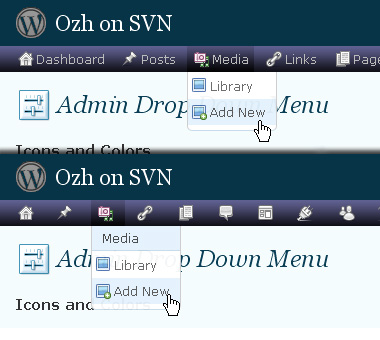
- Normal mode for regular users, compact mode for real estate maniacs, minimal mode for those who never have enough
- Optional cute icons from FamFamFam
- Enhanced compatibility with handheld devices
- Joy and happiness for every day
Javascript is involved for advanced features and to make stuff compatible with MSIE6, but on any decent browser everything works even with Javascript disabled.
Super neat color picking.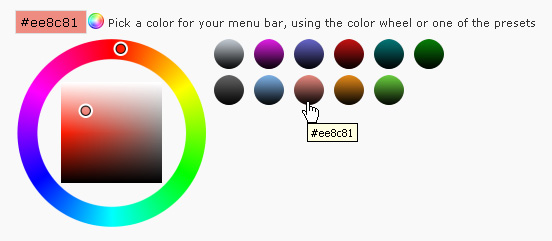
Any color you'll love.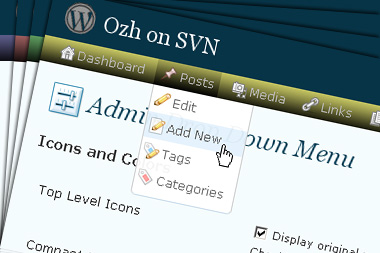
Normal or compact display.
Browser compatibility
The plugin has been developed on Firefox 3, Chrome and MSIE7. It should do fine with MSIE6 and Safari too.
There are glitches with Firefox 2 and Camino which both use a deprecated rendering engine. There are also glitches with Opera. I won't fix these, but if anyone wants to submit a CSS patch to resolve one of these issue, you're welcome :)
Developer friendly
The plugin comes with a wickedly cool API that will allow other plugin developers to interact with it, like adding your own custom icon for your plugin. Read the API for Coders page for examples and documentation. Also, all elements the plugin produces get custom CSS classes and id's to allow easy styling or selecting.
Translations
The plugin is ready for interglobanalization and there is a .pot template file included so polyglots can even make their own translation and sent the .mo and .po files to me that I'll include in the package.
The plugin comes with the following translations, in no particular order:
- Turkish, thanks to Baris Ünver
- Korean, thanks to Jong-In Kim
- Spanish, thanks to Karin Sequen
- Italian, thanks to Gianni Diurno
- Deutsch, thanks to Frasier Crane
- Russian, thanks to Fat Cow
- Brazilian Portuguese, thanks to Renato Tavares
- Greek, thanks to Friedlich
- Belorussian, thanks to ilyuha
- Hebrew, thanks to Amiad Bareli
- Romanian, thanks to Octav
- Ukrainian , thanks to wpp.pp.ua and Jurko Chervony
- Traditional Chinese, thanks to Paogray and Joan Wang
- Dutch, thanks to Cees van den Heuvel
- Slovak, thanks to Branco from WebHostingGeeks.com
And maybe more since I might totally forget to update this list :)
Older Versions
All my plugins are designed to run on the latest WordPress version available. Upgrade WordPress whenever a new version is out, or be sorry when your site gets compromised.
If for some unintelligent reason you need to get an older version of this plugin, it might be available, yet totally unsupported or recommended. Check here: Other versions.
Feedback, Bug report, Feature request
Sure. Feed me back. Like it? Blog about it. Love it? Click on the download link, see the Paypal button appear, and give it some clicks!
If you're reporting bugs, you're welcome, but please provide a screenshot and informations about your browser & your OS. I'm not supporting deprecated blogs or plugins or browsers, and I can't respond to incomplete bug reports.
If you're suggesting a feature, you're welcome too, but I won't add an admin menu on the public side of the blog, on top of pages. If you're looking after having this menu fixed on top of page, check this companion plugin that works as a plugin to this plugin: Admin Menus Fixed.
Hello,
Can i use this plugin for multisite providing the same look and feel to all my site users.
Regards,
Sam.
Hi Ozh,
love your plugin and use it on 5-6 wp sites, all run wp 3.0.1.
However the issue I have with your plugin in that I can't upgrade. When I try through the automatic upgrade option the page changes to show the sites homepage.
It won't activate or delete, so I need some advise as how to resolve this issue
Regards
It's a great plugin. But when I add custom post-types to my site, the extra menu icons are blank. Is there a way to customize these icons?
koxx » I'll look into this
Hi,
Im using this fantastic plugin on my German WordPress Blog and it works perfectly.
Now I have started an English WordPress Blog for a friend and use this plugin there too, but cant´t change the settings. When I try to change the settings and save the settings are just not updated.
thankful for any kind of help
Christoph Jochum
Christoph Jochum » obviously not a language related problem. I suspect a browser cache problem, most likely. The plugin itself just uses the internal WP stuff to save settings.
Hi Ozh,
Thank you for the quick reply.
I emptied the cache deleted all cookies and tried to change the settings in 5 different browsers … no success.
Do you have any idea?
thanks Christoph
Christoph Jochum » Nope. Definitely not related to the language anyway.
hi Ozh, thank you again.
I did not mean to say that the "settings problem" is language related. I just cannot change the settings.
What I will do is install wordpress and just your plugin in another subdirectory of my webspace at Startlogic and see, if the problem persists.
I`ll let you know about the results. If so, I will give you the user name and password and let you take a look at it, if you don´t mind.
Christoph
Hi,
problem solved but reason still unclear.
I reinstalled the whole site, got a new copy of "Admin Drop Down Menu", installed that too and everything is fine.
Thank you for this fantastic plugin.
Christoph Jochum
Ozh, Just 2 questions..
whats new in the version 3.4.4 (just released) ?
Where can we find the changelogs (fixes,new features..)?
I always upgrade automatically via my blog so I was looking for this info at your site.
James Smith » Answer in the readme or the plugin page on extend or in the source
I have just updated your plugin on a site that is under construction. Here is a screen shot of what I am now seeing as a result…
http://lunafengshui.com/wp-content/uploads/2010/10/Ozh-Admin-Drop-Down-Menu-screen-shot-LFS-2.jpg
This has happened in the past(many times). The fix has always been to refresh the page to get it to display correctly. This additional step is a nuisance but I still prefer using your plugin over not using it.
This time however, after updating the plugin, refreshing the page does not correct the problem.
Please advise.
Thank you.
I just checked the plugin and the update deactivated it for some reason….. I've reactivated it and things are displaying correctly for the moment….
Can I fix menu on top? (always visible)even when I scroll the page?
Just upgraded t 3.0.1 and my menu is totally gone. I cannot do anything. There is a blank space on the left side of my Dashboard info. I cannot navigate to any page.
See screenshot
http://dev.fusionwaredesign.com/xo/Screen%20shot%202010-10-21%20at%2012.43.51%20PM.png
Please help!
Edmar » should be doable with a few CSS tweaks. Something like
#ozhmenu_wrap {position:fixed; top:40px;}
#wphead {position:fixed; top:0px; width:100%}
Might need tweaking.
erica » browser cache maybe. Also, load in browser the test.html file that's in the plugin to check if everything works as expected.
This mod hide the sub menu…
#ozhmenu_wrap {position:fixed; top:40px;}
#wphead {position:fixed; top:0px; width:100%}
Thanks
Got it working guys. just replaced all he files and it began working.
Don't know if this minor bug has been mentioned before (143 pages of comments I don't have time to sift through); but if the orginal WordPress admin menu is in compact mode before this plugin is enabled a margin is applied to the left of the page most likely a variable that is set that your plugin doesn't check for; this is consistent behavior across Chrome, IE beta, and Firefox.
Regards.
hi. i use your plug in over this: http://greenhost.gr/ and sure it was helpfull
Hi Ozh, love your plugin. Use it on ALL sites (wish it was standard w/ WP!)
I'm currently trying to build a functions.php file to include on all my client sites I build. I try to strip out any unnecessary panels and links and things because many of my clients require a much simpler admin screen. I retain my own login as "admin" to be able to make modifications and such, and give them a custom login as "editor". I'm using the "unset($menu[10]);" code to hide some menu/submenu items, but have run into a snag trying to figure out what code to use for your menu item. Since it's appended to the end of the options-general.php link, I'm not sure how to call it! Any help is appreciated. Thanks!
Ramsey Stoneburner » there are a lot of hooks & filters in the plugin for you to hack the menu before it's printed, look into these.
Hello,
Codestyling Localisation plugin reports this:
"Loading Issue: Author is using load_textdomain instead of load_plugin_textdomain function. This may break behavior of WordPress, because some filters and actions won't be executed anymore. Please contact the Author about that." Maybe you could be interested in fixing this.
Li-An » I'll check this
This is one awesome Plugin .Well Done.
Hello, I always use yr plugin but in 3.1rc3 Multi site it looks buggy, especially in the Network Admin view it doesn't show at all, dunno if you're already aware of it, if so sorry…
Thank you for this post. This was my inspiration when i wrote wordpress admin menu plugin. Thank you for sharing it with us.
How do I remove the following from the footer of my Admin Menu?
Thank you for using Admin Drop Down Menu, a wonderful plugin by Ozh
Ash Quadir » you uninstall the plugin.
Great post. You seem to have a good understanding that how to create a professional drop down menu. When I entering your blog, I felt this. Come on and keep writing your blog will be more attractive. To Your Success!
Hi Ozh,
I've been using this plugin for a little while now, and I've grown to really like it… Thanks!
I just thought that I'd let you know that it has a compatibility problem with the "Image Store" plugin. The plugin works fine with the standard wordpress admin configuration, but if the OZH admin bar is active, and I attempt to make a setting change in the image store, it returns an error: "Cannot load ims-settings." I used a fresh installation of WP and installed ONLY the two plugins in question, just to be sure.
Don't know if you care, but since I seem to be able to at least leave comments here (was not so obvious on the image store website), I thought I'd pass along the info.
– Matthew Gore
I just installed your plugin, but for some reason when I try to activate it I redirect to my home page, funny this is when I try to edit or delete it, I still get redirected>.< so I'll have to delete it via FTP I guess.
I meet all the installation criteria, any suggestions?
Thank you.
GuyDude » not related to my plugin.
I love this plugin, Just upgrade my MU site to 3.1 The new admin menu replacing the super admin will not display with the current version of the ozh admin drop down menu.
I do hope there is a update soon. I really don't want to give up this plugin even on the few MU installs I now have.
Re- Dave Smith's comment above, I just ran into the same problem. Been messing with it for about an hour now. Seems like in 3.1 your admin menu still shows up on the individual sites, but not on the new network admin screens. Here's where that creates a big problem, and why I've sadly had to remove my favorite admin dropdown menu until you can come up with a fix:
Even though I only have two sites in my network and I'm the only user, WP in 3.1 has removed the "Add New" option from the plugin menu on all network sites. The only way you can add a new plugin is to do it from the network administrator screens, which won't display your dropdown menu. In other words, that fairly important function no longer works with your menu running multisite.
Still haven't solved the other mystery, which seems to me to be a WP issue. That's that even though I've network activated about 20 plugins across both of my sites, only the new ones I've added since the upgrade seem to appear in each site's list of plugins. Go figure! It may mean that from the admin screen, I'll have to deactivate and network reactivate every one of my plugins. Oh well.
Sure hope you can come up with a fix for the other issue, though. Cause I just love your plugin.
Michaelangelo and others » just pushed a quick update. Icons are missing in the network admin but the plugin is functional.
Ozh,
It works great. Just installed it on my MU site and all is well again.
YOU ROCK! thanks.
Ozh, I hate to inform you this error which is occurred to me, just right after I upgraded your plugin. I love yours but this one has some problem in this version. I want to send the print screen for you by email. So please fix this problem for me. Thank you sooooo much. I really want to use your new version.
On 3.0.5 with newest version of plugin in Multisite the admin menu just completely gone, not at the top, not at the side, on network site and all sub-sites. Reverting back to previous version.
Menu totally disappears on 3.0.5 just like Patung. How can I revert back to the previous version?
Confirmed: the 3.4.99 release breaks in WP3.0.5 (aka the "admin bar from hell" release)
Mike D: go here where you can download the previous 3.4.5 release.
hey,man,this plugin is awesome,thanks a lot!
Just updated to 3.4.99 from 3.4.5 running on WP 3.1. In both versions the submenu "settings" in the admin menu does not display correctly after updating to WP 3.1. In WP 3.0.5 the settings submenu was displayed in two columns side by side. I predefined that the submenu should be shown in columns side by side, if there are more than 30 submenu items to display, because they are too many to be displayed one below the other. In WP 3.1 the submenu is so wide, that the items in the left column can only be read partly, because the first half of the left column is "cut" by the frame of the computer monitor. Everything else seems to work fine.
Tom » Screenshot please
Could you please add an icon for the new network admin & vice versa for the site admin tab, i really hate this big huge admin bar, but if i dont select show in your plugin you cannot see the network admin link, so it sucks for me because it is to damn huge, also in explorer only it is causing the dropdown to screw the screen up stretching way bigger than 1500px from what i could see?
Seahawkfanatic » the last update was just a quick fix, I didn't take time to pick and add icons for the network area. Will do next week.
Thanks for the quick response, look forward to the update to your plugin!
Cant live without it!