
One of the first things I wanted to improve in the admin area of my WordPress blog, back in the 1.5 days, was the header menu. I wanted to be able to reach any admin page in one click, instead of first clicking on the first level link ("Manage" for example) and then only on a submenu link ("Comments") So came a very neat plugin : the WordPress Admin Drop Down Menu
When WordPress 2.7 and its new and optimized user interface came, I thought there was still room for improvements: a horizontal menu gave the admin area more of a "desktop application" feel, and I think it's superior to a vertical menu. So I updated the WordPress Admin Drop Down Menu.
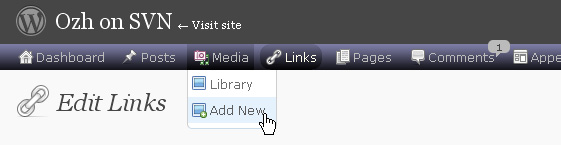
Download
Get the plugin :
ozh-admin-drop-down-menu.zip
Extract and upload to your blog, preserving directory structure.
Note: download counter here and stats on wordpress.org may differ and reflect the number of downloads before this plugin was hosted on the plugin directory
Activate and enjoy. Another friendly install & forget piece of PHP.
Features
- Customizable color scheme with a neat color picker
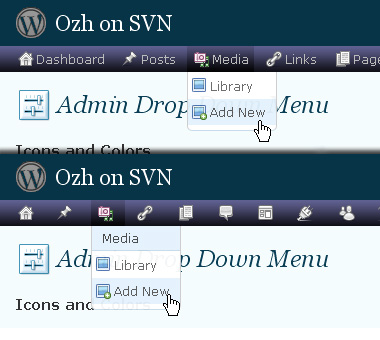
- Normal mode for regular users, compact mode for real estate maniacs, minimal mode for those who never have enough
- Optional cute icons from FamFamFam
- Enhanced compatibility with handheld devices
- Joy and happiness for every day
Javascript is involved for advanced features and to make stuff compatible with MSIE6, but on any decent browser everything works even with Javascript disabled.
Super neat color picking.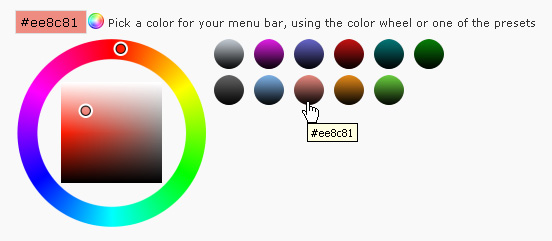
Any color you'll love.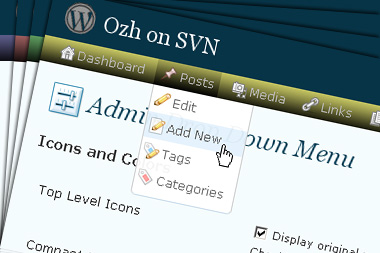
Normal or compact display.
Browser compatibility
The plugin has been developed on Firefox 3, Chrome and MSIE7. It should do fine with MSIE6 and Safari too.
There are glitches with Firefox 2 and Camino which both use a deprecated rendering engine. There are also glitches with Opera. I won't fix these, but if anyone wants to submit a CSS patch to resolve one of these issue, you're welcome :)
Developer friendly
The plugin comes with a wickedly cool API that will allow other plugin developers to interact with it, like adding your own custom icon for your plugin. Read the API for Coders page for examples and documentation. Also, all elements the plugin produces get custom CSS classes and id's to allow easy styling or selecting.
Translations
The plugin is ready for interglobanalization and there is a .pot template file included so polyglots can even make their own translation and sent the .mo and .po files to me that I'll include in the package.
The plugin comes with the following translations, in no particular order:
- Turkish, thanks to Baris Ünver
- Korean, thanks to Jong-In Kim
- Spanish, thanks to Karin Sequen
- Italian, thanks to Gianni Diurno
- Deutsch, thanks to Frasier Crane
- Russian, thanks to Fat Cow
- Brazilian Portuguese, thanks to Renato Tavares
- Greek, thanks to Friedlich
- Belorussian, thanks to ilyuha
- Hebrew, thanks to Amiad Bareli
- Romanian, thanks to Octav
- Ukrainian , thanks to wpp.pp.ua and Jurko Chervony
- Traditional Chinese, thanks to Paogray and Joan Wang
- Dutch, thanks to Cees van den Heuvel
- Slovak, thanks to Branco from WebHostingGeeks.com
And maybe more since I might totally forget to update this list :)
Older Versions
All my plugins are designed to run on the latest WordPress version available. Upgrade WordPress whenever a new version is out, or be sorry when your site gets compromised.
If for some unintelligent reason you need to get an older version of this plugin, it might be available, yet totally unsupported or recommended. Check here: Other versions.
Feedback, Bug report, Feature request
Sure. Feed me back. Like it? Blog about it. Love it? Click on the download link, see the Paypal button appear, and give it some clicks!
If you're reporting bugs, you're welcome, but please provide a screenshot and informations about your browser & your OS. I'm not supporting deprecated blogs or plugins or browsers, and I can't respond to incomplete bug reports.
If you're suggesting a feature, you're welcome too, but I won't add an admin menu on the public side of the blog, on top of pages. If you're looking after having this menu fixed on top of page, check this companion plugin that works as a plugin to this plugin: Admin Menus Fixed.
First try at informing you was on 9/22/09.My post has been ignored.
When I try to upgrade to version 3.3.4(Doing this from memory so if I have the version wrong), I'm sorry . In any case attempting to upgrade to your latest version in effect fails and I wind up on my homepage instead of the plug-in activation page,no error message is given
If I try to do it manually a error messge states that the folder already exists and the install fails
Robert » something wrong with your install, I obviously cannot know what. Manually delete the plugin folder and reupload.
I love your ozh-admin-drop-down-menu plug-in. I wanted to report a bug I believe I found:
I was getting a JavaScript error message in wp-admin/load-scripts.php that reads: jQuery is not defined, and it points here: /public_html/wp-admin/js/farbtastic.js
jQuery.fn.farbtastic = function (callback) {
jQuery.farbtastic(this, callback);
return this;
};
It only occurs on the Dashboard page. As soon as I deactivated your plug-in it disappeared.
Anyways, I look forward to reactivating it. I can't stand having my menus on the side again.
Thanks.
CU » Find the conflicting plugin (one plugin that interferes with the dashboard page) and deactivate this one instead.
Hi!
Thanks for the great plugin. I love it.
Just a suggestion for future development. It would be good if the plugin would support multi-row menus. I have many items on my menu, so there is no space for all of them and some end up on a second row below. The issue is that the second menu line is not styled…
Ozh,
Great plugin. I noticed that the link to the stylesheet is using '&' instead of '&' in the $_GET information. This is down to the http_build_query() command currently in the core file as follows:
$query = http_build_query($query);
If you use the following instead the query is more web standards compliant:
$query = http_build_query($query, '', '&');
Heck, WordPress encoded my ampersands! It should read like this:
$query = http_build_query($query, '', '&');
I quit! Email me direct if you want this minor amendment :-) You'll have my email from these comments!
Hey,
I've got to tell you, I've loved the drop down menu plug in. However, I just started a new site and installed the plug in on it and rather than being across the top, it just has the links running down the page on the left, right next to the links already there. I've tried uninstalling and reinstalling, but nothing happens.
Any suggestions? Because, I'm gonna have a REALLY hard time giving this little gadget up.
Thanks
Béh y'a pas de version française ???
Is it normal that in compact mode the menu shows only one column and in normal mode, it's flexible ?
That's so cool! I think this plugin is more practical than "Fluency Admin".
I'm a Chinese User. And it works perfectly on my site. I have given five stars for it on the official WordPress-Plugin site.
How useful is this…. great job guys. big thanks
I recently tried to install the plugin, I like it for its features, but after copying the files into the plugins directory, when trying to activate it, I receive a 404 error – no page found.
I also put details here: http://wordpress.org/support/topic/324836?replies=1 (wordpress forum)
Tried to change some permissions, but nothing seems to work. Only very common 15 plugins installed.
I can perform some advanced test, beeing a programmer myself (but not on php/mysql) so if you need some error log or something, please ask.
Best regards,
misule60 » most likely a dir/subdir confusion. Remove the files then reinstall from within WP itself.
I deleted the dir ozh-admin-drop-down-menu then recopy using FTP. It's the usual directory plugins, where the most plugins resides, in their own directories.
The permission is set to 755.
I receive the same error. Tried to change perms to 777 for wp-admin and ozh'dir, recursively (only for directory), but no positive result.
Thanks for a great plugin and all the work that goes into creating and maintaining it! Much appreciated.
I had do disable the plug-in. When I installed version 3.5.5 it made my edit.php screen go blank, as soon as I deactivated the plug-in my screen came back. Any idea why this would happen? I really like the plug-in but I can't use it right now.
Cindy Schultz » Find the conflicting plugin (the one that messes with the edit screen) and bitch at the author for not coding properly.
So nice plugins thanks.
Only problem I Have/See is "Hide speech bubbles when no awaiting comments or outdated plugins" doesn't work for comments? I still see the speech bubble there.
Other than that great work
Wow, that is all I can say. The software plugin is great and easy to use. The customization is off the scale. It beautiful…I will let all my members know about it.
Antonio Coleman "TrafficColeman" Signing Off
Bug Report:
Ozh' Admin Drop Down Menu: Version 3.3.5
/wordpress/wp-admin/edit.php doesn't seem to use the css when your plugin is activated. With the plugin deactivated, the page looks like all the other admin pages. It is the only page I've run into where this occurs, and it was doing this before your last update/upgrade.
It does it on all of the sub pages of edit.php:
All
Published
Drafts
Private
Screenshot
Browser: Opera (latest version)
I didn't check it with any other browser but will if you need that help. I have IE, Foxfire, Chrome, and Safari loaded.
OS: Windows XP (latest version; all updated)
WordPress is Version 2.8.6
Tom Usher » This is a bug report for the other plugin. Which one? The one that sends its crap into the edit page and prevents mine from working.
Hi,after installing Ozh's Admin Drop Down Menu, I can't use lightbox function of admin control, Installing plugins,Previewing themes or others don't show lightbox,only jump to another page, how can I modify back to show lightbox in admin? thanks. :)
Jackitshot » Probably got a conflicting plugin that doesnt know how to properly inject JS.
The "Tag PiG" page (configurations) doesn't show anything when Drop Down Menu is active. ( http://emberapp.com/rsnyder6/images/safari/sizes/o ). I'm guessing it is an issue with that plug in, but thought you should know.
Thanks for your work!
Organize Series breaks Ozh' Admin Drop Down Menu plugin on the Posts/Edit pages. I am informing http://unfoldingneurons.com/neurotic-plugins/organize-series-wordpress-plugin of that problem now. Thanks Ozh.
Bug Report:
I love this plugin! After checking it out, I installed it on ALL my WP blogs. Very good indeed!
Anyways – I found a bug, and verified it on all my sites, just to make sure it was actual. Here it is.
When you activate the plugin, your admin side menu disappears as well as the margin from the left of the content area. (This is expected.) You accomplish this on line 42 of the adminbar.css.php file. However, this only works IF you do not have the side menu collapsed. With the side menu collapsed (showing only icons) and you activate the plugin, the side menu disappears, but it's margin is still there, thus pushing the content right still. It is a little different on the CSS Class for some reason.
Anyways, it is an easy fix. Just add the CSS below to line 43 of the adminbar.css.php file, and you are all set!
.folded #wpbody {margin-:0px}
Thanks!
Sorry, I didn't paste the code correctly. Here it is again.
Thanks for such a great plugin!
Great plugin is great, but there is only problem. I hope is not only for me :)
The subitems of Dashboard like Blog Stats and Akismet Stats, are not visible from the drop-down menu.
Is this right or i made a mistake somewhere?
Hi Ozh,
I've been using your plugin for quite some time now.
For SSL compatibility in the admin area, can you use the plugins_url() function instead of WP_PLUGIN_URL?
Using plugins_url() correctly switches SSL requests to https, instead of http.
Thanks!
Also your plugin doesn't play nice with scribu's Custom Field Taxonomies plugin.
When I click on the menu item for CFT, it loads for a sec, but then stops. HTML source is viewable though.
OMG . . . . . just had to come stop by your site and tell you that this PLUG-IN ROCKS!!! Now thats an ADMIN PANEL – Thank you so much – I feel so much more productive now – =o)
Hi Ozh,
I submitted the bug report to Darren over at http://unfoldingneurons.com/neurotic-plugins/organize-series-wordpress-plugin#comment-7751
He replied: "Thanks for also submitting a report on this Tom. Unfortunately I haven't had the time to try to discover how to fix this conflict."
If you know what his plugin is doing and how to correct it while not breaking it, perhaps you could cooperate with him. Both of you seem to know a great deal about WordPress and plugins. I should think you could put your heads together.
I really like both plugins very much. I have to tweak his via css upon each update, but it's worth it to me.
Peace,
Tom
Very sexy. I will most definitely be using this.
Hi Ozh,
Bug Report:
I last mentioned this via
http://planetozh.com/blog/?page_id=450&cp=115#comment-94923
but this comment is more detailed for you.
Plugin: Ozh' Admin Drop Down Menu: Version 3.3.5
WordPress: 2.9
OS: Windows XP Home SP 3
PHP: 4.3.11
Browsers: Opera, Safari, Internet Explorer, Firefox, and Chrome (all latest versions)
The plugin page says, "Upgrade Available (4)."
In Opera, the plugin bubble shows 0. I understand that you mentioned you wouldn't be tweaking thinks for Opera. However, the bubble shows 0 in Safari, Internet Explorer, Firefox, and Chrome where all of those browsers are at their most recent versions.
I thought maybe it had to do with
/wordpress/wp-config.php
define('FORCE_SSL_ADMIN', true);
so I set that to false and tried it again.
The bubble still shows 0 even though there are 4 available.
I also deactivated all plugins but yours and then refreshed the plugin page again. The bubble still shows 0 while there are 4 upgrades available.
As usual, let me know via email if there is anything you want me to try.
Thanks Ozh,
Tom Usher
Tom Usher » Cannot reproduce: http://i49.tinypic.com/25zjrc4.gif (using FF3 or Chrome it works on my comp)
hi Ozh:
your plugin might conflict with a plugin named "showtime slideshow". when this plugin was activated, the menu cant display its name correctly. after deactivating your plugin, the menu just can display the correct name of "showtime slidshow" plugin. do you know how to fix it?
thank you very much
gogotony » Sorry I don't know this particular plugin but chances are it's not coded properly. Did you contact the author?
dear Ozh:
I dont contact the author yet. Because the plugin displays normally in the orighinal admin menu. So, do you suggest me that I shounld inform the author?
Very good.
Thanks!
Seems that on the dashboard using Chrome as a browser all the drop downs are rendered behind the WP.com stats graph. Not a deal-killer since I can just minimize the graph, and I'm also rarely on the dashboard for any length of time. Any ideas on a fix?
Demo » Unfixable, unfortunately.
Ozh >> Browser issue, or something else?
Demo » browser issue: flash comes on top, no matter what, across most if not all browsers.
I like your plagin, it's very usefull. But a little problem makes my love to it broken. When i want to add a new post (WP 2.8.6 + Firefox 3.5.7) on my blog i see a blank page without any site of admin panel. What can be wrong? ANY CLUE?
Alex » Sure. Just find and disable the crap plugin that's breaking the "new post" page.
I must say that I absolutely love your plugin. It makes using WordPress much easier. I ran into a bit of a problem today with two other plugins. When I activate either of these plugins, they cause the settings menu to run horizontally instead of vertically. Because of this I am only able to see the first few options before the rest fall off the page (and I can't scroll because going to the bottom scrollbar releases the menu selections).
The two plugins are "WP Comment Auto Responder" and "Digg Digg". I am running WP 2.9.1 and version 3.3.6 of your plugin. I have tried this on Chrome 4.0.249.78 and Firefox 3.5.7.
having the same issues… does not seam to be fixable.
Hye Ozh,
I'm running your latest drop down menu and love except for the fact that I can't get to my edit posts menu. I can get to everything else. I have plenty of memory and I have checked the involvement of other plugins, but it seems that its only th drop down menu.
Any ideas?
Michael » There *is* another (crappily coded) plugin involved.