
One of the first things I wanted to improve in the admin area of my WordPress blog, back in the 1.5 days, was the header menu. I wanted to be able to reach any admin page in one click, instead of first clicking on the first level link ("Manage" for example) and then only on a submenu link ("Comments") So came a very neat plugin : the WordPress Admin Drop Down Menu
When WordPress 2.7 and its new and optimized user interface came, I thought there was still room for improvements: a horizontal menu gave the admin area more of a "desktop application" feel, and I think it's superior to a vertical menu. So I updated the WordPress Admin Drop Down Menu.
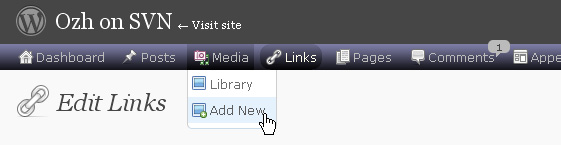
Download
Get the plugin :
ozh-admin-drop-down-menu.zip
Extract and upload to your blog, preserving directory structure.
Note: download counter here and stats on wordpress.org may differ and reflect the number of downloads before this plugin was hosted on the plugin directory
Activate and enjoy. Another friendly install & forget piece of PHP.
Features
- Customizable color scheme with a neat color picker
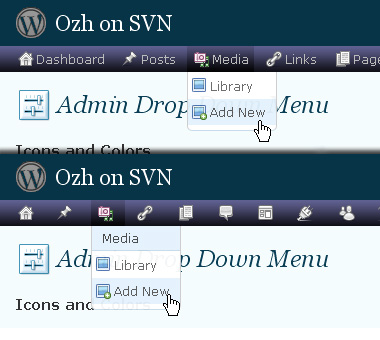
- Normal mode for regular users, compact mode for real estate maniacs, minimal mode for those who never have enough
- Optional cute icons from FamFamFam
- Enhanced compatibility with handheld devices
- Joy and happiness for every day
Javascript is involved for advanced features and to make stuff compatible with MSIE6, but on any decent browser everything works even with Javascript disabled.
Super neat color picking.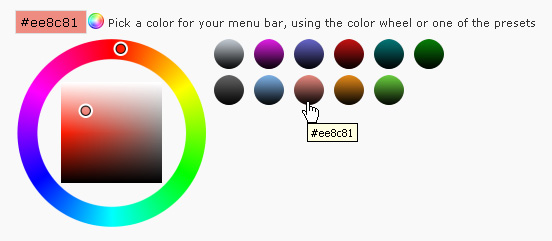
Any color you'll love.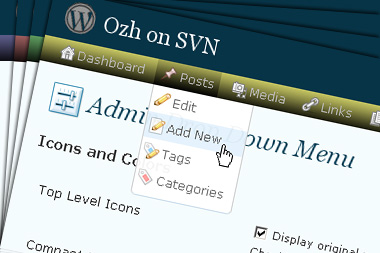
Normal or compact display.
Browser compatibility
The plugin has been developed on Firefox 3, Chrome and MSIE7. It should do fine with MSIE6 and Safari too.
There are glitches with Firefox 2 and Camino which both use a deprecated rendering engine. There are also glitches with Opera. I won't fix these, but if anyone wants to submit a CSS patch to resolve one of these issue, you're welcome :)
Developer friendly
The plugin comes with a wickedly cool API that will allow other plugin developers to interact with it, like adding your own custom icon for your plugin. Read the API for Coders page for examples and documentation. Also, all elements the plugin produces get custom CSS classes and id's to allow easy styling or selecting.
Translations
The plugin is ready for interglobanalization and there is a .pot template file included so polyglots can even make their own translation and sent the .mo and .po files to me that I'll include in the package.
The plugin comes with the following translations, in no particular order:
- Turkish, thanks to Baris Ünver
- Korean, thanks to Jong-In Kim
- Spanish, thanks to Karin Sequen
- Italian, thanks to Gianni Diurno
- Deutsch, thanks to Frasier Crane
- Russian, thanks to Fat Cow
- Brazilian Portuguese, thanks to Renato Tavares
- Greek, thanks to Friedlich
- Belorussian, thanks to ilyuha
- Hebrew, thanks to Amiad Bareli
- Romanian, thanks to Octav
- Ukrainian , thanks to wpp.pp.ua and Jurko Chervony
- Traditional Chinese, thanks to Paogray and Joan Wang
- Dutch, thanks to Cees van den Heuvel
- Slovak, thanks to Branco from WebHostingGeeks.com
And maybe more since I might totally forget to update this list :)
Older Versions
All my plugins are designed to run on the latest WordPress version available. Upgrade WordPress whenever a new version is out, or be sorry when your site gets compromised.
If for some unintelligent reason you need to get an older version of this plugin, it might be available, yet totally unsupported or recommended. Check here: Other versions.
Feedback, Bug report, Feature request
Sure. Feed me back. Like it? Blog about it. Love it? Click on the download link, see the Paypal button appear, and give it some clicks!
If you're reporting bugs, you're welcome, but please provide a screenshot and informations about your browser & your OS. I'm not supporting deprecated blogs or plugins or browsers, and I can't respond to incomplete bug reports.
If you're suggesting a feature, you're welcome too, but I won't add an admin menu on the public side of the blog, on top of pages. If you're looking after having this menu fixed on top of page, check this companion plugin that works as a plugin to this plugin: Admin Menus Fixed.
[…] küçük ek özellik eklenmi? bulunuyor. Eski admin paneli çok kullan??s?z oldu?u için ben Ozh Admin Drop Down Eklentisini kullan?yordum art?k ihtiyaç kalmamas?na ra?men yinede kullan?yorum çünkü […]
[…] WordPress bloggers still miss the old style. There is no need to fret as PlanetOZH have released an Admin Drop Down Menu plugin which moves all the links to the top of the […]
[…] Admin Drop Down Menu […]
I tried de-activating the plugin and activating it again, but it still just shows me the long list of the all the options in an format. Below it is my regular menu. Any ideas of what I should try?
Nemo » empty browser cache, as it can keep outdated JS files. Deactivate other plugins. Delete admin menu & reinstall it. These things.
[…] Ozh’s Admin Drop Down Menu??????????WordPress 2.7?????????????????????????????????????????????????????????????????????????????????????????????WordPress????????????????? […]
[…] If you don't know about this wonderful plugin, it adds drop down menu type navigation to your wp admin and reducing you navigation to a single click (may be not true with wp2.7, which itself has that feature). If interested, you may read more details about drop down menu plugin. You may download the plugin here. […]
Hello,
I have found one bug with the plugin and have pointed about that on my blog. Please fix that asap. You can find my article here: http://www.techpavan.com/2008/12/23/drop-down-menu-wordpress-plugin/
[…] doing some searching I found exactly what I needed. It's the Worpdress Admin Drop Down Menu by planetOzh. The original purpose of this plugin was to allow the menus of the old admin interface […]
There is a errir of the .pot template file, that is the url is errir.
Hello,
Second plugin of yours that I am using (first one is better feed).
Keep up the good job!
Merci bien et joyeux noel.
sebastien
[…] folks at PlanetOZH have released a new feature for your WordPress platform called the Admin Drop Down Menu plugin. Simply install the plugin and your menu bar links will magically appear at the top of your […]
Hello,
I am facing some problem with Chrome. I didn't check in other browsers.
When I have too many links under the "Settings" menu, then in stead of showing them normally under each other, links show up beside each other so I have to drag the page to the right in order to access the links.
I've been using this gr8 plugin for a long time. I was very glad that you made it work with 2.7 – my blog version.
Hope you solve this issue.
thnx.
[…] Admin Drop Down Menu […]
no menu access, cant access menus, menus not displaying, manual upgrade:
I had a problem after I ran my svn to wordpress 7. The admin menus disappeared.
The menus were gone. I could not access the menus. I couldn't upgrade the plugin.
What I did was to erase the \plugns\ozh* directory. Then I downloaded the newest ozh*.zip plugin and unzipped it in the plugin directory.
now I have all the menus. Good luck friends!!
[…] 10. Admin Drop Down Menu When navigating the admin menu in WordPress, this plugin lets you reach any admin page in one click, instead of first clicking on the first level link ("Manage" for example) and then only on a sub-menu link ("Comments"). Very helpful. http://planetozh.com/blog/my-projects/wordpress-admin-menu-drop-down-css… […]
[…] ?????? ?????? ??? ?????? ?????.?? Ozh' Admin Drop Down Menu ?????? ?????? ??????? ??? ???????? 2.7 ????? ?? […]
[…] Ozh' Admin Drop Down Menu ?????? ?????? ??????? ??? ???????? 2.7 ????? ?? […]
[…] Ozh' Admin Drop Down Menu ?????? ?????? ??????? ??? ???????? 2.7 ????? ?? […]
I received the following errors when I tried to activate in my new blog. I am using WP2.7.
Thanks,
Bryan
Warning: require_once(/home/content/c/o/r/cortaxact/html/wp-content/plugins/admin drop down menus/inc/core.php) [function.require-once]: failed to open stream: No such file or directory in /home/content/c/o/r/cortaxact/html/wp-content/plugins/admin drop down menus/wp_ozh_adminmenu.php on line 63
Fatal error: require_once() [function.require]: Failed opening required '/home/content/c/o/r/cortaxact/html/wp-content/plugins/admin drop down menus/inc/core.php' (include_path='.:/usr/local/php5/lib/php') in /home/content/c/o/r/cortaxact/html/wp-content/plugins/admin drop down menus/wp_ozh_adminmenu.php on line 63
Bryan: reinstall the plugin properly.
I am moving my blog from IIS6 using ISAPI to IIS7 with FastCGI. The Ozh Admin Menu does not work properly. It displays all options for all categories in a single vertial column, with no animation.
Suggestions?
I should give some details, I suppose. I am using Wordpres 2.7, PHP 5.2.8, and I just downloaded the latest version of Ozh Admin Menu, deleted the one that was there, dropped the new one in, and activated it.
Ozh:
First of all, love the plugin! I have a question, however. When I upgraded to WP 2.7, I had an issue where the drop down plugin made all my menus disappear. I figured it was an update thing (which you pushed a new version a day or so later resolving that issue on my blog).
Well, I also maintain a few blogs for other folks, and I just upgraded a friend to WP 2.7 and he's getting the same thing, except he has the most current version of the plugin. Any known conflicts with other plugins?
Thanks!
lawvol » Most likely cache problem, keeping old version of the .js file. Refresh. If not, I don't know.
For some reason, I can't make localization to work… what could be the problem? I'm using WP2.7 and the latest version of the plugin…
Karin » Will look. Maybe I bugged something, localization is usually something I throw in late & quickly
[…] das vantagens do novo WordPress é que ele é compatível com o plugin Ozh' Admin Drop Down Menu. Este plugin entre muitas outras coisas, permite ao utilizador criar um menu horizontal drop down, […]
Hi Ozh. I just upgraded to 2.7 and was really pissed. How to find the plug-ins and where to edit security. I managed to find the links in the admin folder, but should I really need to write manually /plugins.php /widgets.php to get to those? What a crap… I searched for a new plug-in to get back my dropdown option and here you are! What a relief!
Thanks.
Alexander
[…] I was having a hard time understanding the new navigational menus in WordPress, so I downloaded this cool plugin to ease my frustration. With this plugin, I guess even a 4-year old would have no problems […]
[…] Ozh' Admin Drop Down Menu – The lazy and the productive will love it : all admin links available in a neat CSS driven drop down menu. No need to click on "Manage" then "Pages" to edit pages, go to any admin page from any admin page. […]
it seems you must add this in `wp_ozh_adminmenu.php` to make localization available?
`add_action('init', 'wp_ozh_adminmenu_load_text_domain');`
and there are some words(titles and the setting link) not localized…
I have finished the Simplified Chinese translation, how to submit to you?
Thanks for the cool plug in. I read about this on Wayne the WP engineers blog and had it working in just minutes. I hit the tip jar, thanks for your work!
[…] Admin Drop Down Menu will save you a lot of time by drastically reducing your clicks rate in the administration panel. […]
[…] the Ozh Admin Drop Down Menu WordPress Plugin for […]
[…] known that it was missing. Fortunately I found the solution pretty quickly: it had to do with the Ozh admin drop down plugin that was no longer needed for 2.7. Today I also noticed that my lightbox view (the cool overlay for […]
Hi. Great plugin. Looks like it works great in Firefox, but not in IE. Is that because of the png files? They have blue background…
Also, in Firefox, the dropdowns display behind the WordPress stats graph.
Other than that, it's great. Thanks so much.
[…] 11. The result that is currently at the top of the list is called "Ozh' Admin Drop Down Menu" […]
Here's a WPmu fix that works, derived from a bit of code in WordPress_Admin_Bar and juiced for Ozh. Can simplify if current blog doesn't need to be tracked…
At the top of function wp_ozh_adminmenu ():
And replacing everything in mu.php:
Then just re-enable mu.php include and don't bother with the filters.
Hope that's slightly helpful…
I absolutely love this plugin, I found out about it from a post in Jack Humphrey's 'Friday Traffic Report' blog.
I hated having to use the default wordpress 2.7 left had menu because I kept having to scroll down even though I have a 17 inch monitor…it was very annoying to say the least. I kept thinking to myself "why didn't they just leave the menu at the top?" as in older versions. If it ain't broke, don't fix it!.
Anyway…just thought I'd tell you that this plugin is really cool!
John O'Hara
United Kingdom
[…] Ozh’ Admin Drop Down Menu v3.1 […]
Great plugin. Posted about it here: http://educhalk.org and send a few bucks your way. Thanks.
figaro
[…] plugin podpira tudi zelo znan plugin Worpdress Admin Drop Down Menu, ker je seveda dobra novica. Uporabljamo ga tudi na tem blogu in lahko iz prve roke povem, da je […]
[…] Admin Drop Down Menu : Ce plugin vous permet donc de supprimer définitivement le menu de gauche de WordPress et d'insérer un menu horizontal au-dessus des modules. Ces différents menus déroulant vous permettra de naviguer sans fatigue dans les différentes parties de votre administration. […]
The only issue I have with the plugin is that there is no link for draft posts. I wish you could include this in the next release. Please. ;-)
On certain pages in the dashboard/administrator area, when the menu drops down, it is overlapped by objects on the pages, when you scroll down and the pointer hits an object, the drop down menu closes. The only pages I don't have a problem with this are the plug-in pages and settings page I believe. Not complaining, just curious if there's a fix.
This is great. Love it! Do you have any plans on fixing the FF2 issue with the drop down menus displaying behind the Dashboard boxes?
olovito: No.
Ozh Ozh Ozh, Thank you. I've been sitting and struggling trying to restyle the WP2.7 admin menu and never thought of using the approach you did. You are clearly one of those warped individuals who think outside the box that holds the box.
[…] Ozh' Admin Drop Down Menu: For WordPress 2.7 and above. It replaces admin menus with a CSS dropdown menu bar. Saves lots of clicks and page loads! […]