
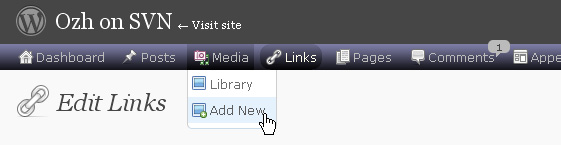
One of the first things I wanted to improve in the admin area of my WordPress blog, back in the 1.5 days, was the header menu. I wanted to be able to reach any admin page in one click, instead of first clicking on the first level link ("Manage" for example) and then only on a submenu link ("Comments") So came a very neat plugin : the WordPress Admin Drop Down Menu
When WordPress 2.7 and its new and optimized user interface came, I thought there was still room for improvements: a horizontal menu gave the admin area more of a "desktop application" feel, and I think it's superior to a vertical menu. So I updated the WordPress Admin Drop Down Menu.
Download
Get the plugin :
ozh-admin-drop-down-menu.zip
Extract and upload to your blog, preserving directory structure.
Note: download counter here and stats on wordpress.org may differ and reflect the number of downloads before this plugin was hosted on the plugin directory
Activate and enjoy. Another friendly install & forget piece of PHP.
Features
- Customizable color scheme with a neat color picker
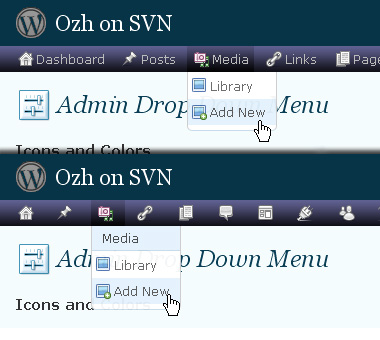
- Normal mode for regular users, compact mode for real estate maniacs, minimal mode for those who never have enough
- Optional cute icons from FamFamFam
- Enhanced compatibility with handheld devices
- Joy and happiness for every day
Javascript is involved for advanced features and to make stuff compatible with MSIE6, but on any decent browser everything works even with Javascript disabled.
Super neat color picking.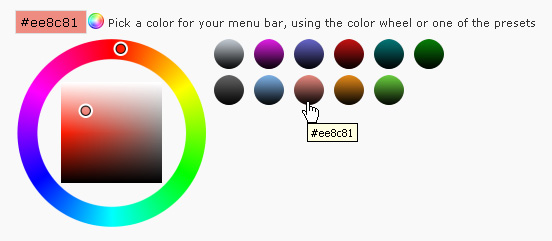
Any color you'll love.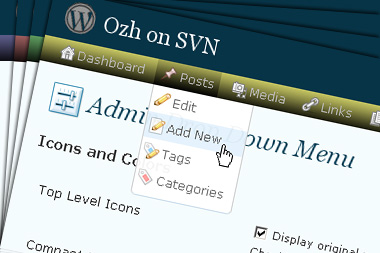
Normal or compact display.
Browser compatibility
The plugin has been developed on Firefox 3, Chrome and MSIE7. It should do fine with MSIE6 and Safari too.
There are glitches with Firefox 2 and Camino which both use a deprecated rendering engine. There are also glitches with Opera. I won't fix these, but if anyone wants to submit a CSS patch to resolve one of these issue, you're welcome :)
Developer friendly
The plugin comes with a wickedly cool API that will allow other plugin developers to interact with it, like adding your own custom icon for your plugin. Read the API for Coders page for examples and documentation. Also, all elements the plugin produces get custom CSS classes and id's to allow easy styling or selecting.
Translations
The plugin is ready for interglobanalization and there is a .pot template file included so polyglots can even make their own translation and sent the .mo and .po files to me that I'll include in the package.
The plugin comes with the following translations, in no particular order:
- Turkish, thanks to Baris Ünver
- Korean, thanks to Jong-In Kim
- Spanish, thanks to Karin Sequen
- Italian, thanks to Gianni Diurno
- Deutsch, thanks to Frasier Crane
- Russian, thanks to Fat Cow
- Brazilian Portuguese, thanks to Renato Tavares
- Greek, thanks to Friedlich
- Belorussian, thanks to ilyuha
- Hebrew, thanks to Amiad Bareli
- Romanian, thanks to Octav
- Ukrainian , thanks to wpp.pp.ua and Jurko Chervony
- Traditional Chinese, thanks to Paogray and Joan Wang
- Dutch, thanks to Cees van den Heuvel
- Slovak, thanks to Branco from WebHostingGeeks.com
And maybe more since I might totally forget to update this list :)
Older Versions
All my plugins are designed to run on the latest WordPress version available. Upgrade WordPress whenever a new version is out, or be sorry when your site gets compromised.
If for some unintelligent reason you need to get an older version of this plugin, it might be available, yet totally unsupported or recommended. Check here: Other versions.
Feedback, Bug report, Feature request
Sure. Feed me back. Like it? Blog about it. Love it? Click on the download link, see the Paypal button appear, and give it some clicks!
If you're reporting bugs, you're welcome, but please provide a screenshot and informations about your browser & your OS. I'm not supporting deprecated blogs or plugins or browsers, and I can't respond to incomplete bug reports.
If you're suggesting a feature, you're welcome too, but I won't add an admin menu on the public side of the blog, on top of pages. If you're looking after having this menu fixed on top of page, check this companion plugin that works as a plugin to this plugin: Admin Menus Fixed.
Tom » same id for 2 div is a mistake I'll fix because it can interfere with javascript and CSS. I honestly don't care a minute about the other "errors".
Edit: actually it's not a mistake. To fix this I would need a few extra hooks WordPress don't provide at this point.
[…] Ozh' Admin Drop Down Menu […]
[…] Admin Drop Down Menu – […]
This is a cool plugin and I've used it on several projects; it really does save loads of time.
One thing that I'd like to see improved though: The little info balloons next to categories and plugins should not be displayed when they are Zero. The balloons draw the eye to them, but the purpose of that is to show you when there is something there — you don't need to show people when something isn't there.
I'd really like to see these removed or made optional as it's rather confusing keep noticing them in the menu bar when they say zero. Would this be possible?
[…] Admin Drop Down Menu by Ozh 2.0.3 (Admin sayfan?zdaki menüyü daha kullan??l? hale getirir.Aç?l?r menü ?eklinde kullan?rs?n?z) […]
[…] am Ziel ist. Deutlich schneller navigiert es sich per Dropdown-Menü, das sich ganz einfach mit dem Plugin von Ozh realisieren lässt. Richtig schick wird das Ganze, wenn man zusätzlich noch Fluency Admin […]
Latest version 2.3.4.1 appears to have solved the issue for me… Thank you!
Tera
[…] This plugin was based off of Admin Drop Down Menu […]
this plugin verry cool and verry flexible. thanks bro for this plugin.
Thank you for this verry cool plugin. I use it with WordPress mu 2.6, but i have a problem:
I also use the plugin role manager http://www.im-web-gefunden.de/wordpress-plugins/role-manager/
but after activated the drow-down-menu, the site "roles" of the role-manager doesn´t works correct and the drop-down-menu is dispersed about the site.
I have the same problem with widgets, when i ad some widgets, for examplae 7 next gen gallery widgets. the drop-down-menu is dispersed about the site.
any idea ?
[…] ???: WordPress Plugin : Admin Drop Down Menu […]
torre » I don't notice anything wrong with this plugin: http://i37.tinypic.com/vq5fk6.gif
@Ozh:
my site: http://i37.tinypic.com/2v2cs9d.jpg
I tried with different browser on different pcs. I think i use no other plugin for the backend.
Excelent plugin!
Regards,
O Silva
[…] Ozh' Admin Drop Down Menu […]
thanks for your help, but now i get this error:
[[edit by Ozh: tons of garbage]]
@OzH:
The problem is only with mu 2.6, not with wp 2.61
chris tolles » I have no idea what causes such a mess but certainly not my plugin, that I don't even see mentioned.
torre » Same for me. Just tried with the latest MU and I notice nothing wrong.
[…] Ozh' Admin Drop Down Menu: With all the add-ons I use my WordPress backend can get a bit cluttered, using the drop down menu though, everything is organized and readily available. [Current Verson – 2.3.4.1] […]
Hey, I love your plugin!
However, I just autoupgrading and got a fatar error:
Plugin failed to reactivate due to a fatal error.
Warning: require_once(/home/uniteddi/public_html/wp-content/plugins/ozh-admin-drop-down-menu/inc/core.php) [function.require-once]: failed to open stream: No such file or directory in /home/uniteddi/public_html/wp-content/plugins/ozh-admin-drop-down-menu/wp_ozh_adminmenu.php on line 57
Fatal error: require_once() [function.require]: Failed opening required '/home/uniteddi/public_html/wp-content/plugins/ozh-admin-drop-down-menu/inc/core.php' (include_path='.:/usr/lib/php:/usr/local/lib/php') in /home/uniteddi/public_html/wp-content/plugins/ozh-admin-drop-down-menu/wp_ozh_adminmenu.php on line 57
Now I'm a bit lost. What should I do?
Thanks! I'm not sure I can live without drop down admin menus! :P
Josef
Josef Davies-Coates » Delete the directory and upload it again. You somehow manage to incorrectly upload or extract it.
[…] Ozh' Admin Drop Down Menu – ??????? ????????? ???? ? ????? ??????, ?? ???????? ???????? ????-??? ???????? ??????? WordPress ? ???? ????. ??????? ????????? ????????? ? ???????? ?????????? ??????. […]
Can i use this plugin in WordPress 2.6.1?
Hi Ozh,
I just wanted to let you know that I have found your plugin to be a real time-saver. It may not seem that way at first, but after several days, it really becomes clear what a difference it can make to an administrator who works his or her blog a great deal. It is so much easier on the eyes. It's easier to find things. Being able to just click once is so much better. The option of turning off the icons is helpful (I did that). It's just a valuable plugin. Having "Settings" right with "Deactivate | Edit" on the plugins page is smart too.
Good job.
Tom Usher
Istifajar » Of course
I resisted it for a while thinking the default admin. WordPress interface was fine (and it generally is), but what a time and click saver this plug-in is!
Now I can go directly to virtually any function with just one click. Very nice!
[…] WordPress ??????? ???????????? ?????? ??? ????? ??????. 16. Admin Drop-Down Menu – ??????? ?????????? ???? ? ???????, ??? ????????? […]
just wanted to let you know there are some issues with your plugin and wpmu. using IE7 when going to manage => posts the layout completely breaks :-(
@ovidiu:
coud it be the same problem, i postet with a screeshot a few days ago?
for testing i installed mu 2.6 a lot of times, but when i activated (only) this plugin and role-manager, the admin-site of rolemanager breaks the layout. with one installtion it breaks the site to manage posts, but with ie7 and firefox.
@torre
it looks very similar to your screenshot, but so far I only have this scrambled screen when going to the manage post screen and I currently don't have role manager installed or at least not activated. And the problem is only in IE7 and IE6 :-(
it seems I have found the plugin conflicting with your plugin. As I only had problems on the manage posts screen I had a closer look at what plugins are active on that screen and it turns out the only active plugin was: http://www.schloebe.de/wordpress/admin-management-xtended-plugin/
I have deactivated this plugin for now and it seems its ok, but I can't be 100% sure as I am sitting behind a caching proxy at work
@ovidiu:
i have deactivated all other plugings, but always the same problem
an plugins inside mu-plugins active?
no other active plugin
now i use this version and there are no problems:
http://wpmudev.org/project/lighter-admin-menus-for-WPMU
thats ok as well, but as far as I remember it doesn't work with IE?
@ovidiu:
thats right. sh…
now i try lighter-admin-drop-menus 2.6.1
with a few changes in the css-area it works with mu and there are only problems with ie6. with ie7 it works fine
[…] Admin Drop Down Menu – This plugin makes life a little easier (Live Demo) […]
torre & ovidiu » can you give me details ? (browser, OS, etc). I can't reproduce the error yet you all seem to get it…
Hi! LOVE your admin dropdown plugin, but for one site it did not work – the whole menu displayed, unstyled, down the page – unless I turned off the plugin.
Then I upgraded to WP 2.6.1, and it worked!
But right away I foolishly followed the "upgrade" link on the Plugins page to version 2.3.4.1 of your plugin – and it went back to the same "broken" behaviour.
I'd ideally like to install the version just prior to 2.3.4.1… or if you could suggest a reason why the plugin would not work.
I'm just using the default Admin layout style… nothing fancy or different…
Hope you can help. Thanks!
Adam
Adam » Don't know.
No worries, I discovered the "slightly" earlier version 2.1 in my archives. I swapped it in, and it works perfectly with WP 2.6.1.
Perhaps you might want to keep it available for download for others who might need it….?
Hi Ozh! ;)
Your plugin is causing some problems when using together with Viper's Video Quicktags.
You can find more details in this wp forums thread:
http://wordpress.org/support/topic/201693?replies=5#post-846474
Samuel »
Replied. Can't reproduce any problem.Fixed.Hello ozh,
I am using your plugin on wpmu and it works fine except for a new plugin I installed. This plugin creates its own submenu and only 2 of 3 links in that menu work…
details: http://wpmu.org/helpdesk/#comment-536
the submenus of this particular plugin should look like:
h**p://zice.ro/wp-admin/admin.php?page=help-desk-settings but one of the 3 is looking like:
h**p://zice.ro/wp-admin/help-desk.php and gives me a 404 error
any ideas why your plugin kills one of 3 links?
ovidiu » yes. In one particular case I'm aware of, my plugin can generate wrong URLs for top level links. I still have to hunt this one down.
[…] Ozh' Admin Drop Down Menu Face foarte frumoase meniurile din admin. Tags: blog, wordpress […]
Hi,
This is indeed a great plugin. I can see it working on my hosted wordpress admin page under the Google Chrome browser. But unfortunately, it simply doesn't show up well under firefox 3. The whole menu is shown as a list of links below a deep black patch on the top of the page.
I've hosted it on a Linux server… I don't understand, what could be wrong in this case…
Can you point out something I might have got missed?
Mithun » it works fine with Firefox. Don't know what's wrong on your side.