On: 2007/10/28 Viewed: 47901 times

Absolute Comments
Responding to comments left by readers is a critical part of watering your blog so it grows and keeps healthy. Out of the box, WordPress mostly sucks at this: you need to visit your own post and post a reply just as a visitor would do. How suboptimal and time wasting. What you want is the ability to reply to comments from within the same page as where you manage them. What you want is a real “Manage Comments” page.

Absolute Comments : comments as they were meant to be

A simple image being worth a thousand words, let me show you how such a “Manage Comments” page should be:

Absolute Comments: Comment Manager with Instant Reply

Absolute Comments : Features

This wonderful plugin will change your blogging life because :

  • Effective integration
    It is completely transparently integrated within WordPress. No extra page, just WordPress the way you wanted it to be.
  • Cute icons
    Did you see all the tiny icons on the action links? How cute! (can turn them off if you don’t like them, of course).
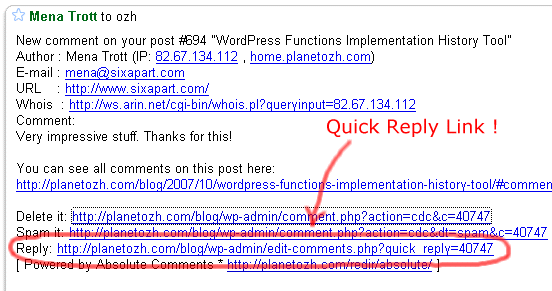
  • Quick Reply
    If you have mail notifications activated (ie you get a mail each time a comment is posted), the mail will contain a handy Quick Reply link to make things faster than ever.
    Absolute Comments
  • Comment Reply Prefill
    When replying to Joe, do you always like to start your comment with “Joe »” or “@Joe:” ? Define an automatic pattern so you won’t have to type it everytime (the big animated screenshot above shows this feature)
  • Threaded Comments Support
    Your blog runs whatever plugin to support threaded comments ? So does Absolute Comments
  • Translations
    Nearly 20 languages! See below for thankful credits. The translation template file (.pot) is included, so anyone speaking something that’s not English and using poEdit is encouraged to share their words!

Limitations and troubleshooting

There are a couple of very minor limitations I thought you might need to now, if you haven’t guessed most already

  • 2.5+ everywhere: current version if for WordPress 2.5+ and won’t work below. See below for older versions.
  • Ajax everywhere: it obviously means you need to have Javascript enabled.
  • Javascript everywhere: it means it will have to break some day or another due to the browser, another plugin conflicting, the KGB spying on you, or anything that might look like an excuse for Javascript not to run smoothly. This said, it was developed and tested in MSIE6 and Firefox with nothing but extreme pleasure.

In any case if things are not running as expected, please read the Troubleshooting guide.

Download Absolute Comments

“Enough of your useless documentation” you think, “give me the plugin !!”. OK Boss. Here it is.

Download the plugin :
ozh-absolute-comments.zip
Extract and upload to your blog, preserving directory structure if any.
Note: download counter here and stats on wordpress.org may differ and reflect the number of downloads before this plugin was hosted on the plugin directory

Older version

This plugin was created initially for WordPress 2.2 / 2.3 and is still available but not maintained (in other words, no support, help or anything for this deprecated version!)
Download : Absolute Comments 1.0 (for WordPress 2.3.3 and below)
Same installation as ever.

Credits and Love

If you like this plugin and you feel it enhances your blogging and community managing experiences, please make my day and simply blog about it to let your readers know about it. They might like it too:)

Related posts

Metastuff

This page "Absolute Comments: Comment Manager with Instant Reply" was posted on 28/10/2007 at 5:09 pm
Watch this discussion : Comments RSS 2.0. You can trackback this post from your own site

358 Blablas

    Pages: [36] 35 34 33 32 31 30 29 28 27 261 » Show All

  1. 358
    WP-Plugins | BlogFrosch Germany »
    pingback on 07/Jan/09 at 2:44 pm # :

    [...] Ozh’ Absolute Comments: Hiermit kann man über den Adminbereich direkt auf abgegebene Kommentare antworten und auch die Kommentare selber verwalten. [...]

  2. 357
    WordPress 2.7 Final ?? United States »
    pingback on 04/Jan/09 at 6:28 pm # :

    [...] WP AJax Edit Comments ? Better Comments Manager ? Absolute Comments [...]

  3. 356
    Absolute Comments, gestió dels comentar... United States »
    pingback on 24/Dec/08 at 8:16 pm # :

    [...] Absolute Comments és un plugin que s’encarrega de facilitar la gestió dels comentaris afegint una sèrie de botons al panell d’administració de comentaris de WordPress mitjançant els quals és possible marcar els comentaris com a spam, respondre al comentari o bé editar-lo. [...]

  4. 355
    Audi Kiralama Turkey »
    wrote, on 22/Dec/08 at 4:51 pm # :

    This one isn’t working good for me, I’m getting recurring errors and blank pages

  5. 354
    The Best Wordpress Plugins For Blogging ... United States »
    pingback on 18/Dec/08 at 5:32 am # :

    [...] Ozh’ Absolute Comments [...]

  6. 353
    Giulia -italian blog Italy »
    said, on 15/Dec/08 at 8:01 pm # :

    it looks really really useful, looking foreward to try it. I hope it works with wordpress 2.6 (you said you should, so i’m not really worried about it), hope it is also very easy as it looks! Thanks a lot for this plug-in!!!

  7. 352
    Stan Brower Australia »
    replied, on 15/Dec/08 at 1:39 pm # :

    Hi, is this the only plugin of the kind or can I find another one too? This one isn’t working good for me, I’m getting recurring errors and blank pages.I’ll post about it too.

  8. 351
    WordPress 2.7 Final ?? « ???? United States »
    pingback on 13/Dec/08 at 12:46 pm # :

    [...] WP AJax Edit Comments ? Better Comments Manager ? Absolute Comments [...]

Pages: [36] 35 34 33 32 31 30 29 28 27 261 » Show All

Leave a Reply

Comment Guidelines or Die

  • HTML: You can use these tags: <a href=""> <em> <i> <b> <strong> <blockquote>
  • Posting code: Post raw code (no <> &lt; etc) within appropriate tags : [php][/php], [css][/css], [html][/html], [js][/js], [sql][/sql], [xml][/xml], or generic [code][code]
  • Gravatars: Curious about the little images next to each commenter's name ? Go to Gravatar.
  • Spam: Various spam plugins on patrol. I'll put pins in a Voodoo doll if you spam me.
  • I will mark as Spam test comments, all comments with SEO names (ie "My Cool Online Shop" instead of "Joe") or containing forum-like signatures.

Close
E-mail It