Responding to comments left by readers is a critical part of watering your blog so it grows and keeps healthy. Out of the box, WordPress mostly sucks at this: you need to visit your own post and post a reply just as a visitor would do. How suboptimal and time wasting. What you want is the ability to reply to comments from within the same page as where you manage them. What you want is a real “Manage Comments” page.
Absolute Comments : comments as they were meant to be
A simple image being worth a thousand words, let me show you how such a “Manage Comments” page should be:

Absolute Comments : Features
This wonderful plugin will change your blogging life because :
- Effective integration
It is completely transparently integrated within WordPress. No extra page, just WordPress the way you wanted it to be. - Cute icons
Did you see all the tiny icons on the action links? How cute! (can turn them off if you don’t like them, of course). - Quick Reply
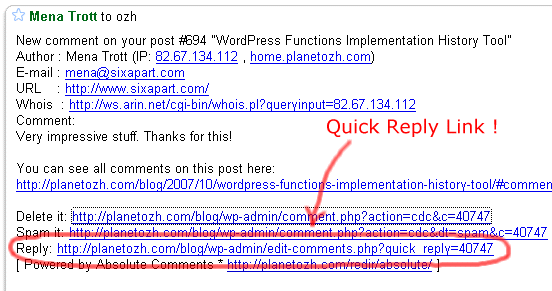
If you have mail notifications activated (ie you get a mail each time a comment is posted), the mail will contain a handy Quick Reply link to make things faster than ever.

- Comment Reply Prefill
When replying to Joe, do you always like to start your comment with “Joe »” or “@Joe:” ? Define an automatic pattern so you won’t have to type it everytime (the big animated screenshot above shows this feature) - Threaded Comments Support
Your blog runs whatever plugin to support threaded comments ? So does Absolute Comments - Translations
Nearly 20 languages! See below for thankful credits. The translation template file (.pot) is included, so anyone speaking something that’s not English and using poEdit is encouraged to share their words!
Limitations and troubleshooting
There are a couple of very minor limitations I thought you might need to now, if you haven’t guessed most already
- 2.5+ everywhere: current version if for WordPress 2.5+ and won’t work below. See below for older versions.
- Ajax everywhere: it obviously means you need to have Javascript enabled.
- Javascript everywhere: it means it will have to break some day or another due to the browser, another plugin conflicting, the KGB spying on you, or anything that might look like an excuse for Javascript not to run smoothly. This said, it was developed and tested in MSIE6 and Firefox with nothing but extreme pleasure.
In any case if things are not running as expected, please read the Troubleshooting guide.
Download Absolute Comments
“Enough of your useless documentation” you think, “give me the plugin !!”. OK Boss. Here it is.
ozh-absolute-comments.zip
Extract and upload to your blog, preserving directory structure if any.
Note: download counter here and stats on wordpress.org may differ and reflect the number of downloads before this plugin was hosted on the plugin directory
Older version
Download : Absolute Comments 1.0 (for WordPress 2.3.3 and below)
Same installation as ever.
Credits and Love
- This plugin has been generously tested and translated by the following kind people, in no particular order:
- Chinese Simplified: by Arctic
- Chinese Traditional: by Cronobow
- Italian: by Sergio Gandrus
- German: by iKArus
- Hebrew: by Elad Salomons
- Romanian: by octav
- Finnish: by sadejousi
- Brasilian Portuguese: by Daniel Kaiser
- Italian: Sergio Gandrus
- Tagalog: Manuel Viloria
- Norwegian: Einar Helland Berger
- Danish: Thomas
- Spanish: Karin Sequen
- Polish: Grzegorz Gibas
- Russian: Lecactus
- Swedish: Mikael Jorhult
- Catalan: Albert Ferran
- Greek: Stratos Geroulis
- English & French: by myself and moi-même
- On early development stages, I’ve had very encouraging feedback and suggestions from Maki, who I thank again for this.
- I’m in love with jQuery. Writing Javascript gets almost fun :)
If you like this plugin and you feel it enhances your blogging and community managing experiences, please make my day and simply blog about it to let your readers know about it. They might like it too:)
Related posts
Metastuff
324 Blablas
Pages: « 1 … 7 8 9 10 11 12 13 14 15 [16] 17 » Show All
pingback on 01/Oct/08 at 6:15 am # :
[...] Ozh’s Absolute Comments 2.2 [...]
commented, on 02/Oct/08 at 6:00 am # :
Thanks for this plugin. I’ve been looking for such a plugin where I can reply directly to comments like this.
said, on 02/Oct/08 at 6:17 pm # :
great plugin, i have downloaded it, thanks for share
thought, on 08/Oct/08 at 2:49 pm # :
Hi,
I was getting the nothing-happening issue when trying to reply to comments, several comments here observe a possible plugin conflict problem, so just to let you know that I tracked mine down to Disable Password Protection
http://www.firesidemedia.net/dev/software/wordpress/disable-password-protection/
Cheers
YikYak
pingback on 18/Oct/08 at 12:01 am # :
[...] Absolute Comments probably won’t get updated for 2.7 since most of its feature will be built-in. Almost 3 years ago I wrote the first ever Admin Drop Down Menu plugin and they’ll be now available out of the box (definitely not as cool and usable as mine, but that’s better than nothing) [...]
pingback on 19/Oct/08 at 7:17 am # :
[...] WP AJax Edit Comments ? Better Comments Manager ? Absolute Comments [...]
pingback on 26/Oct/08 at 1:27 am # :
[...] and are already in the 2.7 beta. Current Version: 2.2.2 — Download Link — Author Site: planetozh.com Share and [...]
pingback on 30/Oct/08 at 10:23 am # :
[...] Absolute Comments: version 2.0 (Yap?lan yorumlar? admin panelinden kolayca yönetin) [...]
pingback on 31/Oct/08 at 4:30 am # :
[...] But… that’s a lot to remember, isn’t it? And typing all that in every time? Yeah, I know, it can be a bit of a chore. So I commend to you Ozh’ Absolute Comments. [...]
pingback on 31/Oct/08 at 8:00 pm # :
[...] Absolute Comments: Comment Manager with Instant Reply- Gives you the ability to reply to comments from within the same page as where you manage them. [...]
pingback on 01/Nov/08 at 3:47 pm # :
[...] Absolute Comments: Comment Manager with Instant Reply- Gives you the ability to reply to comments from within the same page as where you manage them. [...]
pingback on 02/Nov/08 at 4:56 am # :
[...] WP AJax Edit Comments ? Better Comments Manager ? Absolute Comments [...]
pingback on 02/Nov/08 at 1:26 pm # :
[...] 7?Admin Panel Comment Replies ?????????????????????????????????????WP AJax Edit Comments, Better Comments Manager?Absolute Comments. [...]
pingback on 03/Nov/08 at 8:27 pm # :
[...] author to respond to comments, in her session at WordCamp Dallas, and she is right on the money. Absolute Comments lets you reply to comments from the Comment Management screen in the WordPress Admin panel. It’s [...]
pingback on 05/Nov/08 at 1:18 am # :
[...] plugin that i really find usefull is “Absolute Comments” by Ozh. The “Reply” Ajax feature from the comment management is what i use the [...]
pingback on 06/Nov/08 at 1:21 pm # :
[...] panel instead of viewing the whole post and all other comments. Previously we needed a plugin like Ozh’ Absolute Comments to achieve [...]
replied, on 12/Nov/08 at 8:23 pm # :
I’m assuming this will not work with Wordpress.com blogs with only a CSS edit upgrade??
What I’m looking for is a simple way to have the user get a message after they “submit” a comment that says “Your comment will be held for moderation by XX and approved soon, thank you.” or the like
thx.
said, on 12/Nov/08 at 8:49 pm # :
Caleb » That’s the downside of wp.com, you can’t make it work like you want it to.
pingback on 14/Nov/08 at 11:14 am # :
[...] atsakymai ? komentarus s?raše. Aš šiuo metu atsakymams ? komentarus naudoju puik? ?skiep? Ozh’ Absolute Comments, kurio netrukus nebereik?s, nes visk? bus galima valdyti s?sajos komentar? puslapyje be [...]
commented, on 14/Nov/08 at 4:37 pm # :
Sounds very useful this wordpress plugin. Thank you for sharing it. I will test it with my next blog.