Responding to comments left by readers is a critical part of watering your blog so it grows and keeps healthy. Out of the box, WordPress mostly sucks at this: you need to visit your own post and post a reply just as a visitor would do. How suboptimal and time wasting. What you want is the ability to reply to comments from within the same page as where you manage them. What you want is a real “Manage Comments” page.
Absolute Comments : comments as they were meant to be
A simple image being worth a thousand words, let me show you how such a “Manage Comments” page should be:

Absolute Comments : Features
This wonderful plugin will change your blogging life because :
- Effective integration
It is completely transparently integrated within WordPress. No extra page, just WordPress the way you wanted it to be. - Cute icons
Did you see all the tiny icons on the action links? How cute! (can turn them off if you don’t like them, of course). - Quick Reply
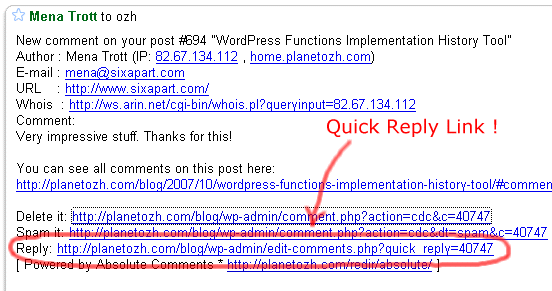
If you have mail notifications activated (ie you get a mail each time a comment is posted), the mail will contain a handy Quick Reply link to make things faster than ever.

- Comment Reply Prefill
When replying to Joe, do you always like to start your comment with “Joe »” or “@Joe:” ? Define an automatic pattern so you won’t have to type it everytime (the big animated screenshot above shows this feature) - Threaded Comments Support
Your blog runs whatever plugin to support threaded comments ? So does Absolute Comments - Translations
Nearly 20 languages! See below for thankful credits. The translation template file (.pot) is included, so anyone speaking something that’s not English and using poEdit is encouraged to share their words!
Limitations and troubleshooting
There are a couple of very minor limitations I thought you might need to now, if you haven’t guessed most already
- 2.5+ everywhere: current version if for WordPress 2.5+ and won’t work below. See below for older versions.
- Ajax everywhere: it obviously means you need to have Javascript enabled.
- Javascript everywhere: it means it will have to break some day or another due to the browser, another plugin conflicting, the KGB spying on you, or anything that might look like an excuse for Javascript not to run smoothly. This said, it was developed and tested in MSIE6 and Firefox with nothing but extreme pleasure.
In any case if things are not running as expected, please read the Troubleshooting guide.
Download Absolute Comments
“Enough of your useless documentation” you think, “give me the plugin !!”. OK Boss. Here it is.
ozh-absolute-comments.zip
Extract and upload to your blog, preserving directory structure if any.
Note: download counter here and stats on wordpress.org may differ and reflect the number of downloads before this plugin was hosted on the plugin directory
Older version
Download : Absolute Comments 1.0 (for WordPress 2.3.3 and below)
Same installation as ever.
Credits and Love
- This plugin has been generously tested and translated by the following kind people, in no particular order:
- Chinese Simplified: by Arctic
- Chinese Traditional: by Cronobow
- Italian: by Sergio Gandrus
- German: by iKArus
- Hebrew: by Elad Salomons
- Romanian: by octav
- Finnish: by sadejousi
- Brasilian Portuguese: by Daniel Kaiser
- Italian: Sergio Gandrus
- Tagalog: Manuel Viloria
- Norwegian: Einar Helland Berger
- Danish: Thomas
- Spanish: Karin Sequen
- Polish: Grzegorz Gibas
- Russian: Lecactus
- Swedish: Mikael Jorhult
- Catalan: Albert Ferran
- Greek: Stratos Geroulis
- English & French: by myself and moi-même
- On early development stages, I’ve had very encouraging feedback and suggestions from Maki, who I thank again for this.
- I’m in love with jQuery. Writing Javascript gets almost fun :)
If you like this plugin and you feel it enhances your blogging and community managing experiences, please make my day and simply blog about it to let your readers know about it. They might like it too:)
Related posts
Metastuff
304 Blablas
Pages: « 1 … 6 7 8 9 10 11 [12] 13 14 15 16 » Show All
pingback on 02/Aug/08 at 5:24 pm # :
[...] WP AJax Edit Comments ? Better Comments Manager ? Absolute Comments [...]
pingback on 02/Aug/08 at 5:26 pm # :
[...] WP AJax Edit Comments ? Better Comments Manager ? Absolute Comments [...]
pingback on 02/Aug/08 at 6:13 pm # :
[...] Panel de Administración - Hay muchos plugins que te permiten hacer esto, con mención especial a Absolute Comments, que te permite citar los comentarios. Puede ser interesante contar con algo así [...]
pingback on 02/Aug/08 at 7:17 pm # :
[...] WP AJax Edit Comments ? Better Comments Manager ? Absolute Comments [...]
replied, on 02/Aug/08 at 7:31 pm # :
I love this plugin, thank you for developing it!
Quick question: do you know if there’s a way to integrate Quick Reply with email? By this I mean, when I “quick reply” to someone in the Manage Comments section, is there a way for them to also get a copy of my response via email?
(If the email feature already covers this sorry for asking… I was a little confused about the email link actually….)
pingback on 03/Aug/08 at 3:16 am # :
[...] WP AJax Edit Comments ? Better Comments Manager ? Absolute Comments [...]
pingback on 03/Aug/08 at 4:31 am # :
[...] 7?Admin Panel Comment Replies ?????????????????????????????????????WP AJax Edit Comments, Better Comments Manager?Absolute Comments. [...]
pingback on 03/Aug/08 at 11:20 am # :
[...] Panel de Administración - Hay muchos plugins que te permiten hacer esto, con mención especial a Absolute Comments, que te permite citar los comentarios. Puede ser interesante contar con algo así [...]
pingback on 03/Aug/08 at 2:02 pm # :
[...] bent jau bus galima atsakyti ? komentarus tiesiai administravimo tinklalapyje (dabar tam naudoju Ozh Absolute Comments ?skiep?), dar ir naudojant klaviat?ros komandas. Ketinama ?diegti komentar? atšakas ? [...]
pingback on 03/Aug/08 at 2:49 pm # :
[...] 7?Admin Panel Comment Replies ?????????????????????????????????????WP AJax Edit Comments,Better Comments Manager?Absolute Comments. [...]
pingback on 03/Aug/08 at 3:52 pm # :
[...] ?????? ?? ??????????? ? ?????? ????????????????? - ???? ?????? ???????? ?????????????? ???????? ?? ???????????, ??????????????? ?? ?????? ????????????????? ?????. ?? ?????? ?????? ?????????? ????????? ????????, ??????? ??? ?????? ??? WP AJax Edit Comments, Better Comments Manager ? Absolute Comments [...]
commented, on 04/Aug/08 at 2:07 pm # :
thanks you.
pingback on 04/Aug/08 at 6:13 pm # :
[...] Absolute Comments - BLOG?????? [...]
pingback on 05/Aug/08 at 5:32 am # :
[...] WP AJax Edit Comments?Better Comments Manager ? Absolute Comments??????Wordpress thread [...]
pingback on 05/Aug/08 at 6:37 am # :
[...] PlanetOzh a concocter un Plugin destiné a cette tache , depuis votre panneau de configuration , il a ajouter deux liens fort utiles , l’un pour répondre immédiatement au commentaire et l’ autres pour voir tous les commentaires d’un article donné … [...]
pingback on 05/Aug/08 at 10:14 pm # :
[...] I know! None of my plugins were really broken by 2.6, but some glitches require a few updates. Absolute Comments and Admin Drop Down Menus will be my main targets for the moment. I also have a very cool new [...]
pingback on 06/Aug/08 at 8:54 am # :
[...] Panelinden Yorum Cevaplama: ?u anda WP AJax Edit Comments, Better Comments Manager ve Absolute Comments gibi eklentiler taraf?ndan sa?lanan özellik yine standart hale getirilip, yap?lan yorumlara [...]
pingback on 06/Aug/08 at 11:43 am # :
[...] ?????? ?? ??????????? ? ?????? ????????????????? - ???? ?????? ???????? ?????????????? ???????? ?? ???????????, ??????????????? ?? ?????? ????????????????? ?????. ?? ?????? ?????? ?????????? ????????? ????????, ??????? ??? ?????? ??? WP AJax Edit Comments, Better Comments Manager ? Absolute Comments [...]
pingback on 06/Aug/08 at 4:05 pm # :
[...] Panel de Administración - Hay muchos plugins que te permiten hacer esto, con mención especial a Absolute Comments, que te permite citar los comentarios. Puede ser interesante contar con algo así [...]
pingback on 06/Aug/08 at 9:28 pm # :
[...] Panel de Administración - Hay muchos plugins que te permiten hacer esto, con mención especial a Absolute Comments, que te permite citar los comentarios. Puede ser interesante contar con algo así [...]