On: 2007/10/28 Viewed: 35166 times

Absolute Comments
Responding to comments left by readers is a critical part of watering your blog so it grows and keeps healthy. Out of the box, WordPress mostly sucks at this: you need to visit your own post and post a reply just as a visitor would do. How suboptimal and time wasting. What you want is the ability to reply to comments from within the same page as where you manage them. What you want is a real “Manage Comments” page.

Absolute Comments : comments as they were meant to be

A simple image being worth a thousand words, let me show you how such a “Manage Comments” page should be:

Absolute Comments: Comment Manager with Instant Reply

Absolute Comments : Features

This wonderful plugin will change your blogging life because :

  • Effective integration
    It is completely transparently integrated within WordPress. No extra page, just WordPress the way you wanted it to be.
  • Cute icons
    Did you see all the tiny icons on the action links? How cute! (can turn them off if you don’t like them, of course).
  • Quick Reply
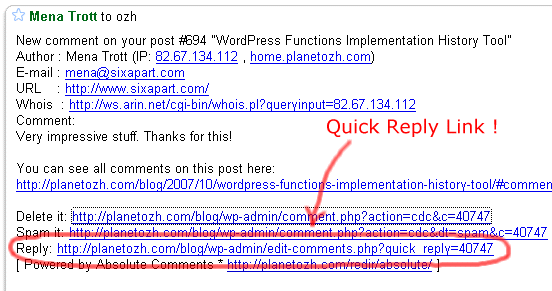
    If you have mail notifications activated (ie you get a mail each time a comment is posted), the mail will contain a handy Quick Reply link to make things faster than ever.
    Absolute Comments
  • Comment Reply Prefill
    When replying to Joe, do you always like to start your comment with “Joe »” or “@Joe:” ? Define an automatic pattern so you won’t have to type it everytime (the big animated screenshot above shows this feature)
  • Threaded Comments Support
    Your blog runs whatever plugin to support threaded comments ? So does Absolute Comments
  • Translations
    Nearly 20 languages! See below for thankful credits. The translation template file (.pot) is included, so anyone speaking something that’s not English and using poEdit is encouraged to share their words!

Limitations and troubleshooting

There are a couple of very minor limitations I thought you might need to now, if you haven’t guessed most already

  • 2.5+ everywhere: current version if for WordPress 2.5+ and won’t work below. See below for older versions.
  • Ajax everywhere: it obviously means you need to have Javascript enabled.
  • Javascript everywhere: it means it will have to break some day or another due to the browser, another plugin conflicting, the KGB spying on you, or anything that might look like an excuse for Javascript not to run smoothly. This said, it was developed and tested in MSIE6 and Firefox with nothing but extreme pleasure.

In any case if things are not running as expected, please read the Troubleshooting guide.

Download Absolute Comments

“Enough of your useless documentation” you think, “give me the plugin !!”. OK Boss. Here it is.

Download the plugin :
ozh-absolute-comments.zip
Extract and upload to your blog, preserving directory structure if any.
Note: download counter here and stats on wordpress.org may differ and reflect the number of downloads before this plugin was hosted on the plugin directory

Older version

This plugin was created initially for WordPress 2.2 / 2.3 and is still available but not maintained (in other words, no support, help or anything for this deprecated version!)
Download : Absolute Comments 1.0 (for WordPress 2.3.3 and below)
Same installation as ever.

Credits and Love

If you like this plugin and you feel it enhances your blogging and community managing experiences, please make my day and simply blog about it to let your readers know about it. They might like it too:)

Related posts

Metastuff

This page "Absolute Comments: Comment Manager with Instant Reply" was posted on 28/10/2007 at 5:09 pm
Watch this discussion : Comments RSS 2.0. You can trackback this post from your own site

272 Blablas

    Pages: « 14 5 6 7 8 9 [10] 11 12 13 14 » Show All

  1. 181
    Wordpress geli?mi? yorum yöneticisi | A... Germany »
    pingback on 07/Jun/08 at 7:12 pm # :

    [...] özelliklerinin devam?n? ?uradan ingilizce olarak okuyabilirsiniz.Eklentiyi buradan direk indirebilirsiniz.Bildirgeç‘te [...]

  2. 182
    50 Tips to Make Money Blogging by Buildi... United States »
    pingback on 08/Jun/08 at 4:04 am # :

    [...] Tracking Comments Easier. Ozh’ Absolute Comments Wordpress Plugin makes it easy to approve and reply to the comments on your Blog right from your Administrator [...]

  3. 183
    Wordpress 2.5 versiyonu ile uyumlu Eklen... Ukraine »
    pingback on 08/Jun/08 at 12:44 pm # :

    [...] Absolute Comments: version 2.0 [...]

  4. 184
    7 Plugin Wordpress Untuk Memudahkan Kerj... Malaysia »
    pingback on 11/Jun/08 at 1:49 am # :

    [...] Ozh’ Absolute Comments [...]

  5. 185
    Kommentar gelöscht,anstatt es beantwort... Germany »
    pingback on 11/Jun/08 at 8:32 pm # :

    [...] Dieses Plugin ist ziemlich praktisch,denn damit kann ich direkt aus dem Dashboard heraus auf Kommentare anworten. [...]

  6. 186
    Koral Denmark »
    wrote, on 15/Jun/08 at 1:23 am # :

    This is very neat!
    I will definatly use Absolute Comments when i start a WordPress blog.

  7. 187
    Wordpress - Melhores plugins para admini... United States »
    pingback on 16/Jun/08 at 11:20 am # :

    [...] Ozh’ Absolute Comments - Um excelente plugin para gerir comentários. Vale a pena! [...]

  8. 188
    Movie Goers Indonesia »
    thought, on 27/Jun/08 at 3:59 pm # :

    thanks for this plugin, very useful for comment tasking =)

  9. 189
    Lecactus Russia »
    thought, on 28/Jun/08 at 3:10 pm # :

    Russian (ru-RU) translation (for version 2.2.2)

    http://lecactus.ru/download/absolutecomments-ru_RU.zip

  10. 190
    Ozh France »
    commented, on 28/Jun/08 at 5:29 pm # :

    Lecactus » thank you very much!

  11. 191
    Wordpress 2.5 Uyumlu Eklentiler (Liste) ... Turkey »
    pingback on 29/Jun/08 at 9:40 pm # :

    [...] Absolute Comments: version 2.0 [...]

  12. 192
    max United States »
    said, on 30/Jun/08 at 8:04 pm # :

    Can you add a feature that automatically emails the person who left the comment. So that they know there is a reply to their comment.

    Thanks

  13. 193
    Ozh France »
    wrote, on 30/Jun/08 at 8:39 pm # :

    max » That’s another plugin

  14. 194
    Frank Germany »
    commented, on 02/Jul/08 at 11:12 am # :

    Hello Ozh,
    i love your plugin. I have one problem, when i read my blog with a mobilephone, than i have a long load-time in backend on the comments-page and the css is wrong with your plugin. ON the laptop is all OK.
    Do you have an idea?

  15. 195
    WordPress Working Plugins | Utricks United States »
    pingback on 04/Jul/08 at 11:27 am # :

    [...] Absolute Comments: version 2.0 [...]

  16. 196
    2.5 Sürümüyle Uyumlu Eklentiler | Wor... France »
    pingback on 06/Jul/08 at 12:22 pm # :

    [...] Absolute Comments: version 2.0 [...]

  17. 197
    wordpress 2.5 Uyumlu Eklentiler Listesi ... Germany »
    pingback on 06/Jul/08 at 5:31 pm # :

    [...] Absolute Comments: version 2.0 [...]

  18. 198
    Wordpress 2.5 Uyumlu Eklentiler Listesi ... France »
    pingback on 06/Jul/08 at 11:29 pm # :

    [...] Absolute Comments: version 2.0 [...]

  19. 199
    Jim United States »
    said, on 07/Jul/08 at 4:51 pm # :

    Hey, Ozh, can I make a suggestion for the next iteration of this plugin? Would it be possible to flip the buttons so that the blue ones are on top of the red ones? I just accidentally deleted a comment because the Delete and Reply buttons are right next to each other and I clicked the wrong one. First time I’ve ever done that, but it’d be nice to separate those buttons a bit.

  20. 200
    Jen United States »
    wrote, on 07/Jul/08 at 8:18 pm # :

    This is a great plugin! however on the latest release, I noticed that when I click on the 'Reply' link in the email, the resulting permalink that gets pre-populated in the comment field looks like this:

    CODE:
    1. @<a>NAME HERE</a>:

    The backslashes need to be removed manually in order for the link to work properly once I submit. Not a huge deal, but something that might be an easy fix?

Pages: « 14 5 6 7 8 9 [10] 11 12 13 14 » Show All

Leave a Reply

Comment Guidelines or Die

  • HTML: You can use these tags: <a href=""> <em> <i> <b> <strong> <blockquote>
  • Posting code: Post raw code (no <> &lt; etc) within appropriate tags : [php][/php], [css][/css], [html][/html], [js][/js], [sql][/sql], [xml][/xml], or generic [code][code]
  • Gravatars: Curious about the little images next to each commenter's name ? Go to Gravatar.
  • Spam: Various spam plugins on patrol. I'll put pins in a Voodoo doll if you spam me.
  • I will mark as Spam test comments, all comments with SEO names (ie "My Cool Online Shop" instead of "Joe") or containing forum-like signatures.

Close
E-mail It