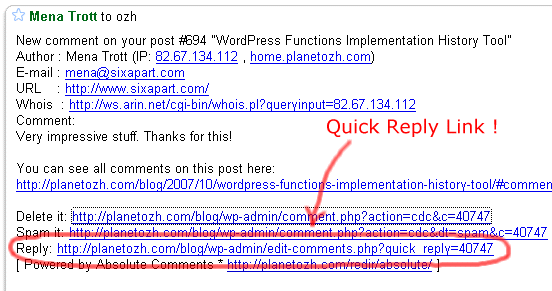
Absolute Comments allows you to reply to comments right from the email notification. It also automatically fills the reply with the commenter's name (so if you reply to Joe, your comment will be prefilled with "Joe » " for your convenience)
There's no setup, no setting. Just upload, activate and forget.
Download Absolute Comments
This plugin is for WordPress 3.1+.
ozh-absolute-comments.zip
Extract and upload to your blog, preserving directory structure if any.
Older version
Absolute Comments used to be a feature packed plugin, back in the WordPress 2.x days. WordPress 2.7 implemented most of these much needed features (reply to comments from the Edit Comments page, those stuff you don't even believe weren't always part of WordPress). Older versions are still available but totally unsupported, obviously.
If you like this plugin and you feel it enhances your blogging and community managing experiences, please make my day and simply blog about it to let your readers know about it. They might like it too:)
Feedback
I'm closing the comments here. This post is attracting 80% of my spam and I'm tired of manually moderating messages. If you have a question, ask your mom :)
Shorter URL
Want to share or tweet this page? Please use this short URL: http://ozh.in/kq


trackback on 06/Nov/07 at 11:22 am # :
WordPress æ’件:Absolute Comments…
Ozh 今日终于å‘布了他的最新 WordPress æ’件:Absolute Comments。这个æ’件的功能相信大家都很喜欢,那就是å…许 WP 管ç†å‘˜åœ¨åŽå°ç•™è¨€ç®¡ç†é¡µé¢ä¸ä»¥ Ajax æ–¹å¼ç›´æŽ¥å¯¹è®¿å®¢çš„æ‰€æœ‰ç•™è¨€è¿›è¡Œå¿«é€Ÿå›žå¤ï¼Œ…..
commented, on 06/Nov/07 at 12:21 pm # :
Ah, this plugin is like a dream come true. I have just one request/suggestion. Could you also add a feature so that when you respond to a guest's comment your response is emailed to them? Right now I use the comment responder because not everyone checks back for responses or can find their way. :)
replied, on 06/Nov/07 at 4:04 pm # :
thnaks for the plugin ozh is very useful!!!
wrote, on 06/Nov/07 at 6:49 pm # :
You know what would be really cool?
Integration with Comment Mailer. So they you could really reply to your commentors.
Nice plugin idea, idea :)
wrote, on 06/Nov/07 at 7:29 pm # :
Oh, wow, very nice!
wrote, on 06/Nov/07 at 8:20 pm # :
Elaine » adding the ability to send emails sounds cool, I'll have a look at this. As for adding support for other plugins, this is something I want to avoid when possible, because maintaining compatibility while other plugins' code evolve is a real pain.
wrote, on 06/Nov/07 at 8:39 pm # :
Brilliant plugin. This is how WP's comments should have functioned out of the box.
commented, on 06/Nov/07 at 10:59 pm # :
Hmm, hold the phone. I'm getting the following error when making a comment in the admin area:
Any thoughts?
commented, on 06/Nov/07 at 11:08 pm # :
Ok, this is interesting. Turns out that my comments did post to the database. But that error occurred only after the plugin attempted to display the results.
Permissions problem of some sort?
replied, on 07/Nov/07 at 12:06 am # :
Understandable.
Great. Sounds cool.
said, on 07/Nov/07 at 12:10 am # :
Rob » OK, got it. I develop on PHP5 and your server is running on PHP4, and this is a PHP4 only error. Going to fix this in the next minutes.
Edit: this should be fixed. Anyone on PHP4 please re-download the file (I didn't bump the version up)
said, on 07/Nov/07 at 2:32 am # :
Plugin sounds great – I liked the idea of the other comments manager plugin but the separate page just didn't make sense to me.
Unfortunately I can't seem to post any comments. If I use the inline posting I get the error…
"Error (duplicate content or posting too quickly)"
If I post a quick reply I get the error
Fatal error: Call to undefined function: add_options_page() in /home/.oedipus/binarysun/binarymoon/wp-content/plugins/wp-contact-form/wp-contactform.php on line 342
so I wonder if there is some sort of plugin conflict going on somewhere?
Would love some help so I can get this working :)
Thanks in advance
wrote, on 07/Nov/07 at 2:45 am # :
hello ozh
thanks for this plugin even he dosn't work on my blog (wp 2.2.3).
i got everytime a strange error message on my browser.
"The page at http://blog.superdesign.ch says:
Fault (double coment or to fast publishing?)
action terminated"
this on camino (gekko engine, macosx 10.4.10).
do you have any idea what to do?
thanks
replied, on 07/Nov/07 at 2:49 am # :
same problem like BEN.
sorry for my bad english on my previous post.
thought, on 07/Nov/07 at 9:50 am # :
Ben & Kux » this message pop when the comment has not been posted for some reason. I heavily suspect WP-ContactForm, the crappiest plugin on earth with ugliest broken code I've ever seen. How are things when you disable it ?
said, on 07/Nov/07 at 11:06 am # :
Ok – that fixes it. Now I need to find a new contact form plugin.
BTW I am from England but your flags say Italy. Maybe you need to update your IP database :)
Must admit the second error gave me the impression that plugin was the issue. Didn't realise it was such a bad one though – the advantage (disadvantage?) of plugins.
Thanks
wrote, on 07/Nov/07 at 11:24 am # :
As before…
Awesome plugin…
But just one thing, change the url of my blog…this one is for my partner
hehe
mine is http://www.dkcell.com.br/design
Thanks for credits…
If need anything else tell
wrote, on 07/Nov/07 at 1:41 pm # :
@Ozh
thanks. it works now.
please tell us wich CONTACT PLUGIN do you use.
replied, on 07/Nov/07 at 3:04 pm # :
excellent and powerful !
thought, on 07/Nov/07 at 6:43 pm # :
Any reason why the "reply" link doesn't show up in the comment moderation queue? Since I moderate all my comments, being able to reply from there would be ideal, personally. Thanks! ;)
commented, on 07/Nov/07 at 10:10 pm # :
Chris » there's no "Reply" link to comments in moderation because, well, I thought it would be mostly useless :) If you want to add it, it's pretty simple, add the following at the end of the main file:
I may add this as an option in next release.
thought, on 07/Nov/07 at 10:13 pm # :
kux » I'm not recommending any contact form plugin. The one I use (this) is less than optimal and the code mostly sucks (but at least it's not breaking every plugin). I never really took some time to search for something decent :)
replied, on 08/Nov/07 at 5:54 pm # :
Great plugin. I am real tired of having to moderate a comment and then go back and find the post and then reply.
thought, on 08/Nov/07 at 11:50 pm # :
Stephan » I think next release will have the "Reply from moderation notification email" link, so you will be able to reply & moderate all at once in the same admin screen. How cool will this be ? :)
replied, on 09/Nov/07 at 11:21 am # :
Nice plugin, Ozh. I've been looking for something like this for a while. If I may, I'd like to suggest to kux and Ben that they check out Mike Cherim's "Secure & Accessible PHP Contact Form" plugin for WordPress over at http://green-beast.com/blog/?page_id=136
I'm not sure right now how well it works with your plugin, but if I get some free time this weekend, I'll be more than happy to take the two out for a test spin on a blogging resource site I'm in the process of developing and let you know how well the two work together.
said, on 09/Nov/07 at 5:10 pm # :
Hey, Ozh,
For some reason this plugin is putting a terrible strain on my database. When I add a new reply comment from the admin panel, it takes upwards of 30-60 seconds to post, and in the meantime, locks down any page calls on my site until the plugin releases the database again. I don't know if anyone else is having this problem, but it's terribly inefficient for me. With Better Comments Manager, the submit-to-post time on comment replies was virtually nil, so I'm not really sure how your plugin queries the DB differently. Just something I wanted to point out for your investigation, in case it's a more widespread problem than with just me.
thought, on 09/Nov/07 at 5:58 pm # :
Dan Schulz » thanks for the contact form suggestion. It shouldn't conflict with my plugin, just as any plugin shouldn't conflict with another. The problem with WP-ContactForm is a terribly inefficient code which gets executed no matter what page you're on.
commented, on 09/Nov/07 at 6:57 pm # :
Just a thought… Is there any way to not send email notifications for comments written by the author/admin? There used to be a separate plugin for this (can't remember the name) but it had spotty success.
Just curious if this would even be possibly by your plugin.
replied, on 09/Nov/07 at 7:59 pm # :
Jim » when the plugin adds a comment it's just like posting in the regular comment form on the page post. It takes as many queries, no more, no less. Better Comments Manager does roughly the same thing, there shouldn't be any noticeable difference between both.
said, on 09/Nov/07 at 8:02 pm # :
Rob » I don't get it… I receive no mail when I post a comment. Are you using different logins maybe? WP is made so that email notifications are not sent to user currently logged in & posting, my plugin does nothing for or against this.
thought, on 12/Nov/07 at 3:45 pm # :
Ahh, nice to see, it's out now! And thanks for the backlink. :)
commented, on 12/Nov/07 at 6:56 pm # :
This is a great plugin! Thanks so much!! Can't wait to use it and talk all about it in my own blog!!
replied, on 13/Nov/07 at 6:12 am # :
Hi OZH,
I've got error when reply the comments, "duplicate comments"
Why ?
thought, on 13/Nov/07 at 7:33 am # :
Raffaell » don't know. Maybe it's because you're duplicating comments?
thought, on 14/Nov/07 at 9:48 am # :
I'm getting the following when trying to post a reply:
"Error (Duplicate Comment, or posting too quickly ?).
Aborted"
wrote, on 14/Nov/07 at 10:24 am # :
Alec Peden » you probably have a conflicting comment plugin.
wrote, on 14/Nov/07 at 6:00 pm # :
Hmm, curious! I suspected that your plugin (as cool as it is!) wouldn't affect author notify's. That's really odd that I do get them. I have only one login, set to administrator, ID of 1. I wonder if one of the other roles would work, like "author".
said, on 14/Nov/07 at 7:54 pm # :
Rob » Well, same thing for me, and I received no mail from all my blogs.
wrote, on 20/Nov/07 at 12:36 pm # :
Ahh very cool, thank you. I would also like to see the email function, it'd be cool to let the commenters know I've replied to them. :)
commented, on 21/Nov/07 at 2:18 pm # :
OZH,
Already turn off any comment related plugin, but why i still got this message:
"Error (duplicate content or posting too quickly)"
?? and Im not use wp contact form
wrote, on 24/Nov/07 at 4:08 pm # :
Hye, ozh, je dois bouletiser quelque part mais une fois unzipé et uploadé dans le rep plugin ton machin n'apparait pas dans la liste des plugins …
replied, on 24/Nov/07 at 4:11 pm # :
gni, c'est réglé
commented, on 28/Nov/07 at 12:24 pm # :
hey thats really2 good stuff, i luv that, thanks :)
wrote, on 02/Dec/07 at 2:36 am # :
…because those long ping-back/trackback URL in the name field 'absolutely' break the designs of the WP theme =( now you know why I have a longggggg name =).
commented, on 02/Dec/07 at 10:54 am # :
theseoblogger » this is not the purpose of this plugin. There are already plugins doing something similar (for instance WP Chunk), and this also often a CSS issue (word-break)
wrote, on 07/Dec/07 at 6:50 pm # :
Very nice. It would be great if you could provide a 'draft' option, so that I can recheck it at a later time before actually replying.
wrote, on 07/Dec/07 at 9:18 pm # :
Krishna » Draft… Interesting feature request. This would require more hacking, because there is no way in WP as is to mark a comment as pending, but that's something I'll keep in mind. Thanks for your input!
replied, on 08/Dec/07 at 4:13 am # :
this's a great plugin, i using it, thanks
said, on 18/Dec/07 at 10:32 pm # :
I've basically been doing nothing. I've just been sitting around waiting for something to happen, but I don't care. Shrug. I can't be bothered with anything recently. My mind is like a void.
thought, on 19/Dec/07 at 10:30 am # :
I'd like to use this, but when I have it activated and go to use it to reply to a comment, I get the following popup error message: error (Duplicate response or posting too quickly), aborted.
said, on 19/Dec/07 at 10:42 am # :
I'm sorry – I didn't read the older comments and saw there was a solution; my WP Contact plugin. It's working now. Thanks Ozh.
wrote, on 25/Dec/07 at 5:56 pm # :
I've translated the plug-in to Norwegian. Drop me a mail and I'll send you the .po-file. :)
wrote, on 25/Dec/07 at 7:04 pm # :
Hello Ozh :-)
I'm using this great plugin and am finding it very useful although there is one thing I wish I knew how to do. How can I make my reply look different from the rest so then visitors can see it's the admin who has replied?
I want to create my own custom div class and have looked through all the files but I cannot find where I would add my own div tag.
Can you point me in the right direction? Thanks.
Gemma
wrote, on 25/Dec/07 at 8:51 pm # :
Einar » Great! Mailed you already :)
commented, on 25/Dec/07 at 8:54 pm # :
Gemma » there are various ways to do so. A simple way is to modify your theme so that author's comments are styled, as explained here: http://5thirtyone.com/archives/774
Other ways: http://www.google.com/search?q=wordpress+author+comments
replied, on 25/Dec/07 at 10:22 pm # :
Thanks Ozh. I guess I'll just have to figure it out on my own as none of those hacks work.
commented, on 05/Jan/08 at 8:20 am # :
Found this fantastic plugin that emails the comment poster when you reply to a comment by that poster here
It even threads the comments to a degree, down one level.
Would love it if you combined your plugin with the emailing part of this plugin.
thought, on 07/Jan/08 at 10:26 pm # :
Charles » Emailing comments the blog owner posts has been a regular feature request. This is on my todo list.
commented, on 08/Jan/08 at 11:48 am # :
Greetings!
Just want to say thank you again for such a great plugin! It's incredible how I could just improve my site with a few plugins of yours. great! This comments plugin was just what I needed as I often don't answer back to people as the normal wordpress comment way to do it takes me too long having to go to the exact page etc! wow thank you again! stay well and enjoy your week!
commented, on 24/Jan/08 at 9:54 pm # :
Hi there, what a great plugin!
I installed it and activated it, and all the new features appear in my Manage section, however the Reply to Comment button and the Thread Reply button don't do anything when clicked. And in the IE7 browser pane, I go to the bottom lefthand error message area, and it says that in line 265 of the page code, which it seems is this:
jQuery.post('MyURLandPluginPath/_save_comment.php', postarray, function (xml) {cqr_get_reply(xml);}
there is an "Access is Denied" error in URL/wp-admin/edit-comments.php.
Any idea what's going on? I tried temporarily changing the permissions on edit-comments.php to all-access 777 and it didn't help.
Any thoughts would be greatly appreciated!
Many thanks,
Diane
thought, on 03/Feb/08 at 1:50 am # :
yeah.. also to be more specific. It's ONLY emailing the person you are replying to that is important.. tie that in with threaded comments.. and it brings people back in droves. The current Subscribe to Comments plugin sends emails to everyone no matter who posts.. or no matter to whom the admin is replying.. and that just pisses people off and they unsubscribe altogether.. but being notified when the Author REPLIES TO ME SPECIFICALLY is such a great feature.
Take a look at the plugin I mentioned above.. it not only emails the commenter when I reply to him specifcally.. it also threads the comments. UNFORTUNATELY.. it doesn't seem to work with your plugin.. or some other pluging I have installed as I can't get your plugin to work at all for me.. keep getting the duplicate comment warning thing.
thought, on 12/Feb/08 at 7:26 pm # :
"Responding to comments left by readers is a critical part of watering your blog so it grows and keeps healthy…" Has to be developed in WordPress..
replied, on 14/Feb/08 at 10:36 pm # :
Hi !
Nice plugin indeed.
For what reason did you use variables (e.g. $wp_ozh_cqr[’editor_rows’]) instead of options ? Variables are quicker but need to be re-set after each plug-in upgrade.
Here's a feature request : find a way to respond to multiple comments in just one answer.
For example, you could add a checkbox before all comments displayed and add a "respond to all" button.
Then it would create a template answer like this :
commenter 1 »
commenter 2 »
…
said, on 15/Feb/08 at 12:48 am # :
CUI » I always tend to prefer hardcoded vars instead of options manageable through an option page for 2 reasons mainly. 1) because at the beginning I develop stuff for myself and it starts as a dirty plugin, then when I realize it has some potential for others I more or less package it nicely, but there are some leftovers :) and 2) because I'm always reluctant adding yet another option page. My blogs usually run between 10 to 40 plugins, the admin menu gets unreadable sometimes…
As for the feature request, I sort of don't like it. What I like about this plugin is you can respond individually and connect individually with your commenters.
replied, on 24/Feb/08 at 10:26 pm # :
Well, I must admit that your point about ever-expanding option menu is a good point ; perhaps a compromise would be to keep all the parameter variables in a single short file ? Database options really make upgdrades easyer.
Another feature request after some use : the "view all" comments for a page" page is great, indeed. It would be greater if there was 2 links to previous/next articles.
wrote, on 04/Mar/08 at 5:03 pm # :
I found it conflicts with cold-form contact.
http://perishablepress.com/press/2008/01/08/contact-coldform/
This plugin conflicts almost with every contact form plugin.
Strange.
thought, on 09/Mar/08 at 11:54 am # :
Hi,
Thanks for this great plugin. Is it compatible with "Comment Referrers" (and conversely)? I have a doubt.
Thanks.
Chris Masse
said, on 09/Mar/08 at 2:54 pm # :
Chris Masse » Don't know. Try. Tell us :)
said, on 10/Mar/08 at 12:52 pm # :
I'm indeed trying the two plugins. Waiting to see actually one comment referral, and after that, I will re-enable Absolute Comments to see if that comment referral still subsists… Will tell you once I get to know that…
Chris Masse
commented, on 10/Mar/08 at 6:16 pm # :
Hey Ozh, just so you know (which you probably do), this doesn't work in 2.5. They went and changed the admin on you! I added an entry to the codex's plugin compatibility page to let other users of your fine plugin know.
said, on 11/Mar/08 at 12:47 pm # :
I can't say whether Absolute Comments messes or not with Comment Referrers because there is a problem with Comment Referrers. Their referrals appear in the e-mails sent to me, but not on the comments page in WordPress. I will contact them.
replied, on 18/Mar/08 at 11:52 pm # :
Thanks for updating the plugin compatibility page!
thought, on 21/Mar/08 at 10:41 am # :
hi.thank you for plugins
commented, on 22/Mar/08 at 9:14 pm # :
Great plugin man, one of the best. I'm having a weird issues – I can't delete, unapprove or mark comments as spam anymore. They appear to delete as normal, with the red fade out, than they reappear immediately with the red background remaining – any thoughts?
thought, on 28/Mar/08 at 10:25 am # :
Seems like a very cool plug-in! I shall check it out! I have one question though. Does it also highlight the author's comments or do you use a different plug-in for that? Thanks.
wrote, on 28/Mar/08 at 11:14 am # :
Nanda » Author's comments highlighting is a simple theme issue.
In the foreach ($comments as $comment) loop in comments.php, I have something like "if ($comment->user_id == 1) $class= 'comment_ozh';" then I jus output the classname.
thought, on 28/Mar/08 at 12:33 pm # :
Ah ok thanks very much!
thought, on 29/Mar/08 at 3:56 am # :
Great idea, but the plugin doesn't work with my blog. I have the version 2.0.4 and I get the following error while accessing "manage comments":
Fatal error: Call to undefined function: wp_enqueue_script() in wp-content/plugins/ozh-absolute-comments/wp_ozh_absolutecomments.php on line 72
Does anyone know a solution?
replied, on 29/Mar/08 at 11:03 am # :
chabot » Sure: upgrade to the minimal WP version supported. Yours is old, deprecated and insecure.
said, on 30/Mar/08 at 1:49 am # :
hello, can you update this plugin for version 2.5 ?
this is very usefull . thank you :)
thought, on 30/Mar/08 at 6:36 am # :
hi, i am using this plugin since a few weeks. today my site crashed with an error (in german) like "The Email could no be sent. Probably on your server the function mail() is deactivaded." it seems by sending a ping the function crashed… no idea. Do you know what happened and how I could fix it?? THANKS!!!
commented, on 30/Mar/08 at 11:30 am # :
vsy » real soon!
commented, on 30/Mar/08 at 11:31 am # :
Buenos Aires Insider » No idea, and it's probably completely unrelated to my plugin. Contact your server admin.
said, on 31/Mar/08 at 12:43 pm # :
wow, too cool to be true :)
I just want to thank you for this plugin
commented, on 31/Mar/08 at 1:51 pm # :
any idea when the WP 2.5 compatible version will be ready? i'm lost without your plug-in!
wrote, on 02/Apr/08 at 6:41 am # :
Waiting for the new version…:)It's one of my favourite plugins.
replied, on 02/Apr/08 at 5:30 pm # :
I am also waiting for the 2.5 compatible version desperately.
said, on 02/Apr/08 at 5:40 pm # :
Is there any hope for getting this to work for commenters, too? On Livejournal, you can get into an email conversation with anyone on there. If I comment on someone's blog and some random person replies to me, I get an email. Then, I can actually reply to the random within my email. Then the random will get my reply and option to reply himself in email.
In other words, we can start emailing each other, only all the comments are getting posted. Pretty cool. I love it. I've been in some pretty big exchanges that way.
commented, on 08/Apr/08 at 1:30 am # :
In 2.5, I'm getting the "duplicate or too quick" error every time I try to reply.
thought, on 08/Apr/08 at 7:05 am # :
Michael » There's a conflicting plugin, probably. I still have to find a way to improve error reporting, to make troubleshooting easier.
thought, on 08/Apr/08 at 11:35 pm # :
Hi, i have problems with your plugin in WS 2.5 I always get an error when replaying a comment, that says error(duplicating comment or posting to soon) print screen is om http://www.mittlivsomjag.com/pr.png
said, on 09/Apr/08 at 2:48 pm # :
I too am getting the duplicate comment error.
Any fixes?
replied, on 09/Apr/08 at 3:19 pm # :
Don » There's no "fixes" I will be able to do, I'm only thinking about how to improve error report. The error you get is caused, most probably, by a plugin which sends output where it's not supposed to. You'll have to check, plugin by plugin, which one is conflicting.
commented, on 10/Apr/08 at 5:30 am # :
At least in my case, WP-SpamFree was the cause.
Thanks for this great extension! :)
pingback on 10/Apr/08 at 7:17 pm # :
[...] installation to 2.5. The trigger for this was that one of the plug-ins I'd been waiting for (Ozh's Absolute Comments) has now been updated. I used Fantastico to do the update – so much quicker than downloading the [...]
said, on 11/Apr/08 at 6:00 pm # :
Can you explain about threaded comments feature? It does not thread comments on my blog atleast.
commented, on 11/Apr/08 at 7:00 pm # :
NSpeaks » You need a plugin that… threads. It's just support for those plugin, not a feature in itself. Get one. But I guess I need to make this clearer in my doc :)
commented, on 12/Apr/08 at 6:25 am # :
Well, Anarchy Media Player v2.0 causes that “duplicate or too quick” error.
That's a shame. I was looking forward to this plugin, but I can't live without Anarchy.
thought, on 12/Apr/08 at 9:48 am # :
Jeff » Poorly written plugin, probably. Only comments plugin should potentially conflict with Absolute Comments. Other conflicting plugins are those sending content where they are absolutely not supposed to.
said, on 13/Apr/08 at 11:50 am # :
nice plugin, I'll use this plugin
pingback on 13/Apr/08 at 3:33 pm # :
[...] Absolute Comments 2.0 » Ozh (url) Reply instantly to comments, either from the email notification, or the usual Comments page, without loading the post first. For WordPress 2.5+ [...]
wrote, on 14/Apr/08 at 12:34 am # :
Thanks for this plugin. I highly suspect an incompatibility between Absolute Comments and Comment Referrers.
ocaoimh.ie/comment-referrers/
Developing…
Thanks for listening,
Chris Masse
pingback on 14/Apr/08 at 12:42 am # :
[...] with Absolute Comments, it's mostly because of a conflicting plugin. I've put this troubleshooting guide to help you identify [...]
wrote, on 14/Apr/08 at 1:45 am # :
Doesn't play well with captcha plugins. They don't show on the reply editor and balk because there was no entry made for the captcha.
Perhaps if there were an option to load the original comment page instead of the ajax quickie page this could work.
pingback on 14/Apr/08 at 3:37 am # :
[...] Absolute Comments Manager ??????????????????? [...]
thought, on 14/Apr/08 at 8:12 am # :
Don » What would be the point of loading the comment page?? That's exactly what this plugin is *not* supposed to do. Plus: how silly is a plugin that asks for a captcha when the admin is posting a comment?
wrote, on 14/Apr/08 at 11:50 am # :
Looks like the "View All" link to see all comments on a post doesn't work when the comments are on a page. It always comes up with "No Posts Found".
said, on 14/Apr/08 at 12:54 pm # :
Ozh: Does the plugin have a fallback mechanism, in case javascript is not there?
replied, on 14/Apr/08 at 7:45 pm # :
Shantanu Goel » Everything is added via and requires Javascript, so if it's not there the plugin just does… nothing.
replied, on 14/Apr/08 at 7:50 pm # :
John Kolbert » Good catch, indeed. Damn. I'm not sure I'll be able to fix this. Thanks anyway, I'll look into it!
pingback on 14/Apr/08 at 11:38 pm # :
[...] Absolute Comments: Comment Manager with Instant Reply « planetOzh (tags: plugin WordPress) [...]
pingback on 15/Apr/08 at 1:43 am # :
[...] Absolute Comments: Comment Manager with Instant Reply « planetOzh (tags: BLOG plugin WordPress) [...]
wrote, on 15/Apr/08 at 4:56 am # :
Don >> Try a browser other than the one you are currently using. I ran into the same problem using firefox 3 pre but it was solved immediately I switched to IE. It was due to an incompatible GreaseMonkey script called WordPress Comments Ninja which does almost the same job as Absolute Comments.
Ozh >>I've updated the Simplified Chinese translation for Absolute Comments v2.1 which can downloaded via this link:
http://cuteleo.cn/wp-content/uploads/archives/translations.zip
Thank you for your amazing plugin!
said, on 15/Apr/08 at 5:45 pm # :
Hi, this is a great plugin. It adds the functions that are left on the Comments page. I make the Spanish translation because I see that there is none. Here are the links if you want to add them for the spanish users:
Absolute Comments in Spanish Post
Spanish Direct File Download
You could download the zip that has all the translations and just copy the es_ES to include in your zip file. Thanks a lot!!
Regards
Diego
commented, on 15/Apr/08 at 5:46 pm # :
Sorry, I don't know why the post link didn't work, here is again:
http://www.cabai.com.ar/2008/04/absolute-comments-en-espaol.html
Sorry again…
pingback on 15/Apr/08 at 6:50 pm # :
[...] Source | Plugin Homepage [...]
wrote, on 15/Apr/08 at 7:50 pm # :
Diego » Muchas gracias Diego, I'll add the translation soon!
pingback on 15/Apr/08 at 8:12 pm # :
[...] PlanetOzh a concocter un Plugin destiné a cette tache , depuis votre panneau de configuration , il a ajouter deux liens fort utiles , l'un pour répondre immédiatement au commentaire et l' autres pour voir tous les commentaires d'un article donné … [...]
said, on 15/Apr/08 at 8:58 pm # :
One side note, it would be nice if the "unapprove" and "delete" button traded places because it is very easy to accidentally click delete instead of reply.
pingback on 15/Apr/08 at 11:16 pm # :
[...] you using this Absolute Comments extension for WordPress? If not, it basically allows you to reply to comments directly from your [...]
wrote, on 16/Apr/08 at 3:03 am # :
Hi there. I am getting an error/conflict with another plugin – Enhanced WordPress contact form plugin. Here are the details:
Error (duplicate comment, or posting too quickly ?). Aborted
Clear Details ?
Fatal error: Call to undefined function add_options_page() in /home/xxx/public_html/blog/wp-content/plugins/enhanced-wp-contactform/wp-contactform.php on line 276
wrote, on 16/Apr/08 at 3:20 am # :
I don't know why I waited so long to install this plugin! It is made of pure, unadulterated awesome. Thank you for making it.
commented, on 16/Apr/08 at 9:49 pm # :
Vinny Carpenter » Use another contact form that does not suck.
pingback on 17/Apr/08 at 2:25 pm # :
[...] weeks ago I downloaded Absolute Comments plugin just out of curriosity how it works, later on I started to like because I could replay to [...]
pingback on 19/Apr/08 at 10:37 pm # :
[...] updated two of my plugins today: Absolute Comments to version 2.2 and Admin Drop Down Menu to version 2.1. So, what's new [...]
replied, on 20/Apr/08 at 4:46 am # :
Hi,
Me again.
It's a great progress to have the options configurable in the admin page. Thanks for this improvement! But maybe you forgot some i18n work for it? :-D
wrote, on 20/Apr/08 at 10:07 am # :
Leo » Ho yeah, indeed, completely forgot that part :)
wrote, on 20/Apr/08 at 2:46 pm # :
Hi!
I'm having the 'Undefined function' issue but with another function and plugin, this is the error message:
Fatal error: Call to undefined function add_options_page() in /path/to/a/plugin/file
The add_options_page is a valid function as defined in WP codex, and this plugin is working right and not giving any error message and neither any conflict with WP core or another plugins.
So… I wonder if you may be would reconsider to think that is possible that this conflict is not about "others" writing crappy plugins but Absolute Comments has a not very friendly behaviour… ;)
replied, on 20/Apr/08 at 3:53 pm # :
Samuel » what plugin and what error exactly ?
said, on 20/Apr/08 at 4:12 pm # :
The plugin is WP-Money.
It's a very simple plugin and the problem the error message was about the function used to add the options page for the plugin.
After leaving the comment I was trying to fix this (even I'm not the Moremoney author) and I found this:
At the line that caused the issue with Absolute Comments there was this code:
add_options_page('Configurar MoreMoney', 'MoreMoney', 9, 'options-moremoney.php');That was called from:
add_action('admin_head', 'wpmm_add_options_page');So I moved the action to 'admin_menu' hook using:
add_action('admin_menu', 'wpmm_add_options_page');And the problem between those two plugins dissapear :)
Maybe the admin_head is not the correct hook for that call, but it's used by a lot of plugins, so I think that it would be nice to make Absolute Comments take of this…
Best regards ;)
thought, on 20/Apr/08 at 4:52 pm # :
Samuel » This hook is ok, this plugin is OK and there is no conflict with Absolute Comments on my test blog. Something went wrong on your part that I'm not able to reproduce.
pingback on 21/Apr/08 at 12:59 am # :
[...] found a way to do the same in the new version, which was very frustrating. I've also found a plugin that's supposed to [...]
said, on 22/Apr/08 at 3:09 am # :
Hello,
I have burnt some midnight oil translating this plugin to Russian, it is available for download at http://www.russian-translation-matters.com/blog/wordpress-plugin-russian-localization/absolute-comments
(absolutecomments-ru_RU.zip)
Good luck with development of the plugin, it is great!
pingback on 22/Apr/08 at 11:23 pm # :
[...] WordPress Thread Comment??????????????1.4.6 ????????????????Ozh' Absolute Comments???????????????????????????????????? [...]
commented, on 23/Apr/08 at 10:38 am # :
Hi there! Your plugin conflict with the common plugin named Contact Form ][ by Chip Cuccio.
I also noticed it conflicted with SecureContact thats based on the plugin above…
FYI
replied, on 23/Apr/08 at 11:21 am # :
MittLivSomJag » Try a contact form that doesnt suck.
replied, on 23/Apr/08 at 11:48 am # :
Ozh:
I'm experiencing a little problem with "Absolute Comments". I'm norwegian, but I'm using the original WP (as I generally hate translations) with minor tweaks. When I installet AC, it automatically showed in norwegian, and as I'm using "CommentLuv" in addition, the link-string shows up with a lot of strange characters instead of ÆØÅ and for instance . , ! and so on. Do you know how to fix this?
Kind regards, Shamini.
wrote, on 23/Apr/08 at 12:11 pm # :
Shamini » No idea. Looks like a character encoding problem, but I can't know if it's because of the two plugins, one of them, or the translation file, etc..
thought, on 23/Apr/08 at 12:14 pm # :
As far as I can see, it has something to do with AC interacting with CommentLuv – 'cause when I disable AC, it goes back to acting normal, with the correct chars. Sad, since AC looked like a cool plugin! :)
commented, on 23/Apr/08 at 12:37 pm # :
Shamini » On my test blog (default language ie english) I don't see anything conflicting (and looking at CommentLuv's code, I don't get how they can actually conflict). If it's a translation file problem, simply remove it. Could be also something broken in the Norwegian flavor of WP.
commented, on 23/Apr/08 at 12:59 pm # :
I just figured out that it's got something to do with CommentLuv, not Absolute Comments – and I think it's because I use ISO-8859-1 in my WP, instead of UTF-8. I've notified Fiddy too, so we'll see what happens!
Sorry 'bout this. :)
thought, on 23/Apr/08 at 1:48 pm # :
Shamini » Doh. *Always* use UTF8 everywhere :)
thought, on 23/Apr/08 at 2:34 pm # :
I can't use UTF-8, 'cause then my blog looks f*cked. :(
pingback on 23/Apr/08 at 9:22 pm # :
[...] Ozh' Absolute Comments makes it fun and easy to reply to reader comments by reorganizing the Comments menu and allowing for instant comment reply right in the dashboard. It's fast and powerful, and every WordPress user should be running this plugin. [...]
pingback on 24/Apr/08 at 2:32 am # :
[...] Absolute Comments: Comment Manager with Instant Reply « planetOzh (tags: wordpress plugin webdesign) [...]
thought, on 25/Apr/08 at 5:48 am # :
I have a request: in a future version, please separate the "spam" and "delete" links from the others — it hasn't happened yet, but I'm afraid I'll accidentally click one of them while going for "approve" or "reply". :(
pingback on 25/Apr/08 at 12:52 pm # :
[...] Absolute Comments vereinfacht es ungemein die Kommentare zu verwalten, zu kommentieren und zu administrieren. [...]
pingback on 25/Apr/08 at 2:19 pm # :
[...] Ozh' Absolute Comments – A great plugin to manage your comments, you should really try this to know what you are missing [...]
pingback on 25/Apr/08 at 3:03 pm # :
[...] 2. Plugin ist "Absolute Comments". Wie der Name schon sagt, geht es hier um die Kommentare, genauer die Kommentar-Verwaltung. [...]
trackback on 27/Apr/08 at 12:13 pm # :
WordPress 2.5.1 is out and plugins updates…
Just a few weeks after WordPress 2.5 was releases, here comes WordPress 2.5.1. 70 bugs corrections and a serious security breach corrected.
So go for it
WordPress 2.5.1
Downloads: 20 times
Ozh has aslo updated his plugins.
Admi…
pingback on 28/Apr/08 at 11:40 am # :
[...] dem Plugin Absolute Comments kann man auf Kommentare direkt aus dem WordPress-Admin Menü antworten. Das Admin-Menü ist für [...]
pingback on 29/Apr/08 at 2:14 am # :
[...] Absolute Comments: version 2.0 [...]
pingback on 01/May/08 at 11:23 am # :
[...] Télécharger Absolutes comments Tags:Absolutes comments, commentaires, plugin, téléchargement, wordpress [...]
pingback on 01/May/08 at 1:02 pm # :
[...] Ozh' Absolute Comments - ????? ????? ????? ?? ???? ??? ????????? ?? ?????? ?? ???? ?????? ?????? (+). [...]
pingback on 02/May/08 at 9:14 am # :
[...] 1. Absolute Comments: Comment Manager with Instant Reply [...]
pingback on 02/May/08 at 12:42 pm # :
[...] Ozh' Absolute Comments: va permite sa raspundeti la comentarii mult mai simplu, si in plus adauga un link catre pagina de raspuns in email, daca aveti activata optiunea de primire a comentariilor de pe blog via email. [...]
pingback on 05/May/08 at 5:57 pm # :
[...] Ozh' Absolute Comments Reply instantly to comments, either from the email notification, or the usual Comments page, without loading the post first. [...]
pingback on 07/May/08 at 2:37 pm # :
[...] Source | Plugin Homepage [...]
wrote, on 08/May/08 at 3:54 pm # :
Amazing plugin! Makes replying sooo easy… I was going nuts!
pingback on 09/May/08 at 3:23 am # :
[...] Ozh' Absolute Comments – Um excelente plugin para gerir comentários. Vale a pena! WP Threaded Comments – Um plugin que [...]
said, on 09/May/08 at 1:55 pm # :
Like others here, I am getting the message
Error (duplicate comment, or posting too quickly ?). Aborted Clear Details ?
I know it is a conflicting plugin, and that plugin is 'Quick Code'
http://blog.netnerds.net/quickcode/
I would like to continue to use both of these plugins….but I don't see any solutions to the problems above other than to switch from using one, and I didn't read about any new more advanced error reporting features for troubleshooting.
I appreciate that you are so involved, offering so much support for a free plugin. If you can help me out, that's great…if you can't I understand.
commented, on 09/May/08 at 6:52 pm # :
rotheblog » poor code. Replace last line "add_action('admin_head', 'quickcode_add_options_page');" with "add_action('admin_menu', 'quickcode_add_options_page');" and notify the plugin author about his mistake.
said, on 12/May/08 at 2:21 pm # :
Ozh,
Thanks so much, that fixed my compatibility issue with Quickcode. You took your time to look at that plugin for me, thanks a ton.
I thought your site had subscribe to comments on it…man I was glad I came back eventually to check and see if someone responded. Is there a reason you don't use that plugin?
Will notify plugin maker…he didn't respond to my first email so I doubt I'll hear anything else….
wrote, on 12/May/08 at 3:10 pm # :
rotheblog » The subscribe to comment plugins is something I have to implement here, it's been on my todo list for 12 years now :)
commented, on 14/May/08 at 11:16 pm # :
I installed this comment on WordPress 2.5. It initially worked, but then I changed one of the options (below error messages) and now I can't get the plugin to work or to get back to the setup options to change it back to default so it can work again…
Here are the three error messages I'm getting when I go to set the options:
Warning: include(/wp-content/plugins/o/includes/_admin.php) [function.include]: failed to open stream: No such file or directory in /wp-content/plugins/ozh-absolute-comments/wp_ozh_absolutecomments.php on line 169
Warning: include() [function.include]: Failed opening '/wp-content/plugins/o/includes/_admin.php' for inclusion (include_path='.:/usr/lib/php:/usr/local/lib/php') in /wp-content/plugins/ozh-absolute-comments/wp_ozh_absolutecomments.php on line 169
Fatal error: Call to undefined function wp_ozh_cqr_adminpage_print() in /wp-content/plugins/ozh-absolute-comments/wp_ozh_absolutecomments.php on line 123
If you need the full path, e-mail me.
In the Settings for Absolute Comments, I changed the default to #Joe from @Joe. I put something in there that caused all that, but have no idea what it was or how to get it back out.
I have deleted and reinstalled, but no luck.
Any ideas?
Thanks…Scot
replied, on 15/May/08 at 6:14 pm # :
Just for the record, I was suddenly having that duplicate comment error. It turned out to be a problem with the wp-commentform plugin, and the "add_action(’admin_menu')" thing did the trick.
Thanks again for this awesome plugin!
said, on 15/May/08 at 6:27 pm # :
Spoke too soon.. now the contact plugin doesn't work…
replied, on 15/May/08 at 8:58 pm # :
Scot Herrick » you seem to have screwed all paths (/wp-content/plugins/o/ and /wp-content/plugins/ozh-absolute-comments/ ??). Please delete and reinstall the plugin, be sure to upload as is and preserve directory structure.
commented, on 15/May/08 at 8:59 pm # :
wpGuy » get a contact form plugin that doesnt suck then :)
wrote, on 15/May/08 at 9:30 pm # :
I had already deleted the plugin and reinstalled it, but it will not change the comments page and trying to configure the plugin within settings gives me the above errors.
I also re-downloaded the plugin, extracted and installed with the same result.
This happened when I changed from the default "name" to the Comment # and name option. What happens when the plugin goes to that option? That is what moves this to the errors. Where is it storing that option and holding the setting even after deletion?
Thanks for looking at this; it's pretty weird.
pingback on 16/May/08 at 9:41 am # :
[...] Absolute Comments – BLOG?????? [...]
pingback on 17/May/08 at 5:33 pm # :
[...] man selber zu seinem eigenen Artikel gehen und dort kommentieren. Joost empfiehlt dazu das Plugin Absolute Comments, mit dem man alle Kommentare auf einer eigenen Oberfläche [...]
pingback on 17/May/08 at 10:48 pm # :
[...] ?????????????????????????????????? WordPress ?????????????????????????????????????????????????????????????????????????????????????????Absolute Comments — ??????????? [...]
pingback on 19/May/08 at 2:18 am # :
[...] Absolute Comments: Comment Manager with Instant Reply- Gives you the ability to reply to comments from within the same page as where you manage them. [...]
pingback on 20/May/08 at 4:42 pm # :
[...] Absolute Comments: Comment Manager with Instant Reply permite s? r?spunzi comentariilor chiar din pagina de moderare. Am reg?sit apoi pluginul Smart YouTube despre care Jurgen tocmai a scris ast?zi. Admin Management Xtended adaug? ni?te facilit??i care ar trebui – dup? mine – s? fie native în WP: po?i modifica data unui articol sau starea lui (publicat sau nu) cu un click, din lista articolelor. The Admin CSS Designer Tool: a COLOURlover WordPress Plugin este un alt plugin pentru manipularea schemei de culori din sec?iunea de administrare. My FTP permite manipularea fi?ielor blogului a la FTP (vezi captura de mai jos). O alt? facilitate care mi-ar place s? o v?d nativ în WP este reordonarea cu mouse-ul a categoriilor. Pân? atunci problema o rezolv? Category Order, pur ?i simplu tr?gând categoriile cu mouse-ul pentru a crea ordinea dorit?. [...]
replied, on 22/May/08 at 6:46 pm # :
I'm using WordPress 2.5 and Brian's Threaded Comments. While I can get the Reply Thread button to appear, when I actually click it, it does not thread the comment. Also, when I use the "quick reply" it sites on the little blue posting reply box and never posts the reply. I have to use the advanced reply to do any replies. (Yes, I have javascript enabled and the box appears for me to try to comment when I click Reply) Any ideas? The more urgent of the two is the reply threaded option.
Thanks,
Brad
commented, on 22/May/08 at 9:02 pm # :
Bradford » First issue looks like a plugin conflict. The blue reply box should contain a few details to help find the culprit.
Second issue, I'm not sure. I've never had a bug report about threading, so either it works, or it doesn't but no one uses this feature:) I'll have a look when I have some time.
pingback on 28/May/08 at 7:46 pm # :
[...] Credits A big thank you goes to Ozh, who wrote the Absolute Comments plugin [...]
pingback on 05/Jun/08 at 6:19 pm # :
[...] güzel bir eklentisini tan?taca??m eklentinin ad?: Absolute Comments.Bu eklenti sayesinde wordpress admin panelinde yorumlar? geni? çapl? yönetebiliyoruz. Nas?l [...]
pingback on 06/Jun/08 at 4:07 pm # :
[...] could reply to read comments, and reply to comments from there. (With a little help from the "Absolute Comments" plugin.) That would be useful to the heavy commenters. Indeed, that "comments" [...]
pingback on 07/Jun/08 at 7:12 pm # :
[...] özelliklerinin devam?n? ?uradan ingilizce olarak okuyabilirsiniz.Eklentiyi buradan direk indirebilirsiniz.Bildirgeç'te [...]
pingback on 08/Jun/08 at 4:04 am # :
[...] Tracking Comments Easier. Ozh’ Absolute Comments WordPress Plugin makes it easy to approve and reply to the comments on your Blog right from your Administrator [...]
pingback on 08/Jun/08 at 12:44 pm # :
[...] Absolute Comments: version 2.0 [...]
pingback on 11/Jun/08 at 1:49 am # :
[...] Ozh’ Absolute Comments [...]
pingback on 11/Jun/08 at 8:32 pm # :
[...] Dieses Plugin ist ziemlich praktisch,denn damit kann ich direkt aus dem Dashboard heraus auf Kommentare anworten. [...]
wrote, on 15/Jun/08 at 1:23 am # :
This is very neat!
I will definatly use Absolute Comments when i start a WordPress blog.
pingback on 16/Jun/08 at 11:20 am # :
[...] Ozh' Absolute Comments – Um excelente plugin para gerir comentários. Vale a pena! [...]
thought, on 27/Jun/08 at 3:59 pm # :
thanks for this plugin, very useful for comment tasking =)
commented, on 28/Jun/08 at 3:10 pm # :
Russian (ru-RU) translation (for version 2.2.2)
http://lecactus.ru/download/absolutecomments-ru_RU.zip
wrote, on 28/Jun/08 at 5:29 pm # :
Lecactus » thank you very much!
pingback on 29/Jun/08 at 9:40 pm # :
[...] Absolute Comments: version 2.0 [...]
wrote, on 30/Jun/08 at 8:04 pm # :
Can you add a feature that automatically emails the person who left the comment. So that they know there is a reply to their comment.
Thanks
thought, on 30/Jun/08 at 8:39 pm # :
max » That's another plugin
replied, on 02/Jul/08 at 11:12 am # :
Hello Ozh,
i love your plugin. I have one problem, when i read my blog with a mobilephone, than i have a long load-time in backend on the comments-page and the css is wrong with your plugin. ON the laptop is all OK.
Do you have an idea?
pingback on 04/Jul/08 at 11:27 am # :
[...] Absolute Comments: version 2.0 [...]
pingback on 06/Jul/08 at 12:22 pm # :
[...] Absolute Comments: version 2.0 [...]
pingback on 06/Jul/08 at 5:31 pm # :
[...] Absolute Comments: version 2.0 [...]
pingback on 06/Jul/08 at 11:29 pm # :
[...] Absolute Comments: version 2.0 [...]
replied, on 07/Jul/08 at 4:51 pm # :
Hey, Ozh, can I make a suggestion for the next iteration of this plugin? Would it be possible to flip the buttons so that the blue ones are on top of the red ones? I just accidentally deleted a comment because the Delete and Reply buttons are right next to each other and I clicked the wrong one. First time I've ever done that, but it'd be nice to separate those buttons a bit.
commented, on 07/Jul/08 at 8:18 pm # :
This is a great plugin! however on the latest release, I noticed that when I click on the 'Reply' link in the email, the resulting permalink that gets pre-populated in the comment field looks like this:
The backslashes need to be removed manually in order for the link to work properly once I submit. Not a huge deal, but something that might be an easy fix?
pingback on 18/Jul/08 at 9:00 am # :
[...] Visit [...]
pingback on 18/Jul/08 at 4:01 pm # :
[...] Absolute Comments: version 2.0 (Yap?lan yorumlar? admin panelinden kolayca yönetin) [...]
commented, on 19/Jul/08 at 3:19 am # :
Hello Ozh,
I had been using your plugin for several months. It worked without any problems. I've upgraded to WordPress 2.6 and started using SSL. Now that I've done that, only some of the links supplied by the plugin point to https. The others point to http only.
Unapprove |
Spam |
Delete
Reply »
Edit
View All
The top three point to the secure server. The bottom three don't.
I hope this isn't redundant for you and is helpful.
Peace,
Tom Usher
wrote, on 19/Jul/08 at 5:12 am # :
Hi Again Ozh,
It appears that only the Reply » feature is not working. The other links are automatically resolving to the secure server.
The reply link pops the textbox and allows me to add text and to use the "Reply to Comment" button, but then it sits there showing "Posting comment…". It never posts.
Again, I hope this info is helpful to you.
Tom
pingback on 19/Jul/08 at 4:15 pm # :
[...] Absolute Comments: version 2.0 [...]
wrote, on 23/Jul/08 at 1:19 am # :
I'm having issues with the reply function. I get
Error (duplicate comment, or posting too quickly ?). Aborted
Clear Details ?
Then details say:
Invalid Data: Please go back and try again.
I've had this before with another threaded comment plugin months back (I think it was YATCP). I am not sure what is causing this and would appreciate any insights you may have.
replied, on 30/Jul/08 at 5:56 pm # :
There is a problem of the reply function, prompt where it is possible to esteem more in detail?
pingback on 01/Aug/08 at 7:34 pm # :
[...] Ozh' Absolute Comments [...]
pingback on 01/Aug/08 at 7:34 pm # :
[...] Comment Replies via Admin Panel – This plugin aids administrators ability to reply to comments from the admin panel, there are a few plugins that do this now, but of course having it built in should make it run more smoothly than using the plugins. Here are some similar plugins if you'd like this feature for 2.6 or below: WP AJax Edit Comments, Better Comments Manager and Absolute Comments. [...]
pingback on 01/Aug/08 at 8:48 pm # :
[...] Respostas a comentários via painel administrativo: o próprio nome já diz. Trata-se de recursos para responder comentários através da interface administrativa, o que otimiza o trabalho e reduz o tempo perdido (carregar página, clicar em links, etc.). Existem muitos plugins que fazem coisas parecidas com isso, como o Better Comments Manager, ou o Absolute Comments. [...]
pingback on 02/Aug/08 at 1:50 am # :
[...] Panelinden Yorum Cevaplama: ?u anda WP AJax Edit Comments, Better Comments Manager ve Absolute Comments gibi eklentiler taraf?ndan sa?lanan özellik yine standart hale getirilip, yap?lan yorumlara [...]
pingback on 02/Aug/08 at 3:30 am # :
[...] Admin Panel Comment Replies – This plugin will help administrators to reply to comments using the admin panel. There are several plugins which allow you to do so right now, including WP AJax Edit Comments, Better Comments Manager and Absolute Comments. [...]
pingback on 02/Aug/08 at 5:49 am # :
[...] ??????????????????. ????????????: WP Ajax Edit Comments, Better Comments Manager?? Absolute Comments. [...]
pingback on 02/Aug/08 at 8:43 am # :
[...] WP AJax Edit Comments ? Better Comments Manager ? Absolute Comments [...]
pingback on 02/Aug/08 at 9:53 am # :
[...] WP AJax Edit Comments?Better Comments Manager?Absolute Comments [...]
pingback on 02/Aug/08 at 10:44 am # :
[...] Heute wird diese Funktion von Plugins wie WP AJax Edit Comments, Better Comments Manager und Absolute Comments [...]
pingback on 02/Aug/08 at 11:56 am # :
[...] WP AJax Edit Comments ? Better Comments Manager ? Absolute Comments [...]
pingback on 02/Aug/08 at 1:26 pm # :
[...] Admin Panel Comment Replies – This plugin will help administrators to reply to comments using the admin panel. There are several plugins which allow you to do so right now, including WP AJax Edit Comments, Better Comments Manager and Absolute Comments. [...]
pingback on 02/Aug/08 at 4:20 pm # :
[...] Respostas a comentários via painel administrativo: o próprio nome já diz. Trata-se de recursos para responder comentários através da interface administrativa, o que otimiza o trabalho e reduz o tempo perdido (carregar página, clicar em links, etc.). Existem muitos plugins que fazem coisas parecidas com isso, como o Better Comments Manager, ou o Absolute Comments. [...]
pingback on 02/Aug/08 at 4:40 pm # :
[...] Admin Panel Comment Replies – This plugin will help administrators to reply to comments using the admin panel. There are several plugins which allow you to do so right now, including WP AJax Edit Comments, Better Comments Manager and Absolute Comments. [...]
pingback on 02/Aug/08 at 5:24 pm # :
[...] WP AJax Edit Comments ? Better Comments Manager ? Absolute Comments [...]
pingback on 02/Aug/08 at 5:26 pm # :
[...] WP AJax Edit Comments ? Better Comments Manager ? Absolute Comments [...]
pingback on 02/Aug/08 at 6:13 pm # :
[...] Panel de Administración – Hay muchos plugins que te permiten hacer esto, con mención especial a Absolute Comments, que te permite citar los comentarios. Puede ser interesante contar con algo así [...]
pingback on 02/Aug/08 at 7:17 pm # :
[...] WP AJax Edit Comments ? Better Comments Manager ? Absolute Comments [...]
commented, on 02/Aug/08 at 7:31 pm # :
I love this plugin, thank you for developing it!
Quick question: do you know if there's a way to integrate Quick Reply with email? By this I mean, when I "quick reply" to someone in the Manage Comments section, is there a way for them to also get a copy of my response via email?
(If the email feature already covers this sorry for asking… I was a little confused about the email link actually….)
pingback on 03/Aug/08 at 3:16 am # :
[...] WP AJax Edit Comments ? Better Comments Manager ? Absolute Comments [...]
pingback on 03/Aug/08 at 4:31 am # :
[...] 7?Admin Panel Comment Replies ?????????????????????????????????????WP AJax Edit Comments, Better Comments Manager?Absolute Comments. [...]
pingback on 03/Aug/08 at 11:20 am # :
[...] Panel de Administración – Hay muchos plugins que te permiten hacer esto, con mención especial a Absolute Comments, que te permite citar los comentarios. Puede ser interesante contar con algo así [...]
pingback on 03/Aug/08 at 2:02 pm # :
[...] bent jau bus galima atsakyti ? komentarus tiesiai administravimo tinklalapyje (dabar tam naudoju Ozh Absolute Comments ?skiep?), dar ir naudojant klaviat?ros komandas. Ketinama ?diegti komentar? atšakas ? [...]
pingback on 03/Aug/08 at 2:49 pm # :
[...] 7?Admin Panel Comment Replies ?????????????????????????????????????WP AJax Edit Comments,Better Comments Manager?Absolute Comments. [...]
pingback on 03/Aug/08 at 3:52 pm # :
[...] ?????? ?? ??????????? ? ?????? ????????????????? – ???? ?????? ???????? ?????????????? ???????? ?? ???????????, ??????????????? ?? ?????? ????????????????? ?????. ?? ?????? ?????? ?????????? ????????? ????????, ??????? ??? ?????? ??? WP AJax Edit Comments, Better Comments Manager ? Absolute Comments [...]
replied, on 04/Aug/08 at 2:07 pm # :
thanks you.
pingback on 04/Aug/08 at 6:13 pm # :
[...] Absolute Comments – BLOG?????? [...]
pingback on 05/Aug/08 at 5:32 am # :
[...] WP AJax Edit Comments?Better Comments Manager ? Absolute Comments??????Wordpress thread [...]
pingback on 05/Aug/08 at 6:37 am # :
[...] PlanetOzh a concocter un Plugin destiné a cette tache , depuis votre panneau de configuration , il a ajouter deux liens fort utiles , l'un pour répondre immédiatement au commentaire et l' autres pour voir tous les commentaires d'un article donné … [...]
pingback on 05/Aug/08 at 10:14 pm # :
[...] I know! None of my plugins were really broken by 2.6, but some glitches require a few updates. Absolute Comments and Admin Drop Down Menus will be my main targets for the moment. I also have a very cool new [...]
pingback on 06/Aug/08 at 8:54 am # :
[...] Panelinden Yorum Cevaplama: ?u anda WP AJax Edit Comments, Better Comments Manager ve Absolute Comments gibi eklentiler taraf?ndan sa?lanan özellik yine standart hale getirilip, yap?lan yorumlara [...]
pingback on 06/Aug/08 at 11:43 am # :
[...] ?????? ?? ??????????? ? ?????? ????????????????? – ???? ?????? ???????? ?????????????? ???????? ?? ???????????, ??????????????? ?? ?????? ????????????????? ?????. ?? ?????? ?????? ?????????? ????????? ????????, ??????? ??? ?????? ??? WP AJax Edit Comments, Better Comments Manager ? Absolute Comments [...]
pingback on 06/Aug/08 at 4:05 pm # :
[...] Panel de Administración – Hay muchos plugins que te permiten hacer esto, con mención especial a Absolute Comments, que te permite citar los comentarios. Puede ser interesante contar con algo así [...]
pingback on 06/Aug/08 at 9:28 pm # :
[...] Panel de Administración – Hay muchos plugins que te permiten hacer esto, con mención especial a Absolute Comments, que te permite citar los comentarios. Puede ser interesante contar con algo así [...]
pingback on 07/Aug/08 at 12:32 am # :
[...] Absolute Comments: version 2.0 [...]
said, on 08/Aug/08 at 4:26 am # :
Wow, it's really nice this plugin. I was looking for. Thanks a lot!
pingback on 08/Aug/08 at 8:48 am # :
[...] Admin Panel Comment Replies – This plugin will help administrators to reply to comments using the admin panel. There are several plugins which allow you to do so right now, including WP AJax Edit Comments, Better Comments Manager and Absolute Comments. [...]
pingback on 08/Aug/08 at 5:16 pm # :
[...] default WordPress commenting system. This plugin appears to borrow some code and ideas from my own Absolute Comments as well as throwing a few other features in the mix. The lack of file and directory structure in [...]
said, on 08/Aug/08 at 9:57 pm # :
I wanted to make you aware of an issue that affects the function of Absolute Comments. There is a known problem w. v. 2.6 & the new way it deals with login cookies that causes a conflict for some users. Here is the forum link to the thread.
When the cookie conflict occurs & you use the e mail notification to try to reply to a comment, when you click Reply you get an Absolute Comment error saying you're not allowed to do that. The reply comment will not publish & the text written into the comment box is wiped out forcing you to rewrite the comment fr. scratch.
I now understand that this happens because you're not logged in. I'd suggest that you try to devise a way for users like myself to receive a more specific error msg. (like "cannot publish unless logged in" or something like that). I'd also suggest if there was a way to allow the browser to cache the comment so you didn't lose it after receiving yr error msg., that would be enormously helpful. Current function wipes out the comment after receiving the error.
commented, on 09/Aug/08 at 12:00 am # :
Richard Silverstein » I don't get it. When I'm not logged in, I cannot access any of the Absolute Comments parts, and definitely not the quick reply link from the notification email. All I get is a login form.
pingback on 09/Aug/08 at 11:01 pm # :
[...] Panelinden Yorum Cevaplama: ?u anda WP AJax Edit Comments, Better Comments Manager ve Absolute Comments gibi eklentiler taraf?ndan sa?lanan özellik yine standart hale getirilip, yap?lan yorumlara [...]
pingback on 11/Aug/08 at 2:17 pm # :
[...] ?????????Admin Panel Comment Replies? – ????????????????????????????????????WP AJax Edit Comments, Better Comments Manager and Absolute Comments? [...]
pingback on 11/Aug/08 at 4:02 pm # :
[...] i od teraz b?d? mog?a odpowiadac na komentarze z panelu dzi?ki Absolute Comment [...]
thought, on 12/Aug/08 at 5:38 pm # :
Thanks for the great plugin!
Unfortunately it conflicts with the Survey Gizmo Plugin which is very important for my website.
I always get an error like "Error (duplicate comment, or posting too quickly ?). Aborted"
Fatal error: Call to undefined function add_options_page() in C:\Program Files\xampp\htdocs\wordpress\wp-content\plugins\surveygizmo\surveygizmo.php on line 40
Is there something I can do?
Thanks,
Eddie
said, on 12/Aug/08 at 7:22 pm # :
Eddie » Edit and fix this Survey Gizmo Plugin:
on the last 2 lines of the main plugin file surveygizmo.php, change the 2 add_action('admin_head' with add_action('admin_menu'
And please notify the author so he fixes his plugin.
pingback on 12/Aug/08 at 8:38 pm # :
[...] by Rebecca on 12 Aug 2008 at 8:38 | Tagged as: Babbel Nu har jag installerat ett plugin som gör att det inte är lika omständigt för mig att svara på era kommentarer. Så jag lovar [...]
thought, on 13/Aug/08 at 9:45 am # :
Ozh,
You are a genius! :)
Thank you very much for the support! Everything is fine now.
I'll contact the author of the plugin, so he can make the changes.
Thanks again,
Eddie
pingback on 13/Aug/08 at 11:18 am # :
[...] i od teraz b?d? mog?a odpowiadac na komentarze z panelu dzi?ki Absolute Comment [...]
pingback on 13/Aug/08 at 11:46 am # :
[...] Admin Panel Comment Replies – This function will allow administrators to reply to comments using the admin panel. There are several plugins which allow you to this, including WP AJax Edit Comments, Better Comments Manager (my personal favorite) and Absolute Comments. [...]
pingback on 14/Aug/08 at 6:36 am # :
[...] Admin Panel Comment Replies – ????????????????????????????????????? WP AJax Edit Comments ? Better Comments Manager ? Absolute Comments ? [...]
pingback on 14/Aug/08 at 10:15 am # :
[...] Ozh' Absolute Comments 2.2.2 [...]
pingback on 14/Aug/08 at 2:35 pm # :
[...] Ozh' Absolute Comments Reply instantly to comments, either from the email notification, or the usual Comments page, without loading the post first. [...]
pingback on 18/Aug/08 at 7:09 am # :
[...] Absolute Comments – a comment manager plug-in for WordPress that you can use to respond to comments directly from the [...]
pingback on 18/Aug/08 at 8:46 pm # :
[...] Admin Panel Comment Replies – ????????????????????????????????????? WP AJax Edit Comments ? Better Comments Manager ? Absolute Comments ? [...]
pingback on 18/Aug/08 at 9:09 pm # :
[...] Admin Panel Comment Replies – This plugin will help administrators to reply to comments using the admin panel. There are several plugins which allow you to do so right now, including WP AJax Edit Comments, Better Comments Manager and Absolute Comments. [...]
pingback on 19/Aug/08 at 7:20 pm # :
[...] sampling now some of my own WordCamp Takeways and am really excited about Ozh' Absolute Comments plugin recommended by [...]
pingback on 20/Aug/08 at 5:28 pm # :
[...] Répondre aux commentaires depuis l’interface d’administration : Cette fonctionnalité faciliterait la tache de l’administrateur qui pourrait alors répondre aux commentaires directement depuis l’administration sans avoir à ressortir sur le site public. Actuellement les extensions suivantes le permettent : WP AJax Edit Comments, Better Comments Manager et Absolute Comments. [...]
commented, on 20/Aug/08 at 11:40 pm # :
Cool idea. I finally got around to trying it and I like it. It would cool if the features of this plugin and the WP Ajax Edit Comments plugin by Ronald Huereca were merged into one.
Thanks,
David
pingback on 22/Aug/08 at 2:46 am # :
[...] Absolute Comments WordPress Plugin and WP Comment Remix WordPress Plugin add improved functionality for responding to comments from the Comments Panel in WordPress. [...]
commented, on 22/Aug/08 at 7:15 am # :
This is EXACTLY what I needed! Thanks so much! One (probably dumb) question, though…
Where can I change the default 'Comment Reply Prefill'?
replied, on 22/Aug/08 at 7:16 am # :
Oops, forgot to mention… I'm using version 1.0
said, on 22/Aug/08 at 8:45 am # :
Aahz » Old version are unsupported. I think you need to edit something in the plugin but can't remember.
pingback on 24/Aug/08 at 12:16 am # :
[...] Absolute Comments: one of the features that WordPress should have is the ability to reply to your visitors' [...]
pingback on 25/Aug/08 at 2:19 pm # :
[...] hab ich seit ein paar tagen das plugin Absolute Comments drauf. hauptsächlich benutze ich das um über den admin bereich direkt auf die kommentare [...]
pingback on 25/Aug/08 at 3:54 pm # :
[...] Absolute Comments: version 2.0 (Yap?lan yorumlar? admin panelinden kolayca yönetin) [...]
pingback on 27/Aug/08 at 2:24 pm # :
[...] vorgesehen, der Admin muss das jeweilige Posting aufrufen und dort seine Antwort hineinschreiben. Absolute Comments macht Schluss mit diesem unnötig komplizierten Procedere und stellt auf der [...]
pingback on 29/Aug/08 at 7:50 am # :
[...] Kommentare direkt aus Backend-Bereich beantworten kann. Bisher habe ich mir mit dem Plugin „Ozh' Absolute Comments" geholfen (allerdings macht das Plugin Probleme, wenn ich per Handy im Backend unterwegs [...]
pingback on 29/Aug/08 at 7:53 am # :
[...] Ozh's Absolute Comments lets you reply to comments directly from your "comments" [...]
said, on 29/Aug/08 at 7:27 pm # :
Hello,
Thanks for providing such a great plugin. I'm wondering if there is any known conflict with the WP-Spam Free or Subscribe To Comments plugins. Those are the only two I have installed that seem like they would conflict.
What happens is this: after I click "reply" from an email or the comments page, write the comment, and hit "submit", I am transferred to a blank white screen. No error messages, just a blank browser screen (and the comment has not been posted).
What's strange is that it sometimes works, and sometimes doesn't.
pingback on 01/Sep/08 at 4:19 pm # :
[...] wieder ein echt tolles Plugin vorstellen was ich fast täglich nutze – nennt sich "Absolute Comments" und erleichtert einem im Adminbereich das Verwalten der Kommentare per One-Klick. Die [...]
wrote, on 05/Sep/08 at 8:36 am # :
hi,
Im using wp 2.6.1
and the threaded reply dosent seem to work. any ideas why?
thank you
pingback on 05/Sep/08 at 2:32 pm # :
[...] ?????? ?? ????????? ?? ?????? ?????????? – ??? ???????????? ?????? ???????? ??????????????, ????? ????? ???????? ?? ????????? ?? ?????? ?????????? ?????. ? ????????? ????? ????????????? ????? ???????????? ??????, ??????? ??? ?????? ??? WP AJAX ????????????? ???????????, ????? ??????????? Manager ? ?????????? ??????????? [...]
said, on 05/Sep/08 at 4:14 pm # :
Joel » Probably because you didn't read that it's not a *feature* but a *feature support*
thought, on 06/Sep/08 at 7:21 am # :
Yeah I missed that part out :) so sorry.
Thanks for the speedy reply.
pingback on 08/Sep/08 at 3:05 am # :
[...] *Admin Panel Comment Replies – This plugin will help administrators to reply to comments using the admin panel. There are several plugins which allow you to do so right now, including WP AJax Edit Comments, Better Comments Manager and Absolute Comments. [...]
pingback on 08/Sep/08 at 6:53 pm # :
[...] Absolute Comments WordPress Plugin [...]
commented, on 10/Sep/08 at 4:45 pm # :
This is a very good plugin. Thank you for making it.
pingback on 10/Sep/08 at 6:08 pm # :
[...] Absolute Comments WordPress Plugin [...]
commented, on 10/Sep/08 at 7:22 pm # :
On one site, when I try to reply with your plugin, it comes up with Posting comment… and just hangs. Any ideas?
said, on 10/Sep/08 at 8:08 pm # :
MInTheGap » Conflicting plugin. Read the troubleshooting doc.
pingback on 12/Sep/08 at 10:01 am # :
[...] Absolute Comments: Comment Manager with Instant Reply « planetOzh via Alan, a cool plugin for comment handling, interaction, etc. (tags: linklog wp plugins wordpress) [...]
pingback on 12/Sep/08 at 3:01 pm # :
[...] Absolute Comments: Comment Manager with Instant Reply « planetOzh — via Alan, a cool plugin for comment handling, interaction, etc. [...]
pingback on 12/Sep/08 at 8:31 pm # :
[...] this section is that you don't need a plugin anymore to quickly reply to a comment. I believe Ozh's Absolute Comments plugin made it to core. This makes replying to comments A LOT easier. Also, the Quick Edit feature of the [...]
replied, on 16/Sep/08 at 6:20 pm # :
Very good plugin. Thank you
pingback on 17/Sep/08 at 6:19 pm # :
[...] Mucho no puedo comentar al respecto porque, como les dije, aún no lo logro activar. Pero una buena opción para obtener los mismos beneficios del lado del administrador, es OZH Absolute Comments [...]
pingback on 19/Sep/08 at 7:24 am # :
[...] from here 3) Absolute Comments: Comment Manager with Instant Reply- Gives you the ability to reply to comments from within the same page as where you manage them. [...]
commented, on 21/Sep/08 at 2:55 pm # :
toujours un excellent plugin … le meilleur pour la gestion des comm'. un petit commentaire pour poser une question : quel plugin utilises tu pour que la personne qui poste un commentaire soit informé de ta réponse ? merci !
commented, on 21/Sep/08 at 9:50 pm # :
jG » Aucun à ce jour (aucun mail n'est envoyé)
pingback on 22/Sep/08 at 1:00 am # :
[...] Panelinden Yorum Cevaplama: ?u anda WP AJax Edit Comments, Better Comments Manager ve Absolute Comments gibi eklentiler taraf?ndan sa?lanan özellik yine standart hale getirilip, yap?lan yorumlara [...]
pingback on 22/Sep/08 at 1:01 am # :
[...] Panelinden Yorum Cevaplama: ?u anda WP AJax Edit Comments, Better Comments Manager ve Absolute Comments gibi eklentiler taraf?ndan sa?lanan özellik yine standart hale getirilip, yap?lan yorumlara [...]
pingback on 23/Sep/08 at 1:50 pm # :
[...] AJax Edit Comments, Better Comments Manager?Absolute Comments. 8?Comment Threading [...]
pingback on 25/Sep/08 at 3:40 pm # :
[...] ?????????Admin Panel Comment Replies? – ????????????????????????????????????WP AJax Edit Comments, Better Comments Manager and Absolute Comments? [...]
wrote, on 25/Sep/08 at 8:08 pm # :
I keep getting
Error (duplicate comment, or posting too quickly ?). Aborted
Fatal error: Call to undefined function: add_options_page()
I looked at your Troubleshooting page, but it doesn't seem to mention the Call to undefined function error. I'm not sure how to fix this problem. Would you happen to know what to do in this case?
commented, on 25/Sep/08 at 8:35 pm # :
Sue » Conflicting plugin that is most probably hooking into an incorrect hook
pingback on 01/Oct/08 at 6:15 am # :
[...] Ozh's Absolute Comments 2.2 [...]
thought, on 02/Oct/08 at 6:00 am # :
Thanks for this plugin. I've been looking for such a plugin where I can reply directly to comments like this.
thought, on 02/Oct/08 at 6:17 pm # :
great plugin, i have downloaded it, thanks for share
replied, on 08/Oct/08 at 2:49 pm # :
Hi,
I was getting the nothing-happening issue when trying to reply to comments, several comments here observe a possible plugin conflict problem, so just to let you know that I tracked mine down to Disable Password Protection
http://www.firesidemedia.net/dev/software/wordpress/disable-password-protection/
Cheers
YikYak
pingback on 18/Oct/08 at 12:01 am # :
[...] Absolute Comments probably won't get updated for 2.7 since most of its feature will be built-in. Almost 3 years ago I wrote the first ever Admin Drop Down Menu plugin and they'll be now available out of the box (definitely not as cool and usable as mine, but that's better than nothing) [...]
pingback on 19/Oct/08 at 7:17 am # :
[...] WP AJax Edit Comments ? Better Comments Manager ? Absolute Comments [...]
pingback on 26/Oct/08 at 1:27 am # :
[...] and are already in the 2.7 beta. Current Version: 2.2.2 — Download Link — Author Site: planetozh.com Share and [...]
pingback on 30/Oct/08 at 10:23 am # :
[...] Absolute Comments: version 2.0 (Yap?lan yorumlar? admin panelinden kolayca yönetin) [...]
pingback on 31/Oct/08 at 4:30 am # :
[...] But… that's a lot to remember, isn't it? And typing all that in every time? Yeah, I know, it can be a bit of a chore. So I commend to you Ozh' Absolute Comments. [...]
pingback on 31/Oct/08 at 8:00 pm # :
[...] Absolute Comments: Comment Manager with Instant Reply- Gives you the ability to reply to comments from within the same page as where you manage them. [...]
pingback on 01/Nov/08 at 3:47 pm # :
[...] Absolute Comments: Comment Manager with Instant Reply- Gives you the ability to reply to comments from within the same page as where you manage them. [...]
pingback on 02/Nov/08 at 4:56 am # :
[...] WP AJax Edit Comments ? Better Comments Manager ? Absolute Comments [...]
pingback on 02/Nov/08 at 1:26 pm # :
[...] 7?Admin Panel Comment Replies ?????????????????????????????????????WP AJax Edit Comments, Better Comments Manager?Absolute Comments. [...]
pingback on 03/Nov/08 at 8:27 pm # :
[...] author to respond to comments, in her session at WordCamp Dallas, and she is right on the money. Absolute Comments lets you reply to comments from the Comment Management screen in the WordPress Admin panel. It’s [...]
pingback on 05/Nov/08 at 1:18 am # :
[...] plugin that i really find usefull is "Absolute Comments" by Ozh. The "Reply" Ajax feature from the comment management is what i use the [...]
pingback on 06/Nov/08 at 1:21 pm # :
[...] panel instead of viewing the whole post and all other comments. Previously we needed a plugin like Ozh’ Absolute Comments to achieve [...]
thought, on 12/Nov/08 at 8:23 pm # :
I'm assuming this will not work with WordPress.com blogs with only a CSS edit upgrade??
What I'm looking for is a simple way to have the user get a message after they "submit" a comment that says "Your comment will be held for moderation by XX and approved soon, thank you." or the like
thx.
replied, on 12/Nov/08 at 8:49 pm # :
Caleb » That's the downside of wp.com, you can't make it work like you want it to.
pingback on 14/Nov/08 at 11:14 am # :
[...] atsakymai ? komentarus s?raše. Aš šiuo metu atsakymams ? komentarus naudoju puik? ?skiep? Ozh’ Absolute Comments, kurio netrukus nebereik?s, nes visk? bus galima valdyti s?sajos komentar? puslapyje be [...]
wrote, on 14/Nov/08 at 4:37 pm # :
Sounds very useful this wordpress plugin. Thank you for sharing it. I will test it with my next blog.
pingback on 16/Nov/08 at 2:07 pm # :
[...] Download this Plug-in [...]
pingback on 16/Nov/08 at 2:07 pm # :
[...] Download this Plug-in [...]
pingback on 20/Nov/08 at 7:21 am # :
[...] 7?Admin Panel Comment Replies ?????????????????????????????????????WP AJax Edit Comments, Better Comments Manager?Absolute Comments. [...]
said, on 24/Nov/08 at 10:19 am # :
This Plugin rocks, I dont know if I would have found it without this Page.
pingback on 24/Nov/08 at 4:22 pm # :
[...] Ozh' Absolute Comments Absolute Comments is a comment manager plugin that lets you instantly reply to comments, either [...]
pingback on 25/Nov/08 at 12:32 am # :
[...] schreibt oder bearbeitet. Befreit eure Datenbank also von nutzlosem Ballast. Nummer Zwei ist Absolute Comments. Mit diesem Plugin ist es möglich, direkt auf Kommentare aus dem Backend zu antworten. [...]
pingback on 25/Nov/08 at 8:09 pm # :
[...] Ozh’ Absolute Comments Absolute Comments is a comment manager plugin that lets you instantly reply to comments, either [...]
pingback on 28/Nov/08 at 2:42 pm # :
[...] Ozh' Absolute Comments [...]
pingback on 29/Nov/08 at 4:35 am # :
[...] 5. Ozh' Absolute Comments [...]
pingback on 01/Dec/08 at 10:01 am # :
[...] Ozh’ Absolute Comments [...]
pingback on 01/Dec/08 at 2:25 pm # :
[...] Ozh’ Absolute Comments [...]
pingback on 01/Dec/08 at 2:29 pm # :
[...] 5?Ozh’ Absolute Comments ???????????????????? Ajax ?????????????????????????????????? [...]
pingback on 02/Dec/08 at 9:36 am # :
[...] Ozh’ Absolute Comments [...]
pingback on 02/Dec/08 at 9:30 pm # :
[...] Hier habe ich ein sehr nützliches WordPress Plugin gefunden. Dieses könnt ihr auf dem Planetozh Blog mit Beschreibung finden. Es ermöglicht jeden Kommentar zu beantworten und das in einer [...]
pingback on 03/Dec/08 at 4:20 pm # :
[...] Comment Manager Gérez et répondez aux commentaires depuis l'interface de gestion, plutôt que de vous rendre [...]
pingback on 04/Dec/08 at 2:16 pm # :
[...] Ozh' Absolute Comments [...]
pingback on 05/Dec/08 at 1:36 pm # :
[...] Panelinden Yorum Cevaplama: ?u anda WP AJax Edit Comments, Better Comments Manager ve Absolute Comments gibi eklentiler taraf?ndan sa?lanan özellik yine standart hale getirilip, yap?lan yorumlara [...]
pingback on 08/Dec/08 at 2:51 pm # :
[...] Ozh’ Absolute Comments Absolute Comments is a comment manager plugin that lets you instantly reply to comments, either [...]
pingback on 10/Dec/08 at 10:20 am # :
[...] Panelinden Yorum Cevaplama: ?u anda WP AJax Edit Comments, Better Comments Manager ve Absolute Comments gibi eklentiler taraf?ndan sa?lanan özellik yine standart hale getirilip, yap?lan yorumlara [...]
pingback on 11/Dec/08 at 3:00 am # :
[...] WP AJax Edit Comments ? Better Comments Manager ? Absolute Comments [...]
pingback on 11/Dec/08 at 3:08 am # :
[...] WP AJax Edit Comments ? Better Comments Manager ? Absolute Comments [...]
pingback on 11/Dec/08 at 3:48 am # :
[...] Admin Panel Comment Replies - ????????????????????????????????????? WP AJax Edit Comments ? Better Comments Manager ? Absolute Comments ? [...]
pingback on 11/Dec/08 at 4:23 am # :
[...] WP AJax Edit Comments ? Better Comments Manager ? Absolute Comments [...]
pingback on 11/Dec/08 at 4:54 am # :
[...] WP AJax Edit Comments ? Better Comments Manager ? Absolute Comments [...]
pingback on 11/Dec/08 at 5:21 am # :
[...] WP AJax Edit Comments ? Better Comments Manager ? Absolute Comments [...]
pingback on 11/Dec/08 at 5:40 am # :
[...] WP AJax Edit Comments ? Better Comments Manager ? Absolute Comments [...]
pingback on 11/Dec/08 at 6:28 am # :
[...] WP AJax Edit Comments ? Better Comments Manager ? Absolute Comments [...]
pingback on 11/Dec/08 at 7:30 am # :
[...] WP AJax Edit Comments ? Better Comments Manager ? Absolute Comments [...]
pingback on 11/Dec/08 at 12:55 pm # :
[...] WP AJax Edit Comments ? Better Comments Manager ? Absolute Comments [...]
pingback on 12/Dec/08 at 5:38 pm # :
[...] WP AJax Edit Comments ? Better Comments Manager ? Absolute Comments ? Comment Threading – ?????????????????? WordPress [...]
pingback on 13/Dec/08 at 12:46 pm # :
[...] WP AJax Edit Comments ? Better Comments Manager ? Absolute Comments [...]
said, on 15/Dec/08 at 1:39 pm # :
Hi, is this the only plugin of the kind or can I find another one too? This one isn't working good for me, I'm getting recurring errors and blank pages.I'll post about it too.
commented, on 15/Dec/08 at 8:01 pm # :
it looks really really useful, looking foreward to try it. I hope it works with wordpress 2.6 (you said you should, so i'm not really worried about it), hope it is also very easy as it looks! Thanks a lot for this plug-in!!!
pingback on 18/Dec/08 at 5:32 am # :
[...] Ozh' Absolute Comments [...]
wrote, on 22/Dec/08 at 4:51 pm # :
This one isn’t working good for me, I’m getting recurring errors and blank pages
pingback on 24/Dec/08 at 8:16 pm # :
[...] Absolute Comments és un plugin que s'encarrega de facilitar la gestió dels comentaris afegint una sèrie de botons al panell d'administració de comentaris de WordPress mitjançant els quals és possible marcar els comentaris com a spam, respondre al comentari o bé editar-lo. [...]
pingback on 04/Jan/09 at 6:28 pm # :
[...] WP AJax Edit Comments ? Better Comments Manager ? Absolute Comments [...]
pingback on 07/Jan/09 at 2:44 pm # :
[...] Ozh’ Absolute Comments: Hiermit kann man über den Adminbereich direkt auf abgegebene Kommentare antworten und auch die Kommentare selber verwalten. [...]
pingback on 09/Jan/09 at 4:57 pm # :
[...] WP AJax Edit Comments ? Better Comments Manager ? Absolute Comments [...]
pingback on 13/Jan/09 at 8:08 am # :
[...] Ozh’ Absolute Comments [...]
commented, on 29/Jan/09 at 8:19 am # :
With wordpress 2.7 the functionality of instant reply messege on dasboard is tha same as Absolute Comments does. But the plugin is also great.
pingback on 30/Jan/09 at 6:39 pm # :
[...] For a more detailed documentation, list of available translations and screenshots of the interface, please visit its official page: Absolute Comments [...]
pingback on 10/Feb/09 at 8:35 pm # :
[...] Absolute Comments – a comment manager plug-in for WordPress that you can use to respond to comments directly from the [...]
pingback on 01/Mar/09 at 9:22 pm # :
[...] WP AJax Edit Comments ? Better Comments Manager ? Absolute Comments [...]
pingback on 09/Mar/09 at 5:34 am # :
[...] http://planetozh.com/blog/my-projects/absolute-comments-manager-instant-reply/ [...]
pingback on 13/Mar/09 at 10:30 pm # :
[...] Absolute Comments – ???????? ????????? ??????????????? ? ?????????? ????????????? [...]
pingback on 16/Mar/09 at 6:17 pm # :
[...] güzel bir eklentisini tan?taca??m eklentinin ad?: Absolute Comments.Bu eklenti sayesinde wordpress admin panelinde yorumlar? geni? çapl? yönetebiliyoruz. Nas?l [...]
pingback on 21/Mar/09 at 10:00 pm # :
[...] Absolute Comments – Reply to comments right from the admin area, makes life a bit easier. [...]
pingback on 13/Apr/09 at 3:02 pm # :
[...] Absolute Comments – Makes replying to comments and managing them much easier [...]
pingback on 02/May/09 at 4:48 am # :
[...] Absolute Comments Manager ??????????????????? [...]
thought, on 17/May/09 at 10:11 pm # :
Absolute Comment – absolute useful!
Indeed this function I missed in wordpress since a long time. Thank you for helping us out :-)
pingback on 21/May/09 at 3:45 pm # :
[...] also using their Absolute Comments Plugin which allows you to manage and reply to comments your “Manage Comments” page, or from the [...]
pingback on 22/May/09 at 2:38 am # :
[...] Absolute Comments: version 2.0 [...]
thought, on 13/Jun/09 at 6:48 pm # :
Doesn't work in 2.8 :(
said, on 15/Jun/09 at 3:32 am # :
Same here, for some reason it doesn't seem to work after updated to WordPress 2.8.
commented, on 16/Jun/09 at 10:22 pm # :
Downloaded 3.0, but the download is missing core.php in the includes folder????
said, on 16/Jun/09 at 11:29 pm # :
David Weaver » Fixed!
commented, on 17/Jun/09 at 4:15 pm # :
Have upgraded, but can't get satisfaction with WP2.8 and your 3.0.1. Just hangs and doesn't do what it says it will.
Never realised how clumsy WP is on comments without your plugin.
Please – for the love of god – please help. Please.
said, on 17/Jun/09 at 6:39 pm # :
6000 » what's wrong? Everything working really fine on my blogs…
commented, on 17/Jun/09 at 10:47 pm # :
I installed this the morning of June 17, 2009. When I get a comment that needs to be approved, I press the approved link. However, since I installed this upgrade, it doesn't stay approved. To approve it permanently, I have to edit the comment.
thought, on 19/Jun/09 at 3:52 pm # :
Hi Ozh.
When I click the APPROVE button, it changes to UNAPPROVE, but as soon as I leave the page, the comment is goes back into pending moderation again.
Also, when I try to EDIT a comment, it acts like I've pressed Page Down.
Finally, I now approve my comments either via the WP email link or via BULK ACTIONS on the COMMENTS screen. However, I cannot use either of these methods while OZH Comment Manager is activated, even though it is not working.
Tried in: IE7 & IE8, Opera and on machines running XP, Vista and Win Mobile. (Yes – I'm the guy that loves MS!)
Cheers,
6k.
thought, on 24/Jun/09 at 8:23 pm # :
It seems your latest version (via automatic update) and WP 2.8 aren't playing nice together, at least on a site that moderates all comments. When approving a comment, it appears to go thru as normal. However, within seconds the comment is once again back in "pending"
By process of elimination, when your plugin was deactivated, the problem went away. I know zip about coding, so have no clue exactly where the problem is occurring.
Seems to be working fine on all the other sites I manage that do not moderate comments.
thought, on 07/Jul/09 at 4:14 pm # :
Ditto- I can confirm that this plugin broke comment moderation in my blog. In addition to the same symptoms reported here, if I tried to select a few comments (check boxes on Mod Comments) to approve via the drop down menu, I got the white page of nothingness (PHP error most likely).
pingback on 08/Jul/09 at 4:10 pm # :
[...] Absolute Comments – Makes replying to comments and managing them much easier [...]
pingback on 28/Jul/09 at 12:24 am # :
[...] panel instead of viewing the whole post and all other comments. Previously we needed a plugin like Ozh’ Absolute Comments to achieve [...]
pingback on 03/Aug/09 at 3:45 pm # :
[...] Ozh Absolute Comments [...]
pingback on 03/Aug/09 at 4:23 pm # :
[...] Ozh Absolute Comments [...]
thought, on 08/Aug/09 at 10:17 pm # :
Can anyone confirm how well this operates (or doesn't, as the case may be) with alternative comment systems such as IntenseDebate and DISQUS?
thought, on 28/Aug/09 at 4:11 am # :
I am getting this error:
commented, on 28/Aug/09 at 10:38 am # :
Jane » Something wrong on your side.
wrote, on 30/Aug/09 at 11:36 pm # :
I'm not sure when it started, but I am not able to approve comments when Ozh' Absolute Comments 3.0.1 (WordPress 2.8.4). To rule out a conflict with another plug-in, I have deactivated every plug-in except Ozh' Absolute Comments and the issue still occurs. Initially, it appears that the comment has been approved, but when I load another dashboard page the comment is still waiting for approval. If I disable Ozh' Absolute Comments, approval works normally.
replied, on 31/Aug/09 at 12:01 am # :
Kris Johnson » Yeh, noticed that too. Still haven't taken the time to fix it :) I will, I promise.
said, on 31/Aug/09 at 12:33 am # :
Thanks for the quick response, Ozh. I'm looking forward to a new version of this great plug-in.
said, on 14/Sep/09 at 7:26 pm # :
Same issue as Kris Johnson, but on wpmu 2.8.4. I didn't disable any other plugins, just Absolute Comments sitewide. Can't wait for the update, as this is one of my favorite plugins!
commented, on 19/Oct/09 at 5:42 pm # :
Tryin this!
thought, on 13/Jan/10 at 8:48 pm # :
I'm having the same problem as Kris and Michael, with one additional little wrinkle: When OAC is activated, the "leave a comment" link disappears from the post itself.
Keeping my eye out for the next version, because I really miss this plugin.
commented, on 28/Feb/10 at 12:31 am # :
To rule out a conflict with another plug-in, I have deactivated every plug-in except Ozh' Absolute Comments and the issue still occurs. Initially, it appears that the comment
wrote, on 28/Feb/10 at 12:32 am # :
I load another dashboard page the comment is still waiting for approval. If I disable Ozh’ Absolute Comments, approval works normally.
thought, on 29/Apr/10 at 10:36 pm # :
Wondering if a new version will be released in order to fix the problem that we all are having
commented, on 29/Jul/10 at 7:06 am # :
still broken. pity.
said, on 03/Sep/10 at 6:21 pm # :
Unless I'm very much mistaken, the update released earlier this week has fixed the approval bug. Mega-thanks to you, Ozh!
thought, on 03/Sep/10 at 7:19 pm # :
Kris Johnson » you are not mistaken and welcome :)