
I've been using CSSTidy lately, and I like it a lot. This is a pretty cool software that optimizes CSS files so that they are smaller and cleaner. It comes with a bunch of options and is available in Linux, OSX and Windows flavors.
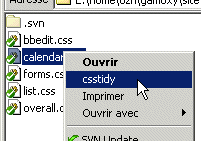 I'm running Windows on my test computer, and I made a convenient right click context menu on CSS files so I can clean them in one click. Here's how I did it:
- Download CSSTidy of course, and put the executable file csstidy.exe in, say, d:\utils\csstidy\
- Create the following file csstidy.bat in the same directory :
@echo off
if "%1"=="" goto notok

copy %1 %~d1%~p1%~n1.orig%~x1
d:\utils\csstidy\csstidy.exe %1 --preserve_css=false --remove_bslash=false --compress_colors=true --lowercase_s=true --timestamp=false --remove_last_;=true --compress_font-weight=true --allow_html_in_templates=false --silent=false --case_properties=1 --sort_properties=false --merge_selectors=0 --sort_selectors=false --template=default %1
goto end

:notok
echo Missing parameter: no filename !
pause

:end
This bat file is a wrapper that will first backup your myfile.css to myfile.orig.css, then call csstidy.exe with pretty standard options: remove comments, remove indents, keep the file readable, etc…
- Now let's add the neato context menu to .css files :
- Open the Control Panel and choose Folder Options. Select the 'File Types' tab, and look for the 'CSS' item. Click on 'Advanced', then click on 'New"¦'
- In 'Action', type 'CSSTidy', and in 'Application used to perform action', enter the following command:
d:\utils\csstidy\csstidy.bat "%1"
You're done ! It even works the same if you select multiple CSS files, right-click and pick CSSTidy in the context menu. Of course, remember to change the paths to reflect your own installation.