
Better Feed is a plugin for WordPress that allows you to enhance your feeds with several highly customizable features.

Features
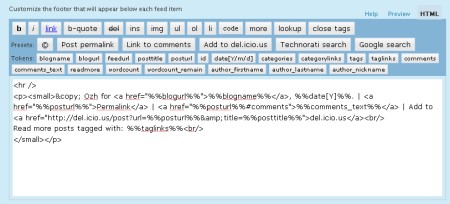
Using a convenient interface with real time preview, Better Feed will allow you to add anything below each entry in your RSS feed. It also brings back the ability to split your feed with "Read More" links, just like your blog posts.
- Add "Read more" links
On your site, you can split post on two parts, teaser and body, using the tag <!–more–>. Why not have a "Read more" link as well in your feed, for longer posts, or when you want to tease and keep the surprise off the feed ?
(By the way, while I'm at it : "summary" feeds truncated after 40 words just suck big time. Read more) - Add a copyright notice
Concerned with content stealers reproducing your posts automatically somewhere without giving you credit ? Why not add something like "© Joe – 2005" and a link to some neat Creative Commons License ? - Add the number of comments
When you find an interesting post via your feed reader, you often have to check the website for new comments, or to subscribe to the comment feed. Why not add, at the end of every RSS item, something like "13 comments", just like in your blog frontpage ? - Add a "Add to del.icio.us" link
Let your readers bookmark your entries right from within their RSS reader - Add a link for incoming links in Technorati or Google
Why not add a handy link to quickly check who's linking to your post ? - Add anything
There's so many stuff you could think of that I just can't list them all :)
Download
wp_ozh_betterfeed.zip
Extract and upload to your blog, preserving directory structure if any.
Note: download counter here and stats on wordpress.org may differ and reflect the number of downloads before this plugin was hosted on the plugin directory
Once you're done installing it, head to "Settings" and then "Better Feed". Everything is configured and tested from there.
Please note
A few things you might not get on first run that will save me some support:
- If you include the number of comments in each feed item, be warned that some feed readers will display an item as "New" every time someone comments on it. It's normal, and it is how I intented it to behave so following conversation is easier than ever.
- If you're using Feedburner, your feed won't immediately show changes after you've activated the plugin. To do so, go to your Feedburner Dashboard → Troubleshootize → Synchronize.
- You won't notice any change if you're viewing your feed with your regular browser. Use a feed reader, or this simple service I set up especially for you: RSS 2 HTML
License
This plugin is released under the terms of the BAI & SMYF License. BAI means "Blog About It". Like the plugin? Let your readers know! SMYF stands for "Show Me Your Feed", so if you happen to use my plugin, just tell me so I can see what you've done (and maybe subscribe to your feed if it's cool !)
[…] Ozh für das Better Feed-Plugin […]
a cool thing that is, alas WP 2.6 tells me there'd be a new version 2.1.1, but when i download that, it still recognizes t as 1.9.9. a little buggy somewhat?
marco » The little buggy stuff is on your side, the plugin is definitely 2.1.1 as of now.
[…] Better Feed – ??Feed??? […]
well, you might have to refresh the whole thing and try again marco. it worked for me.
i activated mine, but i see the changes both in html and in the feed reader. I wish to only show my added footer in a reader. how can i accomplish this?
justin » This plugin does not interfere with post content on the blog. Just in the feed.
Ok. so I read all the comments here and I can say that I didn`t see the solution to my problem.
I see soething like my problem:
this is from samuel.
this is my problem too. Plus, In preview I can`t see anything,(it`s loading forever and doesn`t get to a result) aaand doesn`t cut in "".I run wordpress 2.6 (self-hosted)
Pleeease give me a solution. Thank you.
bebe » I have no clue what could be causing this. A borked WP install, a badly conflicting plugin… Sorry, can't help for such a specific to your install problem.
[…] and manage Custom Fields on the fly. Better Feed allows you to enhance your feeds with several highly customisable features. […]
[…] and manage Custom Fields on the fly. Better Feed allows you to enhance your feeds with several highly customisable features. […]
I installed on threee diffrent blogs in diffrent stages of … history(development). all the same result. how about samuel, did you help him?!
[…] ??better feed???????????? […]
[…] ??better feed???????????? […]
Hi,Ozh,Thanks for your plugin.
I have a question:how can I simply add my google Adsense in my feed?
I try to just past the adsense code in the form and it doesn't work :(
[…] WordPress Plugin : Better Feed « planetOzh. […]
[…] and manage Custom Fields on the fly. Better Feed allows you to enhance your feeds with several highly customisable features. […]
[…] 85?Better Feed???Feed??? […]
[…] Ozh' Better Feed ????????Feed?????????????????????????????????????????????????????????????????? […]
[…] Better Feed […]
This is actually a great plugin. I'm thinking about using this for my new blog. The best thing I like about it is the "READ MORE" links. The reason is because this makes everything easier to work with on the user interface end.
The copyright notice is great as well.
Thanks!
[…] 85?Better Feed???Feed??? […]
[…] the WP plugins Comment Timeout (auto-disables commenting on archived posts over a certain date), Ozh Better Feed (makes my RSS feed footer spiffy) and Sideblog (for aside […]
[…] seit längerer Zeit gibt es das Better Feed Plugin von Ozh, mit welchem man im RSS Feed eine beliebige Notiz am Ende eines jeden Artikels anzeigen […]
[…] ??better feed???????????? […]
I am searching this, I hope this will be more useful for my blogs.
[…] ou mieux, feed-rss.php ou feed-rss2.php). Et j'ai trouvé ! Le plugin s'appelle Better Feed (ça ne s'invente pas), et il permet de paramétrer le pied de page de chaque billet dans son […]
[…] ??????? ?? ???????? ??????? «Better feed» ??? ??????? ???? ???????? ?????, ?????? 27, 2008 ? 17:49 ? […]
[…] enhanced by Better Feed from […]
[…] enhanced by Better Feed from […]
[…] enhanced by Better Feed from […]
[…] enhanced by Better Feed from […]
[…] enhanced by Better Feed from […]
Hi Ozh
Looked thru the many comments and googled but cant find a result, what would be the format to add a DIGG this link to the feed?
Thanks!
[…] 85?Better Feed???Feed??? […]
roger » Something like:
<a href="http://digg.com/tools/diggthis.php?u=%%posturl%%">Digg this</a>
Thanks Oz worked a treat!
[…] enhanced by Better Feed from […]
Very nice plugin. Works like a charm, thank you.
[…] ????????? ????? RSS ???? ? ???????? ?????? ?????????. 30. Better Feed – ????????? ????????????????? ??? RSS ??? ? ??????? […]
[…] 85?Better Feed???Feed??? […]
[…] ????????? ????? RSS ???? ? ???????? ?????? ?????????. 30. Better Feed – ????????? ????????????????? ??? RSS ??? ? ??????? […]
[…] 84?Full Text Feed?????Feed? 85?Better Feed???Feed??? 86?Feed […]
[…] ??better feed???????????? […]
[…] enhanced by Better Feed from […]
[…] 85?Better Feed???Feed??? […]
[…] Ozh' Better Feed – Allows you to add just about anything you want to your RSS feed entries such as links, ads, copyright information and more. […]
[…] enhanced by Better Feed from […]
[…] RSS Feed ????????Wordpress ????? RSS ???????? Better Feed ? RSS Footer?Feedburner ?????? Feedflare […]
[…] Ozh’ Better Feed Añade cualquier cosa a tu feed: anuncios, enlaces, información, copyright… RSS Footer […]