
Better Feed is a plugin for WordPress that allows you to enhance your feeds with several highly customizable features.

Features
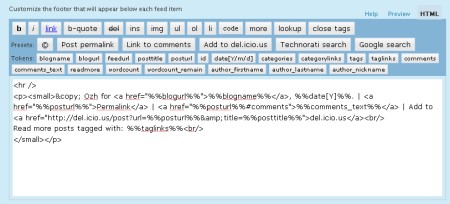
Using a convenient interface with real time preview, Better Feed will allow you to add anything below each entry in your RSS feed. It also brings back the ability to split your feed with "Read More" links, just like your blog posts.
- Add "Read more" links
On your site, you can split post on two parts, teaser and body, using the tag <!–more–>. Why not have a "Read more" link as well in your feed, for longer posts, or when you want to tease and keep the surprise off the feed ?
(By the way, while I'm at it : "summary" feeds truncated after 40 words just suck big time. Read more) - Add a copyright notice
Concerned with content stealers reproducing your posts automatically somewhere without giving you credit ? Why not add something like "© Joe – 2005" and a link to some neat Creative Commons License ? - Add the number of comments
When you find an interesting post via your feed reader, you often have to check the website for new comments, or to subscribe to the comment feed. Why not add, at the end of every RSS item, something like "13 comments", just like in your blog frontpage ? - Add a "Add to del.icio.us" link
Let your readers bookmark your entries right from within their RSS reader - Add a link for incoming links in Technorati or Google
Why not add a handy link to quickly check who's linking to your post ? - Add anything
There's so many stuff you could think of that I just can't list them all :)
Download
wp_ozh_betterfeed.zip
Extract and upload to your blog, preserving directory structure if any.
Note: download counter here and stats on wordpress.org may differ and reflect the number of downloads before this plugin was hosted on the plugin directory
Once you're done installing it, head to "Settings" and then "Better Feed". Everything is configured and tested from there.
Please note
A few things you might not get on first run that will save me some support:
- If you include the number of comments in each feed item, be warned that some feed readers will display an item as "New" every time someone comments on it. It's normal, and it is how I intented it to behave so following conversation is easier than ever.
- If you're using Feedburner, your feed won't immediately show changes after you've activated the plugin. To do so, go to your Feedburner Dashboard → Troubleshootize → Synchronize.
- You won't notice any change if you're viewing your feed with your regular browser. Use a feed reader, or this simple service I set up especially for you: RSS 2 HTML
License
This plugin is released under the terms of the BAI & SMYF License. BAI means "Blog About It". Like the plugin? Let your readers know! SMYF stands for "Show Me Your Feed", so if you happen to use my plugin, just tell me so I can see what you've done (and maybe subscribe to your feed if it's cool !)
[…] Better Feed – ????????? ????????????????? ??? RSS ??? ? ??????? ?????????? ??????????? ?????. […]
Ironically, I discovered that RSS didn't break on the "more" tag just this morning when an article I posted appeared on your own "Planet WordPress" page.
I went to trac to see if anything was being done to fix this, and a commenter led me right back to good ol' Ozh. :)
[…] Better Feed – ????????? ????????????????? ??? RSS ??? ? ??????? […]
[…] Better Feed: Trao ??i […]
Hi there,
Know anyone how plugin to use if I want only a part of the article to be displayed? If someone want to read more there will be a "read more" link…
On my blog right now is displayed all of article content and I don't want this…
I'm talking about the latest 10 articles displayed on the first page of my blog.
I'm using WordPress.
Can anyone help?
Vic » Didn't understand anything, sorry.
[…] Better Feed 1.1 […]
Hi Ozh,
Thanks for creating such a great plugin.
However after upgrading to WP2.5.1 it is having no effect whatsoever. I have upgraded to Better Feed 1.99 and tested using a number of RSS clients – but there is no difference from the standard feed.
Are you aware of any conflicts with other plugins or something similar? You plugin is definitely active and running – but the feed is uneffected.
Any help would be appreciated.
CJ
[…] FEED ?????????2? FEED ?????Better Feed??????????????????????? FEED […]
Chris » I don't know of any incompatibility with another plugin.
[…] mother of all the feed plugins is back: Better Feed version 2.0 just hit the repository and it's now even better than […]
Would you add a feature that we can translate it to other language?
new version 2.0 don't work with russian language – after "Save Changes" I see "Ã?�Ã?¾Ã?¼Ã?" and other bad symbols instead of russian text.
I recently installed the new 2.0 plugin but I'm having trouble editing the text in the footer. Pressing the Save button correctly saves the text and commits it to the footer, but pressing the Save button a second time escapes all of the HTML characters and turns the footer into gibberish. I'm using the "Visual Editor". Thanks for a great plugin.
[…] you like the way my feed footer is configured you can download and install the Better Feeds plugin and go to the admin panel to enter the following […]
Okay, I found out what was causing the problem with escaped HTML characters. It was a result of improperly nested tags like:
small
p
/small
/p
I'm pretty sure this was how the code was distributed in the FEEDFOOT of version 1.99 so… it's not my fault, I just copy/pasted. ;)
The Preview tab works MUCH better now too. :D
Now if only there was a way to get those 3 dots inline immediately after the the excerpt rather than on a new line…
Thanks again and I thought you might like to read my reviiew.
It's now running the feeds on my 2 blogs at striderweb.com. I just replaced Joost's "RSS Footer" plugin.
Great Plugin. It was the ability to break the feed on –more– that caught my eye. :)
By the way, %%comment_text%% isn't working for me. In both the preview and your test feed it comes out as the literal text "%%comment_feed%%"
[…] the page (I'm a big fan of the "Configure" link trick, that I've added to my latest release of Better Feed and will definitely implement in all my plugins […]
Same with PixelWit here.
My conclusion is, u need to give only one shot. Edit everything only under the "HTML" tab, double check the codes, then save. If the "preview" tab is pressed, or you re-edit the saved settings, html formats get messed.
[…] 2.1 of Better Feed fixes some compatibility issues for people using the visual editor which was double-escaping HTML […]
[…] 85?Better Feed???Feed??? […]
Chinese characters still got messed up in 2.1, please see my twitter msg (replied to @ozh). ;)
[…] WordPress Plugin Better Feed habe ich selbst noch nicht getestet. Es klingt aber viel versprechend, da es gleichzeitig als […]
hi. Thanks for plugin
perfect.
Regards
hi, just getting:
when I click on the help or preview tab inside your plugins configuration page.
Maybe a conflict with defensio?
ovidiu » Tell the defensio guys their (awfully coded) plugin is loading its javascript on pages it's not supposed to. Point them at this page.
Below the feed editor buttons I see a lot of code (many function …).
No matter if I turn on or off the visual editor… :-?
I can send you a screen capture if you want.
Samuel » Go ahead
thx Ozh, I'll try and be a little less forward when I relay this to the Defensio guys ;-)
I was once already unfortunate enough to try to help two authors coordinate their plugins to work together and got in the middle :-)
thx for looking into this.
[…] 85?Better Feed???Feed??? […]
[…] Ozh' Better Feed […]
[…] MT?Feed???????????????WP?????????Better Feed?????? […]
[…] ????????? ????? RSS ???? ? ???????? ?????? ?????????. 30. Better Feed – ????????? ????????????????? ??? RSS ??? ? ??????? […]
[…] Ozh' Better Feed per gestire i Feed. […]
[…] Ozh' Better Feed ????????Feed?????????????????????????????????????????????????????????????????? Pagebar2 ??????????WordPress??????WP?????????????Pagebar2?????????????? […]
I am afraid to ask what happens when this plugin and other plugins that redirect your feed to Feedburner are forced into cohabitation. But then diversity can be a good thing. Interested to hear adventures more daring (or possibly more adept at hacking?) than I
[…] Ozh's Better Feed by Ozh […]
[…] ??better feed???????????? […]
[…] the Better Feed plugin from Ozh. Not only does this bad boy return you to the stock behavior of earlier WordPress versions, but […]
[…] ö?e kullan?larak okuyuculara blo?unuza gelmeden çe?itli seçenekler sunmak mümkün. WordPress eklentilerinden Better Feed ile beslemenize birçok özellik […]
[…] Better Feed – ??Feed??? […]
[…] 85?Better Feed???Feed??? […]
[…] 85?Better Feed???Feed??? […]
[…] ?????????????????Wordpress???????? ©Feed ? Better Feed […]
[…] 85?Better Feed???Feed??? […]
[…] Better Feed […]
It's working well for me, thanks.
[…] 85?Better Feed???Feed??? […]
[…] to Feed – ?Feed???????????????UTW?Simple tagging??? Better Feed – ??Feed??? Fedafi RSS WordPress Plugin – Feed ?????? ©Feed – […]