On: 2005/09/17 Viewed: 137669 times

Better Feed is a plugin for Wordpress that allows you to enhance your feeds with several highly customizable features.

Features

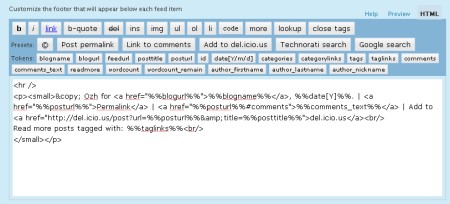
Using a convenient interface with real time preview, Better Feed will allow you to add anything below each entry in your RSS feed. It also brings back the ability to split your feed with “Read More” links, just like your blog posts.

  • Add “Read more” links
    On your site, you can split post on two parts, teaser and body, using the tag <!–more–>. Why not have a “Read more” link as well in your feed, for longer posts, or when you want to tease and keep the surprise off the feed ?
    (By the way, while I’m at it : “summary” feeds truncated after 40 words just suck big time. Read more)
  • Add a copyright notice
    Concerned with content stealers reproducing your posts automatically somewhere without giving you credit ? Why not add something like “© Joe - 2005″ and a link to some neat Creative Commons License ?
  • Add the number of comments
    When you find an interesting post via your feed reader, you often have to check the website for new comments, or to subscribe to the comment feed. Why not add, at the end of every RSS item, something like “13 comments”, just like in your blog frontpage ?
  • Add a “Add to del.icio.us” link
    Let your readers bookmark your entries right from within their RSS reader
  • Add a link for incoming links in Technorati or Google
    Why not add a handy link to quickly check who’s linking to your post ?
  • Add anything
    There’s so many stuff you could think of that I just can’t list them all :)

Download

Download the plugin :
wp_ozh_betterfeed.zip
Extract and upload to your blog, preserving directory structure if any.
Note: download counter here and stats on wordpress.org may differ and reflect the number of downloads before this plugin was hosted on the plugin directory

Once you’re done installing it, head to “Settings” and then “Better Feed”. Everything is configured and tested from there.

Please note

A few things you might not get on first run that will save me some support:

  • If you include the number of comments in each feed item, be warned that some feed readers will display an item as “New” every time someone comments on it. It’s normal, and it is how I intented it to behave so following conversation is easier than ever.
  • If you’re using Feedburner, your feed won’t immediately show changes after you’ve activated the plugin. To do so, go to your Feedburner Dashboard → Troubleshootize → Synchronize.
  • You won’t notice any change if you’re viewing your feed with your regular browser. Use a feed reader, or this simple service I set up especially for you: RSS 2 HTML

License

This plugin is released under the terms of the BAI & SMYF License. BAI means “Blog About It”. Like the plugin? Let your readers know! SMYF stands for “Show Me Your Feed”, so if you happen to use my plugin, just tell me so I can see what you’ve done (and maybe subscribe to your feed if it’s cool !)

Related posts

Metastuff

This page "Wordpress Plugin : Better Feed" was posted on 17/09/2005 at 11:28 pm
Watch this discussion : Comments RSS 2.0. You can trackback this post from your own site

415 Blablas

    Pages: « 111 12 13 14 15 [16] 17 18 19 20 21 » Show All

  1. 301
    Radar France »
    replied, on 30/Jul/08 at 3:54 pm # :

    It’s working well for me, thanks.

  2. 302
    ??E? » Blog Archive » ??100?... China »
    pingback on 31/Jul/08 at 8:44 am # :

    [...] 85?Better Feed???Feed??? [...]

  3. 303
    wordpress????(10) China »
    pingback on 03/Aug/08 at 11:44 am # :

    [...] to Feed - ?Feed???????????????UTW?Simple tagging??? Better Feed - ??Feed??? Fedafi RSS Wordpress Plugin - Feed ?????? ©Feed - [...]

  4. 304
    studio-blog » Archive » Welc... Germany »
    pingback on 04/Aug/08 at 10:01 am # :

    [...] Ozh für das Better Feed-Plugin [...]

  5. 305
    marco Germany »
    wrote, on 05/Aug/08 at 3:41 pm # :

    a cool thing that is, alas WP 2.6 tells me there’d be a new version 2.1.1, but when i download that, it still recognizes t as 1.9.9. a little buggy somewhat?

  6. 306
    Ozh France »
    commented, on 05/Aug/08 at 7:34 pm # :

    marco » The little buggy stuff is on your side, the plugin is definitely 2.1.1 as of now.

  7. 307
    ??? » wordpress???? United States »
    pingback on 06/Aug/08 at 7:24 am # :

    [...] Better Feed - ??Feed??? [...]

  8. 308
    Tom Schavo India »
    said, on 06/Aug/08 at 4:08 pm # :

    well, you might have to refresh the whole thing and try again marco. it worked for me.

  9. 309
    justin United States »
    wrote, on 06/Aug/08 at 6:04 pm # :

    i activated mine, but i see the changes both in html and in the feed reader. I wish to only show my added footer in a reader. how can i accomplish this?

  10. 310
    Ozh France »
    commented, on 06/Aug/08 at 9:28 pm # :

    justin » This plugin does not interfere with post content on the blog. Just in the feed.

  11. 311
    bebe Romania »
    said, on 07/Aug/08 at 12:33 pm # :

    Ok. so I read all the comments here and I can say that I didn`t see the solution to my problem.
    I see soething like my problem:
    this is from samuel.

    Below the feed editor buttons I see a lot of code (many function …).

    No matter if I turn on or off the visual editor… :-?

    I can send you a screen capture if you want.

    this is my problem too. Plus, In preview I can`t see anything,(it`s loading forever and doesn`t get to a result) aaand doesn`t cut in “”.I run wordpress 2.6 (self-hosted)
    Pleeease give me a solution. Thank you.

  12. 312
    Ozh France »
    wrote, on 07/Aug/08 at 6:56 pm # :

    bebe » I have no clue what could be causing this. A borked WP install, a badly conflicting plugin… Sorry, can’t help for such a specific to your install problem.

  13. 313
    by Marcio Rocon - Wordpress Functional P... United States »
    pingback on 07/Aug/08 at 7:25 pm # :

    [...] and manage Custom Fields on the fly. Better Feed allows you to enhance your feeds with several highly customisable features. [...]

  14. 314
    by Marcio Rocon - Wordpress Functional P... United States »
    pingback on 07/Aug/08 at 7:25 pm # :

    [...] and manage Custom Fields on the fly. Better Feed allows you to enhance your feeds with several highly customisable features. [...]

  15. 315
    bebe Romania »
    commented, on 07/Aug/08 at 7:43 pm # :

    I installed on threee diffrent blogs in diffrent stages of … history(development). all the same result. how about samuel, did you help him?!

  16. 316
    Wordpress?SEO?? | rain in rain China »
    pingback on 09/Aug/08 at 11:32 pm # :

    [...] ??better feed???????????? [...]

  17. 317
    ??????? » Blog Archive » wor... China »
    pingback on 10/Aug/08 at 4:48 pm # :

    [...] ??better feed???????????? [...]

  18. 318
    Zhu8 China »
    replied, on 12/Aug/08 at 7:25 am # :

    Hi,Ozh,Thanks for your plugin.
    I have a question:how can I simply add my google Adsense in my feed?
    I try to just past the adsense code in the form and it doesn’t work :(

  19. 319
    Just When You’ve Got It Figured Ou... United States »
    pingback on 12/Aug/08 at 9:04 pm # :

    [...] WordPress Plugin : Better Feed « planetOzh. [...]

  20. 320
    Wordpress Functional Plugins | prowordpr... United States »
    pingback on 14/Aug/08 at 12:18 am # :

    [...] and manage Custom Fields on the fly. Better Feed allows you to enhance your feeds with several highly customisable features. [...]

Pages: « 111 12 13 14 15 [16] 17 18 19 20 21 » Show All

Leave a Reply

Comment Guidelines or Die

  • HTML: You can use these tags: <a href=""> <em> <i> <b> <strong> <blockquote>
  • Posting code: Post raw code (no <> &lt; etc) within appropriate tags : [php][/php], [css][/css], [html][/html], [js][/js], [sql][/sql], [xml][/xml], or generic [code][code]
  • Gravatars: Curious about the little images next to each commenter's name ? Go to Gravatar.
  • Spam: Various spam plugins on patrol. I'll put pins in a Voodoo doll if you spam me.
  • I will mark as Spam test comments, all comments with SEO names (ie "My Cool Online Shop" instead of "Joe") or containing forum-like signatures.

Close
E-mail It