
Basically, a plugin for WordPress creates a PHP function (a filter or an action) which is called when a particular event (a hook) occurs, for example when a post is printed or when a comment is posted (for more info about hooks, filters and action, check the Codex)
When developping a new plugin, you sometimes encounter unexpected behaviors from your code, which can originate from a filter conflict : another PHP function with a higher priority was triggered before your own function, and processed the same bits you're trying to pass through your function.
That's why when developping plugins, it's important to be well aware of what I call the Filter Flow : for each hook, which functions are called in which order ?
So, I wrote this script : WordPress Hooks & Filters Flow
List hooks and current filters
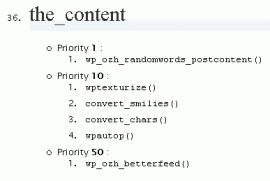 The script runs in your WordPress root (or in /wp-admin/ if you prefer) and enumerates filters that are loaded in your blog. Hooks are displayed alphabetically, and for each hook, active filters (or actions, they're the same) are listed in their execution order, which is either defined by their priority or by their loading order. The purpose of such a list is to help hunt plugin bugs down, and let you wisely fine-tune plugin priorities if needed.
Get the script
- wp-hooks-filters-flow.txt: save and rename as .php
- wp-hooks-filters-flow.php: cut and paste into a blank file (this is colorized HTML, not raw code, do not download and run as is)
Put the script in your wordpress root or in '/wp-admin/' and you're done.
Feedback
Only if it's to say "woohoo it's cool". No support or troubleshooting with your plugin problems. These are your plugin problems :)
Hey its iss great work, but If I can suggest, you need to hook a menu to admin somewhere, it will make easy and accessible for layman :)
[…] Visit […]
Useful tool! "woohoo it’s cool"…
[…] WordPress Hooks & Filters Flow ist kein PLugin, sondern ein kleines Script, welches dabei hilft Konflikte zwischen Plugins zu entdecken. Praktisch für Plugin- Entwickler. Bookmarks setzen: Diese Icons verlinken auf Bookmark Dienste bei denen Nutzer neue Inhalte finden und mit anderen teilen können. […]
Hi Ozh…
I've only been developing with WordPress for a week or two. Your name comes up more often than anyone else when I'm googling something. I've gleaned a lot of good stuff from your contributions already. Thanks for that :)
When I first saw this little debug app, I was thrilled. For a WordPress n00b it was just what I needed, however, I've been unable to get it to work. I changed the txt to php and after trying to install in both the wp root as well as the wp-admin folders, I get a page not found error. Is this script for wp versions prior to 2.7? I'm still learning about nonces and web security and thought that might have something to do with it.
Thanks :)
Cher: yeah I wrote this a looong time ago and never checked with newer versions. It might totally be wacked out :)
Here is the updated version of it, to work with WordPress 3.0:
http://wordpress.pastebin.com/YPmRqY3s
Jonathan Dingman » wow, you've really digged into the old stuff :)
Very useful tool, … except the script doesn't seem to work with WordPress 3.0.1 and/or with some of the plugins I have (e.g., wp-typography)
The error occurs on line 62 when calling strlen($v), when $v is not a string.
I tried adding these lines near line 62 to see what is going on.
Send me email if you want more details to help track down the bug.
David Jones » super outdated stuff here, not even sure it still works as expected
I just used the pastebin link above and it worked perfectly on a 3.0.4 install! Thanks…this will be very handy!
Thanks for the post. It helped me realize that I could increase the priority number of my plugin to make it run after the do_shortcode(). Great little script.
Thats too cool…
If anyone is still interested in this, I made a WordPress 3.4 compatible version: GitHub Gist
Hey – does the latest work? I've tried dropping it in wp-admin or root and I see nothing happening…
Garry » Dunno. It's 6 years old. Maybe. Dunno. :)