
One of the first things I wanted to improve in the admin area of my WordPress blog, back in the 1.5 days, was the header menu. I wanted to be able to reach any admin page in one click, instead of first clicking on the first level link ("Manage" for example) and then only on a submenu link ("Comments") So came a very neat plugin : the WordPress Admin Drop Down Menu
When WordPress 2.7 and its new and optimized user interface came, I thought there was still room for improvements: a horizontal menu gave the admin area more of a "desktop application" feel, and I think it's superior to a vertical menu. So I updated the WordPress Admin Drop Down Menu.
Download
Get the plugin :
ozh-admin-drop-down-menu.zip
Extract and upload to your blog, preserving directory structure.
Note: download counter here and stats on wordpress.org may differ and reflect the number of downloads before this plugin was hosted on the plugin directory
Activate and enjoy. Another friendly install & forget piece of PHP.
Features
- Customizable color scheme with a neat color picker
- Normal mode for regular users, compact mode for real estate maniacs, minimal mode for those who never have enough
- Optional cute icons from FamFamFam
- Enhanced compatibility with handheld devices
- Joy and happiness for every day
Javascript is involved for advanced features and to make stuff compatible with MSIE6, but on any decent browser everything works even with Javascript disabled.
Super neat color picking.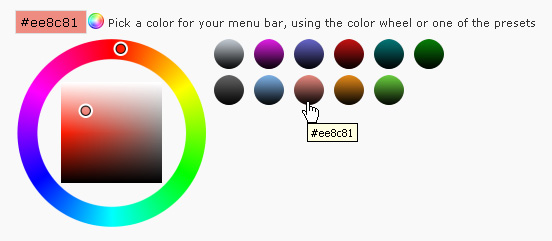
Any color you'll love.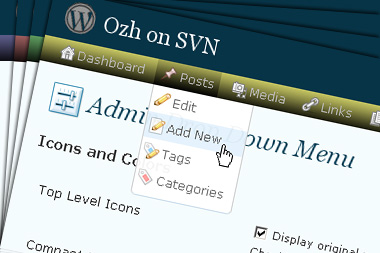
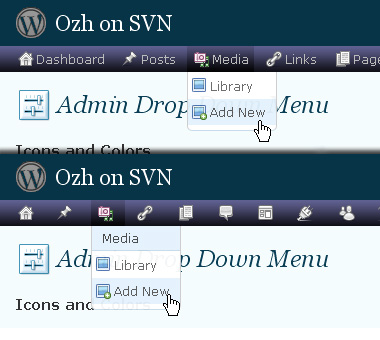
Normal or compact display.
Browser compatibility
The plugin has been developed on Firefox 3, Chrome and MSIE7. It should do fine with MSIE6 and Safari too.
There are glitches with Firefox 2 and Camino which both use a deprecated rendering engine. There are also glitches with Opera. I won't fix these, but if anyone wants to submit a CSS patch to resolve one of these issue, you're welcome :)
Developer friendly
The plugin comes with a wickedly cool API that will allow other plugin developers to interact with it, like adding your own custom icon for your plugin. Read the API for Coders page for examples and documentation. Also, all elements the plugin produces get custom CSS classes and id's to allow easy styling or selecting.
Translations
The plugin is ready for interglobanalization and there is a .pot template file included so polyglots can even make their own translation and sent the .mo and .po files to me that I'll include in the package.
The plugin comes with the following translations, in no particular order:
- Turkish, thanks to Baris Ünver
- Korean, thanks to Jong-In Kim
- Spanish, thanks to Karin Sequen
- Italian, thanks to Gianni Diurno
- Deutsch, thanks to Frasier Crane
- Russian, thanks to Fat Cow
- Brazilian Portuguese, thanks to Renato Tavares
- Greek, thanks to Friedlich
- Belorussian, thanks to ilyuha
- Hebrew, thanks to Amiad Bareli
- Romanian, thanks to Octav
- Ukrainian , thanks to wpp.pp.ua and Jurko Chervony
- Traditional Chinese, thanks to Paogray and Joan Wang
- Dutch, thanks to Cees van den Heuvel
- Slovak, thanks to Branco from WebHostingGeeks.com
And maybe more since I might totally forget to update this list :)
Older Versions
All my plugins are designed to run on the latest WordPress version available. Upgrade WordPress whenever a new version is out, or be sorry when your site gets compromised.
If for some unintelligent reason you need to get an older version of this plugin, it might be available, yet totally unsupported or recommended. Check here: Other versions.
Feedback, Bug report, Feature request
Sure. Feed me back. Like it? Blog about it. Love it? Click on the download link, see the Paypal button appear, and give it some clicks!
If you're reporting bugs, you're welcome, but please provide a screenshot and informations about your browser & your OS. I'm not supporting deprecated blogs or plugins or browsers, and I can't respond to incomplete bug reports.
If you're suggesting a feature, you're welcome too, but I won't add an admin menu on the public side of the blog, on top of pages. If you're looking after having this menu fixed on top of page, check this companion plugin that works as a plugin to this plugin: Admin Menus Fixed.
Hi Ozh, I'm the author of Similar Posts which Chris above is finding in conflict with your plugin. I agree about the problematic nature of 'stealing' the submenu id but the truth is it works on all the systems I have tried. I use your menu alongside similar posts all the time.
I'm trying to find out from Chris what is different about his setup which causes the conflict and I'll dp what needs to be done to sort things out. Just one question about your js though. Why is it that you hide the other menu ids but zap the html for #submenu? My investment is that it is trivial to restore 'my' submenu with inline styles but not so easy to recover the HTML. On my system your js only strips out the first and real submenu and leaves mine intact. I am guessing that more happens on Chris's system.
Your change certainly works, but it struck me a little like having a date with a beautiful woman but at the last minute she decides to wear a burlap sack over her head so as not to show off. One nice thing of Admin Drop Down is to do away with the submenu if at all possible, so I didn't want to drop it just like that.
I posted the changes to a thread on Alakhnor's forum on how to modify his plugin so your change of setting 'display_submenu' to true is unnecessary. I think the general principles probably apply to other plugins. Find instances of the submenu id in the plugin code, and change them to something like #myplugin_submenu. Then, find the plugin's admin CSS and rename the id's as appropriate. One last step is to examine the styling of the original #submenu (which is what was intended) and make sure you have a newly named id with that styling (or at least the ones that are important).
Thanks again.
Rob » simple: if I give #submenu {display:none} the whole page scrolls a bit up and the margin between header and content disappears. Removing its content simply keep the margin since the ul#submenu element its still there.
Ozh, Wouldn't {visibility: hidden} do the trick?
Absolutely beautiful. Love it!
[…] Download […]
I really like the look and feel of the new 2.5 capable plugin. It would be nice if it worked on WPMU, although the next version of wpmu won't be released for a bit (still working out bugs with the merged in code).
[…] Drop Down Menus (Demo Page) – helps improve the navigation around the blogging area. Here you will find a post showing the themes using the drop down menu. […]
Well done, very nice plugin for the new WordPress version 2.5.
Unfortunately, for some reason, the 'Help' and 'Forums' links located on the top right corner next the the 'Log out' link are not displayed once i enable this plugin.
Can this be fixed in a future version.
Thanks in advance
ioannis » Read here please. Those 2 links are hidden in purpose because there redundant (located in the footer) if not useless for most in their day to day tasks.
Hi Ozh,
I love this plugin and I love Fluency too, unfortunately I can not use both at the same time because the menu settings can not fit on the screen. Am I asking on the wrong place? This should be modified by Dean J. Robinson? I really don't know.
Thank you, this plugin is just fabulous.
Joel Teixeira » Looks like a fluency issue, yes, although if you have too many plugins you'll soon have the same problem with just my plugin and no fluency. I'm going to release an updated version of this plugin where submenu which are too long will drop horizontally so that they still fit into the screen
Yes Ozh,
You are right, I already have this problem using only your plugin – but if I get only your plugin actived (without Fluency) I can scroll down the screen and see all entries in menu (thx). Fluency kills my scroll skills ^^.
I will wait patiently and anxiously for the updated version of your plugin.
Thank you so much.
[…] Admin Drop Down Menu 2.0.3 » Ozh (url) Replaces admin menus with a CSS dropdown menu bar. Saves lots of clicks and page loads! For WordPress 2.5+ […]
[…] wp-content/plugins y luego activarlo y listo. También se puede usar junto al plugin para menús Ozh’s Admin Drop Down para mejorar estos y también con soporte para otros plugins. El tema en sí es más compacto, con […]
Is there any place to download the last version (2.0.2)? the latest one causes some strange behavior, like an unreadable light blue top menu, and worse, sometimes completely disappearing menus. The last version was working perfectly, so I am sorry I upgraded, but I am itchy that way sometimes :)
Thanks!
Stephen » Should be this one. Could you send me a sshot of what went wrong with your browser & 2.0.3 ?
[…] Admin Drop Down Menu […]
[…] Admin Dropdown Menu […]
[…] lo combiné con Admin Drop Down Menu que reordena el menú de navegación del CMS, los pone todos en la parte superior (incluyendo el […]
Hey there… I always used your plugin with my good old WordPress 2.0 and before… now I just updated to WP 2.5 and your new Plugin, but it just says
It seems to have some trouble with Akismet – if A. is activated I can't activate Admin Drop Down Menu – if Akismet is not activated ADDM does activate but then there is an error when I try to open the plugins panel…
sad thing :(
But anyway, great job!
kdas
Yikes, 321 comments! Just wanted to pass on that this plugin does not work in trunk WordPressMU yet.
Jeremy » WPMU support coming as announced 10 days ago. Just waiting for a more stable MU to release!
[…] Behavior 2.0.1.3 ? 2.0.1.4Google Analyticator 1.54 ? 2.12Google XML Sitemaps 3.0.3 ? 3.0.3.1Ozh' Admin Drop Down Menu 1.3 ? 2.0.3WordPress.com Stats 1.1.1 ? […]
[…] Fluency Admin: Bessere Darstellung des Admin-Bildschirms (z.B. Menus links und zusammengestellt), vor allem für Wide-Screen-Monitore; funktioniert zusammen mit Ozh' Admin Drop Down Menu […]
[…] Ozh' Admin Drop Down MenuMengganti tampilan menu standar dengan CSS dropdown menu bar. Saya suka dengan plugin ini karena tampilannya cantik dan menghemat beberapa klik dibandingkan jika menggunakan menu standar. Patut dicoba. […]
[…] Admin Drop Down Menu Turns the admin links and sub links (i.e Dashboard, Write, Manage..etc) into a CSS based roll-over menu instead, when you mouse over you can immediately see the sub links of each menu. This will save time, and allow you to skip unnecessary clicks. (see demo-screenshot below). […]
I have no other dashboard plugins other than this and Fluency, but I can't get this to work with Fluency. Versions 2.1 (yours) and 1.1 (Fluency).
I see this huge blank area at the top of the page down to where the page is. It throws everything off.
I am running WP 2.5 and version 2.03 of your plugin works great. 2.3.3 though turns my 'Settings' menu, which has 16 items, into a really wide menu that will not fit on my 22″ screen!. All other menus drop down fine. Kubrick theme.
I just upgraded to 2.1. I get the same extra wide Settings menu that Douglas mentioned.
Also the plugin no longer works with Custom Admin Menu. It puts Write and Manage in the topmost navigation menu, but without drop-down capability nor the rest of the menu items up there. Instead I get the old color scheme and navigation and subnavigation menus.
Steve & douglas » edit $wp_ozh_adminmenu['too_many_plugins'] at the beginning of the plugin. Could you send me a screenshot of the problem ?
2.1 of your plugin doesn't seem to work well with Fluency 1.1. Having both of them active just wipes the whole area to the right away, and I have to resort to going back to the 2.0.3 version of Admin Drop Down if I want both Fluency and Admin Drop Down to work properly.
Here's a screenshot of the problem.
I am facing same problem as Hemisphere.
[…] those who have updated to Admin Drop Down Menu v2.1 yesterday, if you happen to also use Fluency, please re-download my plugin. I fixed […]
Ozh,
Editing '$wp_ozh_adminmenu[’too_many_plugins’]' worked great.
Here's the screenshot of the conflict with Custom Admin Menu. I can still use Custom Admin Menu to make adjustment to my admin menu, them deactivate it without losing the revisions.
Thanks for your work!
[…] Although, WordPress 2.5 has a refreshingly great looks over it's predecessors, I still feel that they have to get the navigation easier. I mean, each section has some subsections, like write section has subsections namely post, page and links. If you want to go to any of these subsection you have no choice but to go through the main section Write. Life would be much more easy if this whole navigation would be driven by Menu based navigation. And to achieve something like that there's a plugin called as Admin Drop Down Menu. […]
I think I've resolved the conflict with Custom Admin Menu by upgrading to PHP 5. My webhost supports PHP 5, but assigned me to 4 by default.
[…] Nummer zwei ist Admin Drop Down Menu. Dies führt die Menüs wieder zusammen und erspart eine Menge überflüssiger […]
[…] bem mais dessa forma. Ainda mais que esta extensão é compatível com o plugin Admin Drop Down Menu, que coloca os itens de menu "em cascata", permitindo acessar qualquer área do […]
[…] solucionar esto ya no es necesario realizar un sacrificio humano, basta con instalar el plugin Admin Drop Down Menu y tendremos un menú desplegable para cada una de las pestañas del panel de […]
[…] Admin Drop-Down Menu – makes it easier the navigation by placing a CSS drop down menu, which in turns saves you a lot of clicks and you should have it right from the start. […]
[…] lo más importante es la productividad. Hoy navegando por el blog de viciao2k3 encontré un plugin para mejorar la navegación, convirtiéndola en una mucho más fluida y cómoda, como bien dice […]
thanks ozh !!
ooohh god this is better than chocolate :D
[…] Ozh' Admin Dropdown Menu reorganizes the WP 2.5 dashboard, putting all the links in a single row at the top of the dash. What's more, a simple mouseover for any menu tab will display a dropdown menu that will give one-click access to any submenu in the dash. This plugin effectively cuts dashboard navigation times in half. […]
[…] 2.5 compatible: Yes Plugin page: http://planetozh.com/blog/my-projects/wordpress-admin-menu-drop-down-css/ […]
[…] hacer click primer en Administrar y luego en enlaces, pero esto se soluciona con un plugin llamado Admin Drop Down Menu así tendrás menús desplegables en cada […]
[…] 10. Admin Drop Down Menu […]
[…] Download WP Admin Drop-down menu | Author Homepage […]
[…] Admin Drop Down – This is really something you need. […]
[…] Pablogeo.com descubro un interesante plugin llamado Admin Drop Down Menu que mejora, y mucho, el aspecto y accesibilidad del panel de administración de la versión 2.5 de […]