
One of the first things I wanted to improve in the admin area of my WordPress blog, back in the 1.5 days, was the header menu. I wanted to be able to reach any admin page in one click, instead of first clicking on the first level link ("Manage" for example) and then only on a submenu link ("Comments") So came a very neat plugin : the WordPress Admin Drop Down Menu
When WordPress 2.7 and its new and optimized user interface came, I thought there was still room for improvements: a horizontal menu gave the admin area more of a "desktop application" feel, and I think it's superior to a vertical menu. So I updated the WordPress Admin Drop Down Menu.
Download
Get the plugin :
ozh-admin-drop-down-menu.zip
Extract and upload to your blog, preserving directory structure.
Note: download counter here and stats on wordpress.org may differ and reflect the number of downloads before this plugin was hosted on the plugin directory
Activate and enjoy. Another friendly install & forget piece of PHP.
Features
- Customizable color scheme with a neat color picker
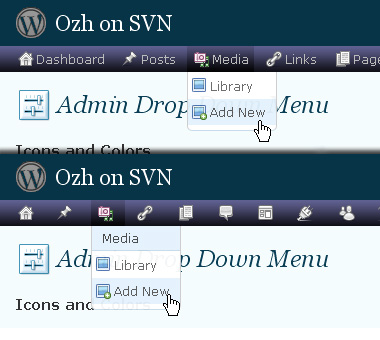
- Normal mode for regular users, compact mode for real estate maniacs, minimal mode for those who never have enough
- Optional cute icons from FamFamFam
- Enhanced compatibility with handheld devices
- Joy and happiness for every day
Javascript is involved for advanced features and to make stuff compatible with MSIE6, but on any decent browser everything works even with Javascript disabled.
Super neat color picking.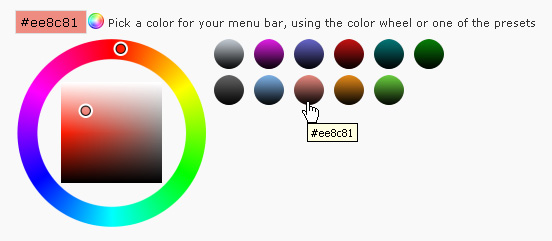
Any color you'll love.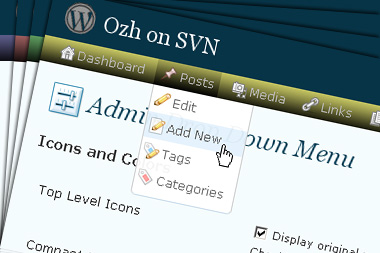
Normal or compact display.
Browser compatibility
The plugin has been developed on Firefox 3, Chrome and MSIE7. It should do fine with MSIE6 and Safari too.
There are glitches with Firefox 2 and Camino which both use a deprecated rendering engine. There are also glitches with Opera. I won't fix these, but if anyone wants to submit a CSS patch to resolve one of these issue, you're welcome :)
Developer friendly
The plugin comes with a wickedly cool API that will allow other plugin developers to interact with it, like adding your own custom icon for your plugin. Read the API for Coders page for examples and documentation. Also, all elements the plugin produces get custom CSS classes and id's to allow easy styling or selecting.
Translations
The plugin is ready for interglobanalization and there is a .pot template file included so polyglots can even make their own translation and sent the .mo and .po files to me that I'll include in the package.
The plugin comes with the following translations, in no particular order:
- Turkish, thanks to Baris Ünver
- Korean, thanks to Jong-In Kim
- Spanish, thanks to Karin Sequen
- Italian, thanks to Gianni Diurno
- Deutsch, thanks to Frasier Crane
- Russian, thanks to Fat Cow
- Brazilian Portuguese, thanks to Renato Tavares
- Greek, thanks to Friedlich
- Belorussian, thanks to ilyuha
- Hebrew, thanks to Amiad Bareli
- Romanian, thanks to Octav
- Ukrainian , thanks to wpp.pp.ua and Jurko Chervony
- Traditional Chinese, thanks to Paogray and Joan Wang
- Dutch, thanks to Cees van den Heuvel
- Slovak, thanks to Branco from WebHostingGeeks.com
And maybe more since I might totally forget to update this list :)
Older Versions
All my plugins are designed to run on the latest WordPress version available. Upgrade WordPress whenever a new version is out, or be sorry when your site gets compromised.
If for some unintelligent reason you need to get an older version of this plugin, it might be available, yet totally unsupported or recommended. Check here: Other versions.
Feedback, Bug report, Feature request
Sure. Feed me back. Like it? Blog about it. Love it? Click on the download link, see the Paypal button appear, and give it some clicks!
If you're reporting bugs, you're welcome, but please provide a screenshot and informations about your browser & your OS. I'm not supporting deprecated blogs or plugins or browsers, and I can't respond to incomplete bug reports.
If you're suggesting a feature, you're welcome too, but I won't add an admin menu on the public side of the blog, on top of pages. If you're looking after having this menu fixed on top of page, check this companion plugin that works as a plugin to this plugin: Admin Menus Fixed.
Saturnine » yes, I came to the same problem over the years.
I'm thinking about it.
[…] an enhanced admin interface. Admin Menu Drop-Down CSS transforms admin menu in a quick drop-down menu; you can reach any admin page in one click, instead […]
Awesome plug-in. thanks for making this available!
I have a lot of activated plugins and "Options" submenu got 2 lines of links and when I'm in other tab like "Users", the second line of "Options" submenu don't disappear completely. Can I help you with the css file?
some screenshots:
http://picasaweb.google.com/rodriggomuniz/Screenshots?authkey=lvv-eoTJhr4
ps: sorry my bad English.
[…] Admin Drop Down Menu Erstellt ein Dropdown Menü im Admin Menü von WordPress. […]
I just change this lines:
/* Nested ULs */
$id li ul {
position:absolute;
left:-9000em;
}
I set 'px' to 'em' and the bug of 2 or 3 lines of links is fixed. :)
[…] an enhanced admin interface. Admin Drop-Down Menu transforms admin menu in a quick drop-down menu; you can reach any admin page in one click, instead […]
[…] Â http://planetozh.com/blog/my-projects/wordpress-admin-menu-drop-down-css/ […]
[…] Admin Drop-Down Menu […]
[…] Admin Drop Down Menu: This really goes good with another plugin on this list and prevent me from making more than one click. It allows for semi-transparent drop down menus of the links under main headings. For example, if you hovered over Presentation, Themes – Widgets – and Theme Editor would show in the semi-transparent menu. Incredibly helpful. […]
[…] an enhanced admin interface. Admin Drop-Down Menu transforms admin menu in a quick drop-down menu; you can reach any admin page in one click, instead […]
[…] an enhanced admin interface. Admin Drop-Down Menu transforms admin menu in a quick drop-down menu; you can reach any admin page in one click, instead […]
[…] Admin Drop Down Menu […]
FYI, it's no longer working with 'WP Tiger Administration' on WordPress 2.2.
[…] WordPress Plugin : Admin Drop Down Menu « planetOzh (tags: plugin wordpress) […]
Hi Ozh,
I'm using your drop down menu plugin right now with the Tiger Admin plugin and it works really well. I just have one problem though. The Options tab of my dashboard is really long and when I put my cursor over the Options tab, part of the drop down menu gets cut off. What do I do?
Thanks,
Jessie
[…] first plugin that I want to discuss here is the Admin Drop Down Menu by Ozh. If you are using the default admin theme, then this plugin is a must use for you. The […]
[…] 3ã€å¢žåŠ Admin Drop Down Menuæ’件 ,很简å•çš„一个å°ä¸œè¥¿ï¼Œèƒ½å¤Ÿç›´æŽ¥æ˜¾ç¤ºç®¡ç†ç•Œé¢çš„导航æ 二级目录,å‡å°‘一次点击。 […]
[…] Admin Drop Down Menu Version: 1.3 Author: Ozh Desc: Replaces admin menu and submenu with a 2 level horizontal CSS […]
[…] found this WordPress Admin Drop Down Menu (Version 1.3) over at Planet Ozh. Very handy. It now saves so many clicks and gets me to various […]
Just installed Plugin.
This plugin is, Simple, Useful, and does the job.
A perfect Plugin
[…] Visit […]
[…] on the page you want! In my opinion, this plugin produces a more beautiful menu than the one from PlanetOzh! The latter was a bit buggy when the menu was too […]
This IS a really great plugin but it really does need to be updated to work with a) WP 2.2+ and bug fixes for when many menu options are present and some items get thrown off the side of the page.
[…] heard about the Admin Drop Down menu plugin for WordPress for a while. I've even installed it a couple of times – or tried to. I got […]
Christophr » I'm using this plugin here with the latest WP (2.2.2 as of writing). This plugin is NOT version dependant.
[…] Admin Drop Down Menu Süper bir eklenti ! Yönetim panelinizdeki alt menüleri üst menülerin üstüne geldiÄŸiniz anda görüyor ve zaman kazanıyorsunuz. Yalnız bazı eklentilerin ayarlarına girerken sorun çıkartabilir. […]
[…] get thje plugin from this page […]
Your plug in rocks! Thank you so much! You've saved me so many clicks!
Far out! Thanks!
Only, hovering over any top level item gives me the second level items without having to click (nice, and what you intended), but hovering over either Write or Manage – the two biggies – doesn't.
Did I do something wrong?
WinXP Pro
FF2.0
I love this plugin, but when I hover Plugins and try to select the sub-items, it open the 'Options' tab everytime…
Ex:
Hover Plugins:
http://i9.tinypic.com/4ope1pv.jpg
Trying to select sub-items:
http://i13.tinypic.com/4xq0o46.jpg
[…] Admin Drop Down Menu – Permite que somente ao passar do mouse pelo menu do admin do wordpress, já mostre o sub menu, economizando tempo. […]
[…] Drop Down Menuæ’件。作者主页:http://planetozh.com/blog/my-projects/wordpress-admin-menu-drop-down-css/ 关键å—Tags: [WordPress, WordPress模æ¿] « ä¸å¤ªåŽšé“çš„Webè¿…é›· | […]
[…] Admin Drop Down Menu […]
Hi there, I came across your blog posting after searching for and your post on makes an interesting read. Thanks for sharing. I will research more next Monday when I have the day off.
[…] an enhanced admin interface. Admin Drop-Down Menu transforms admin menu in a quick drop-down menu; you can reach any admin page in one click, instead […]
[…] Admin Drop Down Menu An indispensible plugin that makes navigating the admin panel much easier. The only problem is that I tend to accidentaly move the cursor outside the "hover" zone, resetting the menu, meaning I have to start over. […]
Hey !
Since switching to my new them – Mandingo http://www.onehertz.com/portfolio/wordpress/ – your wonderful plugin doesn't work anymore.
Obviously I should write to the creators of the theme, but do you have any idea why it doesn't work ?
Thanks !
[…] Menus bikinan Andy Staines, termasuk juga, meskipun dah ga' saya pake' lagi, plugin Admin Drop Down Menu hasil kreasi om Ozh, yang saya pake di blog ni. Jadinya, Earthtones Admin Theme ini saya coba […]
[…] long ago I wrote about several interesting WordPress plugins and mentioned that the admin drop down menu plugin wasn't as easy to use as I'd like it to be. I considered writing a better one, […]
[…] an enhanced admin interface. Admin Drop-Down Menu transforms admin menu in a quick drop-down menu; you can reach any admin page in one click, instead […]
[…] tarayıcılarda çalışmıyor, yine de denemeye deÄŸmez mi?  Şuradan çevrimiçi demosuna, ÅŸuradan da indirme adresine […]
[…] WordPress Not long ago I wrote about several interesting WordPress plugins and mentioned that the admin drop down menu plugin wasn’t as easy to use as I’d like it to be. I considered writing a better one, but […]
[…] Admin Drop Down Menu – The plugin concept itself is rather simple : […]
[…] Admin Drop-Down Menu creates a new menu containing all the wanted links (nothing more than a big boring bunch of intricated <ul>’s and <li>’s). No javascript is involved to create the drop down effect, except a tiny bit that gets added when viewed with MSIE. […]
Great job on making what should be a standard feature in WordPress. It's always the first plugin I install.
hi, thanks for the plugin. good work.
[…] Admin Drop Down Menu Anzichè fare molti click per raggiungere le varie sezioni questo Plugin creerà un menù DropDown nell'area admin veramente molto comodo. […]
[…] Admin Drop Down Menu […]
[…] Admin Drop Down Menu […]