
One of the first things I wanted to improve in the admin area of my WordPress blog, back in the 1.5 days, was the header menu. I wanted to be able to reach any admin page in one click, instead of first clicking on the first level link ("Manage" for example) and then only on a submenu link ("Comments") So came a very neat plugin : the WordPress Admin Drop Down Menu
When WordPress 2.7 and its new and optimized user interface came, I thought there was still room for improvements: a horizontal menu gave the admin area more of a "desktop application" feel, and I think it's superior to a vertical menu. So I updated the WordPress Admin Drop Down Menu.
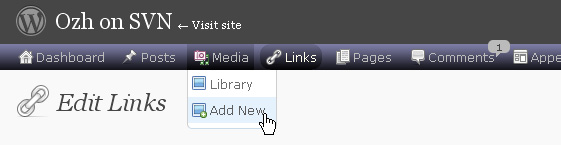
Download
Get the plugin :
ozh-admin-drop-down-menu.zip
Extract and upload to your blog, preserving directory structure.
Note: download counter here and stats on wordpress.org may differ and reflect the number of downloads before this plugin was hosted on the plugin directory
Activate and enjoy. Another friendly install & forget piece of PHP.
Features
- Customizable color scheme with a neat color picker
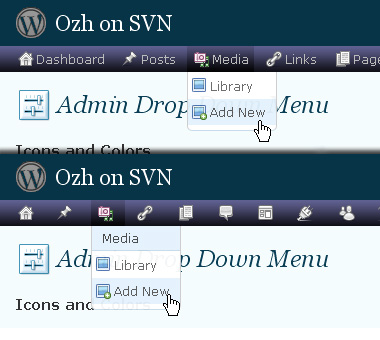
- Normal mode for regular users, compact mode for real estate maniacs, minimal mode for those who never have enough
- Optional cute icons from FamFamFam
- Enhanced compatibility with handheld devices
- Joy and happiness for every day
Javascript is involved for advanced features and to make stuff compatible with MSIE6, but on any decent browser everything works even with Javascript disabled.
Super neat color picking.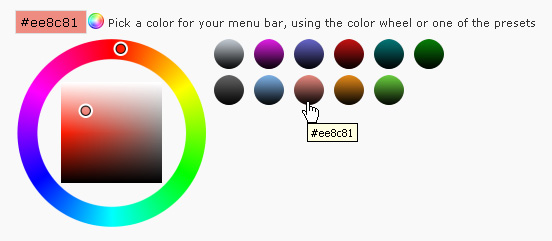
Any color you'll love.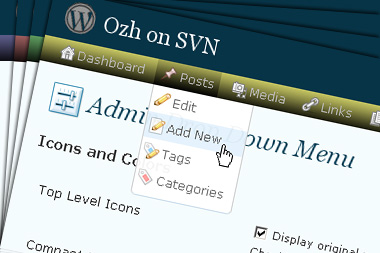
Normal or compact display.
Browser compatibility
The plugin has been developed on Firefox 3, Chrome and MSIE7. It should do fine with MSIE6 and Safari too.
There are glitches with Firefox 2 and Camino which both use a deprecated rendering engine. There are also glitches with Opera. I won't fix these, but if anyone wants to submit a CSS patch to resolve one of these issue, you're welcome :)
Developer friendly
The plugin comes with a wickedly cool API that will allow other plugin developers to interact with it, like adding your own custom icon for your plugin. Read the API for Coders page for examples and documentation. Also, all elements the plugin produces get custom CSS classes and id's to allow easy styling or selecting.
Translations
The plugin is ready for interglobanalization and there is a .pot template file included so polyglots can even make their own translation and sent the .mo and .po files to me that I'll include in the package.
The plugin comes with the following translations, in no particular order:
- Turkish, thanks to Baris Ünver
- Korean, thanks to Jong-In Kim
- Spanish, thanks to Karin Sequen
- Italian, thanks to Gianni Diurno
- Deutsch, thanks to Frasier Crane
- Russian, thanks to Fat Cow
- Brazilian Portuguese, thanks to Renato Tavares
- Greek, thanks to Friedlich
- Belorussian, thanks to ilyuha
- Hebrew, thanks to Amiad Bareli
- Romanian, thanks to Octav
- Ukrainian , thanks to wpp.pp.ua and Jurko Chervony
- Traditional Chinese, thanks to Paogray and Joan Wang
- Dutch, thanks to Cees van den Heuvel
- Slovak, thanks to Branco from WebHostingGeeks.com
And maybe more since I might totally forget to update this list :)
Older Versions
All my plugins are designed to run on the latest WordPress version available. Upgrade WordPress whenever a new version is out, or be sorry when your site gets compromised.
If for some unintelligent reason you need to get an older version of this plugin, it might be available, yet totally unsupported or recommended. Check here: Other versions.
Feedback, Bug report, Feature request
Sure. Feed me back. Like it? Blog about it. Love it? Click on the download link, see the Paypal button appear, and give it some clicks!
If you're reporting bugs, you're welcome, but please provide a screenshot and informations about your browser & your OS. I'm not supporting deprecated blogs or plugins or browsers, and I can't respond to incomplete bug reports.
If you're suggesting a feature, you're welcome too, but I won't add an admin menu on the public side of the blog, on top of pages. If you're looking after having this menu fixed on top of page, check this companion plugin that works as a plugin to this plugin: Admin Menus Fixed.
[…] Ozh' Admin Drop Down Menu […]
[…] s? od razu dost?pne z poziomu panelu administracyjnego (efekt zbli?ony do dzia?ania wtyczki Admin Drop Down Menu). Jak zwykle, zmiana ta bdzie kosztowa?a sporo czasu na przyzwyczajenie si?, dlatego trudno mi […]
[…] Admin Drop Down Menu: ottimizza l'organizzazione del menù di WordPress. Per maggiori informazioni leggete qui […]
That plugin looks a godsend, i've downloaded it and will happily give the paypal button some clicks if i know what that does – does paypal do pay per click now or something?
[…] Ozh’ Admin Drop Down Menu: Seu painel de administração do WordPress se transforma um um menu drop-down, eliminando vários […]
Is it possible to make the menus appear on the blog pages also, not just the admin interface? That would save tons of clicks. The plugin does look really, really nice.
bludude » No
[…] Ozh’ Admin Drop Down Menu If you are using the WordPress version greater than 2.5, then the first plugin you have to install […]
[…] Ozh' Admin Drop Down Menu […]
Hi Ozh, does the settings changes save for you? At my installation (2.6.3 + newest plugin) is not even the ozh_adminmenu row in wp_options table created. Bug?
[…] 2. Planetozh […]
[…] and Download: http://planetozh.com/blog/my-projects/wordpress-admin-menu-drop-down-css/ Share and […]
[…] now got full and proper support for several popular plugins, including Ozh's Admin Drop Down Menus and NextGen Gallery. For full details about which plugins are supported head over to the plugin […]
[…] Ozh' Admin Drop Down Menu????? […]
[…] was using a very nice plugin called Ozh' Admin Drop Down Menu and seeing how there was a new interface that came along with the new 2.7 update, I knew there were […]
No joy after auto upgrading to 2.7 – the Admin Drop Down Menu is gone and i can't find anything back! I did only intend to upgrade to 2.6.5 but the automatic-upgrade plugin was obviously loaded with 2.7 already…. Now what? No more Admin Drop Down Menu?
McHow2 » Of course there is. Just wait a few hours for version 3
[…] Admin Drop Down Menu ???, ?? dashboard menu […]
Hey been using your plugin for ages on both my sites. Unfortunately i just upgraded to 2.7 and alas the plugin does not allow the WP dashboard to function correctly by blocking off the left sidebar. Once disabling your plugin everything worked fine. Great run while it lasted, keep us posted if there will be an update to this plugin or if there will even be a need for one.
[…] Admin Drop-Down Menu – ??? ?????????? ???? ?? ????????, ??????? ?????????? ???? ? ????????? ????, ??? ??????????? ???????? ?????? ? ??????? ?????. […]
[…] ??????? ???????. ?? ???? ???????? ??????? ?????? Ozh' Admin Drop Down Menu, ??????? ?????? ?????? ?? ????? ??? ???? ??????, ?.?. […]
FINALLY! the wp 2.7 version is out and working beautiful :-)
Gosh not working for 2.7?! :(
Ok – first upgrade WP to 2.7, than delete the plugin directly in the plugin folder. Download the new version 3.0 of the plugin, upload it into the plugin folder, unzip it and it works… if that was intended to work like that, a note about it would be in order maybe. BUT it looks great, nice work, thanks.
Where do you guys get the 3.0?
[…] Yes, nós já temos o 2.7 – e confesso, não faço parte do time dos reclamões =p achei a interface nova muito bonita… mas… não consegui me acostumar com aquela barra lateral. Felizmente, nem preciso me preocupar muito com isso, pois um dos meus plugins favoritos foi atualizado tão rápido quanto o WordPress: Ozh Admin Drop Down Menu. […]
Where is the menu that was at the top that controls certain things, like what is displayed on the dashboard? Am I missing something simple, I don't see it incorporated into the main menu or anything…
Your work on the version for 2.7 is amazing, thanks for developing it just on time :)
Keep up one of the best plugins ever!
[…] so) of comments asking about an upgrade, I've committed earlier this morning version 3.0 of Admin Drop Down Menu, the brand new version of everyone's favorite plugin (or so). The plugin page doesn't […]
[…] ??????Ozh' Admin Drop Down Menu?????????????? […]
[…] küçük ek özellik eklenmi? bulunuyor. Eski admin paneli çok kullan??s?z oldu?u için ben Ozh Admin Drop Down Eklentisini kullan?yordum art?k ihtiyaç kalmamas?na ra?men yinede kullan?yorum çünkü […]
[…] as well. I ultimately feel like automatic sub-nav reveals are much more user friendly. For example Ozh’s Admin Drop down menu for WP 2.3-2.6 or even how Apple’s sidebar modules automatically reveal themselves on […]
[…] up more screen real estate, giving you less room for writing or managing your blog posts.Enter Ozh' Admin Drop Down Menu. Long before the WordPress team realized the value of drop down menus, this plugin offered bloggers […]
[…] up more screen real estate, giving you less room for writing or managing your blog posts.Enter Ozh' Admin Drop Down Menu. Long before the WordPress team realized the value of drop down menus, this plugin offered bloggers […]
Thanks for the update, Ozh! :)
[…] nareszcie ma dobre menu! Wywali?em wtyczk? Ozh’ Admin Drop Down Menu, bo nowe menu jest po prostu lepsze. Nie chc? widzie? danego bloku, to po prostu go zwijam. […]
[…] diese Weise aktualisiere ich das Plugin "Ozh' Admin Drop Down Menu" und aktiviere es bei der Gelegenheit auch wieder. Es war damals durch die Installation der […]
[…] you've upgraded and find it hard to find all of your tools and menus, you can give Ozh Admin Drop Down plugin a whirl. I learned about this tool from Download Squad and might give it a try myself since […]
Just wanted to say thanks. I loved this plugin for earlier versions of wp, and am so impressed that you've already updated and released a new compatible version for 2.7.
I donated to keep you motivated. Not much, but I hope it helps. Keep it up!
[…] ??Admin Drop Down Menu??WordPress 2.7?????????? ????????????????2.7???????????????????????????????????????????????????????????????? […]
[…] ???????Admin Drop Down Menu(2.3.4.1) ? Fluency ????????? WordPress ??????? 2.7 ?????(?????)?Disable WordPress Core Update ???????????????????????????????? Tag(s): Gossip, WordPress Shawn Published@14:20 / 2008-12-12 / Trackback / Skip No Comment 'til now Leave Comments Here… […]
KimC » Definitely appreciated, thanks a million!
Hi
Great work! The new version enhance a lot the administration stuff …
however there is a problem: with Opera the comments and plugin items aren't in the right place and are viewed in a second line :(
Please fix this
PS
I've a doubt… why isn't your GUI concept adopted from the WP developers?
Great Drop Down Menu.
But its color is not clear enough,
maybe the behind management platform allows users to customize the color of good!
[…] WordPress 2.7 release ?? Admin Drop Down Menu ? Simple Tags ?? plugins ???, ??????? 2.7 ???????, […]
[…] Zum Glück, werden einige User sagen, ist WordPress sehr flexibel und mit Hilfe des Plugin Ozh' Admin Drop Down Menu ist man wieder in dieser Ebene. Hinzu kommen eine ganze Reihe von Einstellungen die es jedem Nutzer […]
I've been using the Admin Drop down for some time – couldn't stand the WP 2.5 – 2.6 navigation. I'm glad to see your still developing this.
Can we have a non-gradient option. The gradient makes me think of 1990's web design. Much cleaner with a solid color – in my opinion.
Thanks again!
Mic
Mic » Interesting suggestion. Will do!
taglife » There's a color picker. Pick any color you want.
[…] Ozh' Admin Drop Down Menu […]