
One of the first things I wanted to improve in the admin area of my WordPress blog, back in the 1.5 days, was the header menu. I wanted to be able to reach any admin page in one click, instead of first clicking on the first level link ("Manage" for example) and then only on a submenu link ("Comments") So came a very neat plugin : the WordPress Admin Drop Down Menu
When WordPress 2.7 and its new and optimized user interface came, I thought there was still room for improvements: a horizontal menu gave the admin area more of a "desktop application" feel, and I think it's superior to a vertical menu. So I updated the WordPress Admin Drop Down Menu.
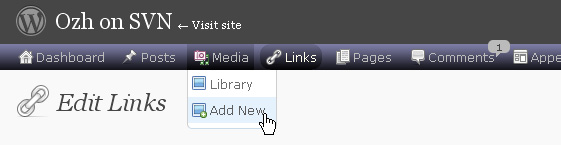
Download
Get the plugin :
ozh-admin-drop-down-menu.zip
Extract and upload to your blog, preserving directory structure.
Note: download counter here and stats on wordpress.org may differ and reflect the number of downloads before this plugin was hosted on the plugin directory
Activate and enjoy. Another friendly install & forget piece of PHP.
Features
- Customizable color scheme with a neat color picker
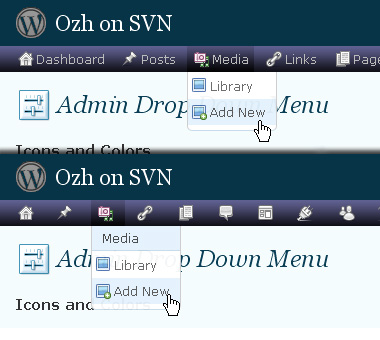
- Normal mode for regular users, compact mode for real estate maniacs, minimal mode for those who never have enough
- Optional cute icons from FamFamFam
- Enhanced compatibility with handheld devices
- Joy and happiness for every day
Javascript is involved for advanced features and to make stuff compatible with MSIE6, but on any decent browser everything works even with Javascript disabled.
Super neat color picking.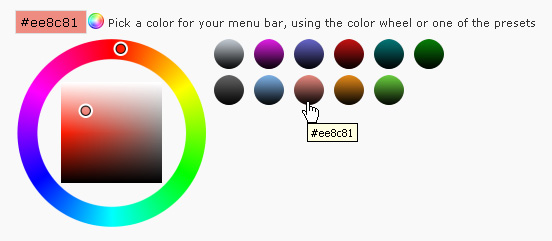
Any color you'll love.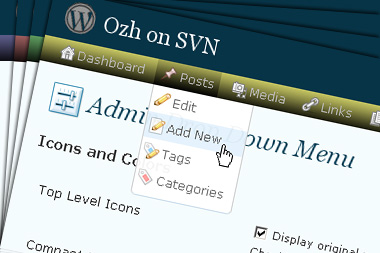
Normal or compact display.
Browser compatibility
The plugin has been developed on Firefox 3, Chrome and MSIE7. It should do fine with MSIE6 and Safari too.
There are glitches with Firefox 2 and Camino which both use a deprecated rendering engine. There are also glitches with Opera. I won't fix these, but if anyone wants to submit a CSS patch to resolve one of these issue, you're welcome :)
Developer friendly
The plugin comes with a wickedly cool API that will allow other plugin developers to interact with it, like adding your own custom icon for your plugin. Read the API for Coders page for examples and documentation. Also, all elements the plugin produces get custom CSS classes and id's to allow easy styling or selecting.
Translations
The plugin is ready for interglobanalization and there is a .pot template file included so polyglots can even make their own translation and sent the .mo and .po files to me that I'll include in the package.
The plugin comes with the following translations, in no particular order:
- Turkish, thanks to Baris Ünver
- Korean, thanks to Jong-In Kim
- Spanish, thanks to Karin Sequen
- Italian, thanks to Gianni Diurno
- Deutsch, thanks to Frasier Crane
- Russian, thanks to Fat Cow
- Brazilian Portuguese, thanks to Renato Tavares
- Greek, thanks to Friedlich
- Belorussian, thanks to ilyuha
- Hebrew, thanks to Amiad Bareli
- Romanian, thanks to Octav
- Ukrainian , thanks to wpp.pp.ua and Jurko Chervony
- Traditional Chinese, thanks to Paogray and Joan Wang
- Dutch, thanks to Cees van den Heuvel
- Slovak, thanks to Branco from WebHostingGeeks.com
And maybe more since I might totally forget to update this list :)
Older Versions
All my plugins are designed to run on the latest WordPress version available. Upgrade WordPress whenever a new version is out, or be sorry when your site gets compromised.
If for some unintelligent reason you need to get an older version of this plugin, it might be available, yet totally unsupported or recommended. Check here: Other versions.
Feedback, Bug report, Feature request
Sure. Feed me back. Like it? Blog about it. Love it? Click on the download link, see the Paypal button appear, and give it some clicks!
If you're reporting bugs, you're welcome, but please provide a screenshot and informations about your browser & your OS. I'm not supporting deprecated blogs or plugins or browsers, and I can't respond to incomplete bug reports.
If you're suggesting a feature, you're welcome too, but I won't add an admin menu on the public side of the blog, on top of pages. If you're looking after having this menu fixed on top of page, check this companion plugin that works as a plugin to this plugin: Admin Menus Fixed.
[…] Por supeusto, Admin Drop Down Menu es un excelente plugin que usamos en este blog, altamente recomendado y 100% funcional. Puedes descargarlo desde el sitio oficial de Plugins de WordPress, o desde el mismo sitio oficial del plugin. […]
[…] Admin Drop Down Menu […]
[…] ????????????????? […]
[…] WordPress 2.7 replaces at least two plugins I had come to rely on, Ozh' Admin Drop Down Menu, and WordPress Automatic Upgrade. I'll be curious to see if the automatic upgrade plugin […]
Thanks for the admin style plugin, installed, worked straight away, looks and works great ! love it. Nice work. Jeramiah
[…] the fact that you had to click on a top-level link to get its sublinks in the WordPress Admin, then this plugin will be your best friend. It uses simple suckerfish dropdowns to display subnav links in the Admin […]
Will you be updating the plugin for WP 2.7?
dee » Almost ready, waiting for 2.7 final !
As I've been playing around more and more with WPMU, i think a killer feature would be "this admin page on another blog". If you're editing widgets on a few blogs, instead of using the blog dropdown on the right, then going to the widgets menu, one could just jump from the widgets page on blog-1 directly to the widgets page on blog-2.
You could use the list_all plugin (http://wpmudev.org/project/List-All) to get the list of all blogs and have it generate links that include the proper path after the domain name (blog1.wpmu.org/wp-admin/widgets.php, blog2.wpmu.org/wp-admin/widgets.php, etc)
I hope that makes sense, it would save so much time!
[…] Ozh' Admin Drop Down Menu – This is a very cool plugin for your wordpress admin area. It puts all your links into a drop down menu. It makes things so much easier to find, makes it organized – especially if you're running lots of plugins and such […]
[…] documentation, examples, screenshot and a live demo, please refer to the official plugin page for Admin Drop Down Menu. There is also an API for plugin coders (give your plugin its own special […]
[…] WordPress ??????? ???????????? ?????? ??? ????? ??????. 16. Admin Drop-Down Menu – ??????? ?????????? ???? ? ???????, ??? ????????? […]
Hello,
Thanks for the plug-in. I just in my blog and implemented with WordPress 2.5.1, it is easily compatible. In addition, I have the Fluency plug-in, which has a different feeling in the admin area provides.
Greetings Alex ..
[…] 10. Admin Drop Down Menu […]
[…] Ozh' Admin Drop Down Menu – Replaces admin menus with a CSS dropdown menu bar. Saves lots of clicks and page loads! For WordPress 2.5+ […]
Hi, your menu settings appear not to work in WP 2.6.3. You can change them but they return to default immediately. I have verified permissions on the server are set to 644 but something isn't quite right. Any ideas here?
Thanks… Dan
Oops, to be sure, the settings I am referring to are the Settings>Admin Drop Down Menu options, such as ICONS and TOP LINKS check boxes…
Great plugin besides this!
I did look through the comments and I think I saw a similar reported issue with an earlier version, but it looked like this was fixed.
[…] The Drop Down Menu by Ozh. – I'm perplexed as to why WP core developers refuse to include this functionility. Having to repeatedly click to do a simple command is rather pointless. […]
It's not working with WP 2.6.3
The top bar looks giant!
:'(
Hope you release a new version soon!
Thanks and keep up the good work.
is this version already 2.7 ready?
ovidiu » Most of it, yes. I'm waiting for the core team to stop working on it, especially the CSS, so I can release it :)
[…] Ozh' Admin Drop Down Menu […]
Hi there,
I was wondering how to implement the code you provided for fixing Disqus so that it'll work with your drop down menu?
With thanks,
Jonathan
Jonathan » I think I posted a quick fix for this (pathetically coded) plugin some time ago. Search in all comments.
I like the look of this plugin. I'm a real WP noob and have been making the rounds: listening to podcasts, visiting many sites. EVERYONE cites "Admin Drop Down Menu" in their top five.
I'm currently running WP 2.63 in my test site — will move up to 2.7 maybe when it goes Release Candidate. It's a bit unclear above: will "Admin Drop Down Menu" work in 2.63?
Again, nice work!
[…] an enhanced admin interface. Admin Drop-Down Menu transforms admin menu in a quick drop-down menu; you can reach any admin page in one click, instead […]
Shepherd Jim » current version works in 2.6.3. Next version will work in 2.7.
Thanks alot for the plug in…
it is really help me…
[…] WordPress????????????????????????????????????????????????? planetOzh – WordPress Plugin : Admin Drop Down Menu […]
[…] Ozh' Admin Drop Down Menu If you are using the WordPress version greater than 2.5, then the first plugin you have to install […]
[…] Ozh' Admin Drop Down Menu Especially, if your server or internet connection is slow, this might save you a lot of clicks, providing drop down menus in the admin panel. […]
hi ozh, thanks for your great plugin, used to be my must installed plugin.
but when i upgrade to wp 2.6.3+admin dropdown menu v2.3.4.1, the plugin doesn't work. the dark top bar is huge, and the menu list is just like a normal ordered list, not menu.
how can i fix this? thanks again.
[…] plugin admin menu dropdown css from planet ozh used to be my must have plugin. But unfortunately since I upgrade my WordPress […]
[…] Ozh’ Admin Drop Down Menu If you are using the WordPress version greater than 2.5, then the first plugin you have to install […]
I upgrade another blog of mine to WordPress v2.6.5 and planetozh admin menu drop down css is working properly, but not with my other blog, even after I upgrade it to WordPress 2.6.5 too.
Looks like there is/are plugin(s) incompatibility between planetozh admin menu drop down css with one of my plugins there, I still don’t know which one it is, if I found it, I'll let you know.
[…] Ozh' Admin Drop Down Menu […]
BEST PLUGIN EVER!
[…] 1. Ozh' Admin Drop Down Menu […]
I'm experiencing the same difficulties as Dan (commented on 16 Nov. at 9am) plugin works, but the options turn back to original after changing and saving.
Is there any fix for this?
For the rest it's an ideal plugin!
Thx,
Piet
Piet » Fixed in next release (for WP 2.7)
[…] Admin Drop Down Menu […]
[…] Ozh’ Admin Drop Down Menu […]
[…] Ozh’ Admin Drop Down Menu […]
[…] 1?Ozh’ Admin Drop Down Menu ????????? WordPress 2.5 ???????????????????????? Ozh’ Admin Drop Down Menu ???????????????????CSS???????????????? “Manage” ??? “Pages” ? […]
[…] no próprio sistema, dessa vez não foi diferente. Já poderei desativar o Automatic Upgrade, Admin Drop Down Menu e com fé o IntenseDebate. Já que o menu da administração foi reformulado. Dessa vez ficou […]
[…] Ozh’ Admin Drop Down Menu If you are using the WordPress version greater than 2.5, then the first plugin you have to install […]
[…] Ozh’ Admin Drop Down Menu […]
Hi, I have been using your plugin for a while now, but I ran into a little hitch lately. The problem I had was that the whole admin menu is now on one line. It still works, but some things are overlapped. I have recently updated some plugins, and at the same time I have made a new .htaccess folder on my server for security. I am still tinkering with both, but I think it might be the .htaccess that has blocked the access of the css or something, and it shouldn't, but it might. I am wondering if you have ever heard of this, or if this is what might be messing me up, I will keep looking at the plugins though, as that might be the issue, especially since I deleted the .htaccess but the problem persists. Just in case though.
goku » No idea. Obviously a side effect of what you've done recently.
[…] Admin Drop-down Menu Fatigué de devoir naviguer dans les profondeurs de l'administration WordPress pour atteindre […]