
One of the first things I wanted to improve in the admin area of my WordPress blog, back in the 1.5 days, was the header menu. I wanted to be able to reach any admin page in one click, instead of first clicking on the first level link ("Manage" for example) and then only on a submenu link ("Comments") So came a very neat plugin : the WordPress Admin Drop Down Menu
When WordPress 2.7 and its new and optimized user interface came, I thought there was still room for improvements: a horizontal menu gave the admin area more of a "desktop application" feel, and I think it's superior to a vertical menu. So I updated the WordPress Admin Drop Down Menu.
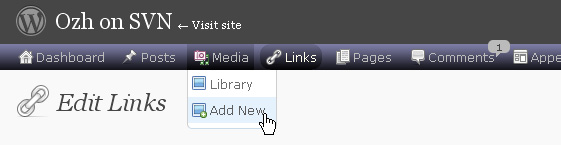
Download
Get the plugin :
ozh-admin-drop-down-menu.zip
Extract and upload to your blog, preserving directory structure.
Note: download counter here and stats on wordpress.org may differ and reflect the number of downloads before this plugin was hosted on the plugin directory
Activate and enjoy. Another friendly install & forget piece of PHP.
Features
- Customizable color scheme with a neat color picker
- Normal mode for regular users, compact mode for real estate maniacs, minimal mode for those who never have enough
- Optional cute icons from FamFamFam
- Enhanced compatibility with handheld devices
- Joy and happiness for every day
Javascript is involved for advanced features and to make stuff compatible with MSIE6, but on any decent browser everything works even with Javascript disabled.
Super neat color picking.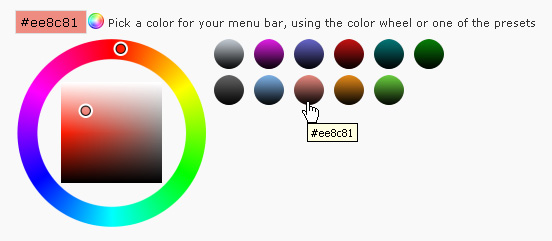
Any color you'll love.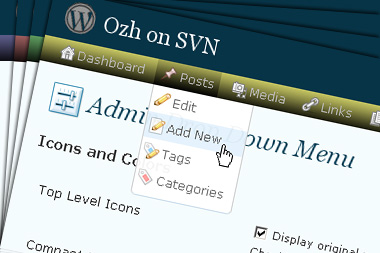
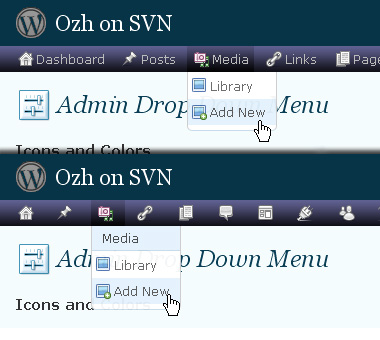
Normal or compact display.
Browser compatibility
The plugin has been developed on Firefox 3, Chrome and MSIE7. It should do fine with MSIE6 and Safari too.
There are glitches with Firefox 2 and Camino which both use a deprecated rendering engine. There are also glitches with Opera. I won't fix these, but if anyone wants to submit a CSS patch to resolve one of these issue, you're welcome :)
Developer friendly
The plugin comes with a wickedly cool API that will allow other plugin developers to interact with it, like adding your own custom icon for your plugin. Read the API for Coders page for examples and documentation. Also, all elements the plugin produces get custom CSS classes and id's to allow easy styling or selecting.
Translations
The plugin is ready for interglobanalization and there is a .pot template file included so polyglots can even make their own translation and sent the .mo and .po files to me that I'll include in the package.
The plugin comes with the following translations, in no particular order:
- Turkish, thanks to Baris Ünver
- Korean, thanks to Jong-In Kim
- Spanish, thanks to Karin Sequen
- Italian, thanks to Gianni Diurno
- Deutsch, thanks to Frasier Crane
- Russian, thanks to Fat Cow
- Brazilian Portuguese, thanks to Renato Tavares
- Greek, thanks to Friedlich
- Belorussian, thanks to ilyuha
- Hebrew, thanks to Amiad Bareli
- Romanian, thanks to Octav
- Ukrainian , thanks to wpp.pp.ua and Jurko Chervony
- Traditional Chinese, thanks to Paogray and Joan Wang
- Dutch, thanks to Cees van den Heuvel
- Slovak, thanks to Branco from WebHostingGeeks.com
And maybe more since I might totally forget to update this list :)
Older Versions
All my plugins are designed to run on the latest WordPress version available. Upgrade WordPress whenever a new version is out, or be sorry when your site gets compromised.
If for some unintelligent reason you need to get an older version of this plugin, it might be available, yet totally unsupported or recommended. Check here: Other versions.
Feedback, Bug report, Feature request
Sure. Feed me back. Like it? Blog about it. Love it? Click on the download link, see the Paypal button appear, and give it some clicks!
If you're reporting bugs, you're welcome, but please provide a screenshot and informations about your browser & your OS. I'm not supporting deprecated blogs or plugins or browsers, and I can't respond to incomplete bug reports.
If you're suggesting a feature, you're welcome too, but I won't add an admin menu on the public side of the blog, on top of pages. If you're looking after having this menu fixed on top of page, check this companion plugin that works as a plugin to this plugin: Admin Menus Fixed.
[…] Admin drop down menu – it gives the control panel a drop down menu, which is quicker and easier to use than the standard control panel menu. Not really unique for using WordPress as a CMS, but I really like this plugin. […]
[…] Admin Drop-Down Menu plugin doesn't really put up a new theme, but it allows you to save a lot of hassle in the […]
@OZH
will you be looking into this matter with the top level URL? I woudl like to enable your plugin by default on my wpmu install but the plugin where the top level url is broken is the helpdesk plugin so I really can't :-(
[…] Gallery???Google Picasa?????? 9?No Self Pings???ping??? 10?Ozh' Admin Drop Down Menu?????????? 11?Regular Readers […]
[…] Hiliter ??????????????????Ozh' Admin Drop Dwon Menu????????????????Simple […]
[…] Admin Drop Down Menu – makes life easier for me when doing admin stuff […]
[…] ?? ?????, ???? ? ??? ? ????????, ? ???????? ????????? Ozh' Admin Drop Down Menu, ??????? ?????????? ???????, ?????? ???????, ??????? […]
Switching off the icons does not work (in 2.6 and 2.6.2) – when clicking "save" the hook is always set again…
Günther » Negative. It does definitely work.
[…] Admin Drop Down Menu […]
[…] so be it, but I object to click, click, click to get where I need to go. To solve that issue I use Admin Drop Down from Planet Ohz. As I mentioned, I don't like the color scheme for WPs Admin page. I'm also not […]
[…] WordPress ??????? ???????????? ?????? ??? ????? ??????. 16. Admin Drop-Down Menu – ??????? ?????????? ???? ? ???????, ??? ????????? […]
[…] Ozh' Admin Drop Down Menu (for WP 2.5+) SLICK! Turn the cluttered WP Admin interface into a clean, very, very slick menu bar with hover-over drop-downs. Oh, very nice! […]
[…] WordPress 2.7?????????????????????????????????????????????????????????????????????????????Admin Drop Down Menu?????? .gallery { margin: auto; } .gallery-item { float: left; margin-top: 10px; text-align: center; width: 33%; } .gallery img { border: 2px solid #cfcfcf; } .gallery-caption { margin-left: 0; } […]
[…] einiger Schriften hapert es. Das Adminmenü von WordPress, das bei mir mit dem Plugin „Admin Drop Down Menu" von Planet Ozh umgebaut wird, stellt Chrome fehlerhaft […]
Hi Ozh,
This plugin won't work on one of my blogs (it works fine on the other 2 which are configured the same way). I am not using fluency with it and have tried using the reset button to no avail. My settings menu contains a lot of plugins and it isn't limiting them to whatever number I place in the box for each column. They are all in one column. I am using FF3 and WP 2.6.2, XPsp3
thanks,
Sue
Ozh,
Apparently it was something flaky with the upgrade to 2.62. I just reinstalled 2.62 and it is fine now.
Sue
I have been using WordPress 2.6.2 since the release date. So far so good except some of the plugins stopped working as usual update….
Your plugin works OK with my 2.6.2 even with 2bytes language such as Japanese. FYI.
Hi Ozh,
I have same problem…Switching off the icons does not work (in 2.6 and 2.6.2) – when clicking "save" the hook is always set again…and the language pack does not work…
Absolutely beautiful and works with Fluency Admin! THANK YOU!
[…] WordPress ??????? ???????????? ?????? ??? ????? ??????. 16. Admin Drop-Down Menu – ??????? ?????????? ???? ? ???????, ??? ????????? […]
[…] know how to use CTRL +/-. It might seem frivolous, but it's about accessibility on the web. Ozh' Admin Drop Menu : This one is a very very close runner up to being my favorite. It customizes and streamlines the […]
[…] JS Admin Menu Admin Drop down Menu (c'est le même en mieux ): Permet d'obtenir des menus déroulant dans […]
[…] Author: Ozh Plugin URI: Ozh's Admin Drop Down Menu […]
I am also having a problem where I cannot change any of the settings from the admin panel. I want to disable icons and I am unable to do so.
[…] Ozh' Admin Drop Down Menu: ??MENU?? / ?? […]
[…] menu icon for those using Ozh's Admin Drop Down Menu plugin This entry was written by Stephen, posted on September 26, 2008 at 11:01 am, filed under […]
[…] documentation, examples, screenshot and a live demo, please refer to the official plugin page for Admin Drop Down Menu. There is also an API for plugin coders (give your plugin its own special […]
[…] Ozh' Admin Drop Down Menu […]
This is pretty cool. For me, though, Viper's WP Admin Bar has a slight lead because his admin bar can be displayed for logged in users while browsing the blog as well. Would you be able to include that feature in yours? I would love to use the same bar both in the admin interface and while browsing (to directly edit a page, edit comments, etc)
I'd like to see your plugin work with Shopp plugin.
here are the details:
http://forums.shopplugin.net/topic/plugin-incompatibility-issues
Thanks for the great plugin
[…] Admin Drop Down Menu von Ozh wandelt das Headermenu im Adminbereich in ein Dropdown Menu um. Auf diese Weise sind alle […]
[…] Zweite Plugin nennt sich Admin Drop Down Menü, entwickelt von Ozh. Es stellt, wie der Name schon sagt, die bestehenden WordPress-Menüs auf […]
[…] Ozh' Admin Drop Down Menu ????????Wordpress?????????????????????????????????????????????????? […]
[…] Admin Drop Down Menu […]
Hi, I don't know if it's a plugin bug or my install but when I'm logging on WP I come on dashboard with this link: http://www.adapei56.com/site/wp-admin/ but if I'm on Wp and click on dashboard link, I've got this url: http://www.adapei56.com/site/wp-admin/admin.php?page=index.php and the page display nothing, only namesite and download link for last WP version but no dashboard with infos. I'm on WP 2.5.1 and WP folder install (not root install). What is wrong ? Thanks for reply.
Aysseline
Aysseline » Not plugin related. You probably have a blank index.php in your plugins directory. Rename it index.html instead.
[…] Ozh' Admin Drop Down Menu […]
????????????? love Ozh’ Admin Drop Down Menu Project.
[…] Ozh’ Admin Drop Down Menu ????? ???????? ? ??????? ??????????, ??????? ????????? ??? ???? ??????? ?? ???? ????? ?????????? ???? ?? ??????????. ?????????? ???? ? ???????, ??? ????????????? ????????? ?????? ? wordpress. […]
Hi. Great plugin. I use it on 3 my blogs.
But I found one bug.
If wordpress installed on subfolder like http://www.example.com/test/ I can't disable icons. Setting not saved :(
I use WordPress 2.6.2 version.
Wonder full plugin, saves me from mess of finding the lost clicks under the wp-admin
thank you for this
best wishes ,
you must be amazing webmaster i must say.
[…] Admin Drop Down Menu – […]
Awesome plugin! A real time-saver. Definitely going to be in my favorite plugins list when I'll get around to posting one.
Thanks for the answer, you're right it's my mistake. Another info: I don't see release history, what is new in 2.3.4.1 (I've got 2.2 version) ? Thanks
Aysseline » Release history is actually included, mostly as a reference for myself, in the plugin itself, as a comment at the beginning of the plugin file
[…] Ozh' Admin Drop Down Menu […]
[…] bem, isso é passado, e desde a última versão, já um pouco antiga, o agora Ozh' Admin Drop Down Menu é compatível com as últimas versões do WordPress. E, não bastasse isso, além de agilizar o […]
[…] dúvidas Abr 12 Admin Drop Down Menu Quinta-feira, 12-04-2007 # 10:40 Plugins, Tutoriais 149 palavras Cria um menu drop-down no seu painel de administração do wordpress facilitando sua navegação. Compatível com WordPress 2.5+. Para outras versões do wordpress, verifique a compatibilidade ou a disponibilidade de outra versão do plugin no site do autor. Página do plugin planetozh.com/blog […]
[…] Ozh' Admin Drop Down Menu – ????? ??????? ???????, ?????? ??????????? WP. […]